Download the PHP package laboiteacode/filament-dependency-graph without Composer
On this page you can find all versions of the php package laboiteacode/filament-dependency-graph. It is possible to download/install these versions without Composer. Possible dependencies are resolved automatically.
Download laboiteacode/filament-dependency-graph
More information about laboiteacode/filament-dependency-graph
Files in laboiteacode/filament-dependency-graph
Package filament-dependency-graph
Short Description The visual architecture explorer for Filament. Explore models, resources, panels and relationships from one visual workspace.
License MIT
Homepage https://github.com/la-boite-a-code/filament-dependency-graph
FAQ
Example:

In general, it is recommended to use always a project to download your libraries. In an application normally there is more than one library needed.

- Some hosting areas are not accessible by a terminal or SSH. Then it is not possible to use Composer.
- To use Composer is sometimes complicated. Especially for beginners.
- Composer needs much resources. Sometimes they are not available on a simple webspace.
- If you are using private repositories you don't need to share your credentials. You can set up everything on our site and then you provide a simple download link to your team member.
- Simplify your Composer build process. Use our own command line tool to download the vendor folder as binary. This makes your build process faster and you don't need to expose your credentials for private repositories.
Informations about the package filament-dependency-graph
Filament Dependency Graph



The visual architecture explorer for Filament.
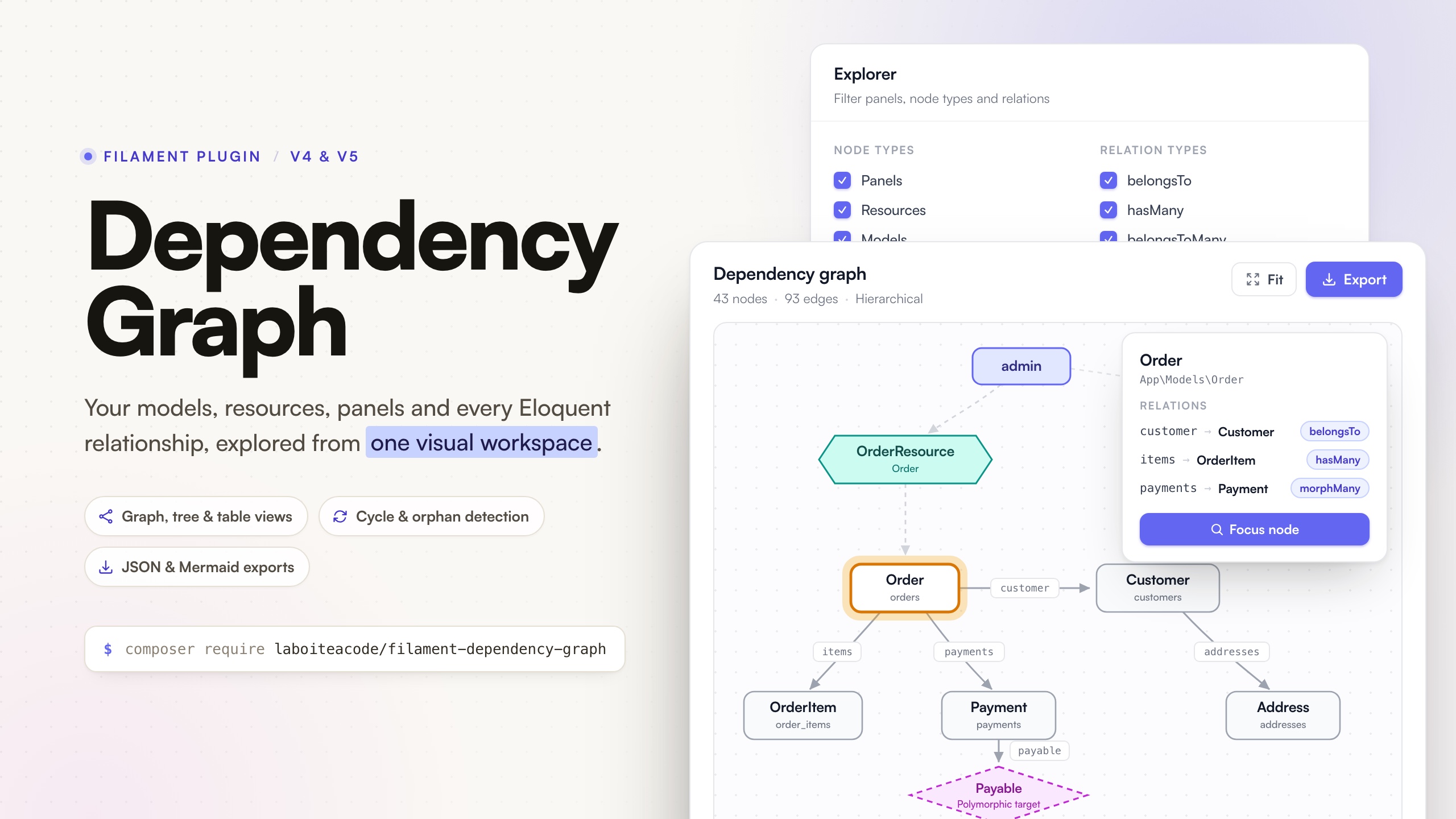
Explore models, routes, controllers, Blade views, Livewire components, resources, panels and relationships from one visual workspace. Filament Dependency Graph automatically discovers the structure of a Laravel and Filament application and presents it through an interactive, navigable interface: a graph, a tree, a table, a contextual inspector, search, focus mode, filtering and exports.
The problem
Large Laravel and Filament applications are hard to understand because their structure is scattered across models, relationships, resources, panels, relation managers, policies, traits, casts and morph maps. A developer joining an existing project inspects dozens of files before understanding which models exist, how they connect, which resources expose them and where circular dependencies live. Static diagrams rot; manual documentation is never complete.
The solution
Install the package, register the plugin, open one page, and immediately answer:
- Which models exist, and which resources expose them?
- Which standalone Livewire components use each model?
- Which panels contain those resources?
- How are the models connected, and through which relation types?
- Which models have no resource? Which are isolated?
- Where do circular dependencies exist?
- What surrounds this specific model?
- Which controller, form request and models does this route reach?
- What does this action dispatch, and who listens to it?
- Which layout, partials and components does this page render, and where is this component used?
Features
- Automatic discovery. Eloquent models and relations, application Livewire components, Filament panels, resources, pages and relation managers, with zero package-specific configuration on standard applications.
- Project-wide Livewire visibility. Components under
app/Livewireor the legacyapp/Http/Livewireconvention appear in the Laravel scope even when they are not registered in a Filament panel. Typed properties, method signatures and explicit static model references become component-to-model dependencies without instantiating the component. - HTTP map. A dedicated scope maps every application route to its controller action, form request, route-bound and referenced models, their policies, and the events, jobs, mailables and notifications dispatched along the way, including one level into injected action or service classes. Listeners come from the event dispatcher, so Laravel's event discovery is covered. Nothing is executed to build it.
- View map. A Views scope maps the Blade templates of the application: what each page extends, includes and renders (partials, anonymous and class components, Livewire components), which Livewire components, Filament classes, mailables, routes and controllers render which view, and where every component is used. Package views appear as leaves, missing and dynamic references are flagged, and nothing is compiled or rendered to build it.
- Every Eloquent relation type. belongsTo, hasOne, hasMany, belongsToMany, hasOneThrough, hasManyThrough, morphTo, morphOne, morphMany, morphToMany and morphedByMany, including morph maps.
- A readable graph. Cytoscape.js with a layered dagre layout for the hierarchical mode and fCoSE for the force-directed mode. Relation labels only appear at readable zoom levels, selecting a node fades everything outside its neighborhood, and disconnected models are packed neatly instead of drifting over the graph.
- Native Filament look. The whole page is built from Filament components (sections, tabs, buttons, selects, checkboxes, badges) and the graph palette reads your panel color scales at runtime, in light and dark mode.
- Tree and table views for the same data, usable without the graph renderer.
- Contextual inspector for models, Livewire components, resources, panels, routes, controllers, form requests, policies, events, listeners, dispatched classes, Blade views and components, and every edge: keys, pivot tables, morph metadata, traits, casts, rendered views, public APIs, middleware, validation rules, dispatch locations and diagnostics.
- Search across class names, labels, tables, namespaces, panels, relation methods, route URIs and route names, with deterministic ranking.
- Focus mode with configurable depth and direction, shareable through the URL query string.
- Filters. Panels, node types, relation types, namespace, vendor or application ownership, orphans only, circular dependencies only, models without resources only, and routes with or without a given middleware in the HTTP scope.
- Deterministic JSON and Mermaid exports, from the UI or the CLI.
- Snapshot cache with dedicated artisan commands.
- Full page customization. Navigation label, icon, group, sort, badge, parent item, slug, cluster, max content width and access control - fluently or from the configuration file.
- Read-only by design. The package never modifies your application or queries business records.
- Resilient discovery. One broken model or throwing relation method becomes a warning, never a crash.
Compatibility
The CI matrix is the source of truth.
| Package | PHP | Laravel | Filament |
|---|---|---|---|
| 1.x | 8.3, 8.4, 8.5 | 12.x, 13.x | 4.x, 5.x |
Installation
Register the plugin in your panel provider:
That is all: open /admin/dependency-graph in your local environment. The plugin can be registered on several panels, each with its own options.
Security warning
Class names, table names and relationship metadata are sensitive architecture information. The page is only visible when app()->isLocal() returns true. Never expose it publicly.
To enable it elsewhere, take an explicit decision:
visible() is an alias of canAccessUsing(). The callback replaces the local-only rule entirely, so make it as strict as your context requires.
The workspace
Graph view
The default view renders the dependency graph with typed nodes: panels, resource hexagons, Livewire components, model boxes and dashed polymorphic-target diamonds. The HTTP scope adds route tags, controllers, form requests, policy octagons, event rhomboids, dashed listeners and green hexagons for jobs, mailables and notifications, with controller methods and dispatch kinds on the edges. The Views scope draws templates as rectangles (layouts with a thicker border), Blade components as pentagons, Filament classes as hexagons, package views as dashed boxes and dynamic references as dashed diamonds, with the directive or tag (@include, <x-alert>, render) on each edge. Two layouts are available from the toolbar:
- Hierarchical (default) - a layered dagre layout: panels on top, then resources, then models, with crossing minimisation.
- Force-directed - fCoSE, which clusters tightly related models together and packs disconnected components side by side.
Interactions: zoom and pan, drag nodes, click a node or an edge to open the native Filament inspector slide-over (the rest of the graph fades to keep focus), click the canvas to clear, use the explicit zoom controls or Fit to re-center. The expand control temporarily gives the explorer column back to the canvas; press Esc to restore it. Relation labels appear once the zoom makes them readable.
Tree view
A cycle-safe, depth-limited expansion of the graph starting from the panels (or from the selected node), with the relation method displayed on every branch. Useful for answering "what hangs off this model" linearly.
In the Views scope the tree starts from what renders views - routes and controllers, Livewire, Filament, Blade components, mail - and unfolds each view into its layout, partials and components; templates nothing references are listed in their own group.
In the HTTP scope the tree starts from the routes, grouped by their first URI segment (/orders, /account...), and reads like a request: route, controller method, form request, models, dispatches, listeners. Events that nothing in the application dispatches are listed in their own group.
Table view
A native Filament Table exposes four inventory categories - models, relations, Livewire components and resources - through compact tabs. The HTTP scope swaps them for routes (action, middleware, form requests, models), events (listeners, queued listeners, dispatchers) and dispatched classes (kind, queue, dispatchers), next to the models. The Views scope shows views (kind, uses, used by), components (Blade classes, anonymous components, Filament classes, with their usage count), package views (missing ones flagged) and Livewire components. Search, sorting, pagination, column visibility and empty states follow the panel behavior automatically. Counts, aliases, views, foreign keys, pivot tables, navigation groups and discovery status remain available, and every row opens the inspector.
Inspector
Selecting a node or an edge opens a native Filament slide-over with everything the discovery collected: namespace, table, primary key, soft deletes, traits, casts, relation list with types and keys, pivot metadata, morph maps, Livewire aliases, rendered views and public APIs, panels and pages for resources, plus diagnostics when discovery was partial. Filament handles its focus trap, scroll lock, responsive placement and dismissal consistently with the rest of the panel.
Focus mode
Press F (or the inspector button) to restrict the graph to the neighborhood of the selected node, with a configurable depth (1, 2, 3 or unlimited) and direction (incoming, outgoing or both). The focus state lives in the URL query string, so the exact view can be shared or bookmarked.
Search
Press / and type: the search matches class names, labels, table names, namespaces, panel ids and relation methods, grouped by node type. Selecting a result clears the transient filters, selects the node and centers the graph on it.
Keyboard shortcuts
| Key | Action |
|---|---|
/ |
Focus search |
Esc |
Close inspector or exit focus mode |
F |
Focus selected node |
R |
Reset graph |
G |
Graph view |
T |
Tree view |
L |
Table view |
E |
Export JSON |
Scopes
- Filament scope (default): starts from the resources registered in the selected panels and includes their models plus related models up to the configured depth.
- Laravel scope: every discovered Eloquent model and standalone Livewire component, including models that no resource exposes. Disable it entirely with
laravel_scope_enabled => falseor->allowLaravelScope(false). - HTTP scope: the application routes and everything they lead to - see HTTP map. Disable it, and its discovery, with
http.enabled => falseor->allowHttpScope(false); the Views scope still reads routes and controller actions to find the views they render. Rendered views appear as leaves, one hop from the route or action that renders them. - Views scope: the Blade templates and what renders them - see View map. Disable it, and its discovery, with
views.enabled => falseor->allowViewsScope(false).
HTTP map
The HTTP scope answers "what happens when this URL is called?" without running a single request.
| Node | Where it comes from |
|---|---|
| Route | The router. Application routes only: controllers under http.controller_namespaces, closures defined outside vendor/, view and redirect routes, and full-page Livewire components. |
| Controller | The routes pointing to it. One node per class; each routed method appears on the edges and in the inspector. |
| Form request | Action parameters typed with a FormRequest. Rules are read only when http.form_request_rules is enabled. |
| Model | Route model binding, typed action parameters, and static references such as Order::query() in the action. |
| Policy | Registered policies, the #[UsePolicy] attribute, then Laravel's naming convention - including a custom Gate::guessPolicyNamesUsing() callback, which is called to compute the name. Policies are never instantiated. |
| Event, listener | The event dispatcher's listener map, which includes Laravel's event discovery. Listeners outside http.application_namespaces are ignored. |
| Job, mailable, notification | X::dispatch(), X::broadcast() and new X in controller actions, listeners and job handle() methods, classified by their type (Mailable, Notification, event, ShouldQueue or bus Dispatchable). |
Calls on injected application classes are followed one level deep: when store() calls $placeOrder->execute() on a typed parameter or $this->orders->archive() on a promoted property, the called method is read as well and its dispatches are attributed to the controller with a via note. Every dispatch keeps its file:line location in the inspector.
Route middleware combines the route definition with the framework's controller attributes (#[Middleware], #[Authorize], #[WithoutMiddleware] on Laravel 13, including on full-page Livewire components). The router then resolves it exactly as it would for a request - aliases, nested groups, and exclusions however they are written - and every alias or group name leading to an effective middleware is kept, so the explorer's middleware filter is reliable: "Routes using auth" keeps the routes whose middleware includes auth (directly, with parameters such as auth:sanctum, through a group or as its class) and what they reach, "Routes without auth" the others. The traversal is action-aware: a controller reached from index does not drag in what store dispatches; the tree view follows the same rule.
Detection limits
Everything above comes from registries, reflection and a token-level reading of the source. What cannot be known that way is left out rather than guessed:
- explicit bindings registered with
Route::bind()orRoute::model(); - classes built dynamically (
new $class,app($name),dispatch($job)on an untyped variable); - dispatches more than one collaborator away from the action, listener or job;
- middleware returned by a controller's static
middleware()method (HasMiddleware), and application subclasses of the middleware attributes: only the framework's own attributes are read; - closure routes restored from the route cache: their file is unknown, so they are skipped with a warning unless
http.include_vendor_routesis enabled (the framework's own/uphealth route is one of them); - several namespaces declared in one file: imports are read for the file as a whole.
Events without any dispatch found in controllers, listeners or jobs carry a No dispatcher found badge. Livewire components, console commands, observers and Filament actions are not scanned, so the event may be dispatched from there - or be dead code.
View map
The Views scope answers "what does this page render?" and "where is this component used?" without compiling or rendering a single template.
| Node | Where it comes from |
|---|---|
| View | Every Blade file of the view paths (published resources/views/vendor/** overrides excluded by default), named as Laravel names it. Livewire 4 single-file and multi-file components included. |
| Blade component | Class components reached from an <x-…> tag, plus the classes under views.blade_component_paths; their view comes from render(). |
| Filament component | Pages, widgets, fields, entries, columns and actions under views.filament_paths declaring their own $view (or returning it from getView()). |
| Package view | Views and components of packages used by the application (<x-filament::badge>, filament::…, mail::message), shown as leaves. Views that do not exist are flagged Missing. |
| Dynamic view | @include($view), <x-dynamic-component :component="…">, <livewire:is>: names only known at runtime. |
Templates are read as text: @extends, @include, @includeIf, @includeWhen, @includeUnless, @includeFirst (every candidate), @each (and its empty view), @component, @livewire, <x-…> and <livewire:…> are extracted with their line, comments and @verbatim blocks ignored. Names are then resolved by the framework itself: the view finder for view names, Blade's component tag compiler for <x-…> (aliases, namespaces, anonymous components), Livewire's registry for <livewire:…>.
Each view has a kind, inferred from how it is used: layout, page, partial, component, livewire or mail. Templates and Blade class components that nothing references carry a No reference found badge.
The owners of views are read, never run: render() (or view() on Livewire 4), ->layout() and #[Layout] for Livewire (a component without either gets the view named after it under livewire.view_path, a full-page component without a layout gets the configured one: livewire.component_layout on Livewire 4, livewire.layout on Livewire 3), render() for Blade components, $view for Filament classes, content() / build() / toMail() for mail, Route::view() and Route::livewire() for routes and view() / View::make() / ->view() in controller actions.
A Filament widget embedded with @livewire(StatsWidget::class) points to its Filament node when it declares its own view.
In the HTTP scope, views stay leaves: a route shows the page it renders, not the layout and partials behind it. In the Views tree, a template shared by several pages is not unfolded twice at the same depth; its other occurrences are marked as already shown.
Detection limits
- view names computed at runtime become dynamic nodes;
- view composers,
@yield/@section,@push/@stackand slots are not mapped; - a
render()that does not return a literal view leaves its component without a view; - package views are leaves unless
views.explore_package_viewsis enabled.
Configuration
Publish the configuration file when you need to adjust discovery:
Every option, with its default:
The plugin exposes the discovery knobs fluently:
Customizing the page
Navigation, page placement and layout follow the same conventions as the other La Boite a Code plugins. Everything is available fluently on the plugin, or under the navigation and page keys of the configuration file; the plugin wins when both are set:
The page renders full width by default so large graphs get the whole viewport; set page.max_content_width (or maxContentWidth()) to any Filament\Support\Enums\Width value to constrain it.
Translations
Every label ships in English and French. Publish the language files to adjust or add locales:
Views
The Blade views are publishable for deep customization, although the stable extension points (exporters, inspectors, configuration) should cover most needs:
Theming
The interface is built from the native Filament Blade components (sections, tabs, buttons, selects, checkboxes, badges) and the graph palette reads your panel color scales (primary, success, info, warning, gray) at runtime, so a custom Filament theme restyles the whole page - including the graph - without any extra work.
Exports
From the UI: the toolbar downloads the current graph, filters included, as JSON or Mermaid.
From the CLI:
For example:
Both exports are deterministic: same application state, same output. Diff them in CI to detect architecture drift, or commit the Mermaid file next to your documentation.
Cache
Discovery relies on reflection and file scanning, so snapshots are cached. The cache stores the discovered snapshot only - never rendered output - and is bypassed automatically in the testing environment.
The cache key includes the package schema version, the runtime versions and every discovery setting, so configuration changes never serve stale graphs.
Programmatic API
The facade proxies the DependencyGraphManager contract, so everything the UI does is scriptable:
GraphQuery accepts the scope, panel ids, node types, relation types, a focus node with depth and direction, whether orphans are included and, in the HTTP scope, a middleware filter - the same capabilities as the UI filters.
Extending
Custom exporters
Implement the GraphExporter contract and register it on the plugin:
The format becomes available in the UI and through the facade on panel requests. For console usage (--format=dot), register the exporter in a service provider instead, by resolving LaBoiteACode\DependencyGraph\Export\ExportManager and calling register() - the plugin only boots with its panel.
Custom inspectors
Implement the NodeInspector contract to enrich (or replace) the inspector panel for the nodes you care about. Custom inspectors are consulted before the built-in ones:
Troubleshooting
- The page returns 404 outside your machine. Expected: the page is local-only by default. Configure
canAccessUsing()deliberately (see the security warning). - The graph looks unstyled or outdated after an update. Republish the Filament assets:
php artisan filament:assets. - Some models are missing. Discovery scans
model_pathsandmodel_namespaces; add your custom locations there or withregisterModelPath()/registerModelNamespace(). Vendor models are excluded unlessvendor_models.enabledis true. - A Livewire component is missing. Add its source directory and namespace under
livewire.paths/livewire.namespaces, or useregisterLivewirePath()/registerLivewireNamespace(). Components are visible in the Laravel scope, not the Filament scope. - A Livewire-to-model link is missing. The read-only scanner recognizes model types on component properties and methods, plus explicit static references such as
Order::query(). Dynamic container resolution and untyped variables cannot be inferred safely. - A route is missing from the HTTP scope. Only application routes are mapped: check that its controller lives under
http.controller_namespaces, that it is not excluded byhttp.exclude, or enablehttp.include_vendor_routesfor package routes. - A dispatch or a model is missing on a controller. The scanner reads the action and one level of typed, injected application classes. Move the class under
http.application_namespaces, type the collaborator, or accept that dynamic calls are out of reach (see Detection limits). - A view or a component is missing from the Views scope. Only the view paths of the application are read; published vendor overrides need
views.include_vendor_overrides. A Blade class component outsideviews.blade_component_pathsstill appears once a template uses its tag. A name built at runtime shows as a dynamic view. - A relation is not detected. Untyped relation methods are only discovered through docblocks (enabled by default) or heuristic invocation (disabled by default, because it calls the methods). Add a return type to the relation method for the most reliable detection.
- A model shows a warning badge. Discovery is resilient: the inspector's diagnostics section lists exactly what failed for that class.
Testing
The suite runs on Pest with Orchestra Testbench against a realistic fixture domain covering every supported relation type, multi-panel resources and failure scenarios.
Architecture
The codebase is layered: a framework-agnostic domain (graph model, DTOs, algorithms), an application layer (use cases), infrastructure (discovery, cache, exporters) and a Filament presentation layer. Filament 4 and 5 differences are isolated behind a compatibility adapter. Architecture decision records live in docs/adr.
Changelog
See CHANGELOG.md for release notes.
Contributing
See CONTRIBUTING.md. Please report security issues privately as described in SECURITY.md.
Credits
- Alexandre Ribes
- La Boîte à Code
- Cytoscape.js, dagre and fCoSE for the graph rendering and layouts
- The Filament team for the UI foundation
License
Open source under the MIT license.
All versions of filament-dependency-graph with dependencies

filament/filament Version ^4.0 || ^5.0
illuminate/contracts Version ^12.0 || ^13.0
illuminate/database Version ^12.0 || ^13.0
illuminate/support Version ^12.0 || ^13.0
spatie/laravel-package-tools Version ^1.16