Download the PHP package yacoubalhaidari/filament-tour without Composer
On this page you can find all versions of the php package yacoubalhaidari/filament-tour. It is possible to download/install these versions without Composer. Possible dependencies are resolved automatically.
Download yacoubalhaidari/filament-tour
More information about yacoubalhaidari/filament-tour
Files in yacoubalhaidari/filament-tour
Package filament-tour
Short Description An interactive guided tour for Filament Admin Panel using Shepherd.js
License MIT
Homepage https://github.com/yacoubalhaidari/filament-tour
FAQ
Example:

In general, it is recommended to use always a project to download your libraries. In an application normally there is more than one library needed.

- Some hosting areas are not accessible by a terminal or SSH. Then it is not possible to use Composer.
- To use Composer is sometimes complicated. Especially for beginners.
- Composer needs much resources. Sometimes they are not available on a simple webspace.
- If you are using private repositories you don't need to share your credentials. You can set up everything on our site and then you provide a simple download link to your team member.
- Simplify your Composer build process. Use our own command line tool to download the vendor folder as binary. This makes your build process faster and you don't need to expose your credentials for private repositories.
Informations about the package filament-tour
Filament Tour
An interactive guided tour for the Filament admin panel powered by Shepherd.js.
This plugin adds a tour trigger button to the Filament user menu and lets you build a step‑by‑step walkthrough of your panel pages, with full control over colors, texts, and welcome/finish screens.
Features: Resources & custom pages · Livewire SPA navigation · Sidebar highlight + modal overlay · Custom welcome/finish · Progress resume · EN / AR / ID translations
Contents
- Requirements
- Installation
- Registering the Plugin
- Defining Dynamic Tour Steps
- How Navigation Matching Works
- Localization
- Running the Tour
- Building Frontend Assets
- Troubleshooting
🎥 Filament Tour – Video Demo
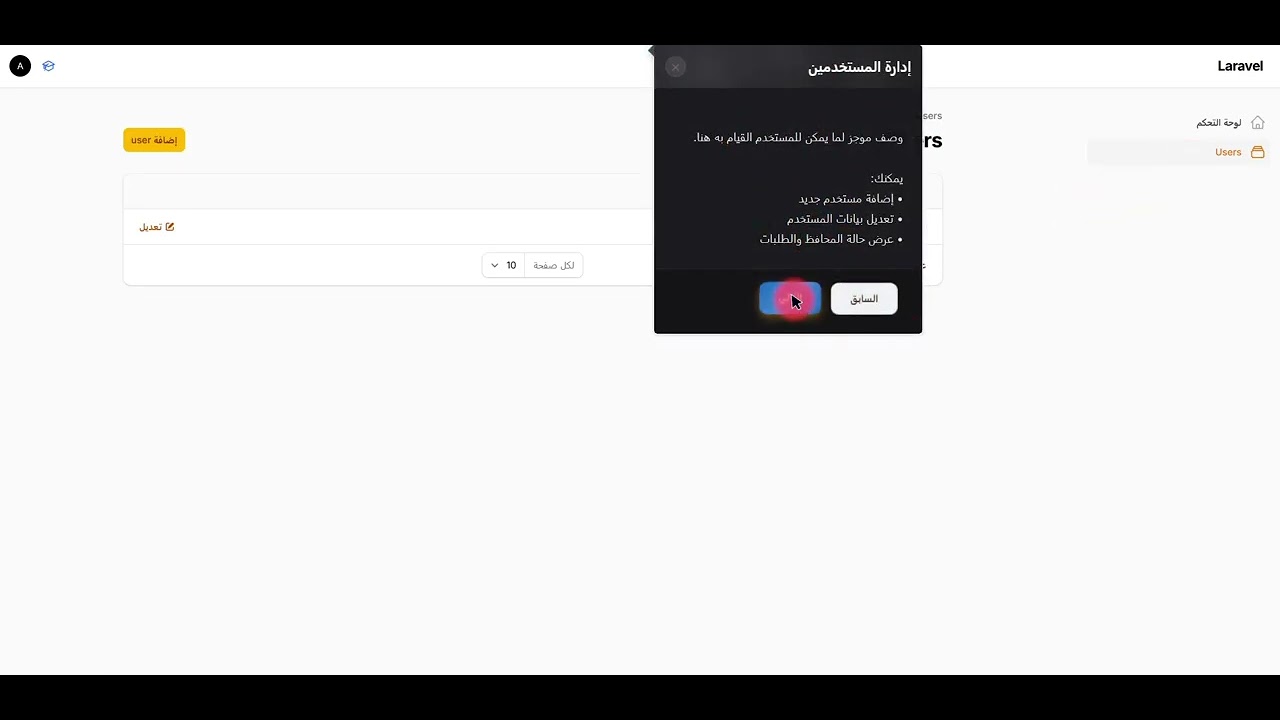
Click the image to watch the full video on YouTube.
Requirements
- PHP ^8.2
- Filament ^3.0 or ^4.0
Installation
Require the package via Composer:
Optionally publish the CSS/JS assets into your public directory (recommended in production so browsers load a stable copy):
This publishes:
public/css/yacoubalhaidari/filament-tour/filament-tour-styles.csspublic/js/yacoubalhaidari/filament-tour/filament-tour-scripts.js
The service provider auto‑registers assets from the package (
resources/dist/filament-tour.js, falling back toresources/js/shepherd-tour.js). After upgrading the package, runphp artisan filament:assetsand hard‑refresh the browser (Ctrl+Shift+R).
Registering the Plugin
In your Filament PanelProvider, register the plugin and optionally customize the tour button and appearance.
Plugin Methods
All configuration methods are chainable on FilamentTourPlugin::make():
showTourButton(bool $condition = true)– Show or hide the tour trigger icon in the user menu.tourButtonIcon(string $icon)– Heroicon or custom icon class for the trigger button.tourButtonColor(string $color)– Filament color name (e.g.info,primary,success).tourButtonTooltip(string $tooltip)– Tooltip text shown when hovering the trigger button.
Color customization (all optional – values are used directly as CSS values and wired into CSS variables):
headerColor(string $color)– Header background (e.g. gradient or hex color).primaryButtonColor(string $color)– Primary button background.secondaryButtonColor(string $color)– Secondary button background.textColor(string $color)– Main text color inside the tour.backgroundColor(string $color)– Overall tour background.contentBackgroundColor(string $color)– Content area background.footerBackgroundColor(string $color)– Footer background (where buttons sit).primaryButtonHoverColor(string $color)– Primary button hover background.secondaryButtonHoverColor(string $color)– Secondary button hover background.primaryButtonTextColor(string $color)– Text color inside the primary button.secondaryButtonTextColor(string $color)– Text color inside the secondary button.footerBorderColor(string $color)– Border color above the footer.
Custom welcome / finish steps:
welcomeStep(array $step)– Override the default first step.finishStep(array $step)– Override the default last step.
Each step array supports at least:
Supported button actions: back, next, cancel, complete.
Defining Dynamic Tour Steps
Dynamic steps are collected automatically by TourStepCollector from:
- Filament Resources that use
HasTourSteps - Filament Pages (custom pages) that use
HasTourSteps
Steps are sorted by getTourStepSort() (lower = earlier). The tour order is:
welcomeStep → dynamic steps → finishStep
On Resources
Add the trait to any resource you want to appear in the tour:
What the Trait Provides
HasTourSteps defines the following static methods (with sensible defaults):
getTourSteps(): array– Low-level hook if you want to return fully custom step definitions (defaults to[]).getTourStepId(): ?string– Unique ID for the step (also used asdata-tourvalue).getTourStepTitle(): ?string– Step title (defaults togetModelLabel()on resources, orgetNavigationLabel()on pages).getTourStepDescription(): ?string– Short description paragraph.getTourStepFeatures(): array– Bullet list of features; rendered as a list in the tooltip.getTourStepPosition(): string– Tooltip position relative to the target (defaultright).getTourStepSort(): int– Sort order (lower = earlier in the tour; default100).getTourSelector(): ?string– Selector used to attach the step (defaults togetTourStepId()).hasTourStep(): bool– Whether the resource should participate in the tour.
The package collects these steps via TourStepCollector and passes them to the frontend as window.dynamicTourSteps.
For resources, the collector resolves the step URL with Resource::getUrl('index') so the tour can navigate to the list page when needed.
On Custom Pages
Use the same trait on a Filament Page class (must be registered on the panel):
For pages, the collector uses Page::getUrl() (no index route). getTourStepTitle() falls back to getNavigationLabel() when getModelLabel() is not available.
How Navigation Matching Works
The frontend tags sidebar items with data-tour="{stepId}" so Shepherd can highlight the correct menu entry.
Matching strategy (in order)
- URL path (recommended) – Each dynamic step includes a
url. Links in the sidebar (.fi-sidebar-item-btn) whosehrefpathname matches that URL receivedata-tour. - Navigation label (fallback) –
TourStepCollector::getNavigationMap()builds{ stepId => navigationLabel }fromgetNavigationLabel()on each resource/page. Sidebar text is matched against the label.
While the tour runs
- Shepherd modal overlay – Darkens the panel and cuts a hole around the target element.
.shepherd-target– Orange outline on the attached element (seeresources/css/shepherd-tour.css)..shepherd-tour-active-nav– Extra highlight on the active sidebar item during the step.
Livewire SPA navigation
When a step belongs to another resource/page, the tour:
- Calls
Livewire.navigate()to the step URL (if available). - Waits for
livewire:navigated. - Re-applies
data-tourattributes and waits for the target element in the DOM. - Re-binds the modal overlay on the sidebar item.
This avoids stale DOM references after Filament replaces the page content.
Welcome & finish steps
Steps without attachTo (default welcome/finish, or your custom welcomeStep() / finishStep()) are centered and use a lighter experience: the full-screen dark overlay is hidden so only the tooltip card is shown.
Localization (en / ar / id)
The package ships with simple translation files that you can override in your app:
resources/lang/en/filament-tour.phpresources/lang/ar/filament-tour.phpresources/lang/id/filament-tour.php
Each file contains default labels for the welcome/finish steps and button texts. You can override them in your own application like any other Laravel lang file and then map them into your custom welcomeStep() / finishStep() calls, for example:
Running the Tour
- Click the tour icon in the Filament user menu (default
heroicon-o-academic-cap). - The tour starts at the welcome step (default or your custom
welcomeStep). - Dynamic steps run in order of
getTourStepSort(). - The final step is the finish screen (default or your custom
finishStep).
Progress persistence
The tour stores state in the browser:
| Key | Purpose |
|---|---|
shepherd-tour-in-progress |
"true" while the tour is active |
shepherd-tour-current-step |
Current step id (e.g. users, documents) |
shepherd-tour-completed |
Set when the user finishes the tour |
shepherd-tour-completed-at |
ISO timestamp of completion |
If the user refreshes or Livewire navigates during a tour, the script can resume from shepherd-tour-current-step.
After complete or cancel
cleanupTourState() runs automatically:
- Removes tour CSS classes (
.shepherd-tour-active-nav,.shepherd-target, modal overlay). - Clears in-progress
localStoragekeys. - Syncs sidebar active state to the current URL (
fi-activeon the matching menu item only), so the dashboard is not incorrectly highlighted after visiting other pages during the tour.
Building Frontend Assets (package contributors)
If you modify resources/js/shepherd-tour.js, rebuild the bundle:
Output: resources/dist/filament-tour.js
Then publish to your app:
Troubleshooting
Highlight works on the first step only
- Run
php artisan filament:assetsand hard‑refresh the browser. - Ensure
getTourStepId()is unique across resources and pages. - Ensure the resource has an
indexURL (or the page is navigable). - Check the browser console for
Tour target not found for step "...". - Confirm sidebar labels match
getNavigationLabel()or that the menu linkhrefmatches the step URL.
Wrong sidebar item active after the tour
This is handled by syncSidebarActiveState() on complete/cancel. If you use a custom sidebar, ensure menu links use standard Filament classes (.fi-sidebar-item, .fi-sidebar-item-btn) and correct href paths.
Custom welcome/finish still show a black screen
Use welcomeStep() / finishStep() without attachTo. Centered steps hide the modal overlay automatically.
Translations not applied to buttons in dynamic steps
Dynamic step buttons use __('filament-tour::filament-tour.buttons.*') from the collector. Publish or override lang files in your app under lang/vendor/filament-tour/ if needed.
License
Released under the MIT License.
All versions of filament-tour with dependencies

filament/filament Version ^3.0|^4.0|^5.0
spatie/laravel-package-tools Version ^1.15.0