Download the PHP package xorgxx/neox-dashboard-bundle without Composer
On this page you can find all versions of the php package xorgxx/neox-dashboard-bundle. It is possible to download/install these versions without Composer. Possible dependencies are resolved automatically.
Download xorgxx/neox-dashboard-bundle
More information about xorgxx/neox-dashboard-bundle
Files in xorgxx/neox-dashboard-bundle
Package neox-dashboard-bundle
Short Description Neox dashboard bundle for Symfony
License proprietary
FAQ
Example:

In general, it is recommended to use always a project to download your libraries. In an application normally there is more than one library needed.

- Some hosting areas are not accessible by a terminal or SSH. Then it is not possible to use Composer.
- To use Composer is sometimes complicated. Especially for beginners.
- Composer needs much resources. Sometimes they are not available on a simple webspace.
- If you are using private repositories you don't need to share your credentials. You can set up everything on our site and then you provide a simple download link to your team member.
- Simplify your Composer build process. Use our own command line tool to download the vendor folder as binary. This makes your build process faster and you don't need to expose your credentials for private repositories.
Informations about the package neox-dashboard-bundle
NeoxDashBoardBundle { Symfony 7 }
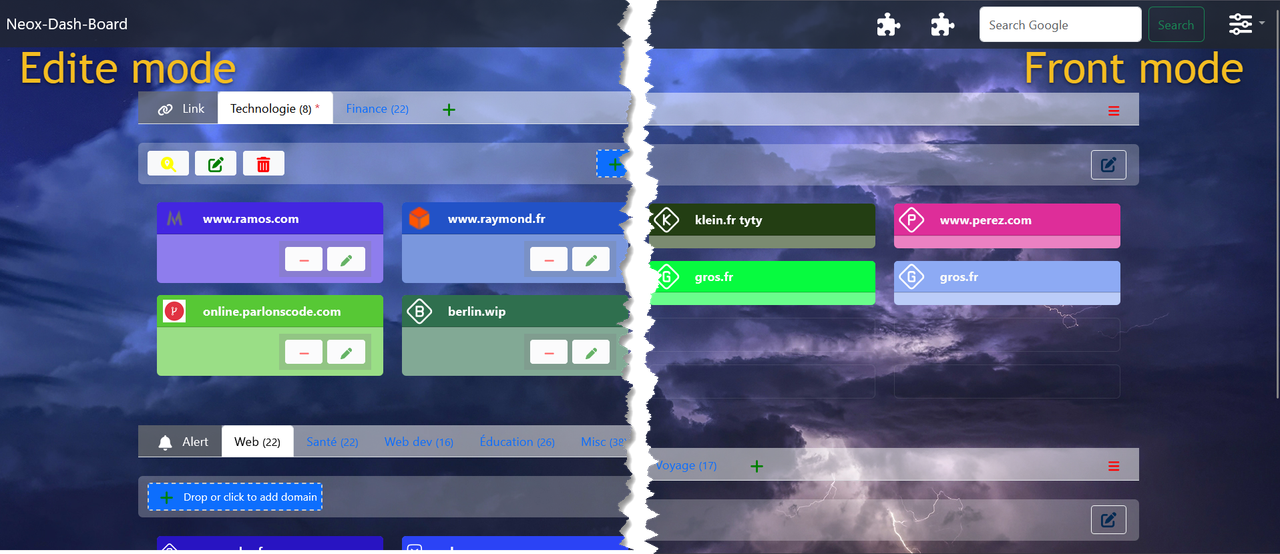
This bundle provides a dashboard for Symfony 7 in your application. Its main goal is to simplify the integration of additional tools!
Features:
- CRUD Link, Class, Section
- Customizable Dashboard
- Move elements Link, Class, Section | Drag & Drop
- Add bookmark drag & drop | liste form your browser, oneBeOne, file, etc ...
- ....
Modular and Autonomous System: Operating Independently from the Main Project!!
Webpack cohabitation !!
If you have Webpack installed in your project, you can use this bundle; however, you must be very careful about where the packages are installed. Install only the packages that will be used by Webpack during development using npm or yarn. Otherwise, the paths for the packages may not be correct, which will prevent the resources from working properly with AssetMapper.
Installation BETA VERSION !!
Install the bundle via Composer! Since it’s still in beta:
`
NOTE: You need to have Symfony 7 installed and configured, along with Messenger, Stimulus, Bootstrap, SweetAlert2, UX Turbo, and UX LiveComponent. You may need to use [ symfony composer dump-autoload ] to reload autoloading
Run commands CLI Symfony
` We use the Messenger queue to process methods asynchronously, preventing requests from being blocked.
To enable this, you’ll need to add the following to your messenger.yaml. This setup gives customers the flexibility to choose whether to use asynchronous processing or not.
SETUP
In your home controller add route name #[Route('/', name: 'app_home')] if it has something else
In twig add link page <a class="menu-link" href="{{'path(app_neox_dashboard_home')}}"><div>Neox dash-board</div></a>
Check if you have in importmap.php
Check this you have in router.yaml
Secure system
`
..... Done 🎈
Usage
Widget!!
We are excited to introduce the concept of Widgets! Currently, we have two available widgets:
- Favorite
- Search
But this is just the beginning! 🚀
We have ambitious plans to expand the range of widgets significantly. In the future, you can expect widgets like:
- Weather
- NAS (Network-Attached Storage)
- Many more, powered by APIs, URLs, and other integrations.
Stay tuned for more updates as we continue to enhance and grow the widget ecosystem!
Documentation (coming soon)
Tools !
Contributing
If you want to contribute (thank you!) to this bundle, here are some guidelines:
- Please respect the Symfony guidelines
- Test everything! Please add tests cases to the tests/ directory when:
- You fix a bug that wasn't covered before
- You add a new feature
Todo
- Packagist
- Multi-lingual (pre-done)
- Theme by CSS
- add widget (pre-done) API ...
- add tracker website 🌶️🌶️🌶️ (scheduler, mercure, rabbitmq, ...)
- Dockerizing image 🐳
Thanks
All versions of neox-dashboard-bundle with dependencies

ext-intl Version *
doctrine/doctrine-bundle Version ^2.0
doctrine/orm Version ^2.6 || ^3.0
gedmo/doctrine-extensions Version ^3.0
stof/doctrine-extensions-bundle Version ^1.0
symfony/amqp-messenger Version ^6.0 || ^7.1
symfony/asset Version ^6.3|^7.0
symfony/asset-mapper Version ^6.3|^7.0
symfony/form Version ^6.0 ||^7.1
symfony/framework-bundle Version ^5.4 || ^6.0 || ^7.0
symfony/mercure-bundle Version ^0.3.0
symfony/messenger Version ^6.0 ||^7.1
symfony/security-core Version ^6.0 || ^7.1
symfony/twig-bundle Version ^5.4 || ^6.0 || ^7.0
symfony/uid Version ^5.4 || ^6.0 || ^7.0
symfony/ux-icons Version ^2.0
symfony/ux-live-component Version ^2.0
symfony/ux-turbo Version ^2.0
symfony/ux-twig-component Version *
symfony/validator Version ^5.4 || ^6.0 || ^7.0
symfony/yaml Version ^6.3|^7.0
symfonycasts/dynamic-forms Version ^0.1.3
twig/string-extra Version ^3.4.0
twig/twig Version ^2.0 || ^3.0