Download the PHP package psalm/plugin-laravel without Composer
On this page you can find all versions of the php package psalm/plugin-laravel. It is possible to download/install these versions without Composer. Possible dependencies are resolved automatically.
Download psalm/plugin-laravel
More information about psalm/plugin-laravel
Files in psalm/plugin-laravel
Package plugin-laravel
Short Description Psalm plugin for Laravel
License MIT
Homepage https://github.com/psalm/psalm-plugin-laravel
FAQ
Example:

In general, it is recommended to use always a project to download your libraries. In an application normally there is more than one library needed.

- Some hosting areas are not accessible by a terminal or SSH. Then it is not possible to use Composer.
- To use Composer is sometimes complicated. Especially for beginners.
- Composer needs much resources. Sometimes they are not available on a simple webspace.
- If you are using private repositories you don't need to share your credentials. You can set up everything on our site and then you provide a simple download link to your team member.
- Simplify your Composer build process. Use our own command line tool to download the vendor folder as binary. This makes your build process faster and you don't need to expose your credentials for private repositories.
Informations about the package plugin-laravel
Laravel Psalm Plugin




Laravel static analysis with built-in security scanning.
The only free tool that combines deep Laravel static analysis with taint-based vulnerability detection that traces user input from request to sink: SQL injection, XSS, shell injection, file traversal, SSRF, open redirects, timing-unsafe secret comparisons, and LLM prompt injection (laravel/ai agents).
Everything runs inside your project and your CI. No account, no cloud upload, no code leaves your machine.
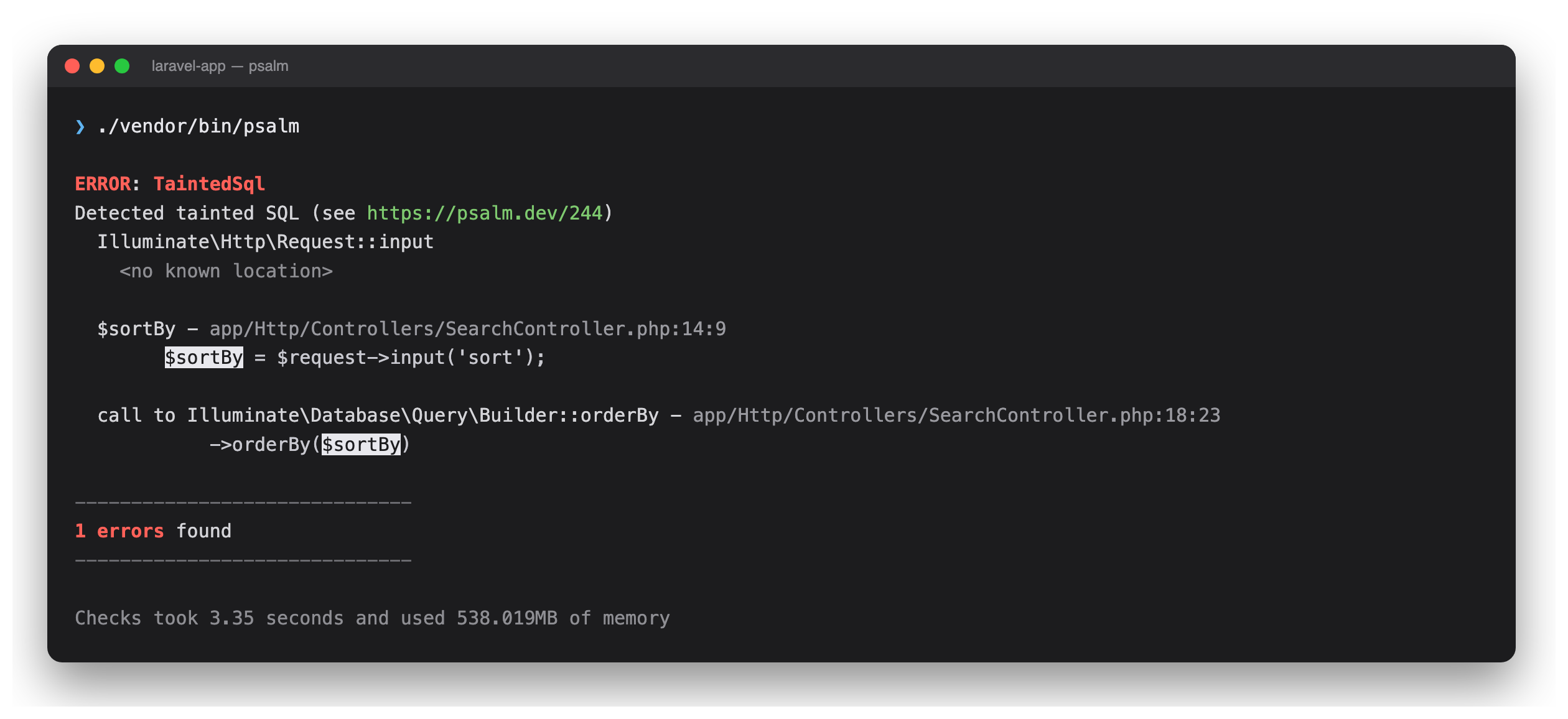
Real output on a fresh Laravel app, tracing the two lines above from source to sink.
[!NOTE] Already using Larastan? psalm-laravel complements it with security analysis that PHPStan cannot provide. See the comparison below.
Install
Requires PHP 8.2+ and Laravel 12 or 13. Full matrix under Versions & Dependencies.
- Psalm 7.x is currently a release candidate. The
@RCflag allows that one package to be pre-release, so your project'sminimum-stabilitystays untouched. Composer honours stability flags only on root requirements, which is whyvimeo/psalmis listed explicitly. - Want zero pre-release packages? The 3.x line runs on stable Psalm 6 and needs no stability flags at all:
composer require --dev psalm/plugin-laravel:^3. It carries the same security checks, and additionally supports Laravel 11. initwrites apsalm.xmlat the project root with the plugin enabled,errorLevel="4"by default (--level 1is strictest,--level 8the most lenient), Laravel-friendly issue handler defaults, andrunTaintAnalysis="true". Pass--forceto overwrite an existingpsalm.xmlwithout prompting.analyzedelegates tovendor/bin/psalmand passes the exit code through, so you can invoke./vendor/bin/psalmdirectly instead.analyze --plugin-option=KEY=VALUE(repeatable) overrides a bool or enum plugin setting for one run. See per-run overrides.
On the 3.x line (Psalm 6) security scanning is a separate mode rather than an extra check: enabling it makes Psalm report Tainted... issues and suppress every type issue. Keep runTaintAnalysis out of your psalm.xml there, which is why init on 3.x omits it, and pass the flag only for the security pass. Putting it in the config turns every run taint-only, including the --set-baseline run below.
Psalm 7, and therefore the 4.x plugin line, merged the two: one run reports both.
Security scanning
Plugin ships Laravel-specific taint stubs that track user input from source to sink across your entire codebase. Unlike pattern-matching tools, Psalm follows dataflow across function boundaries, so input that travels through helper functions, service classes, and any number of call layers is still caught.
| Vulnerability | OWASP | Example sinks |
|---|---|---|
| SQL injection | A03:2021 | orderBy() column, orderByRaw(), DB::select(), DB::statement(), DB::unprepared() |
| XSS | A03:2021 | response(), new HtmlString(), mailable html() |
| Shell injection | A03:2021 | Process::path()->run(), app(Kernel::class)->call() |
| File traversal | A01:2021 | Storage::disk()->get(), ->put(), ->delete() |
| Open redirect | A01:2021 | redirect(), redirect()->to() |
| SSRF | A10:2021 | Http::withOptions()->get() and the rest of PendingRequest |
| Crypto misuse | A02:2021 | encryption and hashing taint escape or unescape |
| Timing attack (CWE-208) | A02:2021 | a secret compared with ===, <=>, or strcmp() |
| XSS in Blade templates, opt-in | A03:2021 | {!! $userInput !!} |
You can read more about how the plugin's taint analysis works and what vulnerabilities it detects in docs/security.md.
Writing laravel/ai prompt middleware that blocks injection? Annotate it so the plugin stops reporting a mitigation you already ship: Marking prompt-guard middleware as trusted.
Blade template analysis
Opt-in static analysis of .blade.php templates: type issues and TaintedHtml findings on unescaped output, reported directly at the template's own file and line. Enable it with <blade />. See docs/blade.md for setup, suppression, and known limits.
Custom checks
13 Laravel-aware checks on top of Psalm's built-in diagnostics, each with a docs page explaining what it detects and how to fix it:
- UndefinedModelRelation: a relation name in
with(),load(), orwhereHas()that resolves to no relationship on the model. - UnknownModelAttribute: a typo'd key passed to
create(),fill(), orupdate()that matches no known attribute. - UnresolvableAppendedModelAttribute: an
$appendsentry with no backing accessor, which is a runtimeBadMethodCallExceptionontoArray(). - OctaneIncompatibleBinding: a
singleton()closure that resolves a request-scoped service, auto-enabled whenlaravel/octaneis installed. - NoEnvOutsideConfig:
env()called outside the config directory, where it returnsnullonce the config is cached.
See docs/issues/index.md for the full catalog.
Adopting it on an existing codebase
The first run on an untouched project will report a lot. Fix the security findings first, then park the type issues in a baseline so only new code is checked. The noisier checks are opt-in and off by default, so nothing here depends on rewriting your codebase.
[!IMPORTANT]
--set-baselinerecords every issue it sees, security findings included, and a baselinedTaintedSqlstops being reported. After generating the baseline, delete the<Tainted...>blocks frompsalm-baseline.xml, otherwise the vulnerabilities you just found go quiet.
Full playbook, including the strictness ramp and how to turn down noise: docs/adoption.md.
Continuous integration
Writes a ready-to-commit .github/workflows/psalm.yml that runs the plugin on pull requests and on pushes to your default branch, and uploads security findings to GitHub Code Scanning. See docs/github-actions.md for what the generated workflow does and how to customize it.
Configuration
You can customize Psalm configuration using XML config and/or cli parameters.
For plugin configuration options, see docs/config.md.
Versions & Dependencies
Maintained versions:
| Laravel Psalm Plugin | PHP | Laravel | Psalm | Plugin Status |
|---|---|---|---|---|
| 4.x (recommended) | 8.2+ | 12, 13 | 7-beta | Stable |
| 3.x (upgrade) | 8.2+ | 11, 12, 13 | 6 | Stable |
| 2.x (upgrade) | 8.0+ | 8, 9, 10, 11 | 4, 5, 6 | Unmaintained |
| 1.x (upgrade) | 7.1+ | 5, 6, 7, 8 | 3, 4 | Unmaintained |
See releases for more details about supported PHP, Laravel and Psalm versions.
How it works
Under the hood the plugin boots your actual Laravel application (or an [Orchestra Testbench](https://github.com/orchestral/testbench) skeleton when analyzing a package). This is not a just a classic static read of your code: config is loaded, facade aliases are resolved via `Illuminate\Foundation\AliasLoader` (including aliases from `config/app.php` and package discovery), and service providers run. It also ships hand-crafted stubs for taint analysis and special cases. For Eloquent model metadata (casts, appended attributes, relations), the plugin goes a step further and instantiates each model class, constructor-less, via reflection, replaying its trait and attribute initializers to read the runtime-computed fields. This never needs a database connection: the model is never booted and no query runs. Column names and types instead come from parsing SQL schema dumps (`php artisan schema:dump`) and PHP migration files. What that does and does not execute: booting the framework runs your service providers, exactly as any `php artisan` command does, so the plugin needs the same trust level you already give artisan. It never handles an HTTP request, never boots a model, never opens a database connection, and never runs a query.Psalm-Laravel or Larastan?
Use both. They solve different problems:
- Larastan excels at Laravel-specific type rules:
model-propertyvalidation,view-stringchecks, and 17+ custom rules. - Psalm-Laravel in addition to type checks, it provides taint-based security analysis that PHPStan structurally cannot offer, plus deep type support for Request data, Eloquent attributes, scopes, attributes, etc.
| Tool | PHP types | Laravel types | Taint analysis | Free |
|---|---|---|---|---|
| Psalm-Laravel | Yes | Yes | Yes, dataflow | Yes |
| Larastan | Yes | Yes | No | Yes |
| Mago | Yes | No | Superglobals only | Yes |
| SonarQube | Partial | No | Yes, generic | Paid only |
| Semgrep | No | No | Yes, interfile paid | Free tier |
| Snyk Code | No | Claimed | Yes, generic | Freemium |
The first three rows are from our own testing. The commercial rows summarize vendor documentation, so check their current tiers before relying on them.
Psalm and PHPStan use almost the same annotation syntax, so they work side by side without conflicts.
Contributing
There are contributing docs that may help you with contributions.
All versions of plugin-laravel with dependencies

ext-simplexml Version *
illuminate/config Version ^12.14 || ^13.3
illuminate/container Version ^12.14 || ^13.3
illuminate/contracts Version ^12.14 || ^13.3
illuminate/database Version ^12.14 || ^13.3
illuminate/events Version ^12.14 || ^13.3
illuminate/http Version ^12.14 || ^13.3
illuminate/routing Version ^12.14 || ^13.3
illuminate/support Version ^12.14 || ^13.3
illuminate/view Version ^12.14 || ^13.3
nikic/php-parser Version ^5.0
orchestra/testbench-core Version ^10.0 || ^11.0
psalm/psalm-plugin-api Version ^0.3.0
symfony/console Version ^7.2 || ^8.0
vimeo/psalm Version ^7.0.0-beta23 || dev-master