Download the PHP package porro/laravel-connector without Composer
On this page you can find all versions of the php package porro/laravel-connector. It is possible to download/install these versions without Composer. Possible dependencies are resolved automatically.
Download porro/laravel-connector
More information about porro/laravel-connector
Files in porro/laravel-connector
Package laravel-connector
Short Description Porro connector for Laravel: a signed, read-only report of versions, advisories, scheduler, queues, migrations and backups, plus suspicious activity and IP blocking on the site.
License MIT
Homepage https://porro.dev/?utm_source=laravel-connector&utm_medium=packagist&utm_campaign=connectors
FAQ
Example:

In general, it is recommended to use always a project to download your libraries. In an application normally there is more than one library needed.

- Some hosting areas are not accessible by a terminal or SSH. Then it is not possible to use Composer.
- To use Composer is sometimes complicated. Especially for beginners.
- Composer needs much resources. Sometimes they are not available on a simple webspace.
- If you are using private repositories you don't need to share your credentials. You can set up everything on our site and then you provide a simple download link to your team member.
- Simplify your Composer build process. Use our own command line tool to download the vendor folder as binary. This makes your build process faster and you don't need to expose your credentials for private repositories.
Informations about the package laravel-connector
porro/laravel-connector
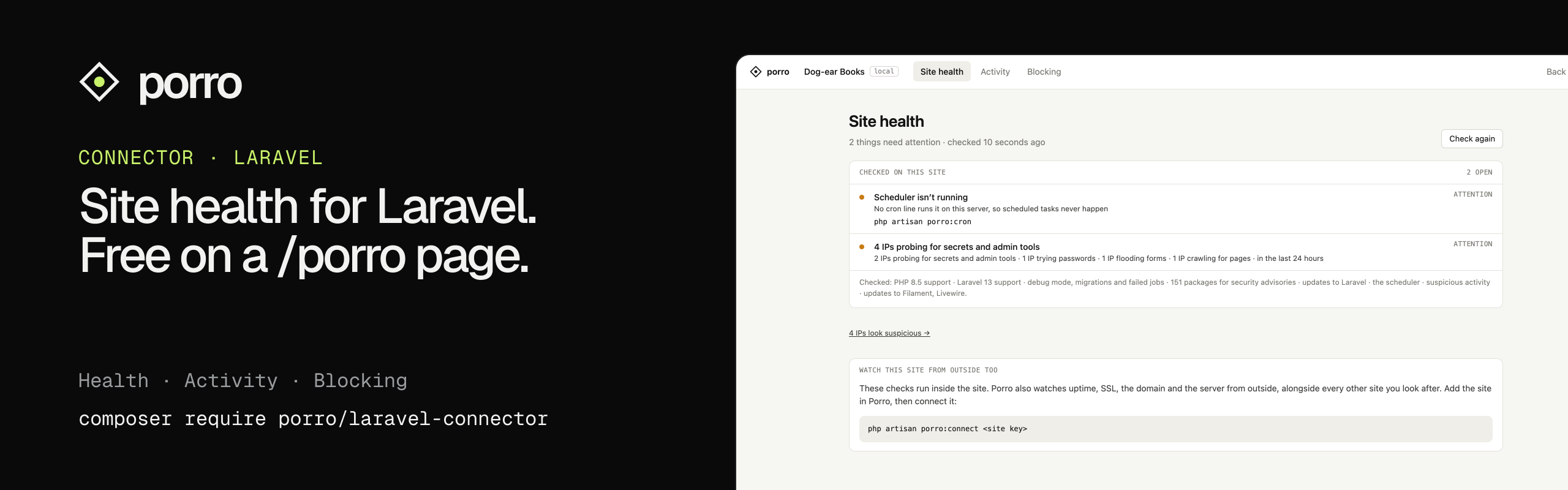
Site health, suspicious activity and blocking for Laravel 10–13, on its own /porro page. It checks the site for the things that quietly go wrong between deploys (security advisories in your Composer packages, PHP and Laravel versions running out of security support, a scheduler that isn't running, debug mode left on in production, migrations not run, failed jobs, stale backups) and tells you what to do about each. It also spots who's probing the site for secrets, trying passwords or flooding its forms, and lets you block them in a click.
It's free and works on its own, with no account. If you use Porro to look after your sites, connecting it adds what can only be seen from outside: uptime, SSL certificates, domain expiry and the server's operating system, with alerts by email or Slack.
On Filament or Statamic? Use Porro Site Health for Filament or Porro Site Health for Statamic instead. They include everything here and show it in your control panel. Install this package on its own and
porro:statuspoints you to the right one.
Install
The migration adds the porro_blocklist, porro_safelist, porro_cache and porro_settings tables. Then visit /porro. It's open in the local environment; anywhere else it needs a gate first (see The /porro page).
The scheduler check, activity batching and nginx mode run on Laravel's scheduler, which needs one cron line. If it isn't running yet, php artisan porro:cron adds it to the server's crontab for you, from the project folder (the current folder on zero-downtime deploys). If it can't, it prints the line to add yourself. See Scheduling reports for Forge, Ploi, Laravel Cloud, Vapor and other hosts.
What it checks
On the site itself, with no account, through Porro\Laravel\SiteHealth:
- PHP and Laravel versions past or close to the end of security support (endoflife.date, with a bundled copy for when it can't be reached), and newer Laravel releases
- Security advisories in
composer.lock(Packagist's advisories API, the onecomposer audituses; only package names are sent) - The scheduler: whether it runs. The scheduler writes a heartbeat every
PORRO_INTERVALminutes so the page can tell - Debug mode in production, pending migrations and failed jobs
- Email in production: mail that isn't sent at all (the
logorarraymailer, or a test inbox like Mailpit), mail sent by the web server's own sendmail, and a sender address that's missing, still[email protected], a free mailbox, or not on the site's domain. Read from your mail config; nothing is sent anywhere - Backups from
spatie/laravel-backup, andspatie/laravel-healthchecks, if installed
Results are cached for five minutes; the public data behind them for between six hours and a day. The Statamic and Filament connectors show the same checks as a panel in the control panel.
The /porro page
Visit /porro for three tabs:
- Site health: the checks above, and Porro's findings once connected
- Activity: suspicious requests in the last 24 hours, with buttons to block or safelist each IP
- Blocking: the blocklist and safelist, and the protected ranges it refuses to block
Locked down by default. In the local environment anyone can open it. Anywhere else it returns 403 unless your app defines a viewPorro gate and the gate allows the signed-in user. Guests never get in. With no gate, production is closed to everyone. Define the gate in a service provider's boot():
Changing the lists also checks a managePorroBlocklist gate when you define one. Without it, anyone who can view the page can change the lists. The routes for connecting to Porro from the page (/porro/connect) need a connectPorro gate and are closed until you define it; the page has no button for them yet.
- Path: set
PORRO_PATHto move it. - Middleware: set
porro.page.middlewareto change it (defaultweb). - Turning it off:
PORRO_PAGE=false. - Statamic and Filament sites: the page turns itself off, because their connectors show the same things in the control panel. Set
PORRO_PAGE=trueto have both. - Assets: everything is in one Blade layout with inline styles, so there's nothing to publish or build.
Suspicious activity and blocking
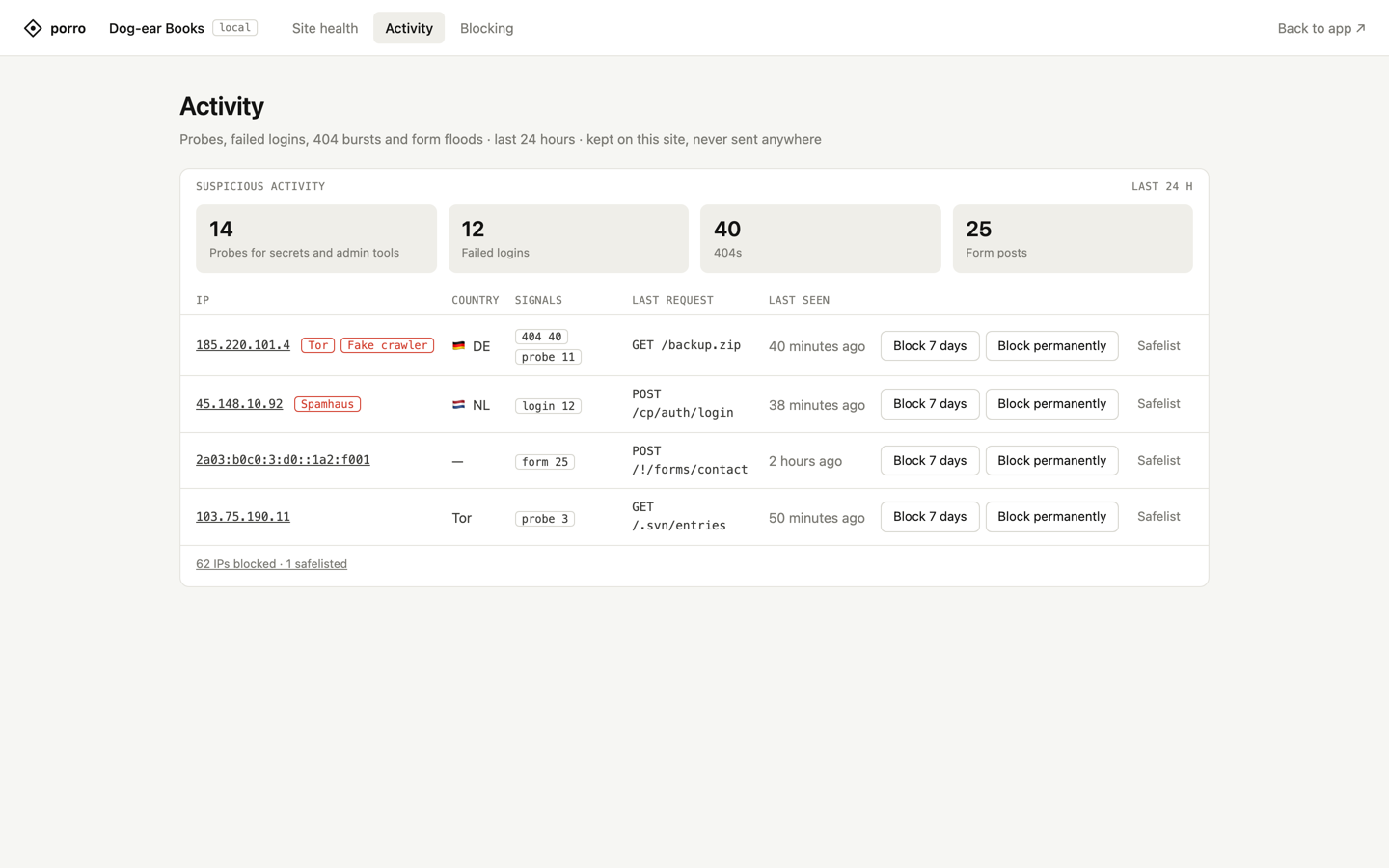
Works without a Porro account. IP addresses aren't sent to Porro, and stay on the site apart from the lookups and Cloudflare blocking listed under Where IP addresses go.
- Run the migration first:
php artisan migrateadds theporro_blocklist,porro_safelist,porro_cacheandporro_settingstables. - What's watched: requests for scanner paths like
/.env,/.gitandwp-login.php, failed sign-ins, bursts of 404s and floods of form posts.- Failed sign-ins are counted from Laravel's
Illuminate\Auth\Events\Failedevent. The session guard'sattempt()fires it, so the usual login forms (Breeze, Fortify, Filament's and Statamic's) are covered. Token guards, Sanctum tokens and custom guards that don't fire the event aren't counted. - Counts are kept for 48 hours in Porro's own
porro_cachetable, so a deploy'scache:cleardoesn't wipe them. Expired rows are cleared hourly; a database backup taken in those 48 hours will include them. SetPORRO_ACTIVITY_STOREto use another cache store instead, such as a dedicated Redis connection. - Suspicious requests are written in batches: each one appends a short line to
storage/porro/activity.bufon its server, and the lines are recorded every minute by the scheduler, now and then at the end of a suspicious request, and whenever the Activity, IP or Site health page opens. Flags can lag by up to a minute; blocking is immediate. The file is capped at 2 MB, so a flood can't fill the disk. Where storage can’t be written, or on Lambda (Vapor), each request is recorded straight away instead. - Only those requests are recorded (form posts count towards a flood, apart from the paths in
activity.ignore_posts), plus every request from an IP that's already been flagged. A normal page view isn't recorded: it checks the visitor against the blocklist, which the app's cache holds and refreshes from the database every five minutes, and about one request in 500 may run the hourly clear-out of expired rows. - Usernames are kept only as hashes.
- Failed sign-ins are counted from Laravel's
- Production only by default. A local or staging copy records nothing unless
PORRO_ACTIVITY=true. - Exposed files: if
/.envor/.gitever answers 200, the panel raises it as critical. - Blocking: blocked IPs get a plain 403 before the app runs, from middleware that's first in the global stack.
- Behind Cloudflare, the visitor's real IP is used and Cloudflare itself is never blocked.
- Always protected: Cloudflare, Laravel Forge and its health checks, private ranges, your safelist and
porro.blocklist.protected. A block that covers any of them is refused when you try to add it, and the app never turns those addresses away. Wide ranges and your own IP are refused too. - Country: behind Cloudflare it comes from the request for free. Otherwise a free DB-IP country file is downloaded monthly into
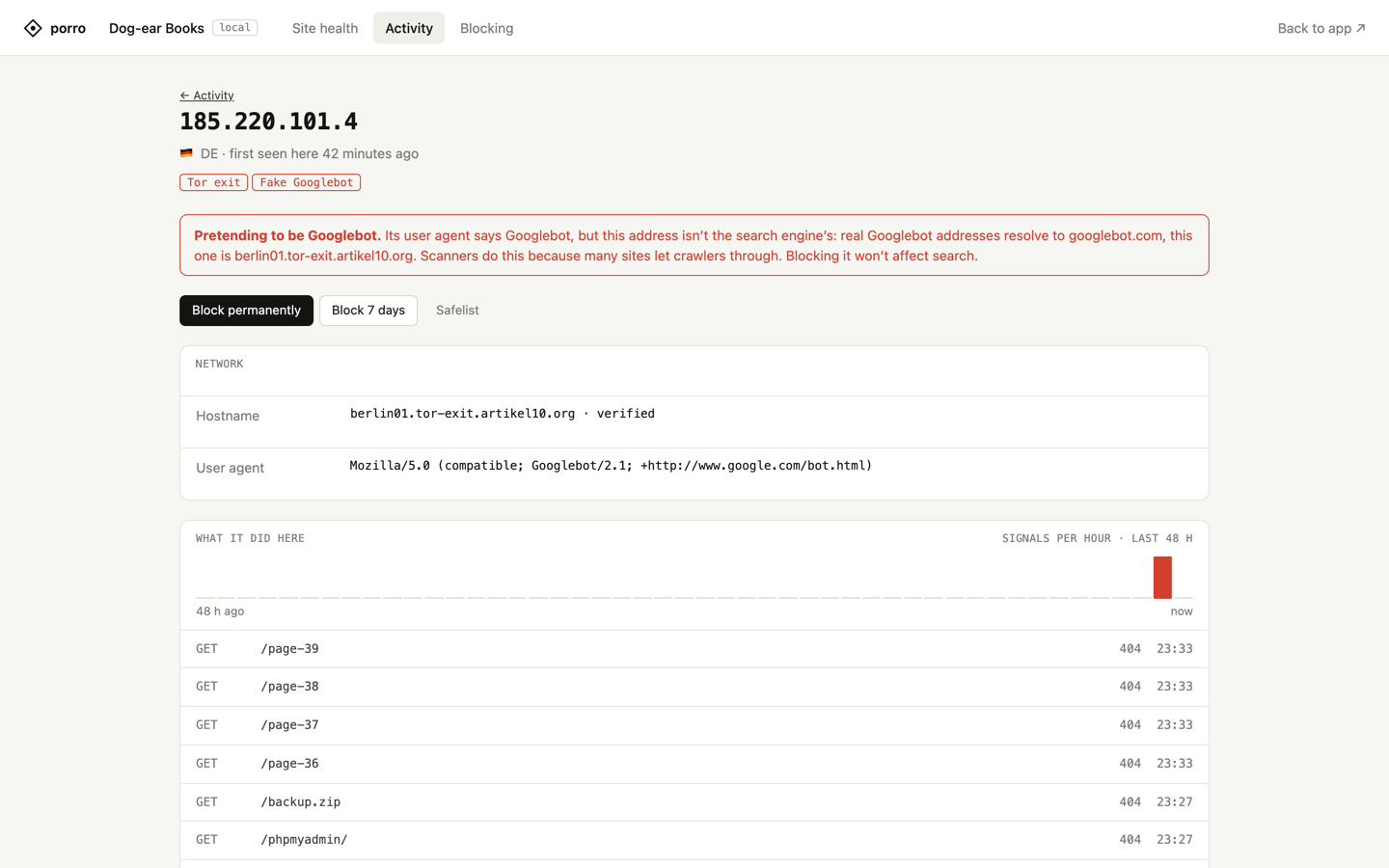
storage/porro. - IP details: click an IP on the Activity tab (
/porro/activity/{ip}). Results are cached a day.- Who it is:
- country, network and its type, and Cloudflare's risk categories, when Cloudflare is set up (Intel if the token has Account → Intel → Read, otherwise Radar). This sends the IP to Cloudflare's API.
- a reverse-DNS hostname, looked up through the server's DNS resolver and kept only when it resolves back to the same IP
- badges for Tor exits, Spamhaus DROP, hosting providers, fake Googlebots and research scanners
- What it did here: activity over the last 48 hours and its last requests.
- Actions: block it, block its /24 (offered only for hosting networks), or safelist it.
- Reputation: with
PORRO_ABUSEIPDB_KEY, a button checks AbuseIPDB. It sends the IP to AbuseIPDB, so it only runs when clicked, and only for people who can manage the blocklist.
- Cloudflare WAF mode, for sites behind Cloudflare. Blocked IPs are stopped at Cloudflare's edge, before they reach the server.
- Token: create a Cloudflare API token (My Profile → API Tokens → Create Custom Token) with two policies: one scoped to the site's domain with Zone WAF Rules: Edit and Zone: Read, one scoped to the entire account with Account Rule Lists: Edit. Set it as
PORRO_CLOUDFLARE_TOKEN; it stays in the environment, never the database. Blocking → Set up Cloudflare walks through it. - Connect: click Connect to Cloudflare on the setup page, or run
php artisan porro:cloudflare connect. It finds the zone servingAPP_URL(orPORRO_CLOUDFLARE_HOST) and creates or reuses the account'sporro_blocklistIP List. It then adds one custom rule blocking that list next to your existing rules, never replacing them. - Syncing: it syncs after every change and on the scheduled task. Only production syncs, and only to the zone it connected to, so a local or staging copy can't push its list.
- Shared list: the list is shared by every site on the Cloudflare account. Each site only adds and removes items tagged with its own id, and an IP another site already blocked is left alone.
- Commands:
porro:cloudflareshows the status.porro:cloudflare syncsyncs now, andporro:cloudflare disconnectremoves this site's items and the rule.
- Token: create a Cloudflare API token (My Profile → API Tokens → Create Custom Token) with two policies: one scoped to the site's domain with Zone WAF Rules: Edit and Zone: Read, one scoped to the entire account with Account Rule Lists: Edit. Set it as
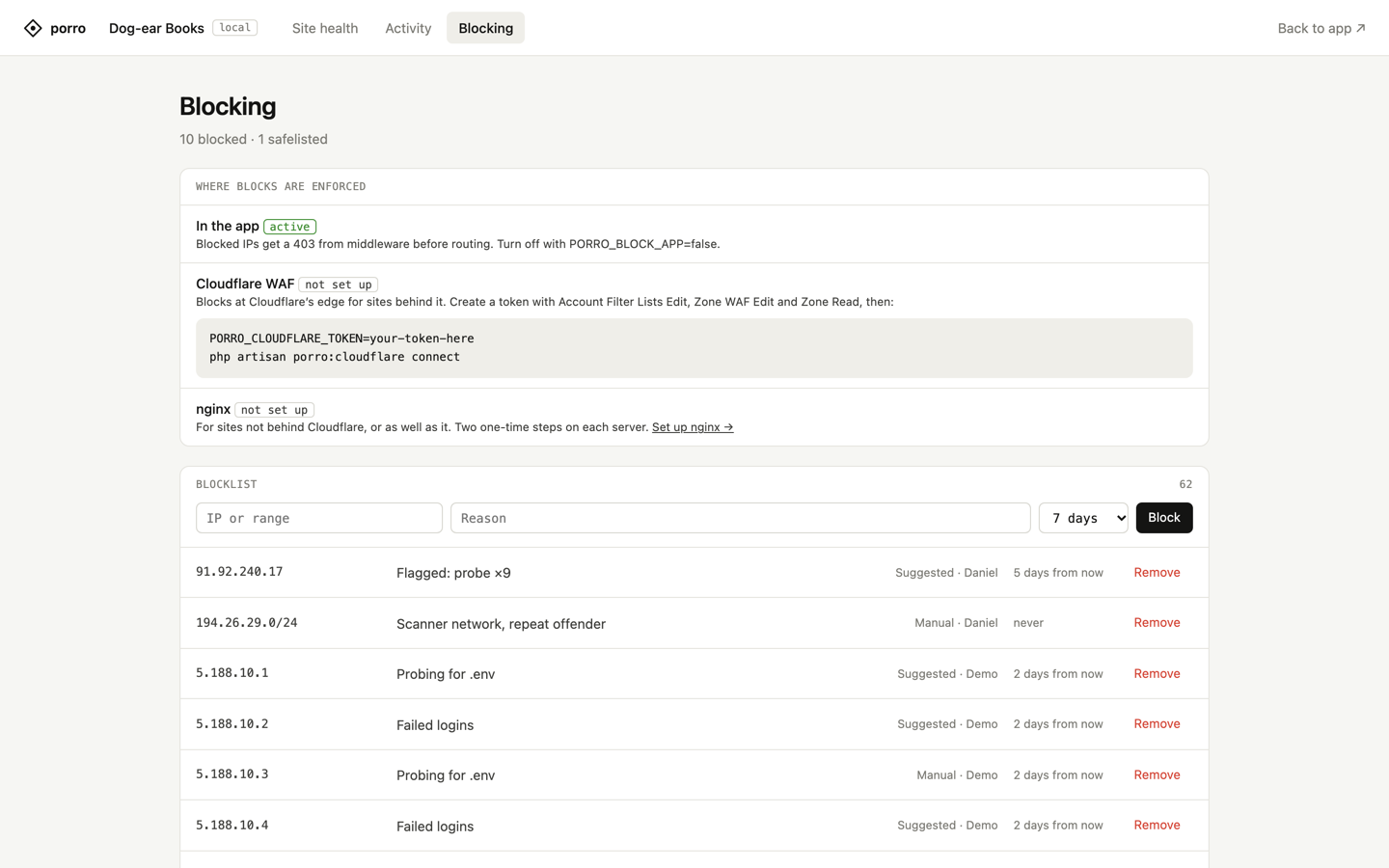
- nginx mode (
PORRO_BLOCK_NGINX=true)./porro/blocking/nginxwalks through setup in three steps with this site's real paths, copy buttons, and an example config showing where the include line goes. Behind Cloudflare, the deny file also carries Cloudflare's real IP lines, so the site's config needs only that one line. It also lists every server and how far each has got: no file yet, include missing, waiting for reload, or loaded.- How a server is checked: each server checks itself every minute by looking, never by running anything. It confirms the file exists, that a readable nginx config includes it, and that the reload job has run since the last change.
- Seeing every server: the list needs a cache the servers share, such as Redis or the database.
- The details:
porro:blocklist-syncwrites adenyfile every minute on each server, in production only.- Include it in the site's nginx config and reload nginx when it changes.
- Without nginx mode, there's no extra scheduled task, so hosts that scale to zero can still sleep.
Where IP addresses go
IP addresses are never in the report to Porro. They leave the server only in these cases:
- IP details, with
PORRO_CLOUDFLARE_TOKENset: opening an IP's details page sends that IP to Cloudflare's API (IP Intelligence, or Radar), once a day at most per IP. - IP details, reverse DNS: the same page looks up the IP's hostname, so the server's DNS resolver sees the IP, as with any reverse-DNS lookup.
- AbuseIPDB: with
PORRO_ABUSEIPDB_KEY, the reputation button sends the IP to AbuseIPDB, only when clicked. - Cloudflare WAF mode: every blocked IP or range goes into the account's
porro_blocklistlist at Cloudflare, with its note. That's how Cloudflare blocks it.
Countries, the Tor and Spamhaus badges and the protected ranges are matched on the server, against files and lists it downloads.
Connect Porro (optional)
Porro watches every site you look after from outside: uptime from several regions, SSL and domain expiry, the server's OS and security updates, with alerts by email or Slack. It's a separate service with its own account; see porro.dev for plans. Nothing in this package needs it, and nothing is sent to Porro until you connect. Add the site in Porro and copy its site key, then:
porro:connect writes PORRO_KEY to .env and sends the first report. The Site health tab then shows the site's open findings in Porro (uptime, SSL, the domain, the server's OS and packages) alongside the checks above, each linking into Porro.
The site key can also come from Connect to Porro in the Statamic control panel, which needs no key to copy: the key is made on the site and kept in its porro_settings table, encrypted with the app key. PORRO_KEY in the environment wins when it's set. php artisan porro:status says which one is in use.
Reports then go every 15 minutes on the scheduler. If it isn't running, porro:connect offers to add the cron line, as porro:cron does. Use --cron to add it without asking (handy in provisioning scripts) or --no-cron to leave the crontab alone. Connected from another machine? Run php artisan porro:cron on the server; it needs no key, and once the site is connected it sends a report straight away. On Laravel Cloud and Vapor, set PORRO_KEY as an environment variable instead.
Add php artisan porro:report to your deploy script so Porro hears about deploys straight away.
Each report is signed and read-only: it never changes the site and never accepts commands, and Porro never connects in.
Scheduling reports
Laravel's scheduler needs to run php artisan schedule:run from the project folder every minute. Reports, the scheduler check and activity batching all run on it.
php artisan porro:cron adds the line to the server's crontab for you, or tells you it's already there. Once the site is connected it also sends a report straight away, so Porro stops saying cron is missing without waiting for the first scheduled one. If it can't reach the crontab, it prints the line to add by hand, using one of the guides below.
Zero-downtime deploys (Forge, Envoyer, Ploi, Deployer): always point cron at the current folder, e.g. /home/forge/example.com/current, never a releases/… folder. A release folder runs old code after the next deploy and stops working once it's cleaned up, with no error you'd see. php artisan porro:cron uses current for you.
Laravel Forge
Open the site and turn on **Laravel scheduler** in its Laravel settings. That's all: Forge adds the every-minute `schedule:run` job for the site, from the right folder. To add it by hand instead, go to the server's **Scheduler** and add a **New scheduled job**: - **Command:** `php /home/forge/example.com/current/artisan schedule:run`. Leave out `/current` if the site doesn't use zero-downtime deploys. On an isolated site, use the site's own user in the path. - **User:** `forge`, or the site's isolated user. Never `root`. - **Frequency:** every minute. If you add sites through Porro's one-click install on Forge, it turns on the Laravel scheduler for you when the Forge API token has the optional `server:create-schedulers` scope.Ploi
Open the server's **Cronjobs** and add one: - **Command:** `php /home/ploi/example.com/artisan schedule:run`, with `/current` before `/artisan` on zero-downtime sites. - **User:** `ploi`, or the site's own user. - **Frequency:** every minute.Laravel Cloud
There's no crontab. Open the environment, edit the **App** cluster and turn on **Scheduler**. Cloud then runs `schedule:run` every minute. Set `PORRO_KEY` as an environment variable rather than running `porro:connect` there.Laravel Vapor
Vapor runs the scheduler for you unless `vapor.yml` sets `scheduler: false`. Leave it on, and set `PORRO_KEY` as an environment variable.Envoyer
Envoyer deploys but doesn't run cron. Add the job on the server itself (Forge's Scheduler, or `crontab -e`), pointing at Envoyer's `current` folder: `php /home/forge/example.com/current/artisan schedule:run`.cPanel or Plesk
- **cPanel:** **Advanced → Cron Jobs**. Choose **Once Per Minute** and use `cd /home/user/example.com && php artisan schedule:run > /dev/null 2>&1`. - **Plesk:** **Websites & Domains → Scheduled Tasks → Add Task**. Choose **Run a command**, **Cron style** `* * * * *`, and the same command. If `php` isn't found, or runs an older PHP than the site, use the full path your host lists for the site's PHP version.Any other server (crontab)
Run `crontab -e` as the user that owns the site (not root) and add: Use the `current` path on zero-downtime deploys.What leaves a site
Only once connected, in the report every 15 minutes:
- Laravel, PHP and package versions (names and versions from
composer.lock; the list is only sent when the lock file changes) - The environment name, and whether debug mode is on (true or false, never the value of any setting)
- Scheduler heartbeat, failed jobs in the last 24 hours, pending migrations
- For failed jobs, up to five groups from the newest 500 in the last day: the job's name, the exception class, where it was thrown (relative to the app, e.g.
app/Jobs/SendInvoice.php:42), how many, when the last one failed, and the queue and connection. Not the job's data or the exception message. SetPORRO_FAILED_JOB_MESSAGES=trueto add each message's first line, cut to 160 characters, with email addresses, file paths and runs of six or more digits replaced by[email],[path]and[number]. Only for thedatabaseanddatabase-uuidsfailed job drivers - The database engine and version (e.g. MySQL 8.0.36, MariaDB 10.11.6), whether it's on the same server, and the provider if it's a known managed database. Never its host, name, user or password
- Newest backup date from
spatie/laravel-backupand check results fromspatie/laravel-health, if installed
Reading the site's findings back from Porro is a GET signed with the same key; it never sends anything about the site.
What never does
Content, customer or user data, environment values or secrets. Run php artisan porro:status --json to see the exact report your site would send.
Commands
| Command | Does |
|---|---|
porro:connect <key> |
Saves the key, sends the first report and sets up cron (--cron, --no-cron) |
porro:cron |
Adds the scheduler to the crontab on its own, no key needed. Sends a report straight away once connected |
porro:report |
Sends a report now (--packages forces the package list) |
porro:status |
Shows what the next report contains (--json for the raw report) |
porro:block <ip> |
Blocks an IP or range (--reason, --days; --remove unblocks) |
porro:blocklist-sync |
Tidies the blocklist and writes the nginx deny file |
porro:cloudflare [status\|connect\|sync\|disconnect] |
Blocks at Cloudflare's edge |
Config
| Env | Default | |
|---|---|---|
PORRO_KEY |
The site key | |
PORRO_INTERVAL |
15 |
Minutes between reports |
PORRO_ENABLED |
unset | true or false to force reporting on or off |
PORRO_FAILED_JOB_MESSAGES |
false |
Send the first line of failed jobs' exception messages, redacted |
PORRO_ACTIVITY |
unset | Record suspicious activity; unset means production only |
PORRO_ACTIVITY_BUFFER |
storage/porro/activity.buf |
Where this server keeps suspicious requests until they're recorded. false records each one straight away |
PORRO_ACTIVITY_STORE |
Porro's porro_cache table |
The cache store for activity, the Cloudflare connection and nginx check-ins. Never the app's default store, which deploys clear |
PORRO_BLOCK_APP |
true |
Turn blocked IPs away with a 403 |
PORRO_BLOCK_NGINX |
false |
Write the nginx deny file every minute |
PORRO_PROTECT_FORGE |
true |
Never block Laravel Forge's servers and health checks. Set false if the site isn't on Forge |
PORRO_PROTECT_CRAWLERS |
true |
Never block Google's and Bing's verified crawlers |
PORRO_NGINX_PATH |
storage/porro/nginx-blocklist.conf |
Where the deny file goes |
PORRO_NGINX_REAL_IP |
on behind Cloudflare | Put Cloudflare's real IP lines in the deny file. Set false if your nginx config already has real_ip_header |
PORRO_CLOUDFLARE_TOKEN |
Cloudflare API token for WAF mode | |
PORRO_CLOUDFLARE_HOST |
APP_URL's host |
The host whose Cloudflare zone gets the rule |
PORRO_ABUSEIPDB_KEY |
AbuseIPDB key, for the reputation check on IP details | |
PORRO_PAGE |
unset | The /porro page: unset means on, except alongside the Statamic or Filament connector |
PORRO_PATH |
porro |
Where the page lives |
The safelist, extra protected ranges, thresholds and the paths your app really serves go in config/porro.php under activity and blocklist.
With PORRO_ENABLED unset, only APP_ENV=production (or prod, live) reports. A local or staging copy running with the live .env stays quiet, so it can't overwrite the live site's state in Porro. Set PORRO_ENABLED=true to report from another environment on purpose. porro:status shows whether reporting is on and why.
Developing
Security
Please email [email protected] rather than opening an issue. We reply within one working day.
License
MIT
All versions of laravel-connector with dependencies

guzzlehttp/guzzle Version ^7.2
illuminate/console Version ^10.0|^11.0|^12.0|^13.0
illuminate/http Version ^10.0|^11.0|^12.0|^13.0
illuminate/support Version ^10.0|^11.0|^12.0|^13.0
porro/php-core Version ^0.3.9