Download the PHP package packstub/filament-flow without Composer
On this page you can find all versions of the php package packstub/filament-flow. It is possible to download/install these versions without Composer. Possible dependencies are resolved automatically.
Download packstub/filament-flow
More information about packstub/filament-flow
Files in packstub/filament-flow
Package filament-flow
Short Description Visual workflow automations for Filament panels: triggers, conditions and actions drawn on a canvas, run by your queue.
License MIT
Homepage https://github.com/packstub/filament-flow
FAQ
Example:

In general, it is recommended to use always a project to download your libraries. In an application normally there is more than one library needed.

- Some hosting areas are not accessible by a terminal or SSH. Then it is not possible to use Composer.
- To use Composer is sometimes complicated. Especially for beginners.
- Composer needs much resources. Sometimes they are not available on a simple webspace.
- If you are using private repositories you don't need to share your credentials. You can set up everything on our site and then you provide a simple download link to your team member.
- Simplify your Composer build process. Use our own command line tool to download the vendor folder as binary. This makes your build process faster and you don't need to expose your credentials for private repositories.
Informations about the package filament-flow
Filament Flow
Visual workflow automations for your Filament panel: draw triggers, conditions and actions on a canvas, and let the runner — or your queue — do the rest.
Features
- Visual builder — a drag-and-drop canvas inside a Filament resource: add nodes from a sidebar, connect them, branch on true / false, and edit each node's settings in a slide-over built from Filament form components.
- Triggers — record created / updated / deleted (only when chosen attributes change, from one value to another, once per record, or not more than once every N days), spatie model-state transitions, user registered, any Laravel event, a cron schedule with its own timezone and catch-up, a signed webhook, a manual run, a Run workflow action on any resource, or a call from another workflow.
- Conditions — compare a record attribute (including "changed from / to") or any two values with twenty operators, combine several rules with AND / OR, or check the time of day.
- Actions — send an email, a Filament database notification, a Slack, Discord, Teams or Telegram message, an SMS or WhatsApp message through Twilio, call an HTTP endpoint and use its response in later nodes, ask an AI model for named fields to branch on (with
packstub/agentsinstalled), create or update records, assign an owner, add tags, transition a state, find records and loop over them, wait for a duration or until a date, ask for approval or wait for a signal from your code, call another workflow, or write to the log. Every action has retries, a continue-on-error switch and an optional error branch; a workflow can name an on-failure workflow. - Placeholders —
{{ model.name }},{{ webhook.order.id }},{{ last.body.id }},{{ model.url }}and friends, with filters such as| date:Y-m-d,| upperand| default:none, resolved from the run's payload wherever you type text. - Secrets — an encrypted store for API tokens and webhook URLs, used as
{{ secrets.slack_webhook }}in actions only and masked in run logs; per tenant when you need it. - Approvals & signals — an Ask for approval step pauses the run until a person decides from a notification, an email link or the Approvals page, with Approved / Rejected / Timed out outputs; Wait for signal pauses it until your code calls
Flow::signal(). Waits are database rows, so they survive deploys and queue restarts. - Multi-tenant — in a panel with tenancy each team manages its own workflows, secrets, runs and approvals, global workflows run for every tenant, and a
maxWorkflows()hook plugs plan limits in. - Templates, import & export — start from a ready-made workflow (welcome series, high-value order alert, dunning, SLA escalation, approval) or your own, or describe the workflow in a sentence and let a model draft it from the nodes of your panel (with
packstub/agentsinstalled); export any workflow as a JSON file, and import it in another panel or from a seeder withWorkflow::import(). - Versioned — every change to a workflow is kept with who saved it and a summary of what changed; compare and restore from the Versions tab; runs pin the version they ran.
- Run history — every run is stored with its status, trigger, record, payload summary, a step-by-step log with timings and outputs, and any error, browsable from a Runs tab and a cross-workflow Runs page with stats; Test (dry run), Run now and Run again buttons; jump from a failed step to its node on the canvas; per-workflow retention and a "deactivate after N consecutive failures" guard.
- Queue & scheduling — run workflows inline or on your queue (dispatched after your transaction commits), pause them for minutes or days with a Wait step, and start them from cron expressions with one scheduler entry.
- Webhooks — a tokenised, optionally HMAC-signed POST endpoint per workflow that answers
202 Acceptedand exposes the request body to your nodes. - Safe by default — outgoing requests cannot reach private networks unless you allow it, record updates respect mass-assignment rules, credential headers never reach the run log, hidden model attributes never reach a template, and the Workflows resource can sit behind a policy, a Gate ability or a callback.
- Extensible — write your own trigger, action or condition class with a Filament form schema and register it on the plugin, in the config, or with
Flow::register(). - Dark mode ready and translatable — the canvas follows Filament's theme, and every string, node name and description lives in a language file.
Compatibility
| Plugin | Filament | Laravel | PHP |
|---|---|---|---|
| 1.x | 4.x, 5.x | 12.x, 13.x | 8.3+ |
Installation
Add the trait to the models you want to automate, and the plugin to your panel:
A Workflows resource appears in the panel navigation.
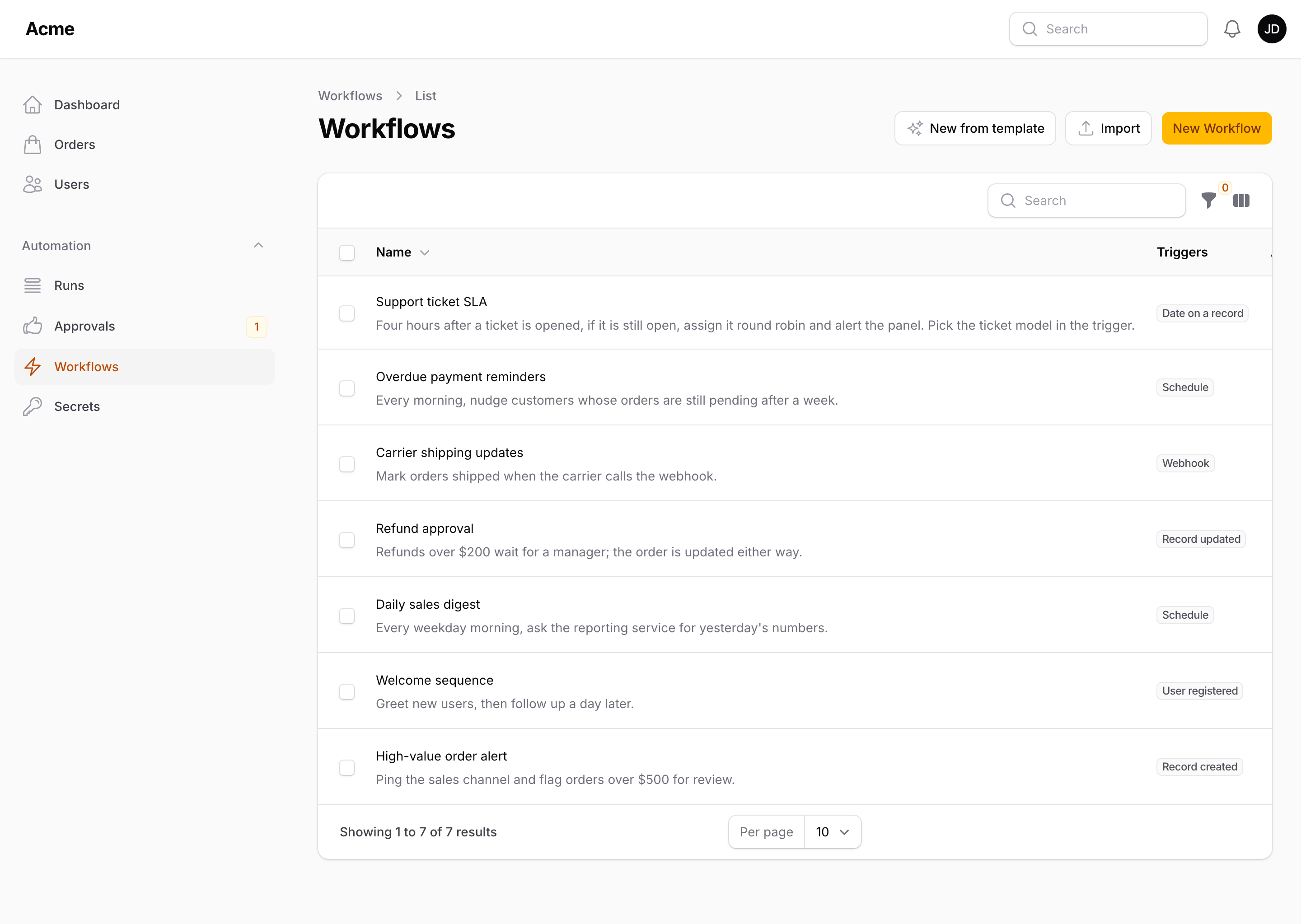
Full walkthrough: Installation.
The builder
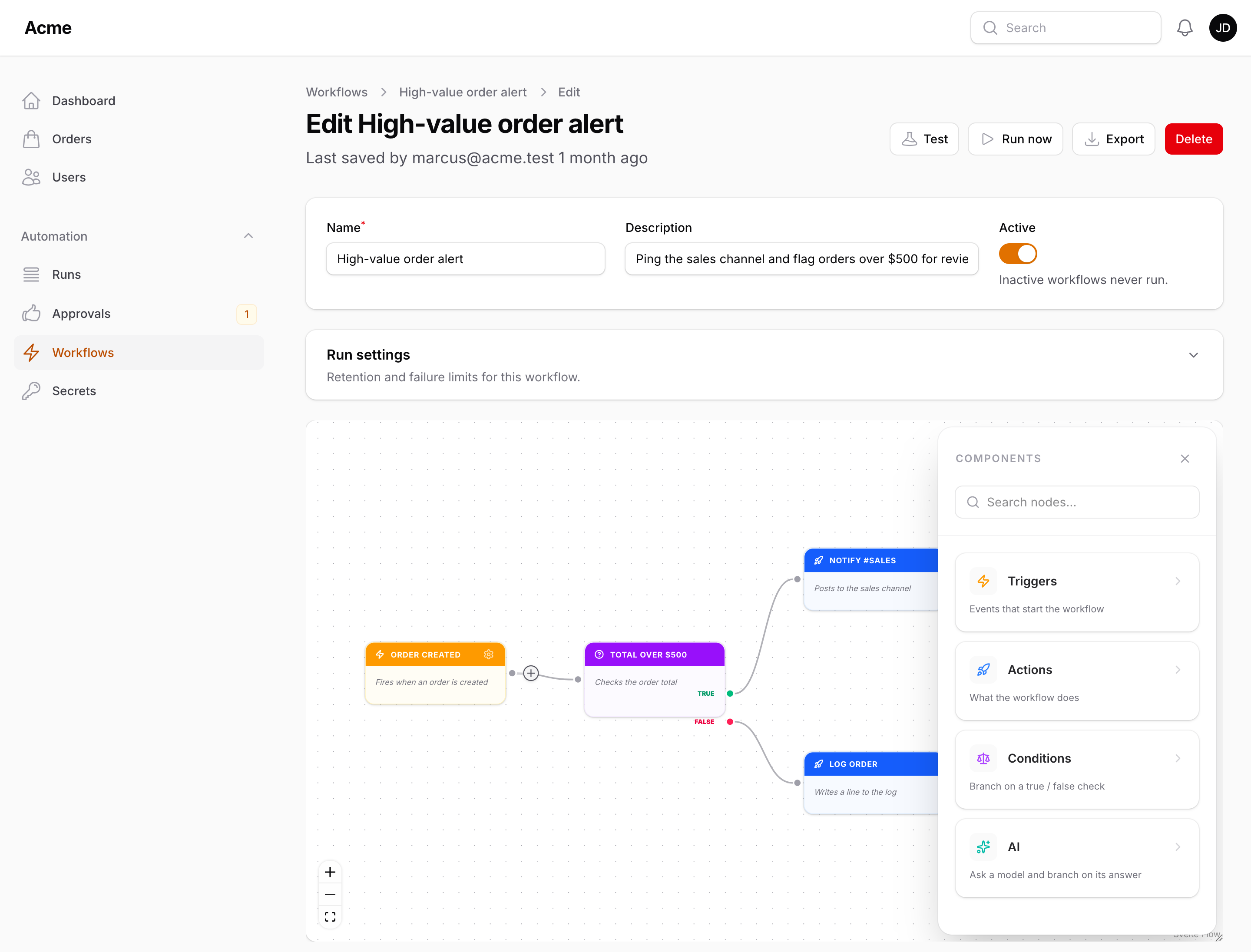
A workflow is a graph: one or more trigger nodes, followed by actions and conditions connected by edges. Draw it on the canvas — add nodes with the Add node button, the right-click menu or the plus on an unconnected output handle, drag handles together to connect them, and use a condition's True and False outputs to branch.
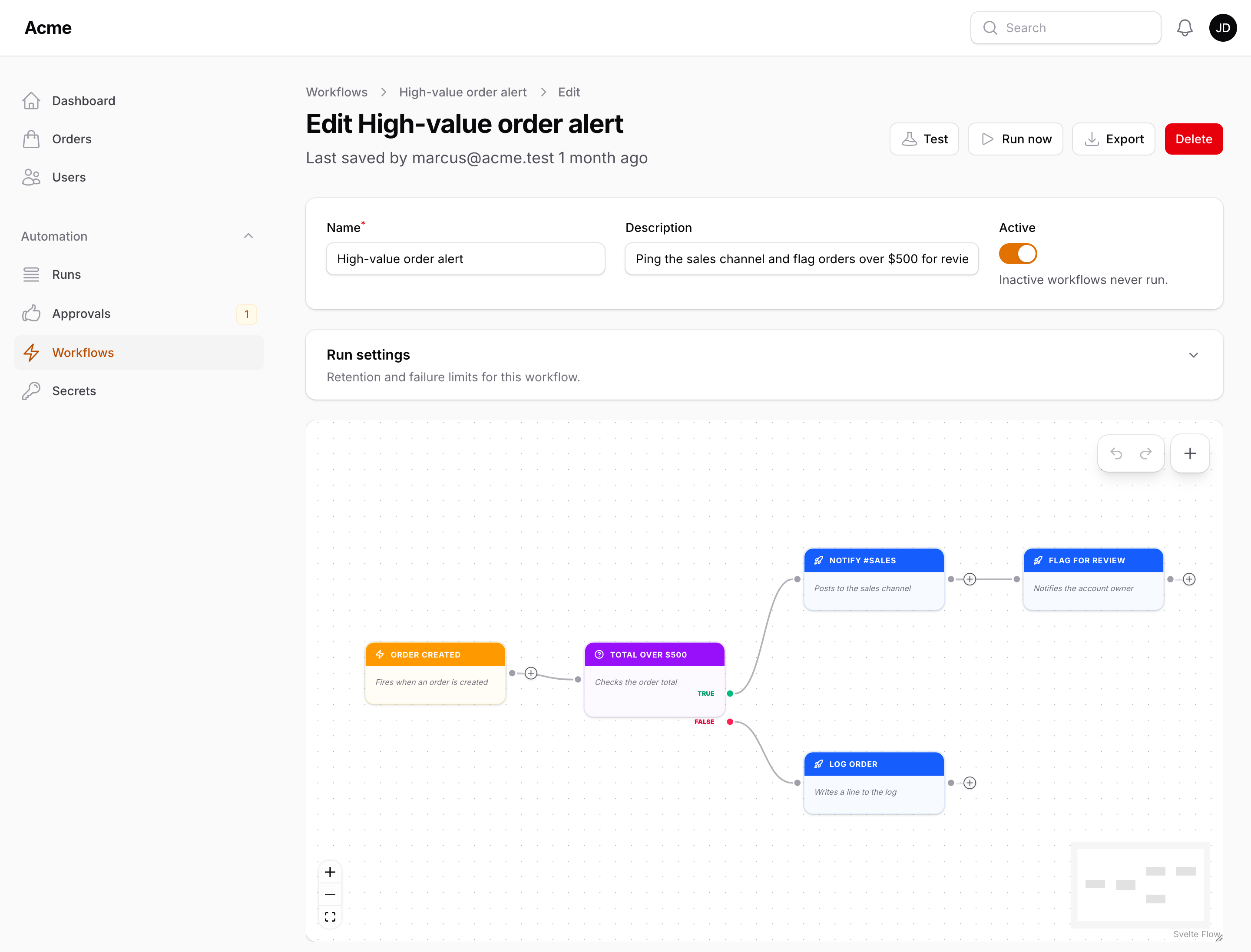
Every node has a label, a description and its own settings, edited in a slide-over you open with the gear icon or a double-click. The graph is saved with the workflow as plain JSON (nodes and edges), so it is easy to seed, export and test.
Not sure where to start? New workflow opens one page with every way in: a Blank canvas; a Template — a welcome series, a high-value order alert, dunning reminders, an SLA escalation and an approval flow, each previewed as a diagram with what it leaves for you to fill in, ready to adapt; with packstub/agents installed, Describe it turns a sentence ("when an order over $500 comes in, post to Slack and flag it for review") into a draft built from your own triggers, conditions and actions; or Import a workflow exported from another panel as a JSON file (Export is on the edit page). Everything but the blank canvas opens inactive with the nodes still to fill in marked.
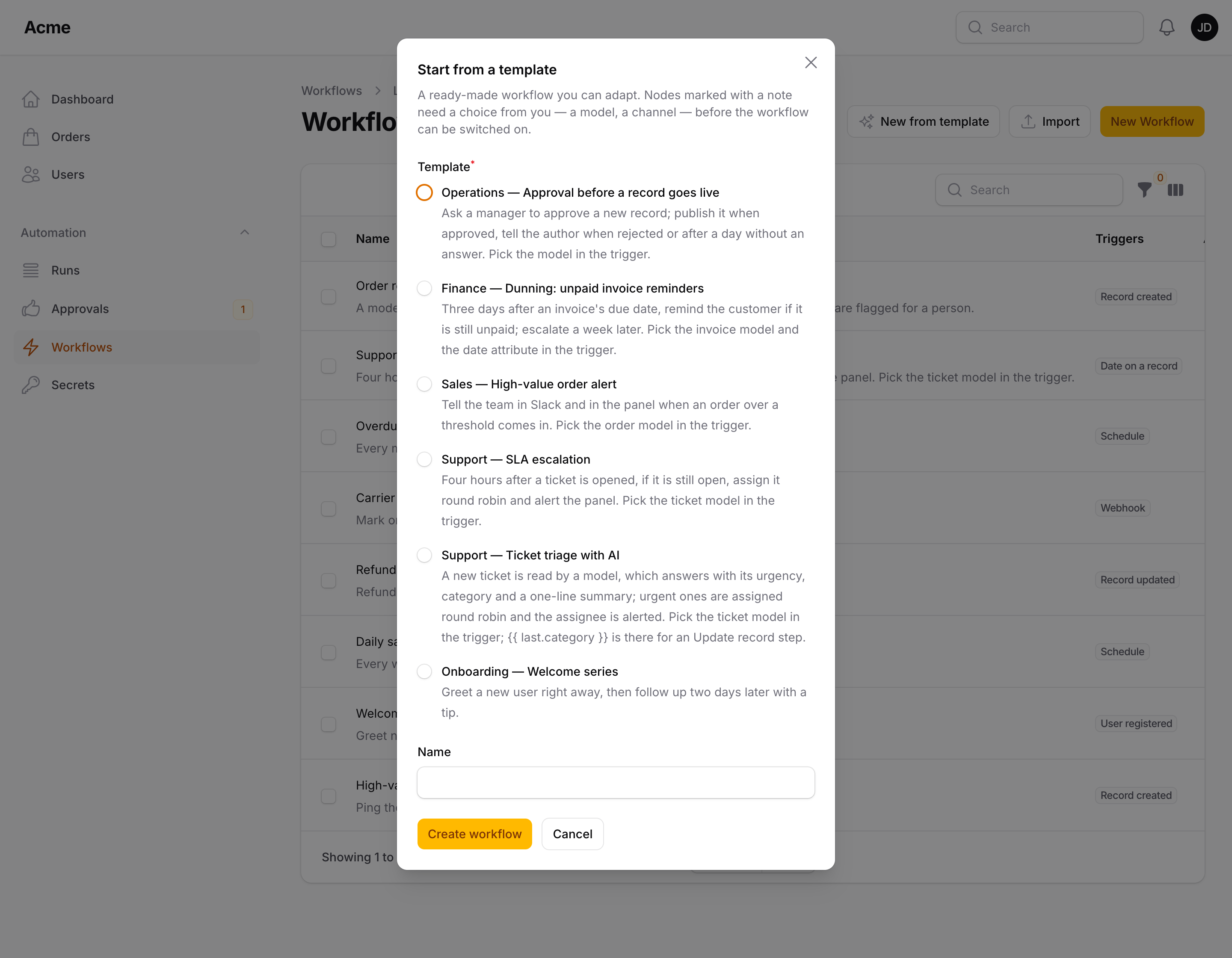
Read more: Building workflows, Templates, import and export.
Triggers
A trigger starts a run and decides what the payload contains. Pick one from the sidebar and configure it in its settings — the model for a record trigger, a cron expression for a schedule, the event class for an event trigger.
| Trigger | Fires when |
|---|---|
| Manual | You press Run now, use a Run workflow action on a resource, run packstub-flow:run, or call Flow::run() |
| Schedule | A cron expression is due (checked every minute by packstub-flow:cron, with optional catch-up of missed minutes) |
| Webhook | A POST hits /flow/webhooks/{workflow}/{token} |
| Record created / updated / deleted | A model using HasWorkflows is created, updated or deleted — optionally only when given attributes change from one value to another, once per record, or not more than once every N days |
| Date on a record | A date column, shifted by an offset, is reached: "3 days before due_at", "1 hour after starts_at" |
| State transitioned / Status changed | A spatie/laravel-model-states state or spatie/laravel-model-status status changes (offered when the package is installed) |
| User registered | Laravel's Illuminate\Auth\Events\Registered event is dispatched |
| Event | Any Laravel event of the configured class is dispatched |
| Called by another workflow | Another workflow runs a Call workflow action pointing at this one |
A workflow can have several triggers; the run starts from the one that fired. Fire your own from code:
Any Filament resource can start a workflow for a record with RunWorkflowAction (and RunWorkflowBulkAction for a selection):
Read more: Triggers.
Conditions
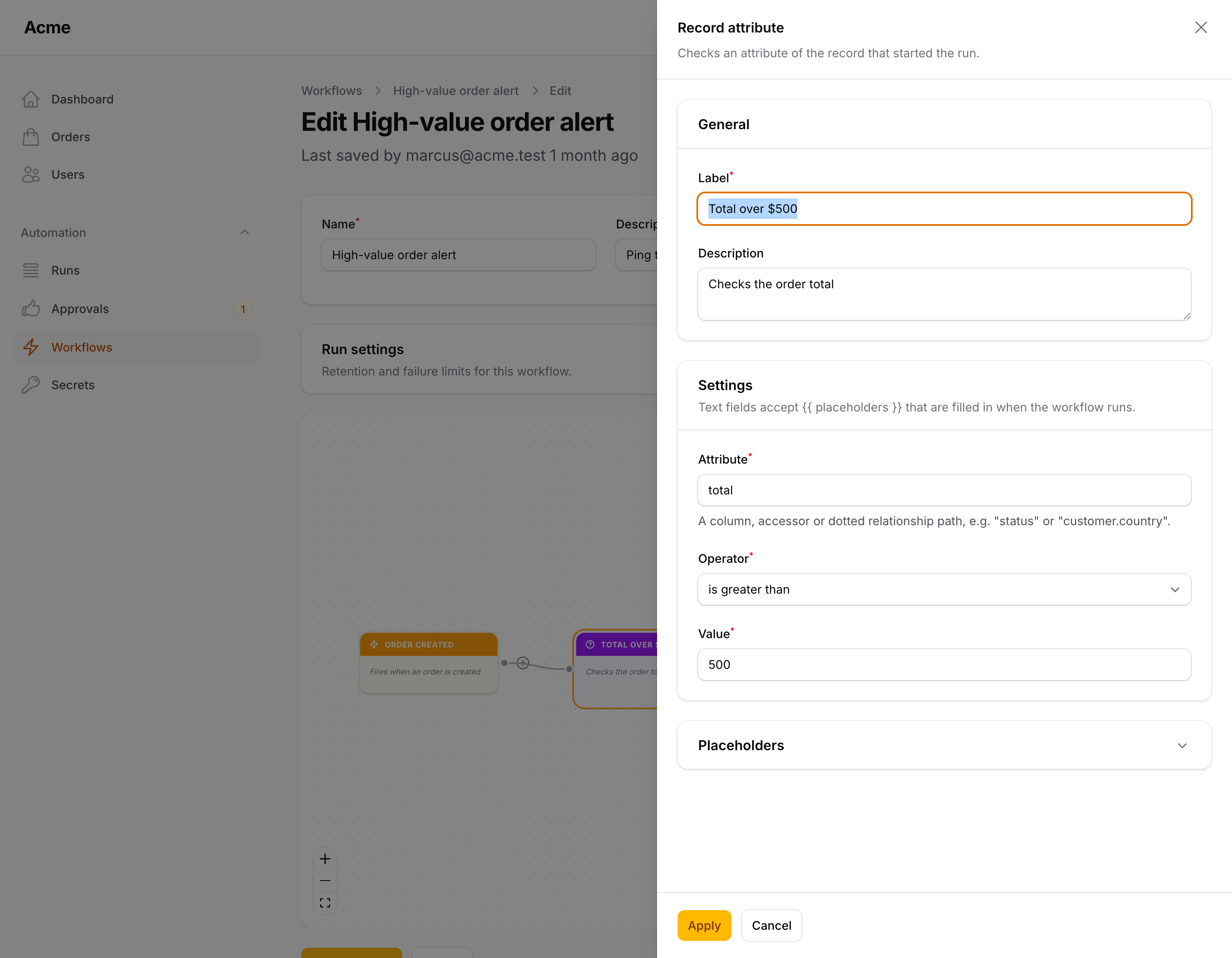
A condition has a True and a False output; the run follows the branch that matches. Record attribute checks a column, accessor or dotted relationship path (customer.country) on the record that started the run, and knows whether it changed, changed from or changed to a value; Compare values compares any two values, placeholders allowed on both sides; Multiple conditions joins several rules with AND / OR; Time of day is true inside a daily window in a timezone of your choice.
Operators: equals, does not equal, greater / less than (or equal), contains, does not contain, starts with, ends with, is one of, is empty, is not empty, is true, is false, is null, is not null, matches regular expression, is a date before / after.
Read more: Conditions.
Actions
Actions do the work. Each one's settings are a small Filament form; text fields accept placeholders.
| Action | What it does |
|---|---|
| Send email | A plain Markdown email to one or more addresses, with an optional button ({{ model.url }} opens the record in the panel) |
| Send notification | A Filament database notification to panel users, picked by email, with an optional action button |
| Send Slack / Discord / Teams / Telegram message | Posts to a Slack or Discord webhook, a Teams Workflows webhook, or a Telegram bot chat |
| Send SMS (Twilio) | An SMS or WhatsApp message through the Twilio Messages API |
| HTTP request | Calls any URL with headers and a JSON body; can fail the run on a 4xx / 5xx response |
| Send to Zapier, Make or n8n | Posts the run (or a JSON body of your own) to a Catch Hook, custom webhook or Webhook node, signed with HMAC-SHA256, so the integration side happens on the platform you already use |
| Ask AI | Asks a language model a question built from the run and gets named fields back ({{ last.urgency }}) to branch on; runs on Agents for Laravel (packstub/agents, free, PHP 8.4) for the provider, the workspace's key and the operator's budgets, and is offered only when it is installed |
| Update record | Sets attributes on the record that started the run, quietly by default |
| Create record | Creates a record, on its own or through a relationship of the current one |
| Assign owner | Sets a user on the record: a fixed one, or round robin over a list |
| Add tag | Attaches, detaches or syncs spatie/laravel-tags tags |
| Transition state | Moves a spatie/laravel-model-states state to another one |
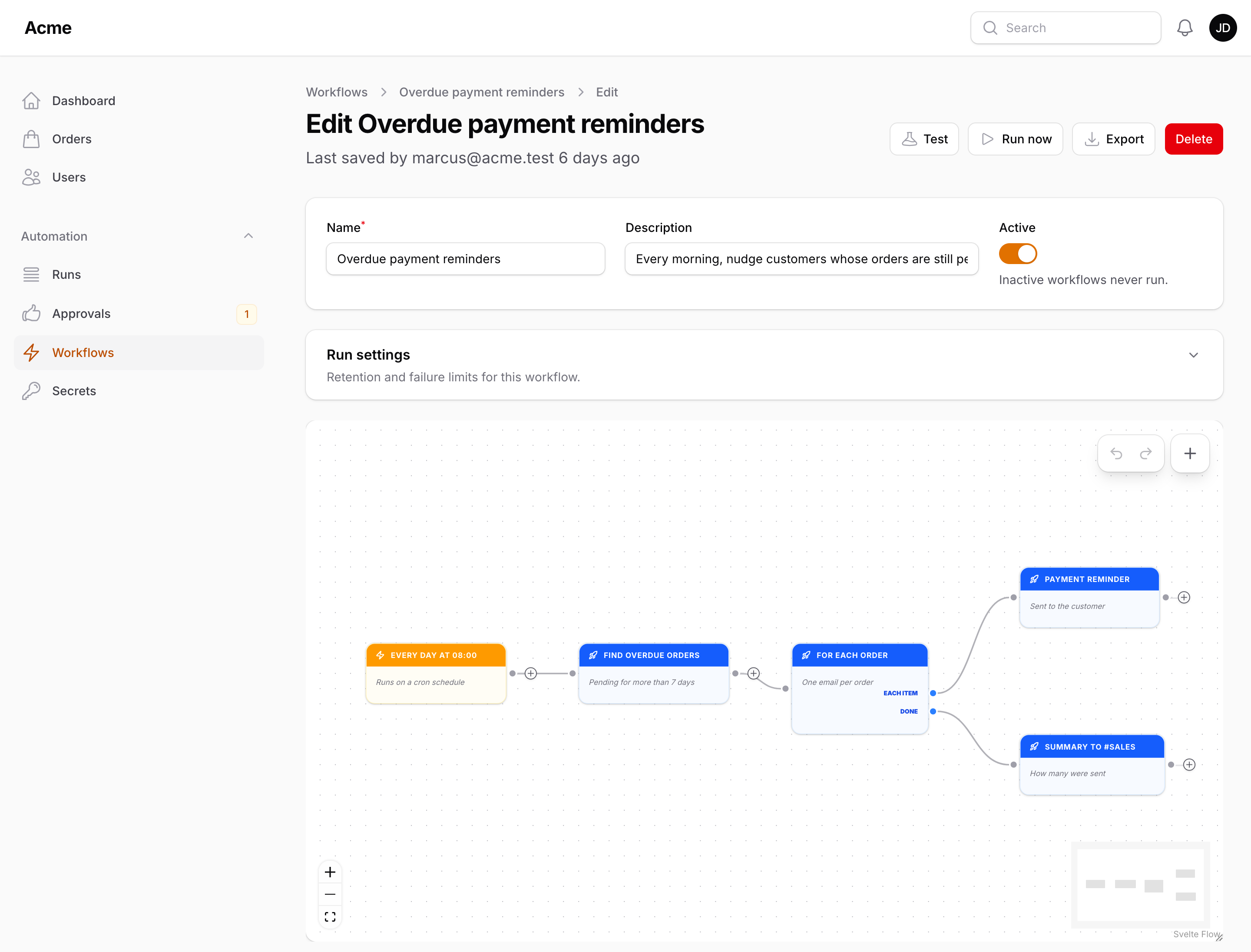
| Find records / For each | Queries records and runs a branch once per item ({{ item.* }}) |
| Ask for approval | Pauses until an approver decides — Approved / Rejected / Timed out outputs, an Approvals page, notification and email links |
| Wait for signal | Pauses until your code calls Flow::signal('payment.42', [...]) |
| Wait | Pauses the run for seconds, minutes, hours or days; the rest continues through the queue |
| Call workflow | Runs another workflow with the current payload |
| Write to log | Writes a line to the application log at the chosen level |
Find records and For each give a workflow a loop: query records, run a branch once per item with {{ item.* }}, then continue from Done.
Read more: Actions.
Placeholders
Any text a node sends or compares can reference the run's payload with {{ path }}. Paths are resolved with data_get(), so relationships and nested arrays just work:
{{ record.x }} is an alias of {{ model.x }}; {{ model.url }} is the record's page in the panel. Each node's settings panel lists the placeholders its trigger provides.
Read more: Placeholders.
Secrets
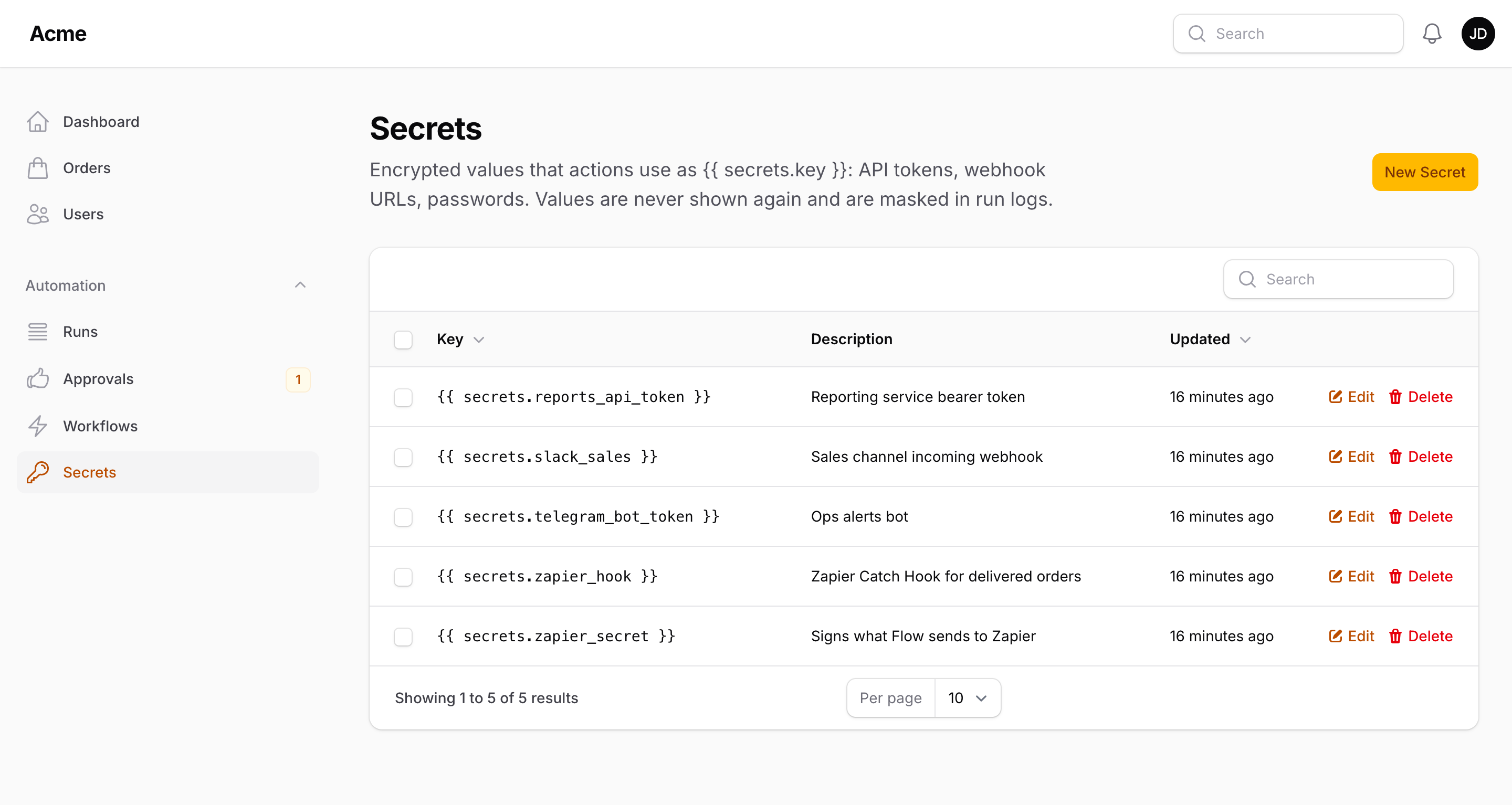
Tokens and webhook URLs live on the Secrets page, encrypted with your app key and never shown again. Actions reference them as {{ secrets.slack_webhook }}; conditions and triggers cannot read them, and every resolved value is masked in the run log. In a panel with tenancy each tenant keeps its own secrets.
Read more: Secrets.
Approvals & signals
Two actions pause a run until something outside the workflow happens. Ask for approval waits for a person: approvers are notified in the panel and by email, and the run continues along Approved, Rejected or Timed out. Wait for signal waits for your code.
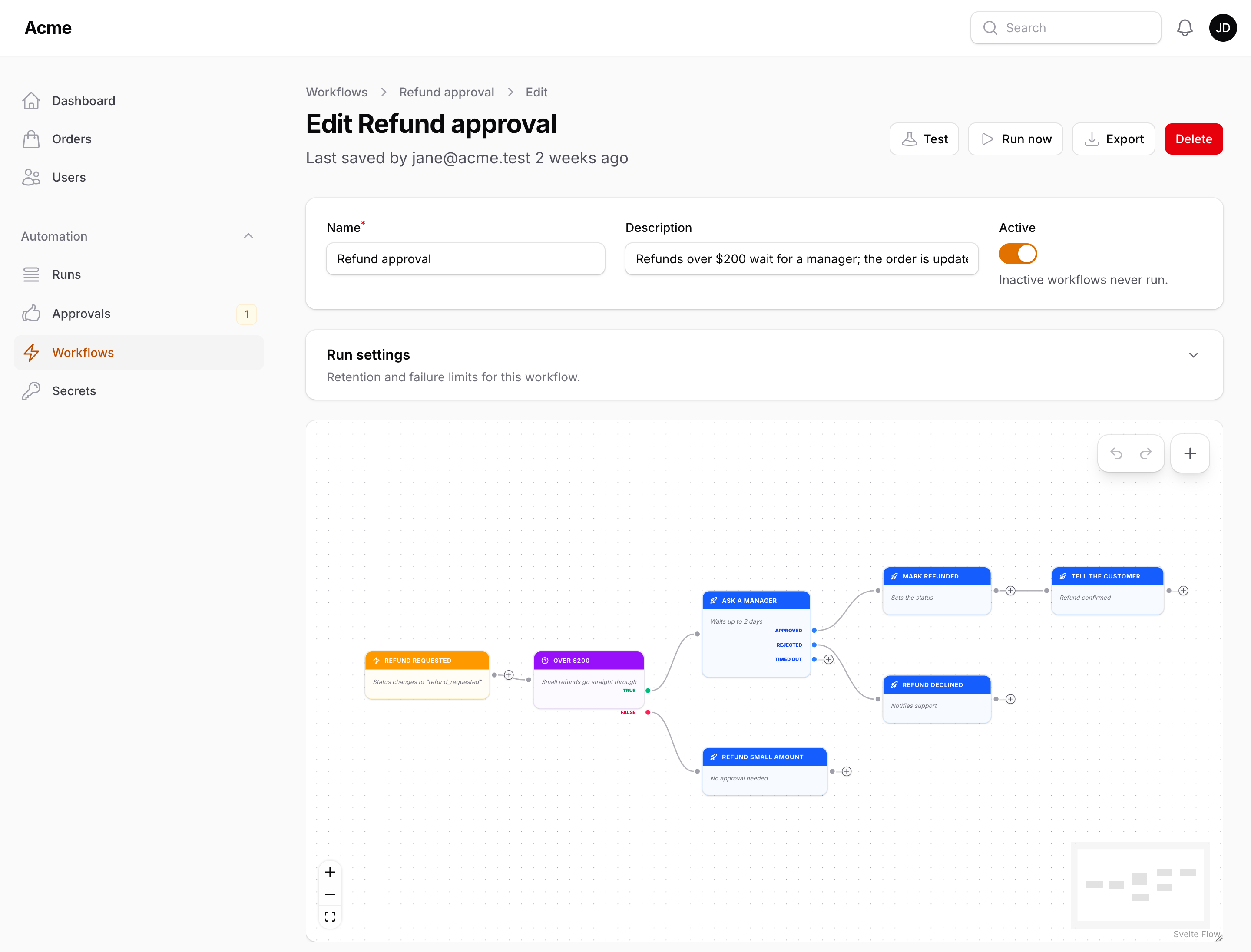
Pending requests are listed on the Approvals page, with a badge counting the ones waiting for the signed-in user.
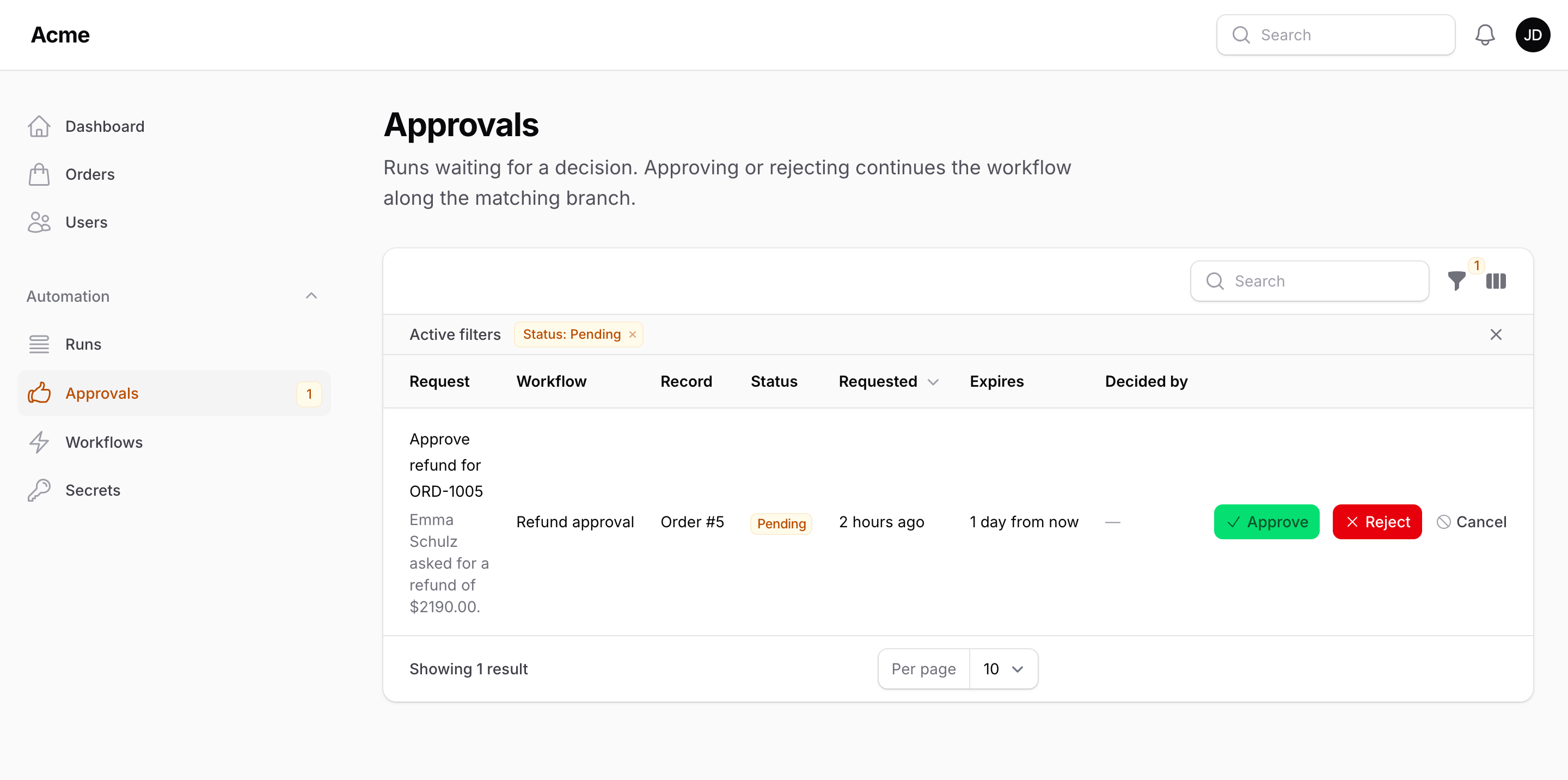
Read more: Approvals & signals.
Runs
Every run is recorded: status (Running, Waiting, Succeeded, Failed), the trigger that started it, a summary of the payload, when it started and how long it took, a step-by-step log, and the error message if something threw. The Runs tab under a workflow lists them and refreshes on its own.
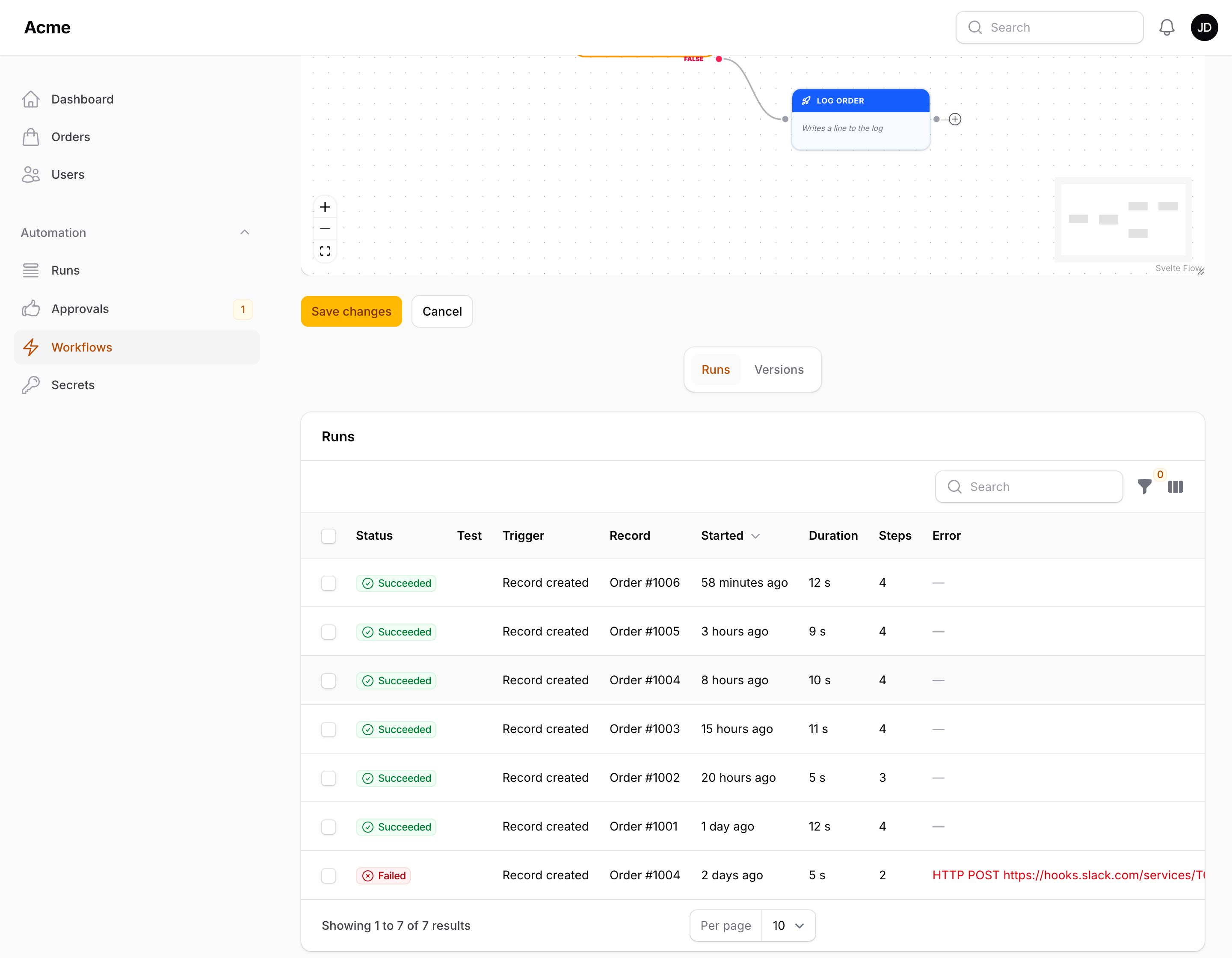
Open a run to see each step in order.
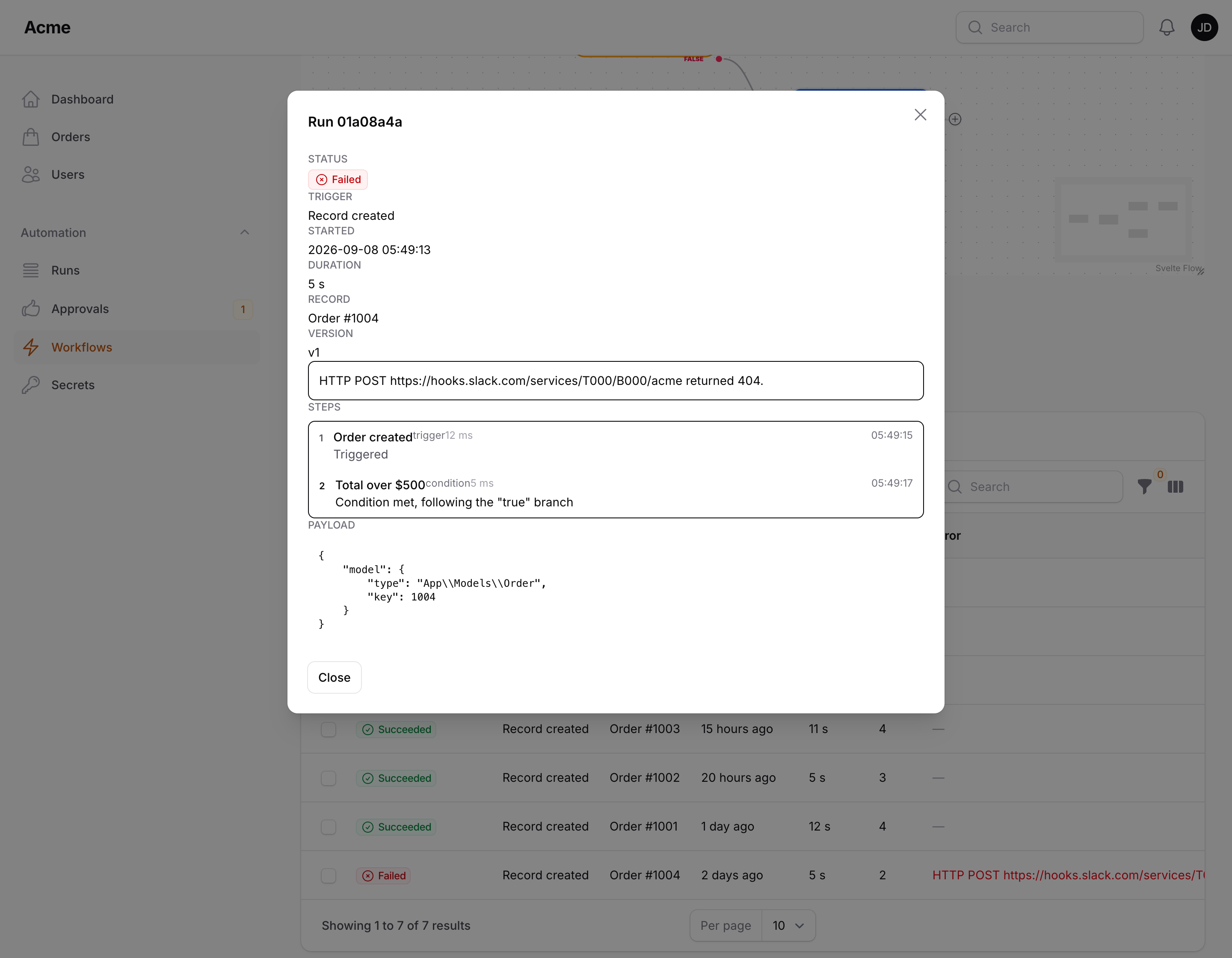
Test on the edit page performs a dry run — conditions evaluated, side effects simulated and logged as "would run". Run now (in the table and on the edit page) starts an active workflow from its first trigger, and packstub-flow:run does the same from the console. The Runs page lists every run across workflows with stats and a jump to the failing node on the canvas. packstub-flow:prune deletes finished runs older than the configured retention (or the workflow's own). A workflow can switch itself off after N consecutive failures, notify your admins, and hand failures to an on-failure workflow.
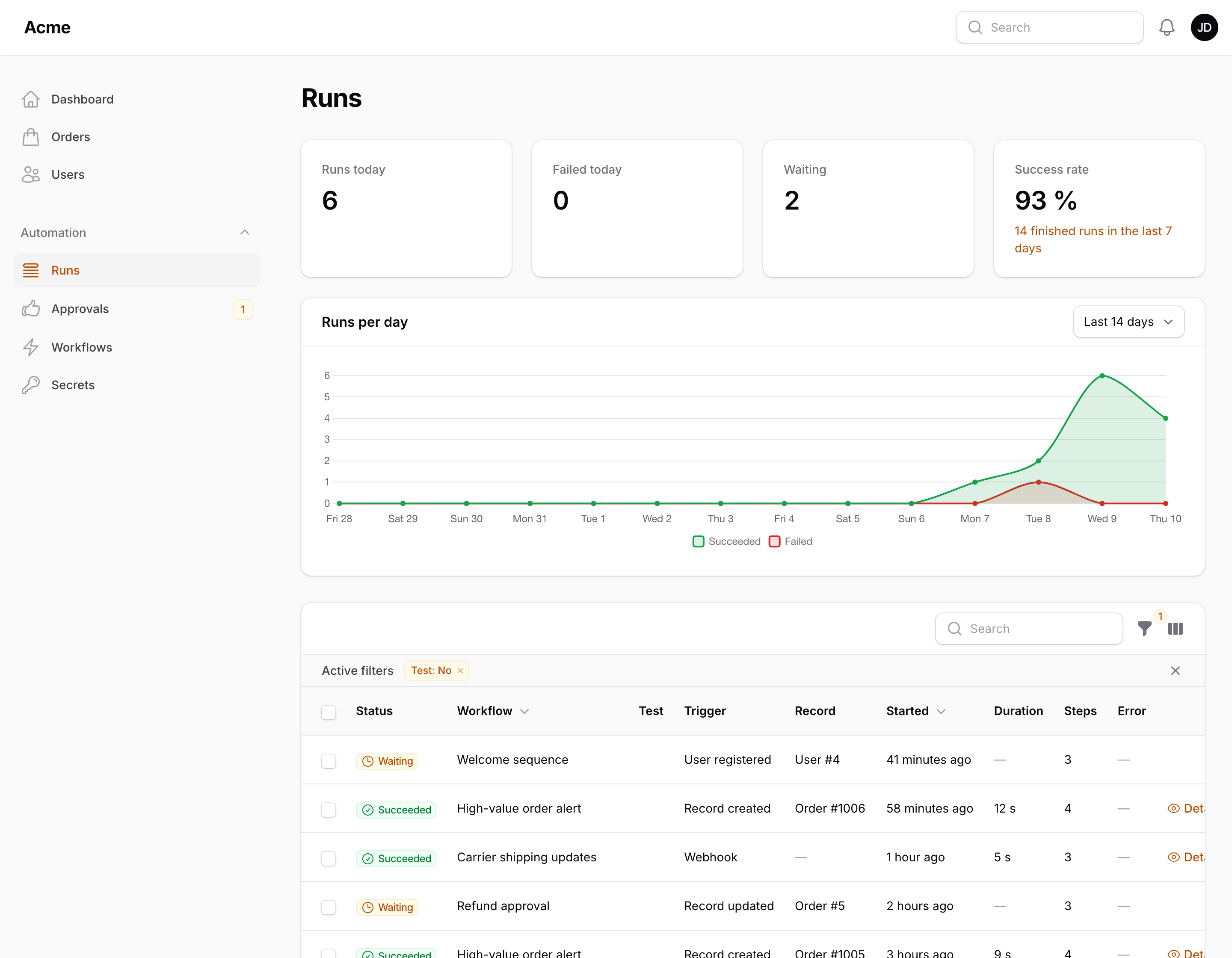
Read more: Runs.
Queue & scheduling
By default a workflow runs inside the request or model event that triggered it. Set PACKSTUB_FLOW_QUEUE=true to push every run onto the queue instead — optionally on its own connection and queue name. Wait steps always continue through the queue, so run a worker whenever you use them.
Schedule triggers are evaluated by packstub-flow:cron, which the plugin registers with Laravel's scheduler every minute. A running schedule:work (or a cron entry for schedule:run) is all you need.
Read more: Queue & scheduling.
Webhooks
A Webhook trigger gives the workflow a secret token. Send a POST to /flow/webhooks/{workflow id}/{token} and the JSON body is available to every node as {{ webhook.* }}. The endpoint answers 202 Accepted with the run id and status, and 404 for an unknown workflow, an inactive one or a wrong token.
The prefix, middleware (api and throttle:60,1 by default) and an on/off switch live in the config.
Read more: Webhooks.
Multi-tenancy
In a panel with ->tenant(Team::class) the Workflows and Secrets resources, the Runs and Approvals pages are scoped to the current tenant, and new workflows belong to it. When a trigger fires, the tenant of the record decides which workflows run: the tenant's own plus the global ones. Tell the runtime where a payload's tenant comes from with a resolver or a relationship name, and cap workflows per tenant with maxWorkflows().
Read more: Multi-tenancy.
Extending
A node is a class with a name, an icon, a Filament form schema and one method: matches() for a trigger, evaluate() for a condition, handle() for an action.
Read more: Extending.
Configuration
Read more: Configuration — the config file, tables and models, queue, webhooks, execution limits and retention.
Documentation
- Installation
- Building workflows
- Triggers
- Actions
- Conditions
- Placeholders
- Secrets
- Approvals & signals
- Templates, import and export
- Runs
- Multi-tenancy
- Queue & scheduling
- Extending
- Configuration
- Testing
The same pages live in the docs/ directory of this repository.
Testing
Changelog
See the changelog.
Security vulnerabilities
Please e-mail [email protected] rather than opening a public issue.
Credits
License
MIT. See the license file.
All versions of filament-flow with dependencies

dragonmantank/cron-expression Version ^3.3
filament/filament Version ^4.0 || ^5.0
illuminate/contracts Version ^12.0 || ^13.0
spatie/laravel-package-tools Version ^1.92