Download the PHP package martin6363/filament-smart-import without Composer
On this page you can find all versions of the php package martin6363/filament-smart-import. It is possible to download/install these versions without Composer. Possible dependencies are resolved automatically.
Download martin6363/filament-smart-import
More information about martin6363/filament-smart-import
Files in martin6363/filament-smart-import
Package filament-smart-import
Short Description Premium smart import plugin for Filament v4/v5 with staging, validation, relationship resolution, upsert, and background batch processing.
License proprietary
Homepage https://filamentphp.com/plugins/martin6363-filament-smart-import
FAQ
Example:

In general, it is recommended to use always a project to download your libraries. In an application normally there is more than one library needed.

- Some hosting areas are not accessible by a terminal or SSH. Then it is not possible to use Composer.
- To use Composer is sometimes complicated. Especially for beginners.
- Composer needs much resources. Sometimes they are not available on a simple webspace.
- If you are using private repositories you don't need to share your credentials. You can set up everything on our site and then you provide a simple download link to your team member.
- Simplify your Composer build process. Use our own command line tool to download the vendor folder as binary. This makes your build process faster and you don't need to expose your credentials for private repositories.
Informations about the package filament-smart-import
Filament Smart Import
A premium Filament plugin for Laravel that imports CSV and XLSX spreadsheets with staging, inline validation, relationship resolution, upsert, and background batch processing.
Built for production admin panels where imports must be reviewed before records are written to the database.
Requirements
- PHP 8.2 or higher
- Laravel 11, 12, or 13
- Filament 4 or 5
- OpenSpout 4.x (installed automatically)
- A configured queue worker for background imports
Optional integrations:
- Spatie Translatable for locale-specific columns
- Any Eloquent model with a
$fillabledefinition
Installation
Demo Video
Watch the walkthrough to see Filament Smart Import in action, including Spatie Translatable support, relationship lookups, and real-time staging table editing:
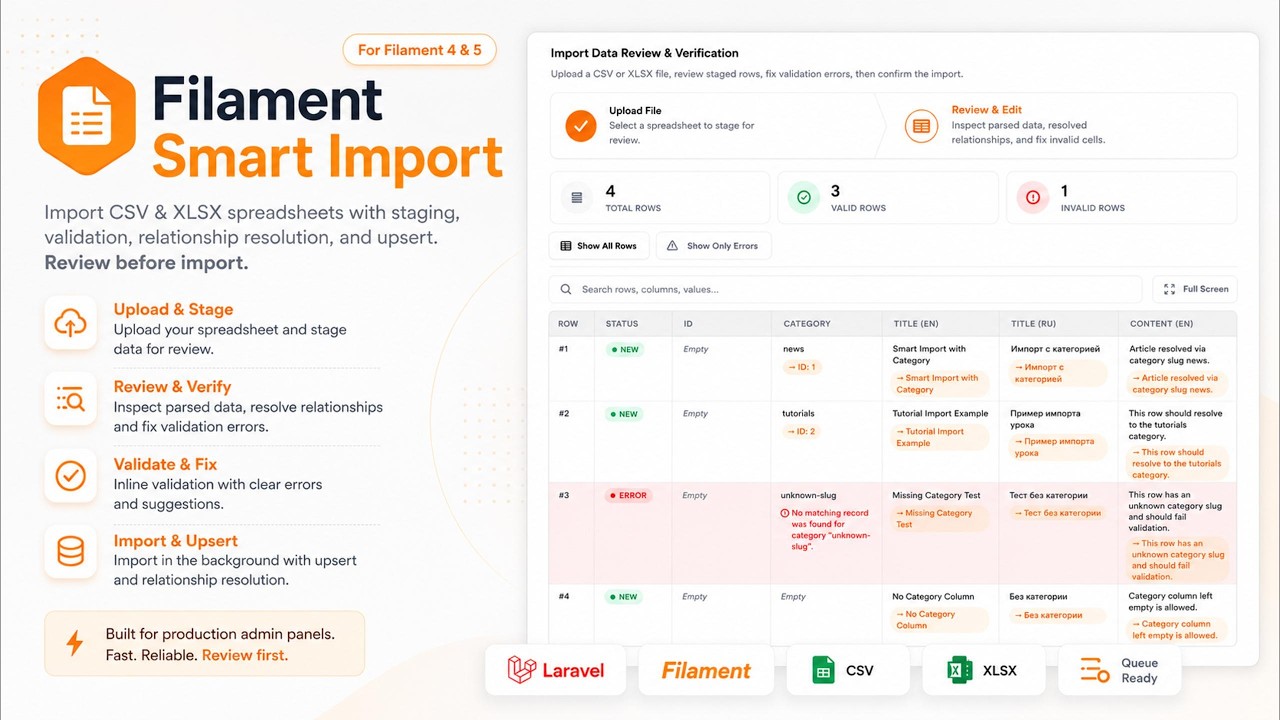
💡 Watch on Demo: Filament Smart Import - Complete Walkthrough & Feature Overview
Purchase License
Filament Smart Import is a commercial package. You can purchase a valid license key from our official checkout:
Buy License Key ($39 – $139)
(Single Domain: $39 | Unlimited Agency: $139)
1. Require the package
2. Add your license key
After purchasing from Lemon Squeezy, add your license key to .env:
3. Run migrations
4. Register the plugin
5. Publish plugin assets
Note: Do not commit license keys or
auth.jsoncredentials to version control.
Queue Setup
Imports are processed asynchronously after the user confirms the staged data. Configure a queue connection and run a worker:
The default queue connection is read from config/filament-smart-import.php (queue_connection). The database driver is used by default.
Basic Usage
Add SmartImportAction to any Filament resource page, typically on a list page header action.
With Spatie Translatable
Use translatable() and locales() when the model stores translations in JSON via Spatie Translatable:
Spreadsheet columns are expanded per locale: title_en, title_ru, content_en, content_ru.
Validation rules use dot notation: title.en, not title_en.
Without Spatie Translatable (Flat Columns)
When locale-specific values are stored as separate database columns, do not call translatable() or locales(). Map spreadsheet headers directly to $fillable attributes:
Example model:
Example CSV headers:
Validation rules match the column names exactly: name_en, not name.en.
Import Flow
- The admin opens the Smart Import modal and optionally downloads a sample template.
- A CSV or XLSX file is uploaded and parsed into staging rows.
- The admin reviews, searches, filters, and edits invalid cells in the staging table.
- On confirmation, valid rows are queued for background import.
- Progress is shown on the action button until the batch completes.
- A Filament notification is sent when the import finishes or fails.
Action Configuration
SmartImportAction exposes a fluent API:
| Method | Description |
|---|---|
model(string\|Closure\|null $model) |
Target Eloquent model class |
translatable(array\|Closure $fields) |
Translatable attribute names |
locales(array\|Closure $locales) |
Locale codes for column expansion |
relations(array\|Closure $relations) |
Relationship lookup mappings |
validationRules(array\|Closure $rules) |
Laravel validation rules for staged rows |
uniqueBy(string\|array\|Closure\|null $columns) |
Unique identifier column(s) for upsert matching |
sampleTemplate(bool\|Closure $condition = true) |
Enable sample template downloads in the upload step |
All methods accept closures for dynamic configuration.
Relationship Lookups
Map foreign key columns to human-readable lookup values in the spreadsheet:
In the spreadsheet, use the column category with values such as news or tutorials. The plugin resolves the value to category_id before persistence.
Multiple lookup columns are supported:
Update Existing Records (Upsert)
When you need to update existing database records instead of always inserting new ones, configure a unique identifier with uniqueBy(). This enables upsert matching during import.
The upload step shows a toggle "Update existing records if match found" when uniqueBy() is configured. The admin chooses per import whether matching rows should update existing records or be treated as duplicates.
Multiple match columns are supported:
For Spatie Translatable models, match by a regular model attribute such as id:
Include the id column in the spreadsheet when updating existing articles by primary key. Sample templates exclude id by default, so add it manually to the CSV or XLSX when using uniqueBy('id').
Toggle behavior
| Toggle state | Matching record found | Result |
|---|---|---|
| Off | Yes | Staging row marked as Error with a duplicate validation message |
| Off | No | Staging row marked as New, record inserted on import |
| On | Yes | Staging row marked as Update, existing record updated on import |
| On | No | Staging row marked as New, record inserted on import |
When update mode is enabled:
uniquevalidation rules on the configured match columns are skipped during staging.- Existing records are located using the configured
uniqueBycolumns. - Spatie translatable fields are merged on update (existing locale values are preserved when not provided in the spreadsheet).
Staging row badges
During review, each staged row displays one of these status badges:
| Badge | Meaning |
|---|---|
| New | A new record will be created |
| Update | An existing record will be updated |
| Error | Row has validation or duplicate errors |
Batch options
The selected toggle value and unique columns are stored in the import batch options:
These options are read by the staging processor, validator, and background import job.
Spreadsheet Format
Standard Columns
Column headers should match importable model attributes from $fillable. These columns are excluded automatically from templates and processing:
idcreated_atupdated_atdeleted_at
Translatable Columns (Spatie Translatable)
When translatable() is configured, each logical field is expanded into one column per locale:
| Model field | Spreadsheet columns |
|---|---|
title |
title_en, title_ru |
content |
content_en, content_ru |
If the model uses Spatie Translatable and no fields are configured manually, the model's $translatable array is detected automatically.
Validation rules use dot notation for locales:
Flat Locale Columns (Without Spatie Translatable)
When each locale is a dedicated database column, define them in $fillable and use the same names as spreadsheet headers. No translatable() configuration is required.
| Database column | Spreadsheet column |
|---|---|
name_en |
name_en |
name_hy |
name_hy |
description_en |
description_en |
description_hy |
description_hy |
is_available |
is_available |
Validation rules reference the flat column names:
Sample templates include all $fillable columns as-is without locale expansion.
Supported File Types
- CSV
- XLSX
Maximum upload size is controlled by max_upload_size_kb in the config file.
Sample Templates
When sampleTemplate() is enabled, the upload step provides download links for:
.xlsxsample template.csvsample template
Templates are generated from the configured model structure, including translatable and relationship columns, with one example row per column.
Configuration
Publish the config file:
Available options:
| Key | Env Variable | Default | Description |
|---|---|---|---|
license_key |
FILAMENT_SMART_IMPORT_LICENSE_KEY |
— | Lemon Squeezy license key (required) |
user_model |
FILAMENT_SMART_IMPORT_USER_MODEL |
App\Models\User |
Owner model for import batches |
queue_connection |
FILAMENT_SMART_IMPORT_QUEUE_CONNECTION |
database |
Queue connection for background jobs |
max_rows_per_batch |
FILAMENT_SMART_IMPORT_MAX_ROWS |
50000 |
Maximum rows per import batch |
read_chunk_size |
FILAMENT_SMART_IMPORT_READ_CHUNK_SIZE |
500 |
Spreadsheet read chunk size |
import_chunk_size |
FILAMENT_SMART_IMPORT_IMPORT_CHUNK_SIZE |
200 |
Persistence chunk size |
max_upload_size_kb |
FILAMENT_SMART_IMPORT_MAX_UPLOAD_SIZE_KB |
51200 |
Maximum upload size in KB |
upload_disk |
FILAMENT_SMART_IMPORT_UPLOAD_DISK |
local |
Filesystem disk for staged uploads |
upload_directory |
FILAMENT_SMART_IMPORT_UPLOAD_DIRECTORY |
filament-smart-import/uploads |
Directory on the upload disk |
With Laravel's default local disk, uploaded files are stored under:
Admin Panel
The plugin registers an Import Batches resource in the Filament navigation under the Smart Import group.
From this page you can:
- Review all import batches and their status
- Inspect staging rows for a specific batch
- Browse uploaded files stored on disk
- Download or delete individual upload files
- Bulk delete selected upload files
- Delete all stored upload files
Developer Commands
Purge import data
For local development and testing, reset all import batch records:
Options:
| Option | Description |
|---|---|
--force |
Skip the confirmation prompt |
--files |
Also delete uploaded files from storage |
Examples:
This command truncates import_staging_rows and import_batches. It is intended for development environments.
Publishing
Architecture Overview
| Component | Responsibility |
|---|---|
SmartImportAction |
Upload wizard, staging UI, and import confirmation |
StagingDataProcessor |
Parses spreadsheets and writes staging rows |
StagingRowValidator |
Validates staged data against configured rules |
RelationshipLookupResolver |
Resolves lookup columns to foreign keys |
TranslatableColumnResolver |
Maps locale columns to translatable structures |
ImportRecordPersister |
Writes validated rows to the target model |
ImportUpsertResolver |
Detects duplicates, marks row intent, adjusts validation for upsert |
ProcessImportBatchJob |
Background batch processing |
ImportBatchResource |
Admin visibility into batches and uploads |
Batch Statuses
| Status | Meaning |
|---|---|
pending |
Batch created, waiting for processing |
staging |
File parsed, rows available for review |
processing |
Background import in progress |
completed |
Import finished successfully |
cancelled |
Import cancelled by the user |
failed |
Background job encountered an error |
Troubleshooting
Import button stays on "Importing"
Ensure a queue worker is running and the configured queue connection is correct.
Validation errors after upload
Check column headers against the sample template.
- Spatie Translatable models: use expanded columns such as
title_en, and validation rules with dot notation (title.en). - Flat column models: use the exact database column names such as
name_en, and validation rules without dots (name_en).
Relationship values not resolved
Confirm the lookup column exists in the spreadsheet and the related record already exists in the database.
Upload fails due to file size
Increase FILAMENT_SMART_IMPORT_MAX_UPLOAD_SIZE_KB and verify PHP upload limits (upload_max_filesize, post_max_size).
Update existing toggle is not visible
The toggle appears only when uniqueBy() is configured on the action. Without a unique identifier, the plugin cannot determine which column(s) to match against existing records.
Duplicate errors during import
If update mode is disabled, rows that match an existing record by the configured uniqueBy column(s) are flagged as duplicate errors. Enable the toggle or remove conflicting rows from the spreadsheet.
License
Copyright (c) 2026 Martin Khachatryan. All rights reserved.
This is proprietary commercial software. See LICENSE.md for the full license agreement.
Unauthorized copying, redistribution, or use without a valid license is prohibited.
All versions of filament-smart-import with dependencies

filament/filament Version ^4.0|^5.0
illuminate/contracts Version ^11.0|^12.0|^13.0
illuminate/database Version ^11.0|^12.0|^13.0
illuminate/support Version ^11.0|^12.0|^13.0
openspout/openspout Version ^4.0