Download the PHP package lab1353/monkyz without Composer
On this page you can find all versions of the php package lab1353/monkyz. It is possible to download/install these versions without Composer. Possible dependencies are resolved automatically.
Download lab1353/monkyz
More information about lab1353/monkyz
Files in lab1353/monkyz
Package monkyz
Short Description Dynamic and autonomous Administration Panel for Laravel 5
License MIT
Homepage http://1353.it
FAQ
Example:

In general, it is recommended to use always a project to download your libraries. In an application normally there is more than one library needed.

- Some hosting areas are not accessible by a terminal or SSH. Then it is not possible to use Composer.
- To use Composer is sometimes complicated. Especially for beginners.
- Composer needs much resources. Sometimes they are not available on a simple webspace.
- If you are using private repositories you don't need to share your credentials. You can set up everything on our site and then you provide a simple download link to your team member.
- Simplify your Composer build process. Use our own command line tool to download the vendor folder as binary. This makes your build process faster and you don't need to expose your credentials for private repositories.
Informations about the package monkyz

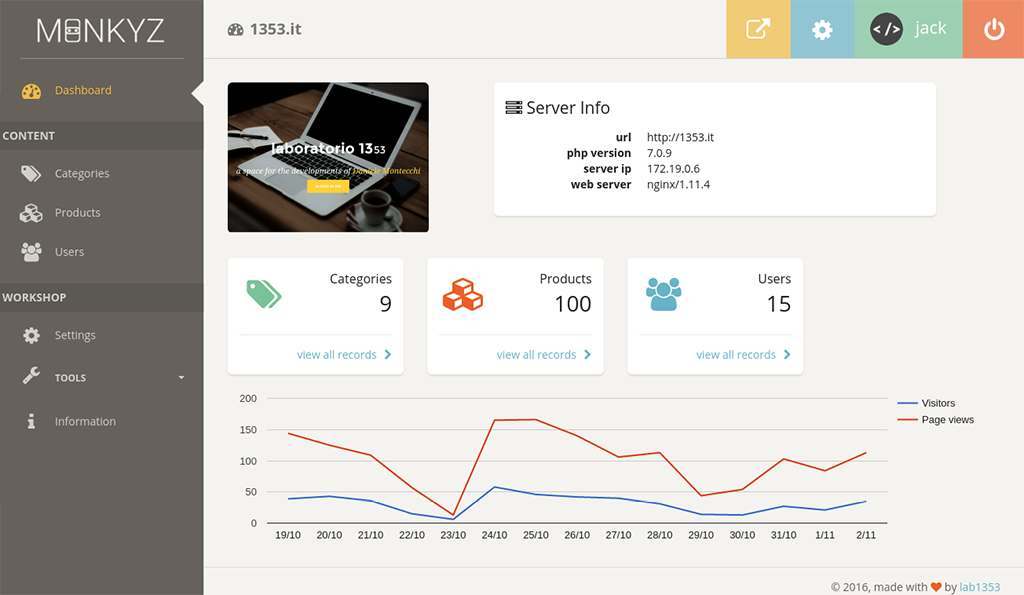
 Monkyz :: dynamic admin panel

Monkyz is a dynamic and autonomous Administration Panel for Laravel 5.2 .
It adapts to existing database by creating a full CRUD management for any table existing. No configuration required: without writing a single line of code, your control panel is ready for use.
Table of Contents
- Requirements
- Installation
- General Informations
- Assets Files
- Tables Relationships
- Configuration
- File
monkyz.php - File
monkyz-tables.php - Parameter
tables- Table Parameters
- Fields Parameters
- File
- Authentication
- Artisan Commands
monkyz:tables
- Customize
- Custom Fields
- Google Analytics
- Troubleshooting
- Change Log
- Into The Future
- Credits
- Links
- Vendors
- Tools
- Copyright and License
Requirements
The requirements are:
- PHP >= 5.5.9
- Laravel 5.2
Installation
First, pull in the package through Composer:
or, for the latest version, in development (it may not be stable):
And then, within config/app.php, include the service provider:
Finally, publish the assets:
This command will publish:
- views in:
resources/views/vendor/monkyz/ - configuration files:
config/ - assets:
public/vendor/monkyz/
General Informations
Assets Files
The file css/monkyz.min.css was generated by a SCSS file.
If you are interested in changing the SCSS source files, you can find here: vendor/lab1353/monkyz/resources/assets/scss/.
The file public/vendor/monkyz/js/monkyz.min.js has been compressed.
The original files are in: vendor/lab1353/monkyz/resources/assets/js/.
Tables Relationships
Relations between tables must follow directions imposed by Eloquent. For more information read the section Eloquent: Relationships
Monkyz currently only supports one-to-one and many-to-one relationships.
Configuration
File monkyz.php
The file config/monkyz.php contains the configuration details of Monkyz:
prefix: prefix of url for access at Monkyzuse_https(true|false): force chema httpsuse_auth(true|false): laravel authentication, otherwise access to panel is automaticallycache_minutes: minutes of duration of cachepath_public_temp: folder name, inpublicpath, for temporary filesvendors: array for define vendors assets version
File monkyz-tables.php
The file config/monkyz-tables.php contains parameters for generate the dynamic configuration of the DB structure:
input_from_type: array to find the relative input according to the field type defined on the databaseinput_from_name: array to find the relative input according to the name of fieldfields_name_hide_in_edit: array of field's name that will be hidden in edit (such as: created_at, updated_at, deleted_at)tables: view the details
This file can be automatically generated with the artisan command monkyz:generate-db
Parameter tables
The tables parameter are the ovveride array of dynamic DB structure:
Table parameters
title: title of tableicon: the fontawesome iconvisible(true|false): visibility of table in the sidebar menùajax_list(true|false): defines whether to activate the ajax paging and filteringfields: list of fields in table
Fields parameters
title: title of columninput: The values for this parameter are:block: the<pre>block to display formatted textcheckbox: checkbox true/falsecolor: hex color selector (for details see: W3C HTML Forms)date: only date tag (for details see: W3C HTML Forms)datetime: date and time (for details see: W3C HTML Forms)editor: a simple wysiwyg editor (used Bootstrap3 Wysiwyg)enum: select box for enum (mandatory to define the parameterenum)file: file upload (mandatory to define the parameterfile)hidden: field hidden used, by default, to the key fieldsimage: file upload for only image (accepted extensions: .jpg, .jpeg, .png) (mandatory to define the parameterfile)number: number tag (for details see: W3C HTML Forms)relation: select box with the relation with another table (mandatory to define the parameterrelation)tel: telephone number (for details see: W3C HTML Forms)text: text tag for stringtextarea: textarea tagurl: url tag (for details see: W3C HTML Forms)- (You can create your own custom fields)
order: (null|asc|desc) defines the default table sortingin_list(true|false): visibility in listin_edit(true|false): visibility in edit and add recordenum: array'key' => 'value'for populate the select boxfile: file/image field detailsdisk: disk name forStorageclass, configured in config filesfilesystems.php(for more info see Laravel Filesystem Documentation). If no one is indicated, it takes the default disk.path: relative path of images uploadedoverwrite(true|false): overwrite the file if it already existsresize(true|false): if field is a image, determines if the uploaded image will be resizedresize_height_px: pixel in height for resize imageresize_width_px: pixel in width for resize image
relation: relationship field detailstable: name of relationship's tablefield_value: name of value field of relationship's tablefield_text: name of text field of relationship's table
attributes: array ('key' => 'value') of extra attributes in input
In automatically search for the type of the field input, it is to be more important to the input_from_name parameter rather than a input_from_type.
!!! ATTENTION !!! Monkyz currently only supports one-to-one and many-to-one relationships. All tables of many-to-many relationship will have to be defined in config file
monkyz-tables.phpand setting the parametervisibletofalse.
Authentication
You can decide whether or not to use authentication to access the administration panel.
You can define it with use_auth parameter in the configuration file monkyz.php.
If use_auth parameters is true, Monkyz uses Laravel authentication.
If you want to use auth, you can run artisan command php artisan make:auth.
Otherwise, if use_auth is false, the access to Monkyz is automatic.
Artisan Commands
monkyz:tables
Monkyz provides the artisan command:
This command allows you to automatically fill in the monkyz-tables.php config file.
It will automatically create all the necessary references to Monkyz for the db structure. Not overwrite already entered parameters: only add the parameters have not been set.
Customize
Custom Fields
Monkyz allows the creation of types of custom fields in the edit page of the record.
To create it, follow these steps:
1) If you have not already done so, to publish the views:
The following command will be published the views files in: /resources/views/vendor/monkyz
2) Go to the resources/views/vendor/monkyz/ folder and create a new file blade,
appointing him as your new field (for example: custom):
You can add css references using the section css:
or js with the section scripts:
3) Edit the new file as you prefer. Know that, the view, the following variables are passed:
$field: name of database column$record: the Eloquent Model (to retrieve the value of the field then use:$record->$field)$params: array of field parameters
4) Now you can use your personal type of field, setting the parameter of the input fields:
Google Analytics
In the dashboard, you can view the statistics taken from Google Analytics.
Monkyz used spatie/laravel-analytics package that requires a particular configuration to be able to retrieve data from Google Analytics.
You have to follow the official guide to create the file storage/app/laravel-google-analytics/service-account-credentials.json.
Once you create the file, set the viewId parameter in the Settings page.
Troubleshooting
To report a issues, use GitHub Issues.
For help with common problems, see ISSUES.md.
Change Log
Please see CHANGELOG.md for more information what has changed recently.
Into The Future
- compatibility with Laravel 5.4
- import/export configurations
- manage useSoftDelete in model
- roles for access sections
- Laravel validation rules for fields
- multi files uploads
Credits
Links
Vendors
Monkyz was made using the following css/js:
All vendors files are loaded in CDN.
Tools
Copyright and License
Monkyz was written by Daniele Montecchi of lab1353.
Monkyz is released under the MIT License. See the LICENSE.md file for details.
All versions of monkyz with dependencies

intervention/image Version 2.*
illuminate/database Version ~5.2
illuminate/support Version ~5.2
spatie/laravel-analytics Version ^2.3
anlutro/l4-settings Version ^0.4.9