Download the PHP package jtmcc/ai-query-builder without Composer
On this page you can find all versions of the php package jtmcc/ai-query-builder. It is possible to download/install these versions without Composer. Possible dependencies are resolved automatically.
Download jtmcc/ai-query-builder
More information about jtmcc/ai-query-builder
Files in jtmcc/ai-query-builder
Package ai-query-builder
Short Description Allow AI to generate safe queries based on a defined schema
License MIT
Homepage https://github.com/j-t-mcc/ai-query-builder
FAQ
Example:

In general, it is recommended to use always a project to download your libraries. In an application normally there is more than one library needed.

- Some hosting areas are not accessible by a terminal or SSH. Then it is not possible to use Composer.
- To use Composer is sometimes complicated. Especially for beginners.
- Composer needs much resources. Sometimes they are not available on a simple webspace.
- If you are using private repositories you don't need to share your credentials. You can set up everything on our site and then you provide a simple download link to your team member.
- Simplify your Composer build process. Use our own command line tool to download the vendor folder as binary. This makes your build process faster and you don't need to expose your credentials for private repositories.
Informations about the package ai-query-builder
Ai Query Builder




A safe boundary between an AI agent and your database.
You declare what an agent may select, filter, join, group and sort. The agent emits a query plan — never SQL. The package checks every part of that plan against your declaration, compiles it to an Eloquent query, adds scopes the plan cannot touch, and runs it under limits you set.
This is not an AI layer. It sits underneath whichever one you already have.
Requirements
PHP 8.3+ and Laravel 13.16+ — the AI adapter builds its schema with Illuminate\JsonSchema, whose
anyOf() arrived in 13.16.
Installation
Defining a resource
Nothing is exposed until you declare it. A declared column is selectable and nothing else until you grant each capability.
Scaffold one from a model:
Every column is written out commented, so opting in is a deliberate edit. Columns whose names look like secrets are skipped entirely.
This example uses every capability, as a reference:
Register it:
Registering makes the resource available; it isn't exposed to any agent yet. An agent sees only
the resources its tools name — and the name is the one the schema declared with ->name('invoices'),
not the class name:
The same resource can be exposed to AI clients outside the application — Claude Desktop, Claude Code, Cursor — through the bundled MCP server (requires laravel/mcp). The user's client brings the model; your app answers tool calls as the authenticated user, through the same validation and scoping:
Another agent handed a different list — or another MCP server exposing one — sees a different slice of the same registry. See Connecting an AI layer for the multi-resource tools, the MCP server in full, and other options.
Column capabilities
| Method | What it grants |
|---|---|
as('alias') |
Expose the column under a different name |
describe('…') |
A note the agent sees |
measuredIn('currency:CAD') |
A unit the agent sees, so it narrates numbers correctly |
typed('date') |
The value type, when the model's casts don't say |
enum([...]) |
A closed set of permitted values |
filterable([...]) |
= != > >= < <= between in not_in like is_null is_not_null |
aggregatable([...]) |
sum avg min max count count_distinct |
groupable() / groupableBy([...]) |
Group by the value, or by day week month quarter year |
sortable() |
Sort by the column |
selectable(false) |
Usable in filters, never returned |
visibleWhen(fn ($user) => …) |
Hide the column from users who fail the check |
Resource-level settings: defaultLimit(), maxLimit(), maxRelationDepth(), maxFilterDepth(),
maxFilterNodes().
Checking what the agent sees
Use --user to confirm a visibleWhen column really is hidden. Reading the schema class cannot
tell you that.
Both halves of the contract are resent on every step of an agent loop, so a resource that is
expensive to describe costs tokens even on turns that never query it. --cost breaks that down by
plan property and filter depth.
Relations
An agent traverses relations by dotted path — lines.product.type — and the compiler derives the
joins. An agent cannot express a join itself.
Supported: hasOne, hasMany, belongsTo, belongsToMany, hasOneThrough, hasManyThrough,
morphOne, morphMany, morphToMany.
morphTo cannot be joined and raises an error. The table it points at is stored per row rather
than fixed by the schema, so there is nothing to join to. Expose each concrete model as its own
resource instead.
Join aliases
Every joined table is aliased to its relation path, so two paths can reach the same table without colliding:
The root table is not aliased, so a resource-level alwaysScope names it directly.
A relation-level alwaysScope adds a condition to that relation's ON clause. It receives the
alias as its third argument — qualify columns with that, not with the table name:
Laravel does not apply a model's global scopes to a join, so anything that must hold for joined
rows belongs in alwaysScope. Soft deletes are the exception — see below.
Many-to-many
Declare a belongsToMany like any other relation:
It compiles to two joins, the pivot and then the related table:
It counts as one relation against maxRelationDepth, and as a to-many join for
fan-out protection.
To constrain the link rather than the row it points at — revoked_at, is_primary — use
alwaysPivotScope. It lands on the pivot join:
Pivot columns
Attributes of the link itself live on the pivot table. Declare them with pivot():
An agent addresses them under a pivot segment, which keeps them distinct from a related column
of the same name:
pivot is a reserved name; declaring a relation called pivot raises an error. The segment does
not count against maxRelationDepth.
Types are not read from casts on a pivot, because the pivot table usually has no model. Declare
them with typed(). It's worth doing: a typed date column also gets within support and
filter-value checking.
Through relations
hasManyThrough and hasOneThrough compile to two joins, the intermediate table and then the far
one:
The intermediate table's soft deletes are applied, so a row hanging off a deleted intermediate is not reachable through it.
Both count as one relation against maxRelationDepth. hasManyThrough counts as to-many for
fan-out; hasOneThrough does not.
Polymorphic relations
morphOne, morphMany and morphToMany carry their type condition on the join, so a table shared
by several parent types only ever returns the rows belonging to this one:
Soft deletes
Deleted rows are excluded from joined relations as well as from the root model. The condition goes
on the ON clause:
On the ON clause rather than the WHERE clause, so a left join stays a left join: an invoice
whose only line was deleted still appears, with nulls where the line would have been.
The column name is read from the model, so DELETED_AT overrides work without configuration.
To include deleted rows — an audit view, a report on cancellations — opt in per relation:
There is no onlyTrashed(). Declare deleted_at as a filterable column instead, so the plan says
what it wants out loud.
Query plans
An agent emits a plan. There is no raw, no expression, no sql key — not behind a config flag,
not anywhere.
Filter values
A filter value must match the kind of value the column holds. The type comes from the model's
casts, or from ->typed(). An unrecognised cast means no type and no check, so type inference
never rejects a plan it simply could not read.
This matters because the wrong kind of value doesn't fail on its own:
Nothing evaluates that string. MySQL reads it as a zero date and matches every row; SQLite compares
it as text and matches none. Either way the query succeeds and the agent reports the result as the
answer. The package rejects it with value_type_mismatch.
Date ranges
A date column that permits between also accepts within, which names a range the package
resolves. The agent does no calendar arithmetic:
Named windows follow calendar boundaries — last_month is the whole of the previous month.
last_<N>_<unit> counts back from now. Bounds are inclusive, and a date column is bound as a bare
date so the boundary day isn't dropped. A window shorter than a day is rejected on a column that
stores no time.
within needs no declaration. It compiles to the same bounded comparison between already
permits, so it grants no reach you haven't already granted.
The grammar is closed — anything outside the list above is rejected, with did_you_mean pointing
at the window that was probably meant.
The window stays in the plan and resolves on each run, so a stored plan means the last 30 days today, not the last 30 days as of when it was written.
Running a plan
explain($plan) validates and compiles without executing, returning SQL and bindings for approval
or logging.
Rejections throw InvalidQueryPlanException carrying every error at once, so a plan can be fixed
in one pass:
Connecting an AI layer
Laravel AI SDK
Register the shipped tool on an agent you already have:
The tool's description is the data dictionary for that user, and its schema constrains the model
while it decodes. A rejection is returned to the model rather than thrown, so it can correct
itself — which makes retries the agent loop's decision. Add #[MaxSteps(1)] for a single attempt.
laravel/ai is a suggested dependency. The package works without it.
Several resources
Each tool carries its resource's full dictionary and column list on every step of the loop, so six resources means six dictionaries on every step — including the turn where the user says hello.
Two tools replace that with a short list and one round-trip:
describe_query_resource carries only the resource names and returns one dictionary when asked.
query_data carries a plan schema that describes columns rather than listing them, so it doesn't
grow as you add resources or columns.
The trade-off: without enums, nothing constrains column names while the model decodes, so expect more rejections and corrections. It's an accuracy trade, not a safety one — the validator is unchanged, and a column hidden from a user is still reported as unknown.
For the smaller schema without the round-trip:
One caveat with Generic: enums steer filter values as a side effect, so a filterable column
with no declared or inferred type has nothing checking what goes into it. Add ->typed() to those
columns. See Filter values.
Compare both with ai-query:describe invoices --cost before choosing.
Prompt caching
Do this before shrinking anything. The tool payload is a good cache target: large, rendered at the front of the prefix, and byte-identical between requests. A warm cache bills the prefix at roughly a tenth — a bigger saving than any wire-format tuning.
laravel/ai doesn't set cache_control itself, but it merges provider options into the request:
Caching is a prefix match, so one changed byte before the breakpoint re-bills everything after it. There's no error when this happens — just a larger invoice, with the cache written every request and read never. A timestamp in your agent's instructions is the usual culprit:
Better still, keep the time out of the prefix. Date ranges exist partly for this:
an agent that says within: last_30_days never needs to be told today's date.
This package renders toPrompt() and the plan schema identically for the same contract and user on
every build, which is what makes the payload cacheable. Tests hold that guarantee, and
SchemaContract::fingerprint() lets you assert it in your own suite.
Anything else
Build the prompt and schema from the contract:
HTTP endpoint
Off by default. Enable it only if you want an HTTP surface, and authenticate it — the configured middleware is the only thing between this endpoint and the internet.
POST /ai-query/{resource}/query with the plan as the JSON body:
columns carries the metadata needed to narrate the rows, keyed by result alias — a number without
its unit is how a model ends up reporting cents as dollars. truncated says whether the row cap
was hit.
Rejected plans return 422 with structured errors. An unknown resource returns 404 without
listing the ones that exist, so a probe can't enumerate them. The resource comes from the URL and
overrides any resource in the body, so a route protected for one resource can't be used to query
another. Compiled SQL is never returned; use QueryRunner::explain() server-side for that.
A plan is a saved query, not a saved result
Running a plan is stateless, so a plan an agent wrote once can be stored and re-posted whenever you want the answer again. The expensive step — a model turning a question into a plan — happens once. Every run after that is a database query with no model involved.
Re-run it from a dashboard panel, a scheduled export, or a refresh button:
Rolling date ranges are what make this a live query rather than a snapshot. A stored plan holding
"within": "last_30_days" resolves on every run, so the same stored bytes mean the thirty days
ending today. Store {"operator": ">=", "value": "2026-07-07"} instead and you've frozen a moment.
Stored plans stay safe because:
- They're re-validated every run. Remove a column, revoke an operator or lower a row cap and every stored plan that relied on it starts failing with a structured error.
- They resolve against the caller, not the author. A plan shared between users is re-checked
against each one's visibility, so a column the caller can't see comes back as
unknown_column. - Mandatory scopes apply every run.
alwaysScopeisn't part of the plan, so a stored plan can't escape the tenancy it was created under.
A stored plan is also readable and diffable, so you can show users what a saved query does and grep your storage for every plan touching a column before you drop it.
MCP server
The doors above serve an AI inside your application. The MCP door serves clients outside it:
Claude Desktop, Claude Code, Cursor, or any MCP client a user points at your app. The model runs in
the user's client against their subscription, so your application serves ordinary HTTP requests and
pays nothing for inference. Don't wire your own in-app agent through it — the laravel/ai tools
reach the same core in-process without the HTTP loop.
Requires laravel/mcp:
Expose resources in config, and register the bundled server in your routes/ai.php — behind
authentication, which is the host's middleware choice exactly as with the HTTP endpoint. OAuth via
Laravel Passport is what MCP clients speak natively:
Mcp::oauthRoutes() registers the discovery and client-registration endpoints, and the user
approves the client in a browser against your app's own login — no tokens to copy:
Already on Sanctum and don't want Passport? Skip Mcp::oauthRoutes() and protect the route with
auth:sanctum instead — the user creates an API token in your app and pastes it into their
client's config as an Authorization: Bearer header. Either way, every tool call resolves to a
real user.
The server carries the same pair of tools as the multi-resource agent setup:
describe_query_resource hands the model a dictionary on request, and query_data runs plans —
validated, scoped and capped identically to every other door, as the authenticated user
($request->user() under whatever middleware you applied). Registering a resource makes it
queryable; this key decides whether the MCP door advertises it. Empty — the default — means the
server registers no query tools at all.
One server per audience is the MCP analog of one agent per audience. Subclass and pin the exposure:
For per-user catalogues on a single endpoint, $exposes — and the config key — also accept a
resolver class-string. It is consulted on every request, including the tools/list call that
populates the client's tool picker, so two users on the same endpoint can see different resources:
Exposure is a catalogue decision, not the security boundary. Schema authorization — visibleWhen,
alwaysScope, the validation gate — runs on every plan whatever these lists say, so a
misconfigured exposure advertises a name; it cannot leak a row.
Verify a server with the inspector, and test it with laravel/mcp's helpers:
Mcp::local() servers work too, but run as an Artisan process with no authenticated user — treat
them as a trusted, single-developer surface.
In practice
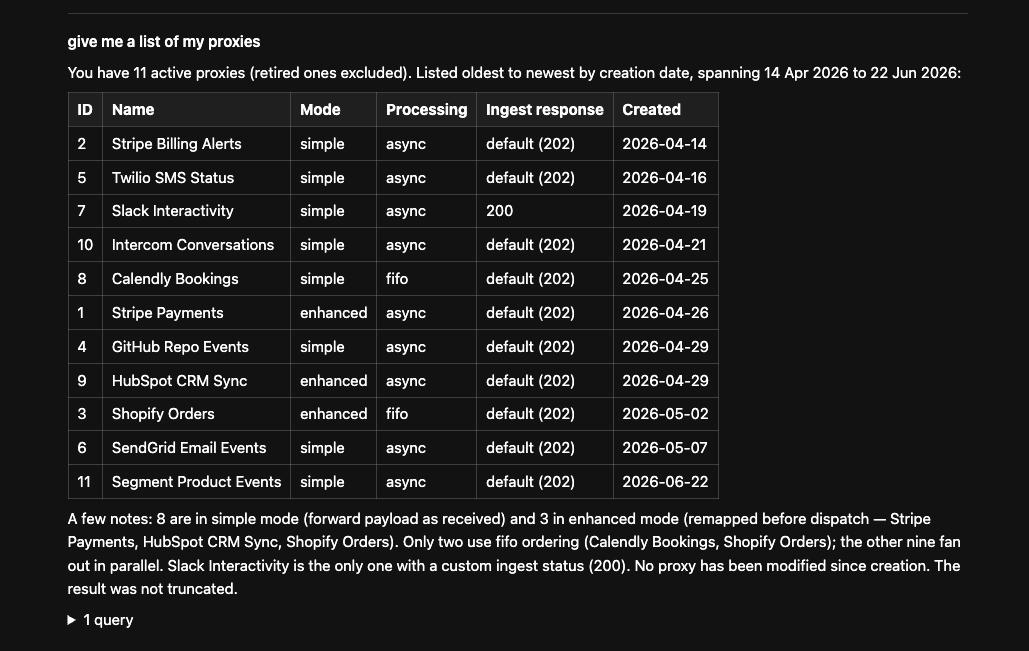
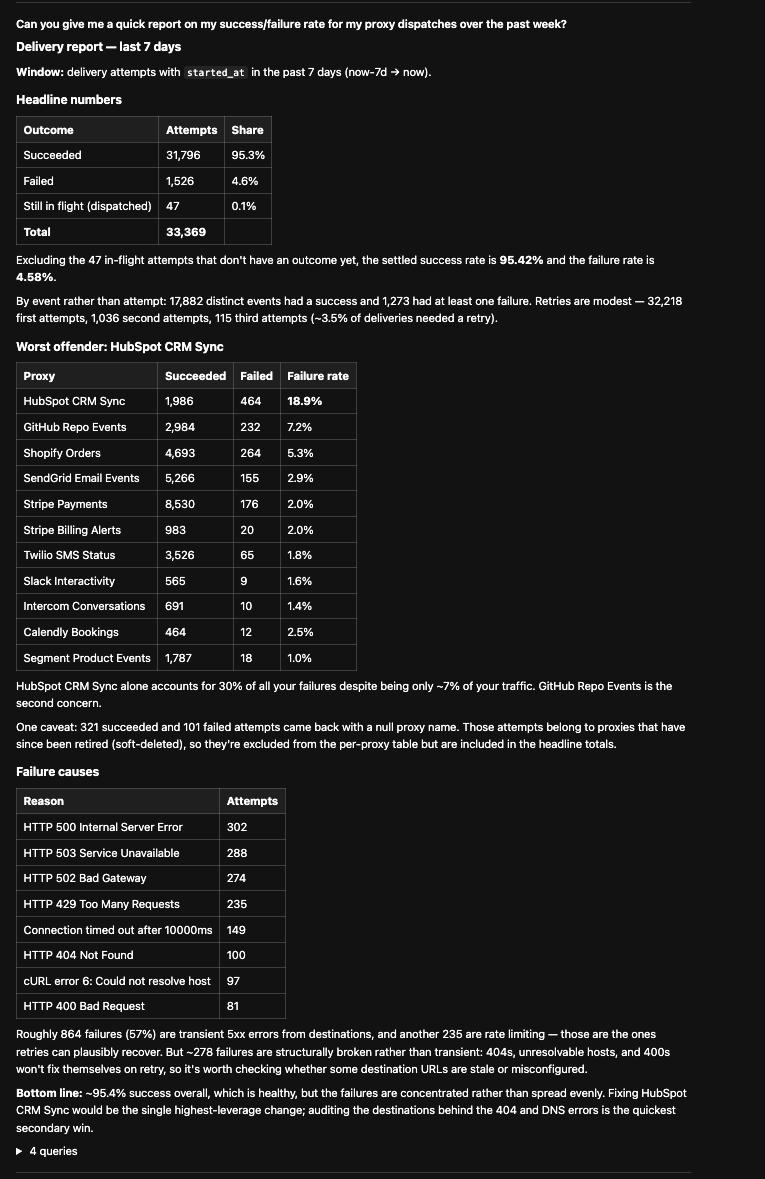
Two turns against a real application — a webhook proxy service — with one resource declared and
QueryDataTool registered on an existing agent.
Auditing
QueryPlanExecuted is the audit record — plan, SQL, bindings, user, prompt, row count, duration
and truncation flag. The package persists nothing and ships no migration: retention and redaction
are your application's decisions.
QueryPlanValidated fires after validation and before compilation — the hook for an approval gate.
QueryPlanRejected carries error codes, so you can measure how often an agent produces an invalid
plan before deciding whether retries are worth the tokens.
What this protects against, and what it doesn't
It does:
- An agent cannot reference a column, relation, operator or function you did not declare.
- An agent cannot remove a mandatory scope. Its filters are wrapped in a group, so a top-level
orcannot escape a tenant scope. - Values are always bound as parameters. Identifiers are built from your schema, never from plan strings.
- A tool queries the resource it was built for. A plan naming a different resource cannot redirect it, so which resources an agent may touch stays a decision about which tools you register.
- A column hidden from a user is reported as unknown and never appears in a suggestion, so a rejection cannot confirm it exists.
- Unknown plan keys are rejected rather than ignored, so a dropped clause never looks like an answered one.
- A filter value of the wrong kind is rejected rather than bound. See Filter values.
- Soft-deleted rows are excluded from joined relations, not just the root model.
- A polymorphic join always carries its type condition, so a shared table never returns another model's rows.
- Truncated results are flagged rather than passed off as complete.
It does not:
- Judge whether a question should be asked. Who may query what is your middleware and your
alwaysScopeclosures. - Apply Eloquent global scopes to joined models — Laravel only applies them to the root query. Soft
deletes are handled explicitly; anything else belongs in that relation's
alwaysScope. - Make query results trustworthy input for a later turn. Rows can contain user-written text; treat them as untrusted when they flow back into a prompt.
- Rate limit. Add that at your middleware or agent layer.
Known limits
- Fan-out aggregates are refused. Aggregating an invoice column while joining to its lines would count each invoice once per line and return a plausible but inflated number. Aggregate a column on the joined side instead.
morphTocannot be joined and is rejected.- Pivot column types are not inferred. Declare them with
typed(). - A through relation's intermediate table is joined but not addressable, the way
pivotaddresses a many-to-many's. - Statement timeouts require pgsql, mysql or mariadb. On other drivers a non-null timeout raises rather than being silently ignored.
- No unions, no pagination, no cross-resource joins yet.
- The JSON Schema does not encode which operators go with which column. That precision lives in the prompt text and is enforced by the validator.
Testing
All versions of ai-query-builder with dependencies

illuminate/console Version ^13.16
illuminate/contracts Version ^13.16
illuminate/database Version ^13.16
illuminate/http Version ^13.16
illuminate/routing Version ^13.16
illuminate/support Version ^13.16