Download the PHP package ictinnovations/ictcore without Composer
On this page you can find all versions of the php package ictinnovations/ictcore. It is possible to download/install these versions without Composer. Possible dependencies are resolved automatically.
FAQ
Example:

In general, it is recommended to use always a project to download your libraries. In an application normally there is more than one library needed.

- Some hosting areas are not accessible by a terminal or SSH. Then it is not possible to use Composer.
- To use Composer is sometimes complicated. Especially for beginners.
- Composer needs much resources. Sometimes they are not available on a simple webspace.
- If you are using private repositories you don't need to share your credentials. You can set up everything on our site and then you provide a simple download link to your team member.
- Simplify your Composer build process. Use our own command line tool to download the vendor folder as binary. This makes your build process faster and you don't need to expose your credentials for private repositories.
Informations about the package ictcore
ICTCore - A Unified Communications Framework for CTI
Documentation: ictcore.readthedocs.io
ICTCore core is open source unified communications framework for developers and integrators to rapidly develop ICT based applications using their existing development skills. By using ICTCore, developer can create communication based applications such as Auto attendant, Fax to Email, Click to Call etc.. they can program custom business logic that can control incoming and outgoing communication instances.
ICTCore having primary focus on integrated and automated communications. ICTCore goal is to be a common server-side software / back-end for CTI (computer telephony integration) related projects. Further as a framework it can be extended to develop new communication solution and services using user's existing development skills and infrastructure.
ICTCore is a PHP and Linux based service application which support multiple gateway interfaces like Freeswitch, Kannel and Sendmail further it offers inbound and outbound transmissions for voice, fax, sms and email. However main feature of ICTCore is its unified way of integration which allow different kind of services to interact with each other, for example a message can trigger a call or an inbound fax can be forwarded over email.
Following are few projects developed over ICTCore communications framework
- ICTFax open source fax server software.
- ICTDialer open source auto dialer software.
- ICTCRM open source CRM with unified communications.
Features
Truly unified communications framework
ICTCore allow developers to use multiple communication methods / services like Call, FAX, Messaging or Email, plus it also allow them to integrate these services with each other, like SMS notification after each call or email to fax.
- ICTCore cover all major communication methods
- Allow integration between different kind of communication methods
- Uses unified terminology and share-able resources for all its services
Scenario based automation
ICTCore have builtin support for few most commonly used scenarios, However ICTCore architecture allow developers to easily implement their own custom scenarios and requirements.
- Flexible programs and logic to allow custom scenario
- Uses one program per scenario approach
- Various builtin programs for common scenarios
- Complete activity and result log for reporting purpose
- APIs and developer guide to build new program for custom scenarios
Easy to extend
ICTCore is build for developers, ICTCore allows developers to
- Introduce new program and scenarios or modify the existing one
- Add support for new software switch, pbx and gateways
- Develop completely new communication methods
Ready to use
- REST APIs
- Third party termination / origination support
- RPM based installation
What it looks like
ICTCore is a back end. It answers on a REST API and ships no dashboard, so there is nothing here to log into and nothing to screenshot.
The interface belongs to whatever you build on top. ICTFax and ICTDialer are the two we maintain, and both put the same ICTCore engine behind a web dashboard:
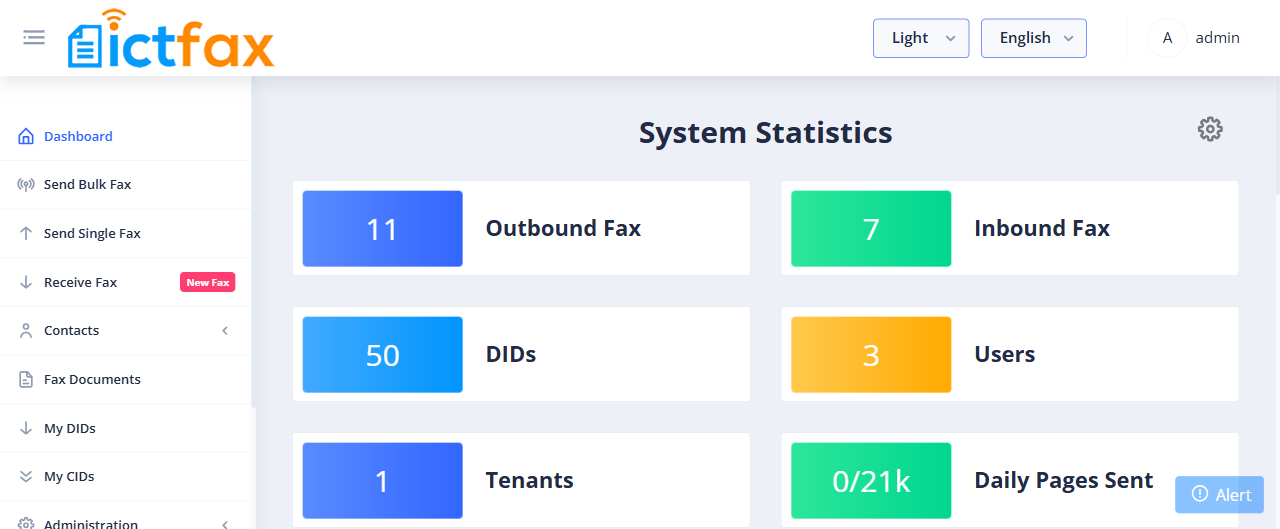
Every counter on that page is an ICTCore transmission, and the job list underneath is the same data the API returns:
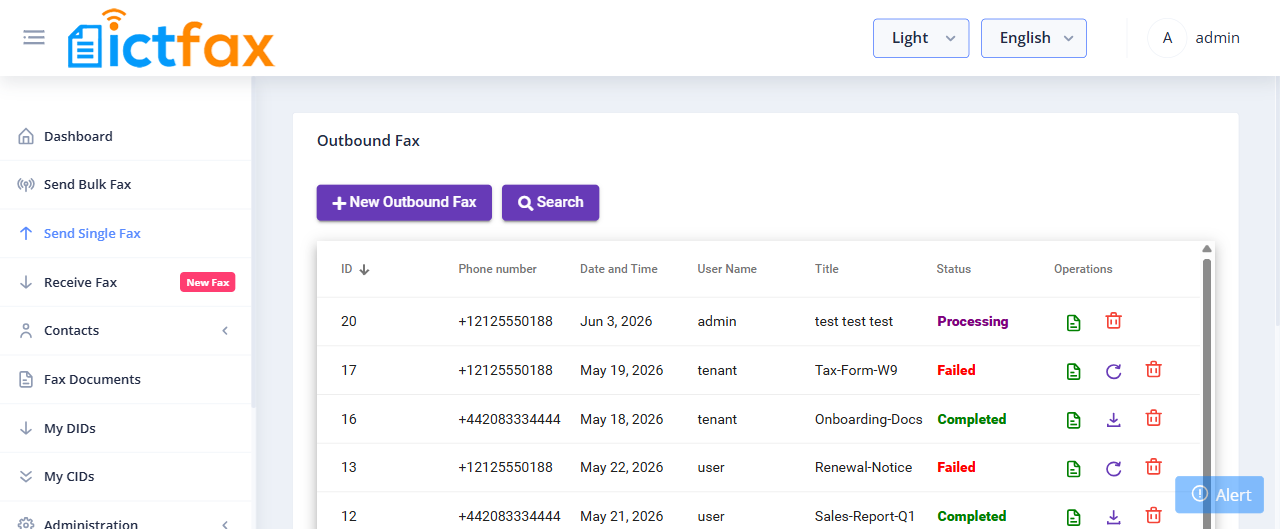
Pull ictinnovations/ictfax or ictinnovations/ictdialer if you want a finished product rather than a framework.
Install
Docker
docker/Dockerfile builds a container with Apache, PHP, FreeSWITCH and MariaDB
already wired together, so there is nothing else to install.
First boot takes about two minutes while the database is created and the schema
loads. After that the API answers on http://localhost:8080/api/. Publish the
RTP range as shown or your calls will connect with no audio.
If you want a finished product rather than the bare API, the ictfax and ictdialer images build this same stack and add a dashboard, and both are published ready to pull.
To point the container at your own database server see docker/README.md.
From packages
Currently ICTCore binaries are available for CentOs 7, 8 and RockyLinux 8, To install ICTCore you need a freshly installed server and then you can follow the instructions mentioned in following. If you are looking for source code you can find it at github ICTCore: Open Source Unified Communications Framework
- First of all we need to install ict and epel repositories
CentOs 7 Installation Guide
-
Install ICTCore
-
Create a new database and database user for ictcore
-
Initiate / populate newly created database using scripts from
/usr/ictcore/db/* -
Update
/etc/ictcore.confand/etc/odbc.inifor database access - Restart HTTP / Apache server
CentOs 8 / RockyLinux 8 Installation Guide
Disable the current PHP version and enable required PHP from remi repo
Install the Okey repository for FreeSWITCH from this link
Install ICTCore packages
- Install FastCGI Process Manager
Configure the document root in apache configuration file /etc/httpd/conf/httpd.conf
Update /etc/httpd/conf.modules.d/00-mpm.conf like following
Change PHP_ADMIN_VALUE open_basedir line into from /etc/httpd/conf.d/ictcore.conf file
Install Imagic
Install mcrypt
Disable selinux and restart the services
Setup the ICTCore database
Open the file /etc/ictcore.conf and find out the [db] section and replace user, password and database name in the following lines:
Configure EMAIL TO FAX / FAX TO EMAIL SERVICE (OPTIONAL)"
to apply email related changes
Configure the email-2-fax services
Restart sendmail service so changes can take affect
In case if document not uploading then install "libtiff-tools" package
Getting started
Following is an example about sending fax by using ICTCore
Get involved!
We believe in leveraging open source in telecommunications, providing a free platform for simple and advanced CTI applications. ICTCore was built by people like you, and we need your help to make ICTCore better! Why not participate in a useful project today? Please check docs folder to learn how to begin.
License
The ICTCore is open-sourced software licensed under the MPLv2 license.
Contact us
Website: ICTCore website
About us: About Us :: ICT Innovations Pakistan
Contact us: Contact Us :: ICT Innovations Pakistan
All versions of ictcore with dependencies

nategood/httpful Version ^0.2.20
aza/thread Version ^1.1
twig/twig Version ^1.35
jacwright/restserver Version dev-master
firebase/php-jwt Version ^5.0
firehed/processmanager Version dev-master
ncjoes/office-converter Version dev-master
dompdf/dompdf Version ^0.8.3