Download the PHP package fof/horizon without Composer
On this page you can find all versions of the php package fof/horizon. It is possible to download/install these versions without Composer. Possible dependencies are resolved automatically.
FAQ
Example:

In general, it is recommended to use always a project to download your libraries. In an application normally there is more than one library needed.

- Some hosting areas are not accessible by a terminal or SSH. Then it is not possible to use Composer.
- To use Composer is sometimes complicated. Especially for beginners.
- Composer needs much resources. Sometimes they are not available on a simple webspace.
- If you are using private repositories you don't need to share your credentials. You can set up everything on our site and then you provide a simple download link to your team member.
- Simplify your Composer build process. Use our own command line tool to download the vendor folder as binary. This makes your build process faster and you don't need to expose your credentials for private repositories.
Informations about the package horizon
Horizon - Advanced Queue Dashboard & Management
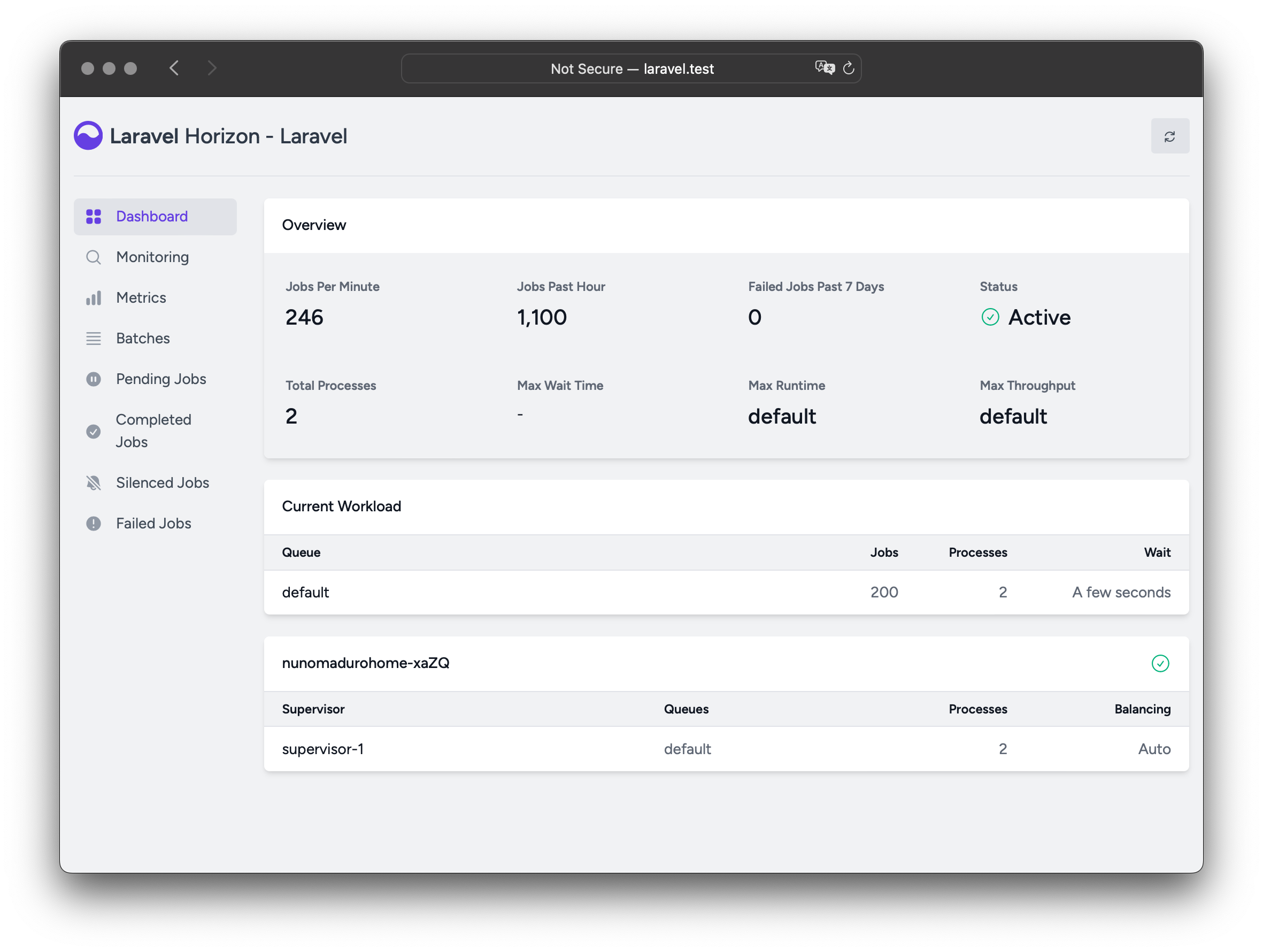
A comprehensive queue management solution for Flarum, powered by Laravel Horizon. This extension provides a beautiful dashboard for monitoring your Redis queues, along with powerful worker management and scaling capabilities.
Features
- 📊 Real-time Dashboard - Beautiful web interface at
/admin/horizon - 🔄 Auto-scaling Workers - Dynamically scale workers based on queue load
- ⚖️ Load Balancing - Multiple balancing strategies (simple, auto, false)
- 📈 Metrics & Insights - Job throughput, wait times, and failure rates
- 🎯 Job Monitoring - Track specific jobs and tags
- 🔍 Failed Job Management - Retry, inspect, and clear failed jobs
- 🚦 Supervisor Control - Pause, continue, and terminate workers
- 📦 Batch Job Support - Monitor and manage job batches
Requirements
- Flarum 2.0+
- Redis Compatible Server (required for Horizon to function)
Installation
Step 1: Install Redis (if not already installed)
On Ubuntu/Debian:
On macOS (via Homebrew):
Verify Redis is running:
Step 2: Install the Extension
This will automatically install fof/redis as a dependency.
Configuration
Basic Setup
Horizon requires Redis to be configured. Create or modify your extend.php in the root of your Flarum installation:
Advanced Redis Configuration
Using separate databases for different services:
Disabling specific Redis features:
Redis Sentinel (High Availability):
Supervisor profiles
Horizon organises workers into supervisor profiles — named worker pools, each tuned for a class of job. Four profiles ship out of the box:
| Profile | Timeout | Purpose | Default state |
|---|---|---|---|
standard |
60s | Regular queue jobs — ordinary background work | active (base 1 × 6 processes) |
emails |
120s | Outbound mail; retries transient failures (tries: 3) |
active, serves the mail queue |
fast |
3s | Quick jobs that mustn't back up — the short timeout kills a hung one early rather than clogging the lane. Does not retry, so don't put work here that mustn't be lost | dormant — nothing built in routes here; an offer for extensions and operators |
realtime |
3s | Websocket pushes. Same short budget as fast, but retries (tries: 2): these cross our own websocket server, which restarts on deployment |
active when flarum/realtime is enabled |
long |
3600s | Heavy lifting — slow, resource-hungry jobs; 4× memory | active when flarum/gdpr is enabled |
Sensible defaults, no configuration. Horizon wires Flarum's own queued work onto these profiles automatically:
standardruns by default for general work.emailsruns by default and serves themailqueue — every install sends mail, so core's mail jobs (notifications, informational emails) are routed onto it out of the box. It's capped by your mail provider's connection budget rather than host CPU, so it uses a small fixed process count and retries (mail failures are often transient).realtimecomes online automatically whenflarum/realtimeis enabled, serving arealtimequeue that realtime's push jobs are routed onto.fastis defined but dormant. Nothing built in routes onto it; it is there for extensions and operators that want a shed-fast lane.longcomes online automatically whenflarum/gdpris enabled, serving agdprqueue that GDPR's export/erasure jobs are routed onto.fof/geoip, when enabled, gets aniplookupqueue — but this one rides the always-onstandardpool rather than a dedicated tier. IP lookups are light background work; the separate queue just stops them sitting behind slowerdefaultjobs, at no extra worker cost.
Absent extensions are simply skipped, so this is safe whichever ones you run.
Scale to zero. A profile with no queue routed to it and no workers stays
dormant and costs nothing — that's why fast and long do nothing until their
extension is present (or you bring them online yourself). You can raise any
profile's process count, route more queues onto it, or define new profiles; see
below. A profile given processes but no queues is a configuration error and
Horizon will refuse to start (see
Failing fast).
Sizing the Horizon host
Horizon runs a pool of worker processes, and each one is a full PHP process that uses a CPU core when busy and holds its own memory. Size the host, container or VM that runs Horizon around the workers you have active — under- provisioning shows up as the OS OOM-killing workers or jobs crawling because every worker is fighting for a core.
Memory is the easy one to get wrong: it's (processes × per-worker memory), summed across active profiles, plus the master and general PHP overhead. With the built-in defaults:
| Active profile | Processes | Memory / worker | Subtotal |
|---|---|---|---|
standard (always) |
6 | 128 MB | 768 MB |
emails (always) |
1 | 128 MB | 128 MB |
realtime (if realtime enabled) |
12 | 128 MB | 1536 MB |
long (if gdpr enabled) |
1 | 512 MB | 512 MB |
So a fresh install wants on the order of ~1 GB of RAM for the queue
alone (≈900 MB of workers plus headroom); with realtime and gdpr enabled and at
default scaling that climbs toward ~3 GB. These are ceilings — the
auto/simple balancers only run as many workers as there is work for — but
provision for the ceiling so a burst doesn't get OOM-killed. Because long
workers each get a 512 MB budget, Horizon automatically raises the worker
memory_limit to the largest supervisor budget (see
Automatic worker memory limit).
CPU: each busy worker saturates roughly one core, so the total worker count across active profiles is a good guide to how many cores you want available. You do not need one core per worker — queue work is bursty and often I/O-bound (waiting on the database, mail server or HTTP) — but a host with far fewer cores than busy workers will see jobs queue behind CPU rather than run in parallel. A useful rule of thumb: cores ≈ the number of workers you expect busy at once, which for most forums is well below the configured maximum.
Scale to your box, not the defaults. The defaults suit a modest dedicated
host. If you run Horizon somewhere smaller — a shared container, a 1 GB VPS —
turn the process counts down (e.g. REDIS_HORIZON_STANDARD_MAX_PROCESSES=2)
rather than leaving the defaults and hoping; a handful of workers that fit in
RAM beats a dozen that get killed. See
Configuration layers for how.
Controlling email throughput
The most common thing you'll want to cap is how many emails go out at once —
mail providers limit concurrent connections, and exceeding that gets you
throttled or blocked. Because each email worker sends one message at a time,
this is simply the emails profile's worker count, and Horizon gives it a
dedicated, purpose-named control on every surface (highest precedence first):
…or the Simultaneous outgoing emails field on the Horizon admin page. Set it
to your provider's concurrent-connection limit. It defaults to 1 and takes
precedence over a generic emails process count, so it's the single knob to
reach for.
Configuration layers
Every tunable resolves through four layers, highest precedence first, so you can pin values per deployment without touching the database:
- Environment variables (highest) — ideal for Docker/Kubernetes
- config.php — under the
horizonkey - extend.php — the
Horizonextender (see below) - Built-in profile defaults (lowest)
Scaling a profile with environment variables
Per-profile scaling uses REDIS_HORIZON_<PROFILE>_* variables and a
base × multiplier model. A literal MAX_PROCESSES / MEMORY_LIMIT wins
outright; otherwise the base is multiplied by the multiplier:
| Variable | Meaning |
|---|---|
REDIS_HORIZON_<PROFILE>_MAX_PROCESSES |
Literal process count (overrides the multiplier) |
REDIS_HORIZON_<PROFILE>_PROCESSES_MULTIPLIER |
Multiplier applied to the base process count |
REDIS_HORIZON_<PROFILE>_MEMORY_LIMIT |
Literal per-process memory in MB |
REDIS_HORIZON_<PROFILE>_MEMORY_MULTIPLIER |
Multiplier applied to the base memory |
<PROFILE> is the upper-cased profile name — STANDARD, FAST, LONG,
EMAILS, or your own. Global (non-profile) tunables keep a plain
REDIS_HORIZON_* name:
| Setting | config.php (horizon. key) |
Environment variable | Default |
|---|---|---|---|
| Master memory limit (MB) | memory_limit |
REDIS_HORIZON_MEMORY_LIMIT |
128 (auto-raised, see below) |
| Trim settings (minutes) | trim.* |
REDIS_HORIZON_TRIM_* |
60 / 10080 |
Note:
REDIS_*(withoutHORIZON_) belongs to FoF Redis — that's your Redis connection (host, port, database, prefix).REDIS_HORIZON_*is Horizon's worker scaling. Two concerns, two prefixes.
Bring the fast tier online with three workers, for example:
Configuring profiles in config.php
Environment variables set scaling; config.php can set anything else on a
profile — the queues it serves, its balance strategy, timeout, or any Horizon
key. Scaling values here are overridden by the matching env var.
Configuring profiles in extend.php
The Horizon extender is the most expressive surface — it also lets you route
jobs onto queues and register brand-new profiles:
Adding queues to a supervisor
A very common need — especially for base images and site skeletons — is to run
your own extra queues on an existing profile without redefining it. queueOn()
appends to a supervisor's queue list, leaving its worker count and every
other setting untouched:
The appended queues are also registered with core so the dashboard and
per-queue pause cover them. Use queueOn() when you just want to add work to a
tier; use supervisor(name, ['queues' => [...]]) when you want to set (and
thereby replace) a profile's full queue list.
To start from a blank slate instead of the four built-in profiles, call
->withoutDefaultProfiles().
Taking full manual control (useRawConfig)
If the profile model doesn't fit your setup, bypass it entirely and hand-write
the worker layout with useRawConfig(). Pass the supervisor map for the
current environment (supervisor name => options); fof/horizon keys it under the
running environment for you, so you don't hardcode production/testing/etc.
This replaces the profile system: no default profiles, no automatic job
routing.
Note:
->config()remains available for other top-level Horizon keys (e.g.fast_termination,waits), but it can no longer set the worker layout — passing anenvironments/supervisorsarray to it (or->environment(), orconfig.php'shorizon.environments) throws at boot, because the profile system owns that. Use profiles oruseRawConfig()instead. See Breaking changes.
Automatic worker memory limit
Horizon raises the forked worker's PHP memory_limit to the largest supervisor
memory budget automatically. Without this, a worker whose supervisor budget
exceeds the CLI memory_limit hits PHP's fatal "Allowed memory size exhausted"
before Horizon's graceful memory check can restart it. An explicit
REDIS_HORIZON_MEMORY_LIMIT still wins if you set it higher.
Failing fast on misconfiguration
Horizon validates scaling at boot and throws (rather than silently falling back to a default) when:
- a
REDIS_HORIZON_*scaling value is not a positive integer, or - a profile is given processes but no queues (it would otherwise silently drain
default, duplicating thestandardpool).
A misconfigured worker fleet should fail loudly at startup, not quietly run the wrong shape.
Note: Supervisor settings are read when Horizon starts. Restart Horizon (
php flarum horizon:terminate) after changing them.
Running Horizon
Development (Manual)
Start Horizon from your Flarum root directory:
This will run as long as the terminal session is active. Press Ctrl+C to stop.
Production (Supervisor)
For production environments, use a process monitor like Supervisor to keep Horizon running:
1. Install Supervisor:
2. Create a Supervisor configuration (/etc/supervisor/conf.d/horizon.conf):
3. Start Supervisor:
4. Check status:
Systemd (Alternative)
Create a systemd service file (/etc/systemd/system/flarum-horizon.service):
Enable and start:
Usage
Accessing the Dashboard
Navigate to: https://yourforum.com/admin/horizon
Available Commands
Start Horizon:
View active supervisors:
Pause all workers:
Continue processing after pause:
Pause a specific supervisor:
Continue a specific supervisor:
View Horizon status:
View supervisor status:
Terminate all workers gracefully:
The terminate signal is broadcast through Redis, so it reaches Horizon wherever it runs — including a different container or host than the one the command is issued from.
Clear all jobs from a queue:
Purge failed jobs:
Delete a specific failed job:
Delete all failed jobs:
Clear metrics:
Dashboard Features
Real-time Monitoring
- Jobs Per Minute - Current throughput
- Pending Jobs - Jobs waiting to be processed
- Failed Jobs - Recent failures
- Processes - Active worker processes
- Wait Time - Average queue wait time
- Status - Horizon operational status (running/paused/inactive)
Job Management
- View pending jobs - See what's in the queue
- View completed jobs - Recent successful jobs
- View failed jobs - Inspect failures with full stack traces
- Retry failed jobs - Re-queue failed jobs
- Monitor specific tags - Track tagged jobs
Metrics
- Job Metrics - Performance stats per job type
- Queue Metrics - Stats per queue
- Throughput - Jobs processed over time
- Runtime - Job execution times
Troubleshooting
Dashboard shows errors
Issue: 500 errors or "Redis not configured" messages
Solution: Ensure Redis is properly configured in extend.php:
Workers not processing jobs
Issue: Jobs remain in pending state
Solution:
- Ensure Horizon is running:
sudo supervisorctl status horizon - Restart Horizon:
php flarum horizon:terminatethen start again - Check for errors:
tail -f storage/logs/horizon.log
After deployment, workers process old code
Issue: Code changes not reflected in running workers
Solution: For code-only deployments, gracefully recycle the worker processes — the Horizon master stays up and respawns them with the new code:
If Horizon's own configuration changed (supervisor settings, queues, memory limits), restart the master instead:
Both signals travel via Redis/cache, so they work across containers.
Memory issues
Issue: Workers consuming too much memory, or you see Memory limit exceeded: Using X/128MB. Consider increasing horizon.memory_limit.
There are two separate memory limits:
memory_limit— the master supervisor process. When exceeded, Horizon restarts itself gracefully. Default: 128 MB.memory(per supervisor) — each individual worker process. When exceeded after a job completes, the worker is recycled. Default: 128 MB.
Solution: Raise the master limit via config.php, and the per-worker limit
on the relevant profile:
Note that Horizon already raises the master memory_limit to the largest
per-worker budget automatically, so you rarely need to set it by hand — see
Automatic worker memory limit.
You can also limit how long a worker runs before being recycled by passing the standard Horizon keys through a profile:
Performance Tips
- Use Auto-scaling: Set
'balance' => 'auto'to automatically scale workers based on load - Separate Queues: Use different queues for high/low priority jobs
- Set Memory Limits: Configure
memoryto restart workers before they consume too much - Monitor Metrics: Regularly check the dashboard for bottlenecks
- Tag Jobs: Use tags to group and monitor related jobs
Security
- The Horizon dashboard is automatically protected by Flarum's admin authentication
- No additional security configuration needed
- Only forum administrators can access
/admin/horizon
Upgrading
Breaking changes: supervisor profiles
The worker configuration model changed. Sites that customised workers must migrate — the old settings no longer have any effect (there is no automatic fallback):
- *`FOFHORIZON
environment variables are gone.** Per-profile scaling now usesREDISHORIZON_ (see [Scaling a profile with environment variables](#scaling-a-profile-with-environment-variables)), and global tunables useREDISHORIZON. Migrate, e.g.FOF_HORIZON_PROCESSES=10→REDIS_HORIZON_STANDARD_MAX_PROCESSES=10,FOF_HORIZON_QUEUES=...` → route those queues onto a profile. - *The `fof-horizon.supervisor.
admin settings are gone.** Configure profiles viaconfig.phpor theHorizon` extender instead. config.phpuseshorizon.supervisors(plural), keyed by profile name. The old singlehorizon.supervisorblock is replaced by the profile model.- A hand-written worker layout now throws instead of being silently ignored.
The profile system owns Horizon's
environments, so passing anenvironments/supervisorsarray to the extender's->config()or->environment(), or settinghorizon.environmentsinconfig.php, throws at boot with a pointer to the supported paths. This is deliberate: previously such a config was quietly dropped and the site ran the wrong layout. Migrate to profiles (supervisor()/routeJob()/queueOn(), orconfig.php'shorizon.supervisors), or, to keep hand-writing the full layout, move it touseRawConfig(), which bypasses the profile system.->config()still works for other top-level Horizon keys. - Setting a job's queue via its static
$onQueueproperty no longer works. Job routing now goes through Flarum core's queue-route map, which Horizon'srouteJob()writes to for you. If you previously set a queue by assigning to a job class's static property — including on a shared abstract base — replace it with->routeJob(JobClass::class, 'queue'). Routing the abstract base still covers all its subclasses (see Configuring profiles in extend.php), and because routing is now keyed per class rather than shared through a static, routing several job classes no longer collides.
After upgrading, run php flarum horizon:terminate so the master restarts with
the new configuration.
Then restart Horizon (via Supervisor or manually).
Migration from Blomstra Redis
If you're upgrading from the older blomstra/redis package:
- Simply update namespace references from
Blomstra\RedistoFoF\Redisin yourextend.php - All configuration options remain the same
Links
- Packagist: fof/horizon
- GitHub: FriendsOfFlarum/horizon
- Discuss: Flarum Community
- Documentation: Laravel Horizon Docs
License
MIT
Made with ❤️ by FriendsOfFlarum
All versions of horizon with dependencies

laravel/horizon Version ^5.45.4
fof/redis Version ^2.0
vlucas/phpdotenv Version ^5.2