Download the PHP package damodar-bhattarai/filament-settings without Composer
On this page you can find all versions of the php package damodar-bhattarai/filament-settings. It is possible to download/install these versions without Composer. Possible dependencies are resolved automatically.
FAQ
Example:

In general, it is recommended to use always a project to download your libraries. In an application normally there is more than one library needed.

- Some hosting areas are not accessible by a terminal or SSH. Then it is not possible to use Composer.
- To use Composer is sometimes complicated. Especially for beginners.
- Composer needs much resources. Sometimes they are not available on a simple webspace.
- If you are using private repositories you don't need to share your credentials. You can set up everything on our site and then you provide a simple download link to your team member.
- Simplify your Composer build process. Use our own command line tool to download the vendor folder as binary. This makes your build process faster and you don't need to expose your credentials for private repositories.
Informations about the package filament-settings
App Settings



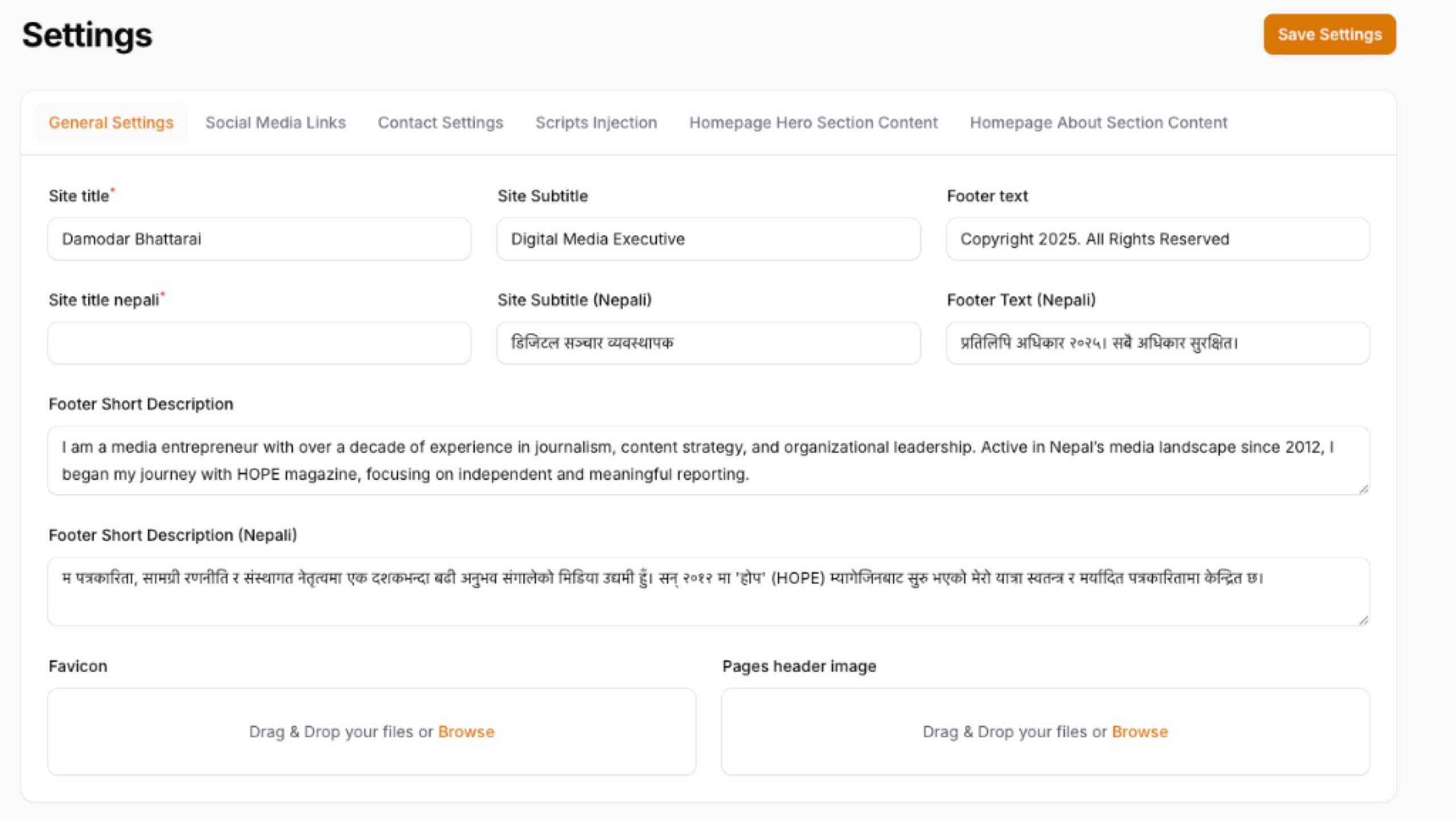
A powerful, tabbed settings management page for your Filament panel that lets you manage all your website settings — general info, social links, SEO, appearance, custom CSS/JS — from one beautiful interface.
Features
- 📑 Tabbed Interface — Settings organized into 6 default tabs: General, Contact, Social Media, SEO, Appearance, CSS & Scripts
- 🎛️ Smart Field Types — Automatically renders the right input based on setting type: text, textarea, image upload, file upload, color picker, toggle (switch), checkbox
- 🔧 Modify Fields Mode — Permission-gated mode to add new settings, delete existing ones, reorder fields, edit labels, and move settings between tabs
- 🎨 CSS & Scripts — Dedicated tab with side-by-side CSS and JavaScript editors for Header, Body, and Footer sections
- 🔐 Flexible Authorization — Control who can modify fields via plugin callback, Laravel Gate, or config
- 📦 Auto-Seeding — Default settings are automatically seeded on first page load
- ⚡ Cache-Aware — Automatically clears the settings cache after every save
- 🌗 Dark Theme Support — Fully compatible with Filament's dark mode
Requirements
- PHP 8.2+
- Laravel 10, 11, or 12
- Filament v4 or v5
damodar-bhattarai/settingspackage
Installation
Step 1: Install via Composer
This will also install the damodar-bhattarai/settings base package if not already installed. The plugin automatically copies and runs all required migrations on the first page load!
Step 2: Register the Plugin
Add the plugin to your Filament panel provider (e.g., app/Providers/Filament/AdminPanelProvider.php):
Step 3: Publish Config (Optional)
That's it! Navigate to Settings → App Settings in your panel.
Usage
Editing Settings
Simply visit the App Settings page, modify the values across any tab, and click Save Settings. All changes are persisted to the database and the settings cache is automatically cleared.
Using Settings in Your Application
Retrieve saved settings anywhere in your application using the base package's helpers:
Modify Fields Mode
Click the "Modify Fields" button in the page header to enter Modify Mode. This mode is permission-gated and allows you to:
| Action | Description |
|---|---|
| Add Setting | Create a new setting with a key, label, type, and target tab |
| Add Tab | Create a new tab group for organizing settings |
| Delete Setting | Remove a setting permanently (with confirmation) |
| Move Setting | Move a setting from one tab to another |
| Edit Label | Rename a setting's display label |
| Reorder | Move settings up or down within a tab |
Click "Exit Modify Mode" to return to value-only editing.
Configuration
Plugin Options
Customize the plugin behavior using the fluent API:
Authorization
Control who can access the Modify Fields mode using one of three methods:
Option 1: Plugin Callback (Recommended)
Best for role-based access. Works with any permission package (Spatie, Bouncer, etc.):
Option 2: Laravel Gate
Define a gate in your AuthServiceProvider or any service provider:
Option 3: Config File
Set a static boolean in config/filament-settings.php:
Resolution priority: Plugin callback → Laravel Gate → Config default.
Programmatic Control from Other Packages
Other packages can control the Modify Fields capability at runtime:
Default Tabs & Settings
The plugin ships with 6 pre-configured tabs. Customize them in config/filament-settings.php:
| Tab | Default Settings |
|---|---|
| General | Site Name, Tagline, Logo, Favicon, Footer Text |
| Contact | Email, Phone, Address, Map Embed URL |
| Social Media | Facebook, Twitter/X, Instagram, YouTube, LinkedIn, TikTok |
| SEO | Meta Title, Meta Description, Meta Keywords, Google Analytics ID |
| Appearance | Primary Color, Secondary Color |
| CSS & Scripts | Header/Body/Footer CSS and Scripts (side-by-side layout) |
You can add, remove, or modify any of these in the config file. Any groups created via the UI are also automatically displayed.
Supported Field Types
| Type | Component | Description |
|---|---|---|
text |
TextInput | Single-line text input |
textarea |
Textarea | Multi-line text area with autosize |
image |
FileUpload | Image upload with preview |
file |
FileUpload | General file upload |
color |
ColorPicker | Color picker with hex output |
switch |
Toggle | On/off toggle switch |
checkbox |
Checkbox | Checkbox input |
Custom Config Example
Changelog
Please see CHANGELOG for more information on recent changes.
Contributing
Contributions are welcome! Please feel free to submit a Pull Request.
Credits
License
The MIT License (MIT). Please see License File for more information.
All versions of filament-settings with dependencies

damodar-bhattarai/settings Version ^1.1.4
filament/filament Version ^5.0
spatie/laravel-package-tools Version ^1.16