Download the PHP package bonniss26/wn-imagery-plugin without Composer
On this page you can find all versions of the php package bonniss26/wn-imagery-plugin. It is possible to download/install these versions without Composer. Possible dependencies are resolved automatically.
Download bonniss26/wn-imagery-plugin
More information about bonniss26/wn-imagery-plugin
Files in bonniss26/wn-imagery-plugin
Package wn-imagery-plugin
Short Description LQIP image placeholders for Winter CMS - Twig filters, database caching, settings, console commands and queued generation, on GD or Imagick.
License MIT
Homepage https://github.com/bonniss/wn-imagery-plugin
FAQ
Example:

In general, it is recommended to use always a project to download your libraries. In an application normally there is more than one library needed.

- Some hosting areas are not accessible by a terminal or SSH. Then it is not possible to use Composer.
- To use Composer is sometimes complicated. Especially for beginners.
- Composer needs much resources. Sometimes they are not available on a simple webspace.
- If you are using private repositories you don't need to share your credentials. You can set up everything on our site and then you provide a simple download link to your team member.
- Simplify your Composer build process. Use our own command line tool to download the vendor folder as binary. This makes your build process faster and you don't need to expose your credentials for private repositories.
Informations about the package wn-imagery-plugin
Imagery for Winter CMS


Show something in the right colours while your photos are still loading.
Add |lqipStyle to an image in a Twig template and it gets a low-quality
image placeholder (LQIP): a flat colour, a gradient or a blurred preview,
painted behind the image until the real photo arrives.
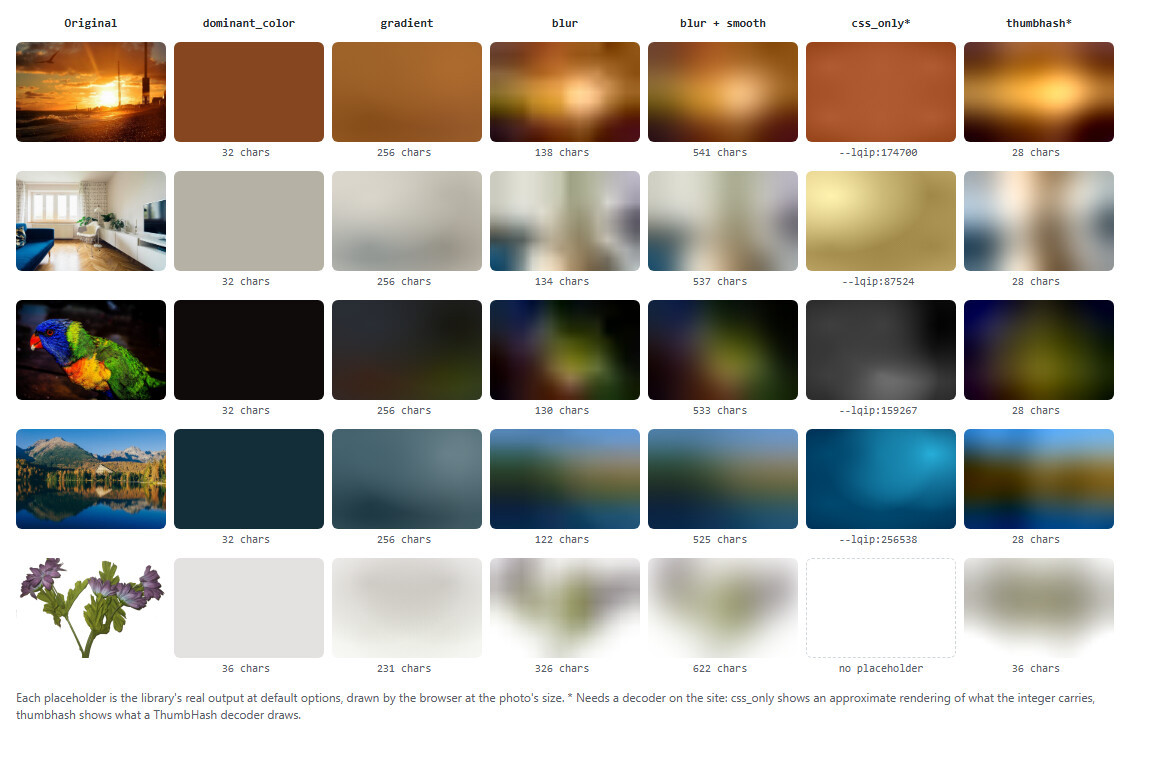
- Three Twig filters:
|lqip,|lqipStyle,|lqipSize. They take Media Library paths,|mediaURLs, file attachments, ornull. - Made on upload. New images get their placeholder as they are uploaded.
- Cached in the database. Each image is processed once, not on every page view.
- Never breaks a page. A missing or broken image gives an empty string, never an exception.
- Settings page, queued generation, console commands. GD or Imagick.
Built on bonniss26/lqip, which does the
image work and can also be used without Winter.
Contents
- Install
- Use it in templates
- Choosing a mode
- Going to production
- configuration
- Housekeeping
- For developers
Install
Requirements: Winter CMS 1.2, PHP 8.0.2+, and ext-gd or ext-imagick.
Imagick is about 3.5× faster on large JPEGs; either works.
Use it in templates
|lqipSize gives {width, height}, stored beside the placeholder, so the
image is not downloaded again to measure it. It is the size the photo is
displayed at: portrait phone photos are often stored sideways with a flag
to rotate them, and this accounts for that. It is null while the
placeholder itself has not been made yet.
Use |lqipStyle rather than building the style yourself where you can: it
adds background-size: cover, without which the blur placeholder, a 16 px
image, is tiled across the element instead of stretched over it.
photo can be any of these:
- a Media Library path (
photos/a.jpg); - the output of
|media; - a
System\Models\File; - an
attachOne/attachManyrelation (the first file is used); null, which gives an empty string.
From PHP, use the Imagery facade:
Choosing a mode
Pick the mode in Settings → CMS → Image placeholders. You can also override it per call, as above.
| Mode | Looks like | Size per image | Good for |
|---|---|---|---|
dominant_color (default) |
One flat colour | ~32 chars | Lightest; works everywhere |
blur |
A blurred thumbnail | ~130 chars | Looks most like the photo. Recommended for most sites |
blur + Smooth |
The same, without visible blocks | ~530 chars | The nicest look, if you can spare the bytes |
gradient |
Four soft colour patches | ~256 chars | Servers whose GD/Imagick lacks WebP |
thumbhash |
A hash your JS or app decodes | ~28 chars (more with transparency) | APIs and headless front ends. Not CSS |
css_only |
Colour plus coarse layout | ~13 chars | Experimental. Needs your own decode stylesheet |
The library's README explains each mode in more detail.
|lqip always returns a background-image value. If the mode is css_only
(a CSS variable) or thumbhash (a hash), |lqip uses dominant_color
instead, so an editor changing the mode cannot break a template. |lqipStyle
renders css_only as --lqip:87524, and falls back for thumbhash.
To serve the hash itself, for example from an API endpoint, set the mode to
thumbhash in Settings (so uploads and imagery:warm produce it) and read it
with:
Logos and cut-out product shots keep their transparency: the placeholder takes the image's own colour and shape instead of a box. If you would rather put them on your page colour, set Background for transparent images.
blur uses a data: URI. If your site sends a strict
Content-Security-Policy, allow img-src data: or the placeholder will not
show.
Going to production
Generating a placeholder means decoding the original photo. That takes about 20 ms per megapixel with GD, so a 24 MP photo costs half a second. The plugin therefore avoids doing it while a page renders.
New uploads are handled for you. When an image is uploaded through the Media Manager or attached to a record, its placeholder is made right away: in a background job if you have a real queue, otherwise during the upload, where the editor is already waiting. Renaming, moving or deleting a file in the Media Manager keeps the cache in step.
Images that were there before - or anything added another way, such as FTP or a script - need one warm-up:
It skips images that are already done and unchanged, so it is safe to run as often as you like, for example after each deploy or from the scheduler.
If an image still has no placeholder when a page shows it:
| Your setup | What happens |
|---|---|
A real queue (database, redis, ...) |
A background job generates it; it appears on a later page view |
Debug mode (app.debug), or lazy on |
Generated during the render, at most 5 per request |
| Otherwise | No placeholder for that image until it is warmed |
What uploads and imagery:warm produce is what Settings say. A different
mode or option passed in a template (|lqipStyle({mode: 'blur'})) is only
generated by a queue or by lazy. So on a production site without a queue,
configure the look in Settings rather than per call, and run imagery:warm
after changing Settings.
When an image fails
An image that cannot be processed (corrupt, an unsupported format, over 60
megapixels) is recorded, not retried on every page view: the next tries come
after 15, 30, 60 and 120 minutes, and after the fifth failure it waits until
you replace the file, run imagery:purge --failed, or run imagery:warm.
The schedule is set by cache.retry in the config.
Upgrading from 1.0
Existing placeholders keep working in between. The warm-up adds the image
sizes that |lqipSize needs, and redoes transparent images, which 1.0 placed
on black.
Settings
Settings → CMS → Image placeholders sets the mode, the engine (GD or
Imagick), the blur options including Smooth, and the background for
transparent images. Leave a field blank to use the configuration file's
value; the blank option shows what that currently is.
Nothing needs clearing after a change, because the options are part of the
cache key: pages pick up new placeholders as they are made - by the queue,
by lazy, or by running imagery:warm. Switching engine keeps existing
placeholders, since both engines produce equivalent ones (except blur when
the new engine cannot write WebP).
Who may open the page is the bonniss26.imagery.manage_settings permission,
given to the Developer and Publisher roles by default.
Configuration
Override any key of config/config.php in your app at
config/bonniss26/imagery/config.php. The ones you are most likely to want:
| Key | Default | What it does |
|---|---|---|
enabled |
true |
Master switch. Off: every filter returns an empty string |
generation |
library defaults | Default options: mode, driver, smooth, background, long_edge, quality, ... |
settings_override_config |
true |
Set false to make this file win over the backend settings |
generate_on_upload |
true |
Make placeholders when images are uploaded, and follow renames and deletes |
lazy |
null (follows app.debug) |
Generate during page renders when no queue is set up |
request_budget |
5 |
Most placeholders generated in one request |
sources.allow_absolute_paths |
false |
Accept raw filesystem paths... |
sources.allowed_roots |
[] |
...but only inside these directories |
cache.retry |
5 tries from 15 min | Backoff for failed images: max_attempts, base_minutes, max_minutes |
cache.remote_identity |
full |
On S3 and similar disks, path_only skips checking each file's modification time |
queue.connection |
null (default queue) |
Queue connection for generation jobs |
register_alias |
true |
Register the global Imagery alias; turn off if the name clashes |
URLs to other sites are never fetched.
Housekeeping
None of these is required; they reclaim database space.
For developers
How it is built
The plugin is a thin Winter layer over the library. Almost all of the logic is in plain classes that are given their collaborators, so it is unit-tested without booting Winter:
| Class | Responsibility |
|---|---|
classes/Imagery |
The service behind the filters and facade: look up the cache, decide what to do on a miss, record failures, prepare uploads |
classes/MediaEvents |
What an upload, rename, move or delete does to the cache. Plugin.php binds it to Winter's events |
classes/OptionResolver |
Merges per-call overrides, settings, config and library defaults, in that order |
classes/SourceResolver |
Turns whatever a template passes into a Source. Refuses path traversal, foreign URLs and paths outside allowed_roots |
classes/CacheKey |
sha1 of the source and the options that change the output. The driver is deliberately not one of them, and options added after 1.0 are left out at their defaults so 1.0's keys stay valid |
classes/RetryPolicy |
Exponential backoff for failed images |
classes/RequestBudget |
The per-request cap on inline generation |
classes/Defaults |
Option names, which ones change the output, available modes and drivers |
A mode registered with the library's PlaceholderGenerator::extend() appears
in the Settings dropdown automatically. The plugin cannot know whether it
produces CSS, so |lqip treats it as it treats css_only and falls back to
dominant_color; |lqipStyle renders it.
The Winter-specific parts are adapters behind interfaces: WinterMediaStorage
(MediaStorage), DatabaseStore + models/Placeholder (PlaceholderStore),
jobs/GeneratePlaceholder, the console commands, and Plugin.php, which
wires them together and registers the Twig filters.
Running the tests
The library is resolved from a sibling checkout during development, through a
Composer path repository. Composer only reads repositories from the root
package, so this does not affect people installing the plugin.
The unit suite needs no Winter install. CI does the same: it clones the library next to the plugin and runs the suite on PHP 8.0 to 8.4. Behaviour inside Winter (filters, migrations, queue, commands, upload events) is checked by installing the plugin into a Winter 1.2 app, including upgrading one that holds 1.0 data. There is no automated integration suite yet.
Contributing
- Templates must never break. Every public path returns
''ornullon failure instead of throwing. - Policy belongs in the plain classes, with a unit test. The Winter adapters should stay thin.
- Image work belongs in the library, not here. A new mode or engine is a library change.
- Keep
composer testgreen, one logical change per commit, and explain why in the commit message.
License
MIT.
