Download the PHP package bonniss26/lqip without Composer
On this page you can find all versions of the php package bonniss26/lqip. It is possible to download/install these versions without Composer. Possible dependencies are resolved automatically.
Download bonniss26/lqip
More information about bonniss26/lqip
Files in bonniss26/lqip
Package lqip
Short Description Framework-agnostic LQIP (low-quality image placeholder) generator: dominant colour, CSS gradient, blurred data URI and CSS-only modes, on GD or Imagick.
License MIT
Homepage https://github.com/bonniss/lqip
FAQ
Example:

In general, it is recommended to use always a project to download your libraries. In an application normally there is more than one library needed.

- Some hosting areas are not accessible by a terminal or SSH. Then it is not possible to use Composer.
- To use Composer is sometimes complicated. Especially for beginners.
- Composer needs much resources. Sometimes they are not available on a simple webspace.
- If you are using private repositories you don't need to share your credentials. You can set up everything on our site and then you provide a simple download link to your team member.
- Simplify your Composer build process. Use our own command line tool to download the vendor folder as binary. This makes your build process faster and you don't need to expose your credentials for private repositories.
Informations about the package lqip
bonniss26/lqip


Show something in the right colours while a photo is still loading.
Give this library an image and it returns a tiny CSS value, a low-quality
image placeholder (LQIP), that you put in background-image. The visitor sees
a colour, a gradient or a blurred preview instead of an empty box.
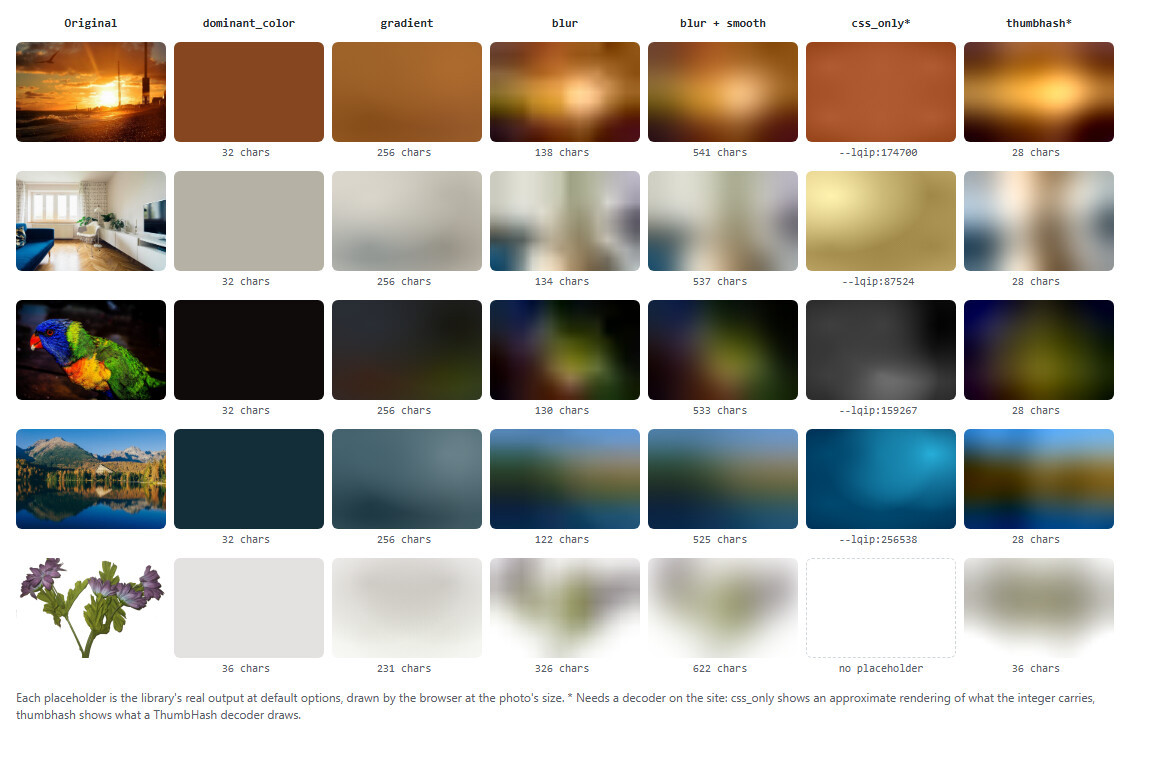
- Plain PHP, any framework. One static call, a string back. No config, no database, no runtime dependencies.
- PHP 7.4 to 8.5, on GD or Imagick, whichever your server has.
- Never breaks your page. A missing or broken image returns
null. It never throws an exception or emits a PHP warning.
Using Winter CMS? Install
bonniss26/wn-imagery-plugin
instead. It wraps this library with Twig filters, caching and a settings page.
Contents
- Quick start
- Choosing a mode
- CSP
- requirements
- contributing
Quick start
The placeholder shows behind the <img> until the photo has loaded and
covers it. For a CSS background photo, layer the two: the photo paints over
the placeholder once it arrives.
Always set background-size: cover. The blur placeholder is a 16 px image,
and without it the browser tiles it across the box at 16 px instead of
stretching it. toStyleAttribute() (below) includes it for you.
Cache the result. Generating a placeholder decodes the whole photo, at about 20 ms per megapixel with GD. Do it once per image, when it is uploaded or on first use, and store the string. Never generate one on every page view.
Choosing a mode
Pass ['mode' => ...] as the second argument. The picture at the top shows
every mode on real images.
| Mode | Looks like | Size | Use it when |
|---|---|---|---|
dominant_color (default) |
One flat colour | ~32 chars | You want the cheapest thing that works everywhere |
blur |
A blurred thumbnail | ~130 chars | You want it to look like the photo. Best choice for most sites |
blur + smooth |
The same, without visible blocks | ~530 chars | You want the nicest look and can spare the bytes |
gradient |
Four soft colour patches | ~256 chars | Your PHP cannot encode WebP (see below) |
thumbhash |
A blurred thumbnail, drawn by the client | ~28 chars | An API or app that decodes ThumbHash itself. Not CSS |
css_only |
Colour plus coarse light/dark layout | ~13 chars | Experimental. Read the caveats first |
dominant_color picks the colour that covers the most of the image. It
does not average, so a blue sofa in a white room comes out white, not
grey-blue. It has no sense of shape. On a photo with a dark background, like
the parrot above, you get the background.
blur is a 16 px thumbnail, blurred and encoded as a WebP data URI. The
browser scales it up smoothly, so it reads as an out-of-focus version of the
photo. It costs about four times the characters of dominant_color, which is
still less than one line of CSS. If your GD or Imagick has no WebP support it
falls back to JPEG, which is about 9× larger (~1 KB per image). On such a
server use gradient instead. Check with:
Enlarging a 16 px image leaves faint soft blocks (visible in the room photo
above). 'smooth' => true wraps the thumbnail in an SVG that blurs it again at
display size, the way next/image does, at about four times the size.
gradient samples a 2×2 grid and paints four radial gradients. There is
no image data, only CSS colours. Where WebP works, blur is both smaller and
better, so gradient mainly exists for servers without WebP.
thumbhash returns a ThumbHash, a
base64 string of about 28 characters (a few more for an image with
transparency), for clients that decode it themselves:
a JSON API feeding a JavaScript front end or a mobile app (decoders exist for
JS, Swift, Kotlin and Rust). It is not CSS, so get it with resultForFile()
and read ->value(). For a server-rendered page, blur needs no script.
css_only (experimental) packs the whole placeholder into one integer,
--lqip:87524, which a stylesheet expands into gradients. The format is
Lean Rada's. It is tiny, but:
- You supply the decode stylesheet. This package does not ship one yet. The column in the picture above is an approximate rendering.
- It needs mid-2024 browsers (CSS
round(),mod(),oklab()and relative colour syntax). Older ones show nothing at all, not even a flat colour. - It is very coarse. On evenly lit photos about half the time the layout vanishes and only one colour is left. Near-grey images can come out tinted, because the format deliberately avoids plain grey.
Unless you are excited about the format, dominant_color at 32 characters is
the safer small option.
Usage
Both return a string that is valid inside a CSS background-image list, or
null.
Laravel
No service provider is needed. Call it from a helper and let Laravel's cache hold the result:
For many images per page, generate in a queued job after upload rather than inside the request.
Options
| Option | Default | Applies to | Meaning |
|---|---|---|---|
mode |
dominant_color |
all | dominant_color, gradient, blur, css_only, thumbhash, or your own |
driver |
auto |
all | auto, gd, imagick. See GD or Imagick |
background |
null |
all | A colour ('#ffffff', '#fff', 0xFFFFFF) to put transparent images on first. See transparent images |
long_edge |
16 |
blur |
Longest edge of the thumbnail in px (1-64). Bigger is sharper and longer |
quality |
25 |
blur |
Encode quality (0-100) |
blur |
true |
blur |
Blur the thumbnail before encoding |
smooth |
false |
blur |
Blur again at display size with an SVG filter. No visible blocks, ~4× the size |
format |
webp |
blur |
webp or jpg. Falls back to jpg without WebP support |
Out-of-range numbers are clamped. An unknown mode or driver, or a
background that is not a colour, returns null.
Image size
Every result also carries the image's size, so you can reserve its space and stop the page jumping when the photo arrives:
This is the size the photo is displayed at. A portrait phone photo is often
stored sideways with an EXIF flag to rotate it; getimagesize() reports it
the wrong way round, this does not.
Transparent images
Logos and cut-out product shots keep their transparency:
dominant_coloruses only the painted pixels, made as see-through as the image is empty: a red logo filling half its box giveslinear-gradient(#ff000080,#ff000080).gradientgives each corner its own transparency.blurkeeps the shape, as a transparent WebP. Transparency costs bytes: the cut-out above is ~330 characters against ~130 for a photo. A JPEG fallback has no transparency and is put on white.thumbhashkeeps transparency too.css_onlyreturnsnull: its format cannot express transparency.
If you know the page colour behind the image, pass it as background. The
image is put on that colour first and every mode treats it as opaque, which
also gives css_only something to encode.
When something goes wrong
forFile() and forBytes() return null when:
- the image is missing, unreadable or broken;
- it is not JPEG, PNG, GIF, WebP, BMP or AVIF (SVG, HEIC and TIFF are refused), or the engine lacks support for that format;
- it is larger than 60 megapixels;
- neither GD nor Imagick is installed;
- the
mode,driverorbackgroundoption is invalid; - the mode is
dominant_colorand the image is entirely transparent, or the mode iscss_onlyand the image has any transparency; - encoding the
blurthumbnail fails.
Nothing throws, and nothing emits a PHP warning. Frameworks often turn a warning into an error page, and placeholders are usually rendered inside templates.
One side effect to know about: while GD decodes a large photo, the library
raises memory_limit to 512M (a 24 MP photo needs ~100 MB as a bitmap) and
puts it back afterwards.
The single exception is a programming mistake. css_only returns a CSS
custom property and thumbhash a hash, neither of which is a
background-image value, so asking forFile() for them throws
NotCssRepresentable. Use resultForFile() / resultForBytes(), which work
with every mode and tell you what you got:
For the CSS modes toStyleAttribute() gives
background-image:linear-gradient(#b5b2a5,#b5b2a5);background-size:cover,
and for thumbhash an empty string.
Content-Security-Policy
blur produces a data: URI, so a site with a strict CSP needs
img-src data:. Without it the placeholder is silently not shown. The other
modes are plain CSS colours.
GD or Imagick
You need one of ext-gd or ext-imagick. Almost every PHP host has GD.
| Driver | Speed on large JPEGs | Notes |
|---|---|---|
gd |
~20 ms per megapixel | Everywhere |
imagick |
~5.5 ms per megapixel, ~3.5× faster | Decodes JPEGs at reduced size |
The default auto uses Imagick when it is installed and GD otherwise. Both
give the same placeholder, give or take a shade, so switching does not
invalidate anything you have cached. To pin one:
Phone photos are rotated according to their EXIF orientation with either driver, so a portrait photo gets a portrait placeholder.
Requirements
- PHP 7.4 - 8.5
ext-gdorext-imagick, ideally with WebP support
For developers
The rest of this page is for people who want to know how it works or want to change it.
How it works
- Drivers (
src/Drivers/) do only what needs an image engine: decode, shrink, sample to aSupport\Raster, and encode.GdDrivershrinks with one resample after a full decode.ImagickDriverasks libjpeg to decode at 1/2-1/8 scale (jpeg:size), which is where its speed comes from. It also only accepts formats PHP has sniffed as JPEG, PNG, GIF, WebP, BMP or AVIF, so ImageMagick's external delegates (PostScript, SVG, MSL) are unreachable. - Strategies (
src/Strategies/, one class per mode) work on theRasterin plain PHP and never touch GD or Imagick. That is why both engines agree, why strategies are testable without an engine, and why a third engine would be one new class. Support\Rasterkeeps colour and alpha apart: colour as0xRRGGBB, alpha in its own array that isnullfor an opaque image. Opaque images therefore take exactly the path they always did. Anything that averages colour weights it by alpha, so the meaningless colour of a transparent pixel never bleeds in; both engines resample that way once GD's alpha blending is off. Thebackgroundoption isDrivers\FlattenedImage, a decorator that flattens every sample, so no strategy needs to know about it.Support\GaussianBlurreproduces GD'sIMG_FILTER_GAUSSIAN_BLURbit for bit on opaque images. The test suite checks it againstimagefilter(). Images with alpha get an alpha-weighted variant, where GD has nothing to match.Support\DominantColoris its own quantizer: median cut, then k-means, then merging clusters closer than 40 RGB units, then counting pixels. GD's quantizer gives different results on different libgd builds and Imagick's is a third algorithm, so neither could be shared. The docblock records the measurements behind each step.Support\ExifOrientationreads the orientation tag from JPEG bytes withoutext-exif. It is applied to the tiny sample, not the full image.Support\LqipInteger/Support\Oklabare thecss_onlycodec, verified against the format's published reference value.Support\ThumbHashis a port of the MIT reference encoder and decoder, checked against the JS reference's own output. It rounds like JavaScript'sMath.round, not PHP'sround(), which pre-rounds before PHP 8.4 and flipped a bit in one hash in testing.LqipResultgets the image's displayed size attached byPlaceholderGeneratorafter the strategy runs, so custom strategies get it for free.
Measurements
The defaults come from measurements, not guesses. 40 photographs, 16 px long edge, length of the value actually sent; RMSE is against the source on a 16×16 grid (0-255, lower is closer):
| Mode / variant | Chars | RMSE |
|---|---|---|
dominant_color |
32 | 56.3 |
blur WebP q25 (default) |
131 | 28.3 |
blur WebP q50 |
138 | 27.3 |
blur JPEG q50 |
998 | — |
blur AVIF q50 |
478 | — |
gradient |
256 | — |
css_only |
13 | — |
thumbhash |
28 | — |
smoothadds ~400 characters (four README photos: 525-541 against 122-138). Its blur radius, 1 miniature pixel, was chosen from a rendered comparison of 0.5, 1 and 1.5.-
thumbhashsamples 32 px rather than the reference's 100: on 41 photos, 30 hashes came out identical and the rest decode within 2.1/255, at 1.4 ms per encode instead of 12.7. - AVIF is 4× larger than WebP at this size and 280× slower to encode, so it is not offered.
- Blur passes matter more than
quality: 0/1/2/3 passes give 125/93/84/79 bytes. Two passes keep the overall layout (2×2 RMSE 3.2 against 3.0 unblurred). - Cost is linear in source megapixels because decoding dominates. Imagick against GD on 37 photos (median 20 MP, PHP 8.3): 5.5 against 19.5 ms/MP.
- GD and Imagick agree to within 1.7 RGB units on
gradient. Ondominant_colorthey agree to a median of 1.4. About 10% of photos have two colour groups of nearly equal size, and there the two engines can pick different winners.
Run the benchmark on your own photos:
Extending
Each mode is a class implementing Strategies\LqipStrategy. Register your own,
or replace a built-in one, with extend():
PlaceholderGenerator::modes() lists every mode. A custom engine implements
Drivers\Driver and Drivers\Image and is installed with useDriver().
Contributing
The test images are generated in code, so there are no binary fixtures.
Tests for a driver whose extension is missing are skipped. To run them all,
use Docker. This copies the checkout into the container, so your own
vendor/ is left alone (bash or zsh; in Git Bash on Windows, put
MSYS_NO_PATHCONV=1 in front):
Change 8.3 to test another PHP version (7.4 to 8.5).
CI runs every PHP version from 7.4 to 8.5, with GD and with GD + Imagick.
Ground rules that pull requests are held to:
- Never throw and never warn, except
NotCssRepresentable. A broken image isnull. A call that can warn (decoding,ini_set, file access) gets an@and a checked return value; anything that can throw is caught. - PHP 7.4 syntax. No constructor promotion, union types,
mixed,matchor named arguments. - No runtime dependencies, and no new required extension.
- Measure before claiming a size, speed or quality improvement. Run
bench/compare-drivers.php, and say what you measured in the pull request. - Every change keeps
vendor/bin/phpunitgreen. Behaviour changes come with tests that show why. - One logical change per commit. The commit message says why, not only what.
If you change what a mode outputs, regenerate the picture at the top. It needs
headless Chrome and ImageMagick's magick command; the three steps are at
the top of docs/render-examples.php.
Ideas on the roadmap: a css_only decode stylesheet (it must be written
independently, because the reference one has no licence), and a vips driver
if it measures faster than Imagick. See CHANGELOG.md for what
changed between versions.
Non-goals
- Caching or persistence. Your app knows its storage.
- A settings UI. Pass options per call, or use a framework plugin.
- Animated images (the first frame is used), video posters, PDFs.
Credits
- The
css_onlyformat is Lean Rada's, from leanrada.com/notes/css-only-lqip. - The colour maths is Björn Ottosson's Oklab.
- ThumbHash is Evan Wallace's (evanw/thumbhash,
MIT);
Support\ThumbHashis a port and carries its licence. - The example photos are CC0, from Wikimedia Commons. See docs/images/source/SOURCES.md.
License
MIT.
