Download the PHP package asosick/filament-layout-manager without Composer
On this page you can find all versions of the php package asosick/filament-layout-manager. It is possible to download/install these versions without Composer. Possible dependencies are resolved automatically.
Download asosick/filament-layout-manager
More information about asosick/filament-layout-manager
Files in asosick/filament-layout-manager
Package filament-layout-manager
Short Description Allow users to create & customize their own FilamentPHP pages composed of Livewire components
License MIT
Homepage https://github.com/asosick/filament-layout-manager
FAQ
Example:

In general, it is recommended to use always a project to download your libraries. In an application normally there is more than one library needed.

- Some hosting areas are not accessible by a terminal or SSH. Then it is not possible to use Composer.
- To use Composer is sometimes complicated. Especially for beginners.
- Composer needs much resources. Sometimes they are not available on a simple webspace.
- If you are using private repositories you don't need to share your credentials. You can set up everything on our site and then you provide a simple download link to your team member.
- Simplify your Composer build process. Use our own command line tool to download the vendor folder as binary. This makes your build process faster and you don't need to expose your credentials for private repositories.
Informations about the package filament-layout-manager
Filament Layout Manager


Allow users to create & customize their own FilamentPHP pages composed of Livewire components
Demo
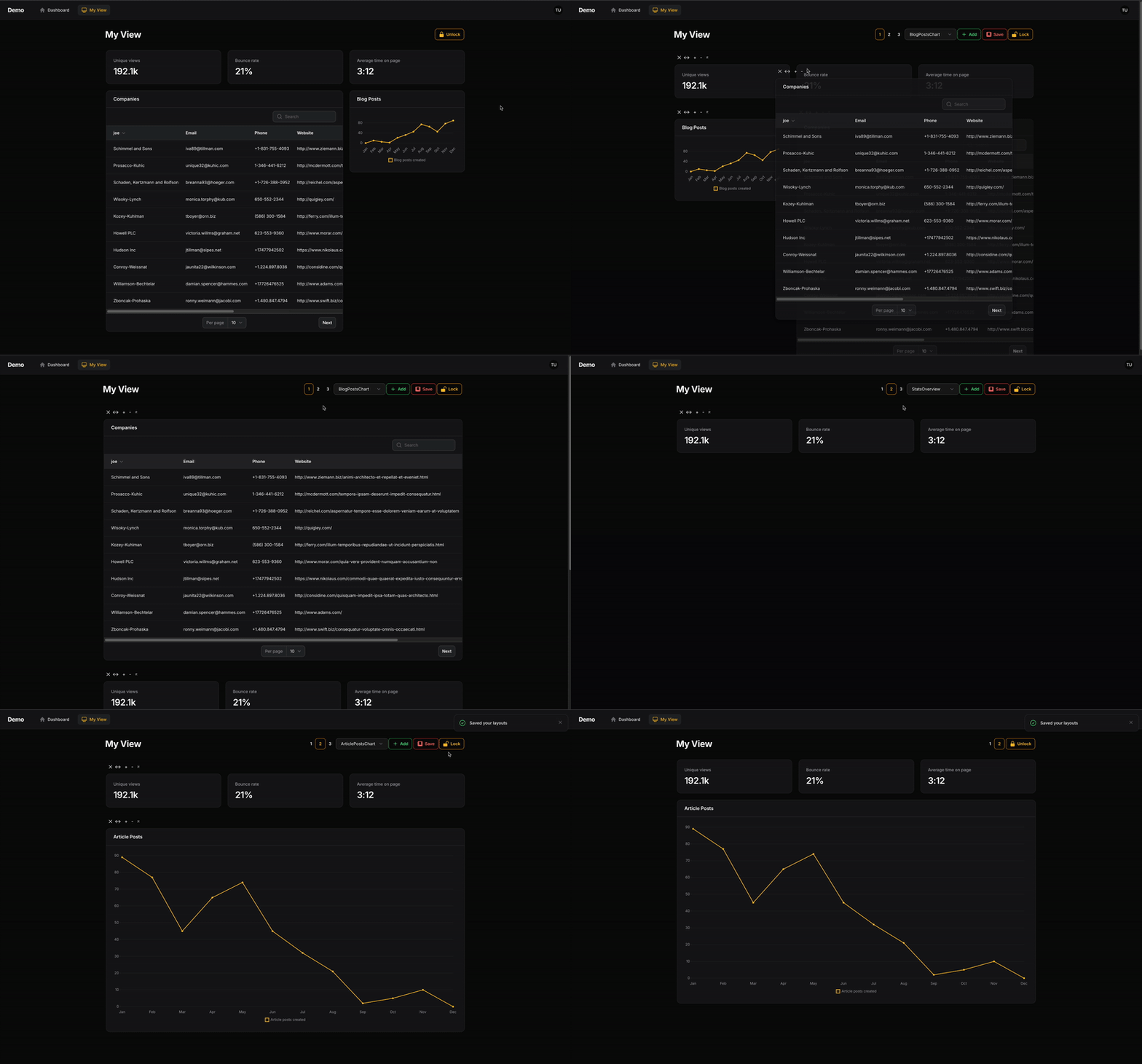
Table of Contents
- Installation
- Usage
- Generate a new page
- Extend your page from LayoutManagerPage
- Remove auto-generated $view property
- Define your components
- Passing Widget Data
- Renaming Selection Options
- Multiple Layouts
- Customization
- Extend LayoutManager
- Update Config
- Saving Layouts to a Database
- Adding Header Actions
- Wrapping in a FilamentPHP page
- Child Component Data Stores
- Why is this useful?
- Event Hook
- Updating the component's store
- Using the store
- Customizing
- Changelog
- Contributing
- Security Vulnerabilities
- Credits
- Open For Work
- License
Installation
You can install the package via composer:
Filament V5 + Filament V4
Filament V3 - no longer supported
You can publish the config file with:
Optionally, you can publish the views using
Optionally, you can publish the translation files using
Usage
The easiest way to use Filament Layout Manager is by creating a new page.
1. Generate a new page
2. Extend your page from LayoutManagerPage
Your custom page needs to extend from use Asosick\FilamentLayoutManager\Pages\LayoutManagerPage;
3. Remove auto-generated $view property
To ensure to correct view is rendered, please delete the autogenerated view property in your new Page class. The view to be used is defined in LayoutManagerPage and this property overrides it.
4. Define your components
You can now define the livewire components you'd like users to be able to add to this new page using the getComponents() method:
You can now visit your page, unlock your layout, and begin reorganizing.
Grid columns
You can specify the number of columns in your layout grid as so from inside your new custom page.
The layout manager includes the required tailwind styles up to a grid size of 12.
Passing Widget Data
Similar to a traditional filament page, you are able to pass data directly to your widgets. (Support for passing data to custom components coming soon...)
NOTE: Data passed to this widget will be applied to all its instances. For component specific data, see section below on component data stores
This passes your data ['company'=>'Apple'] to your widget in a data property. You can access that in your mount() function or via a direct property like any Livewire component.
Renaming Selection Options
The names associated with your selected components can be changed by overriding the getComponentSelectOptions method in your custom page. Be sure to order the array you provided to match the order of the components you provided
Multiple Layouts
Users are able to define multiple layouts they can switch between.
Each layout is mapped to a keybinding based on its number:
command+1 | ctrl+1=> layout 1command+2 | ctrl+2=> layout 2- so forth...
Change the default number of views using the getLayoutCount() function in your page class or update the configuration file.
Customization
Filament Layout Manager wraps your Livewire components inside a customizable class, allowing users to modify them.
This wrapper class is different from your Page class or its Blade view. The Page class renders the wrapper component, while the wrapper enables user manipulation of Livewire components.
The wrapper class that must be extended to enable customization is Asosick\FilamentLayoutManager\Http\Livewire\LayoutManager.php
In order to customize say the colour of one of the header buttons, first:
1) Publish the configuration file
2) Extend LayoutManager
Create a new class in your application called (for example) App\Livewire\CustomLayoutManager.php
and extend that class off of Asosick\FilamentLayoutManager\Http\Livewire\LayoutManager.php
3) Update config
Update your configuration to point to your new custom class.
I recommend exploring the code in LayoutManager when digging into customization. You'll want to ensure you're still calling the require methods on actions you edit.
Saving Layouts to a Database
By default, layouts are saved in the user's session and are not persisted
In order to save your user's layout to a database (or file, etc.), you'll need to
- Override
LayoutManageras shown above - Implement a new
save()function to persist the layout - Implement a new
load()function to load the layout
Where a user's layout is saved in your database and how that is managed is your concern.
There needs to be somewhere to store this information. Perhaps a json column on your user's table called settings for example. You'll need to create a column if it doesn't exist in your DB.
Example
Assumes a settings json column on your user's model where settings can be stored.
Adding Header Actions
Header actions can be added to the right of the 'Lock' button by overriding the getHeaderActions() method in your custom LayoutManager (NOT your custom page).
Example:
(Optional) Wrapping in a FilamentPHP page
By default, the LayoutManagerPage is not rendered with the traditional FilamentPHP page tags. If, for some reason, you need everything wrapped in a FilamentPHP page, you can enable that as so:
or
You may need to override some filament css hooks to get the spacing right for what you need.
Child Component Data Stores
Components can save data about themselves (like table filters or form values) and restore it when the user returns to the page.
Why is this useful?
For example, in my application, I wanted table widgets to remember the filters users applied across sessions.
Filament does provide a persistToSession() option for tables, but this does not work for multiple table widgets or across sessions.
Event Hook
I've provided a livewire event for you to utilize for this purpose.
Each livewire component rendered through your layout manager is passed a value called container_key used to keep track of its data.
Component specific data is passed via the store property.
Each livewire component can dispatch an event to the LayoutManager class to update it's store which is saved alongside your layout data.
Getting the component key and store
Define the container_key and store properties in your widget or component class
Updating the component's store
Execute the following anywhere in your child-component (like a table widget), while replacing the store: [] with actual data.
(For example, I dispatch the above in my table widget where store is all the current table filters)
Using the store
Your components store property is passed just like any livewire property on reloads of your layout.
Customizing
This component-store-update event method is present in LayoutManager meaning if you want to change it's behaviour, you are free to do so in your custom layout manager.
How to create a custom layout manager is detailed above in this README.
//: # () //: # () //: # ()
//: # () //: # ()
//: # ()
//: # () //: # ()
Changelog
Please see CHANGELOG for more information on what has changed recently.
Contributing
Please see CONTRIBUTING for details. All contributors welcome - don't be shy :)
Security Vulnerabilities
Please review our security policy on how to report security vulnerabilities.
Credits
- August
- All Contributors
License
The MIT License (MIT). Please see License File for more information.
All versions of filament-layout-manager with dependencies

filament/filament Version ^4.0 || ^5.0
livewire/livewire Version ^3.5 || ^4.0
spatie/laravel-package-tools Version ^1.15.0