Download the PHP package asignua/filament-xlsx-export without Composer
On this page you can find all versions of the php package asignua/filament-xlsx-export. It is possible to download/install these versions without Composer. Possible dependencies are resolved automatically.
Download asignua/filament-xlsx-export
More information about asignua/filament-xlsx-export
Files in asignua/filament-xlsx-export
Package filament-xlsx-export
Short Description Immediate, streamed XLSX export of the current Filament table: real numbers, dates and booleans in the cells, a column picker with select-all, export options that change the query, no queue and no temporary CSV.
License MIT
Homepage https://github.com/asignua/filament-xlsx-export
FAQ
Example:

In general, it is recommended to use always a project to download your libraries. In an application normally there is more than one library needed.

- Some hosting areas are not accessible by a terminal or SSH. Then it is not possible to use Composer.
- To use Composer is sometimes complicated. Especially for beginners.
- Composer needs much resources. Sometimes they are not available on a simple webspace.
- If you are using private repositories you don't need to share your credentials. You can set up everything on our site and then you provide a simple download link to your team member.
- Simplify your Composer build process. Use our own command line tool to download the vendor folder as binary. This makes your build process faster and you don't need to expose your credentials for private repositories.
Informations about the package filament-xlsx-export
Filament XLSX Export





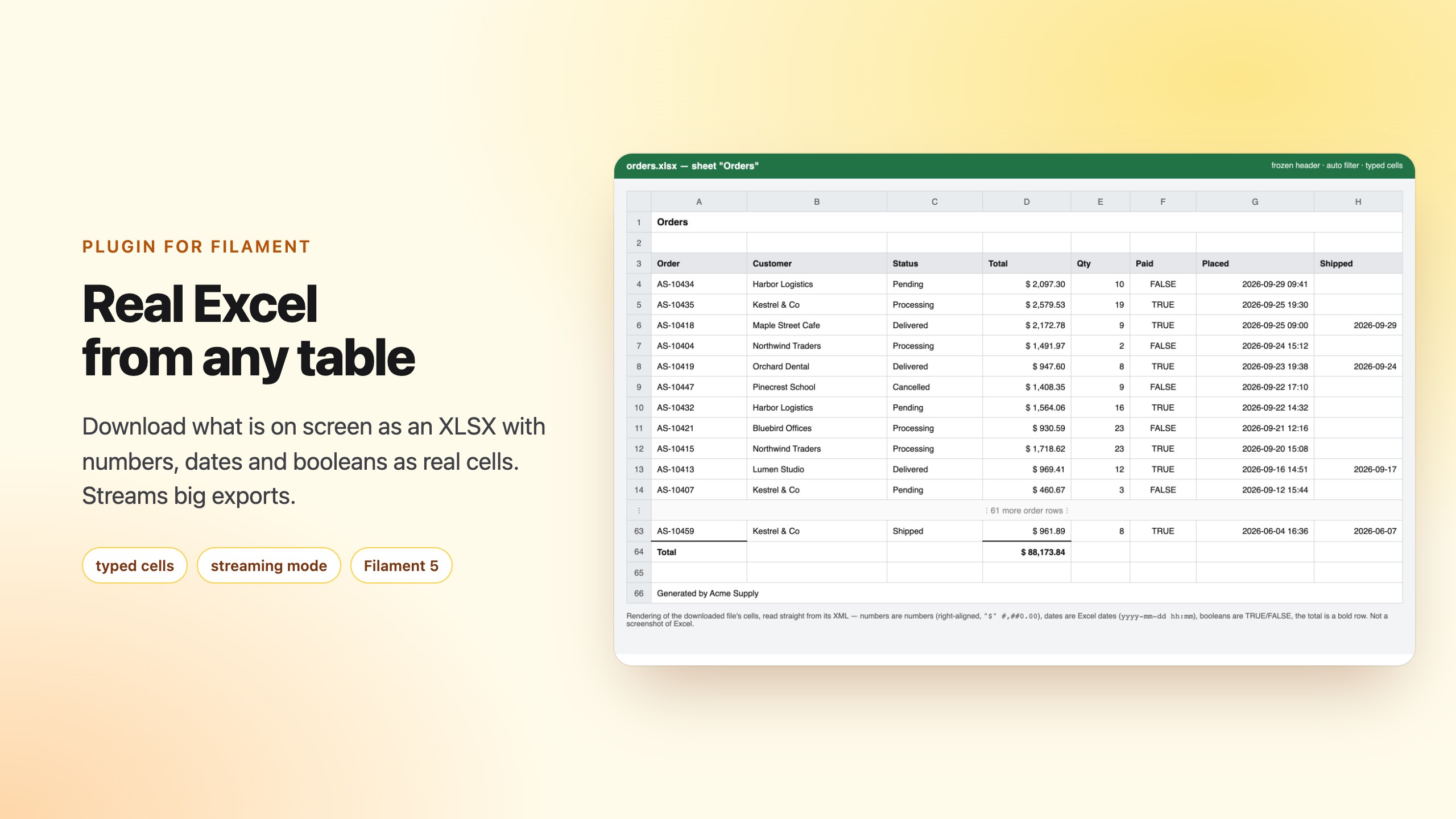
"Download what is on the screen" as a real Excel file: the table's current filters, search and sort — or the rows you ticked — streamed straight to the browser, with numbers that are numbers and dates that are dates.
Filament's built-in export is queued, chunked, stored and goes through a CSV first, so every cell of the XLSX ends up as text. People keep asking for the simple version:
- an immediate download without queues — discussion #11950
- numbers, dates and enums as real cells instead of text, because core builds the XLSX from an intermediate CSV — #16233
- export options that change the query — #12519
- select-all in the column picker — #16062
This plugin does exactly that, and keeps core's Exporter usable too (see Typed cells for core exporters).
- Screenshots
- Requirements
- Installation
- Usage
- Typed cells
- ColumnFormat
- Export options that change the query
- Layout
- Row limit and memory
- Streaming mode
- Typed cells for core exporters
- Configuration
- Gotchas
- Translations
- AI agents
- Testing
Screenshots
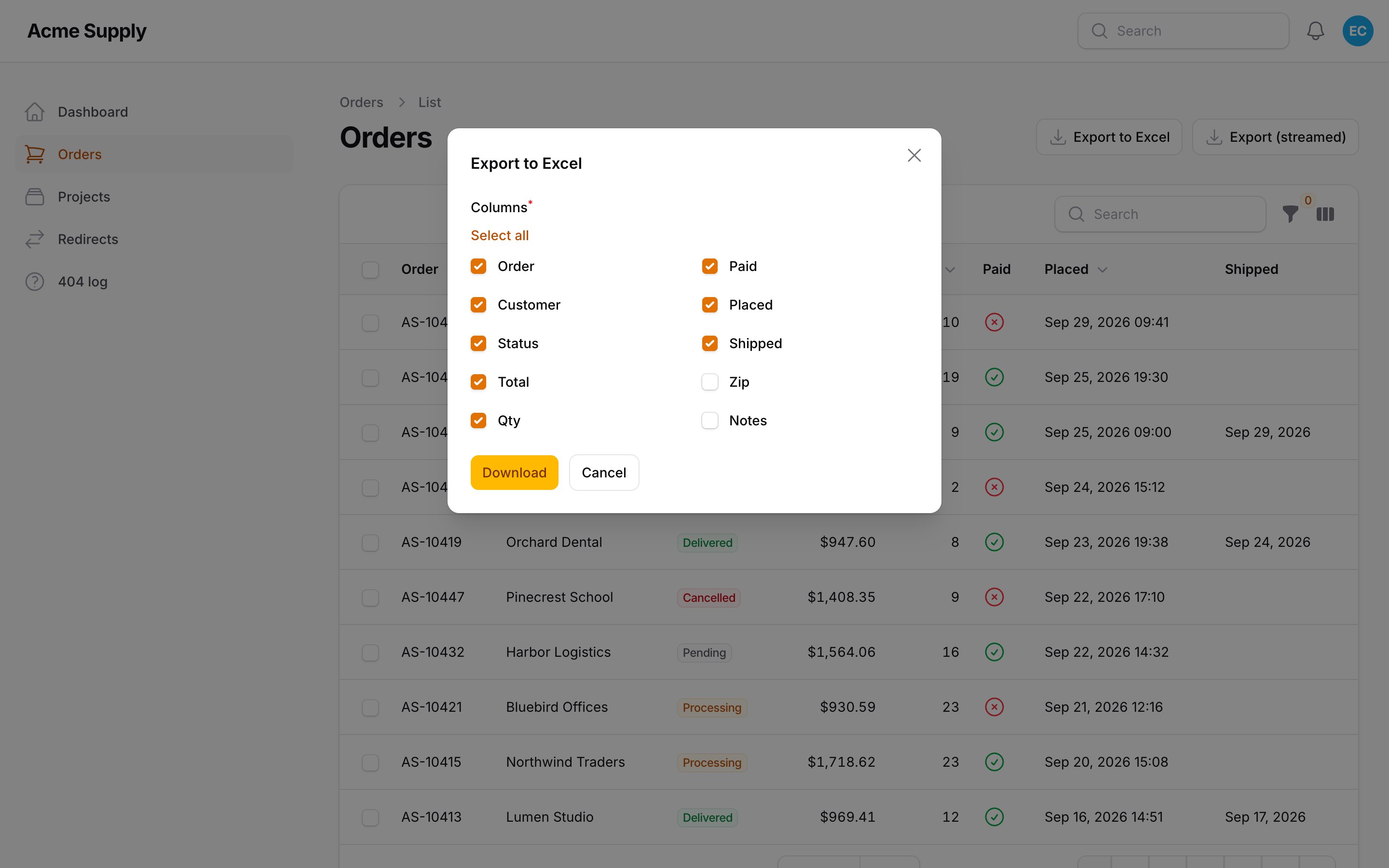
The export modal with the column picker:
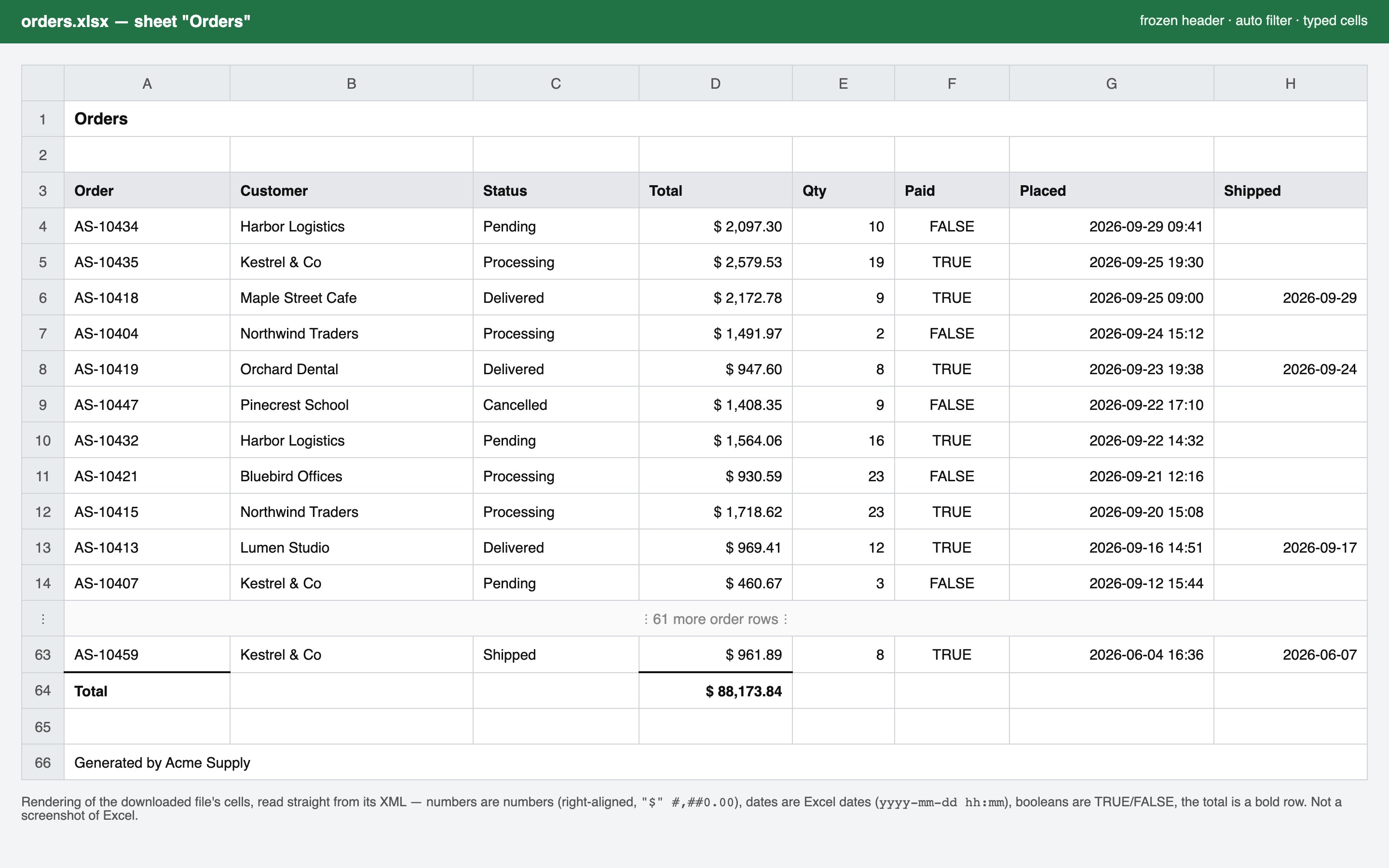
The downloaded workbook - numbers, dates and booleans are real cells, the total is a bold row (a rendering of the file's cells, not a screenshot of Excel):
Requirements
- PHP 8.3+
- Filament 5, Laravel 12 or 13
- OpenSpout 4 (installed with the package)
Installation
There are no assets, migrations or panel registration: the package only adds actions. To change the defaults:
Usage
On a list page:
Selected rows, in the table:
Both actions open a small modal with the column picker (a checkbox list with select all), ticked with the
columns the table shows right now: columns toggled off and hidden() ones stay out, image columns are never offered.
->chooseColumns(false) skips the modal and downloads at once.
The file is exactly the table's query: filters, search and sort. The bulk action turns the selection (including "select
all" across pages, with its deselections) into a query, never into a loaded collection. Like every core bulk action it honours
->authorizeIndividualRecords() and the table's checkIfRecordIsSelectableUsing(): refused rows are skipped as the file
streams (the row count used for the limits and $rowCount is taken before that check).
Closures may ask for $data (the modal's values), $livewire and, for caption(), $rowCount.
Typed cells
| Table value | Cell |
|---|---|
int, float, decimal strings of numeric() / money() columns |
number (money columns get #,##0.00) |
Carbon / DateTimeInterface, strings of date() / dateTime() columns |
Excel date with a number format (yyyy-mm-dd, yyyy-mm-dd hh:mm), shown in the column's timezone |
time() columns |
day fraction with hh:mm |
bool |
TRUE / FALSE |
HasLabel enum |
its label; other backed enums their value |
| arrays, collections, relationship lists | joined with , |
| everything else | text (never a formula, even when it starts with =) |
The value is the column's getState(), so relationships (customer.name), getStateUsing(), accessors and casts work.
formatStateUsing(), prefixes and limits are not applied — you get the typed value. Opt in per column with
ColumnFormat::make()->formatted().
ColumnFormat
Override a column by its name:
A key that is not a table column and has ->value() is added after the table's columns and appears in the picker.
The value() closure takes $record, $state (what the table column would have given), $data and $livewire.
| Method | Effect |
|---|---|
label() |
header text |
number(?string), integer(), decimal($places), money($symbol, $places), percent($places) |
number formats |
date(), dateTime(), time() |
date formats (Excel format codes) |
text(), boolean() |
force the cell type |
width() |
column width in characters |
value() |
where the value comes from |
divideBy() |
divide numbers (money stored in cents) |
formatted() |
use the text the table shows |
sum() |
bold total row under the column |
exclude(), unselected() |
picker behaviour |
Export options that change the query
Add fields to the modal and use them to reshape the query, the file name and the caption:
The row-limit check runs on the final query.
Layout
The sheet is: optional title (merged across the columns, bold), optional caption, a blank line when either is there,
the header (bold, grey), the data, a bold total row when a column asks for sum(), and the footer() lines (string,
list or closure) after a blank row.
The header row is frozen, an auto filter covers the data, and every column gets a width (the label length plus padding
within width.min and width.max, or your ->width()). Switch the first two off with ->freezeHeader(false) and
->autoFilter(false), or in the config.
Row limit and memory
Rows are read with lazy() in chunks (chunk_size, default 500) and written through OpenSpout with inline strings, so
the workbook never exists in memory as a whole. In Livewire mode (up to streaming.above_rows) the limit
row_limit (default 25 000, per action ->rowLimit(n), 0 disables) is checked with a COUNT(*) first; over it the
user sees a notification instead of a download. Livewire still holds that finished file in memory once, which is what
the limit protects. Bigger exports use the streaming mode below.
Streaming mode
A Livewire action cannot stream: it captures the response and sends it back base64-encoded. So above
streaming.above_rows (default 5 000), or when forced with ->streamed(), the action does something else:
- In the Livewire request it validates the choice, then stores a hand-over in the cache under a random 48-character
token (
streaming.ttlseconds, default 120) and redirects the browser to a temporary signed URL. - That plain HTTP request checks the signature, that the logged-in user is the one the token was issued to, and spends
the token (one download per link). It then streams the workbook to
php://outputwithlazy()— nothing is buffered, so memory stays flat at any size (a test exports 20 000 rows with a memory bound).
In streaming mode the config row_limit does not apply; streaming.hard_cap (default 500 000, null = none) does. An
explicit ->rowLimit(n) on the action holds in both modes: when streaming, the lower of it and hard_cap applies.
The download request counts the rows again, so rows added between the click and the download cannot carry the file
past the cap. Grouped, HAVING and UNION queries (for example from queryUsing()) are counted by their result rows,
not by the size of their first group.
Panels with tenancy never stream. Filament scopes a tenant panel's queries through a global scope that does nothing
without a current tenant, and the tenant comes from the page's URL and the tenant middleware — neither of which the
download request has. A streamed file would therefore contain every tenant's rows. So on a panel with ->tenant(...)
the action always stays in Livewire mode (bound by row_limit, even with ->streamed()), and the route refuses a token
issued for such a panel.
When a link cannot be used — it expired (a slow click, a retry from the browser history), it was already used, it belongs to another user, or the action cannot be found after rehydration — the user is sent back to the page that asked for the file with a notification, not to an error page. A link with a forged or altered signature gets a 403. An error while rows are already being streamed cannot be turned into a message any more (the response has started): the browser gets a truncated file, and the exception is reported as usual.
How the query is rebuilt outside Livewire, and the trade-off. A query cannot be serialised soundly: eager loads, casts
and the table's columns (closures) are code, and replaying SQL plus bindings would lose them. Storing the filtered
primary keys would work for the rows but not for the columns, and needs a cap. So nothing about the query is stored;
what is stored is the component's own Livewire snapshot (filters, search, sort, selected keys, mount state, signed
with your app key), the action's name and the modal's values. The route rehydrates the component, runs its lifecycle
hooks, finds the action by name and asks the table for getFilteredSortedTableQuery() (or, for the bulk action,
getSelectedTableRecordsQuery()) — the same query the table would build itself. The cost:
- The component must be rehydratable from its public properties alone. That holds for resource list pages and for plain
table components. A component whose table depends on request state (route parameters read in
table(), a tenant resolved from the URL, a query-string value) will see the download request instead of the page request. Force->streamed(false)on such tables. - The panel is restored from the id stored with the token and booted (a table outside any panel gets no panel, and its user is checked against the app's default guard); the rehydrated component sees the logged-in user, but not the page's route. Panel tenancy is not carried over, which is why tenant panels never stream (see above).
- The download route does not run the panel's middleware — only
streaming.middleware. The locale of the click is restored (from the token and from the component's snapshot), so labels match Livewire mode. Everything else a panel's persistent middleware does is not:canAccessPanel()is not re-checked within the link's ttl, and scopes or settings that your own panel middleware applies per request are missing. Add such middleware tostreaming.middleware. - The action must be reachable by name from the rehydrated component (table header/toolbar/bulk actions, or the page's header actions, groups included). A renamed action is fine; one created on the fly is not.
- State changes between click and download (a few seconds) are not seen: the snapshot is the state at the click.
- The token store is the default cache store; use a shared one (Redis, database) behind several servers.
Route options live under streaming in the config: register_route, path, middleware (default ['web']; it must
start the session and see the panel's guard). The controller checks the URL signature itself. To register your own route
instead (register_route => false), keep its name and its {token} parameter, since the action generates the link with
URL::temporarySignedRoute(StreamedExports::ROUTE, ...):
Typed cells for core exporters
Core's queued Exporter writes CSV files and then copies them into an XLSX as strings; the plugin cannot change the
queued job, but core exposes the hooks, so a trait covers the common case:
There is deliberately no auto-detection: a CSV cell 00123 or 1e5 is indistinguishable from a number, and guessing
would silently corrupt zip codes, phone numbers and IDs. Columns you declare are converted from the CSV text back into numbers, dates and booleans while the workbook is written;
the rest stay text. The header row stays text, and the trait adds widths, a frozen header and a filter. It is still
queued and still goes through CSV — that is core's design. What it cannot do: format a value that the CSV already lost
(a number rounded by formatStateUsing()), and it needs the column's CSV text to parse (Y-m-d H:i:s for dates).
Configuration
config/filament-xlsx-export.php: row_limit, streaming.*, chunk_size, header.bold, header.background, freeze_header,
auto_filter, formats.* (Excel number formats for dates, date-times, times and money), width.min, width.max,
total_label. Everything is a plain value, so the config can be cached.
Gotchas
- Livewire mode buffers the file. Only the streaming mode (see above) avoids it; that is what
row_limitprotects. - Money in cents. The exporter cannot see
->money(divideBy: 100); declareColumnFormat::make()->divideBy(100). - Dates have no timezone in Excel. A date-time is written as the wall time in the column's timezone
(
->timezone(), elseapp.timezone). - Numbers over 15 digits (IBANs, card numbers) stay text; Excel keeps 15 significant digits.
- Long text is cut at 32 767 characters, Excel's cell limit.
- Sorting a chunked read. Rows are read in pages; unless the query already sorts by the primary key, the plugin adds
it as the last sort column, so rows that tie on a non-unique sort are neither repeated nor skipped across pages. A
grouped query (
GROUP BY,HAVING,UNION) is left as it is, since the key is not a valid sort column there; give it a unique order yourself if it can span more than one page. - Tables without an Eloquent query (array or API data sources) are not supported.
Translations
The interface ships in English, Ukrainian, German, Spanish, French, Italian, Dutch, Polish, Brazilian Portuguese and
Turkish under the filament-xlsx-export::xlsx-export namespace. A test keeps every language in step with the English
keys and placeholders. Override a string by publishing the translations (--tag=filament-xlsx-export-translations).
AI agents
The package ships Laravel Boost guidelines (resources/boost/guidelines/core.blade.php)
that describe the actions, ColumnFormat and the options, so a coding agent wires it up correctly.
Testing
The suite runs on Orchestra Testbench with a workbench/ panel and an Order
resource. Tests read the generated workbook back from its XML and assert cell types, values and number formats.
Changelog
See CHANGELOG.md.
License
The MIT License (MIT). See LICENSE.md.
All versions of filament-xlsx-export with dependencies

filament/filament Version ^5.0
illuminate/contracts Version ^12.0|^13.0
openspout/openspout Version ^4.32
spatie/laravel-package-tools Version ^1.16