Download the PHP package asignua/filament-spreadsheet-grid without Composer
On this page you can find all versions of the php package asignua/filament-spreadsheet-grid. It is possible to download/install these versions without Composer. Possible dependencies are resolved automatically.
Download asignua/filament-spreadsheet-grid
More information about asignua/filament-spreadsheet-grid
Files in asignua/filament-spreadsheet-grid
Package filament-spreadsheet-grid
Short Description Excel-style editing for Filament tables: keyboard navigation, TSV copy/paste, fill-down, multi-cell selection and one batch save with per-row errors.
License MIT
Homepage https://github.com/asignua/filament-spreadsheet-grid
FAQ
Example:

In general, it is recommended to use always a project to download your libraries. In an application normally there is more than one library needed.

- Some hosting areas are not accessible by a terminal or SSH. Then it is not possible to use Composer.
- To use Composer is sometimes complicated. Especially for beginners.
- Composer needs much resources. Sometimes they are not available on a simple webspace.
- If you are using private repositories you don't need to share your credentials. You can set up everything on our site and then you provide a simple download link to your team member.
- Simplify your Composer build process. Use our own command line tool to download the vendor folder as binary. This makes your build process faster and you don't need to expose your credentials for private repositories.
Informations about the package filament-spreadsheet-grid
Filament Spreadsheet Grid





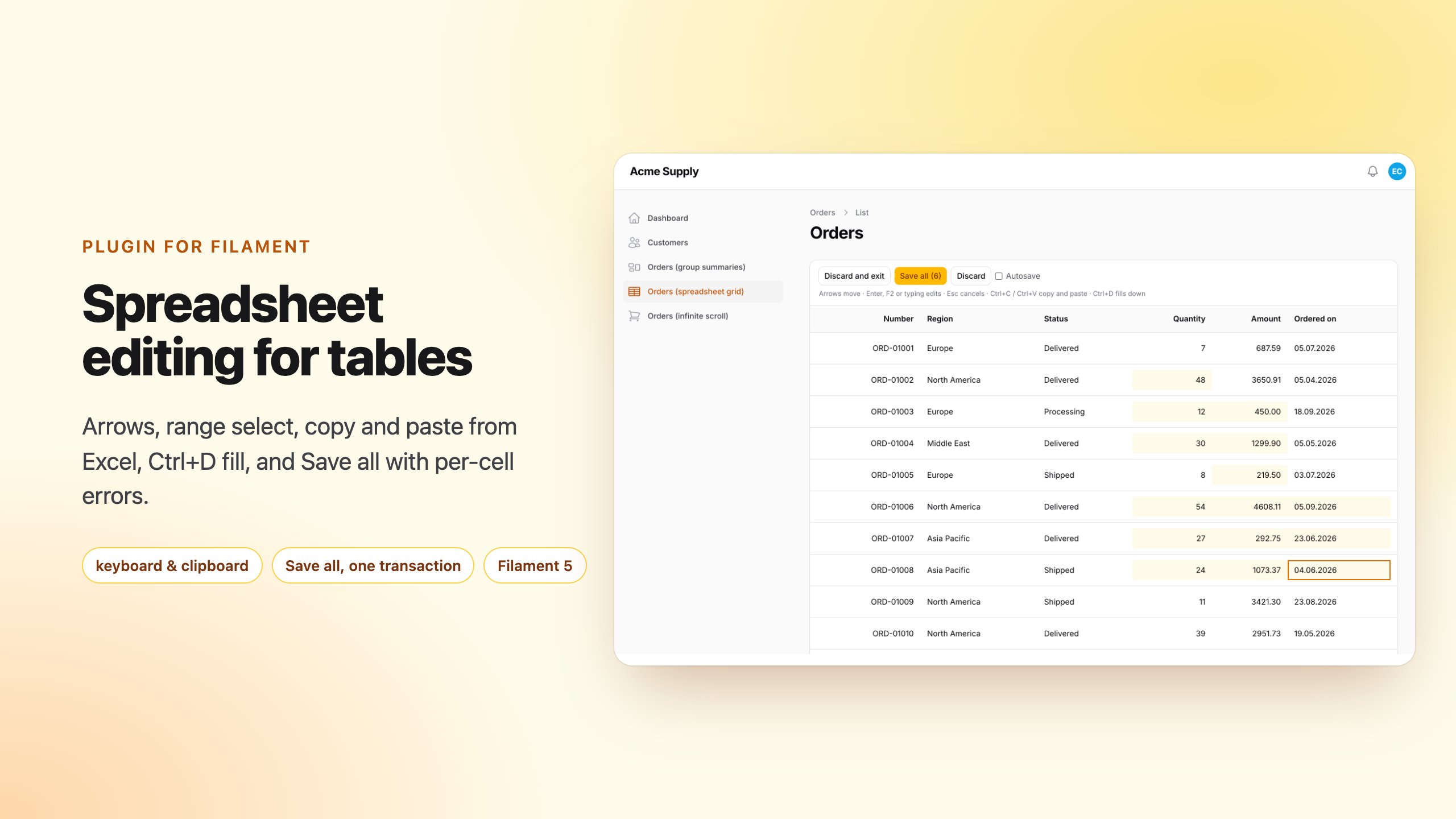
Edit a Filament 5 table the way people edit a spreadsheet: move with the keyboard, type over a cell, paste a block from Excel or Google Sheets, fill a column down, then press Save all once.
Filament's own editable columns (TextInputColumn, SelectColumn, …) save one cell per request, with no keyboard
navigation, no range selection and no clipboard. That is fine for a toggle and painful for "update 60 prices from a
price list". This plugin keeps your table (its query, filters, search, sorting, pagination) and changes how its cells are
edited:
- Spreadsheet interaction: arrows, Tab / Shift+Tab, Enter / F2 / typing to edit, Esc to cancel, Ctrl+Arrow, Home / End, mouse and Shift+click range selection, Delete to clear.
- Clipboard: copy a range as TSV, paste a TSV block from Excel / Google Sheets / LibreOffice (quoted cells,
1 250,5,02.10.2026andTRUEare understood), cut, paste one value over a whole selection. - Fill: Ctrl+D (down), Ctrl+R (right).
- Cell types: text, number, integer, select, date, boolean.
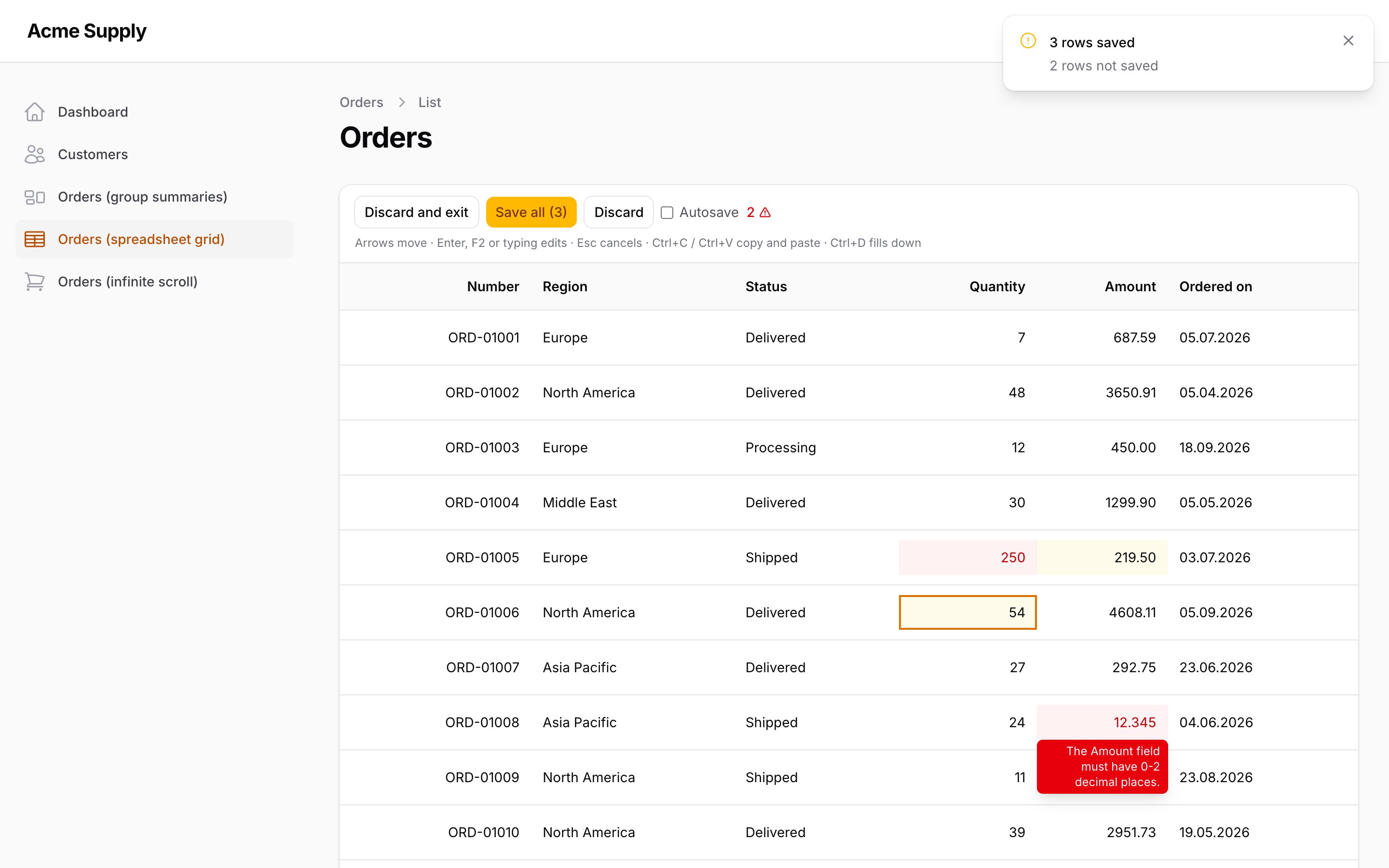
- Validation per cell, inline: instant client checks, then your Laravel rules on the server. A failed cell shows the message; other rows still save.
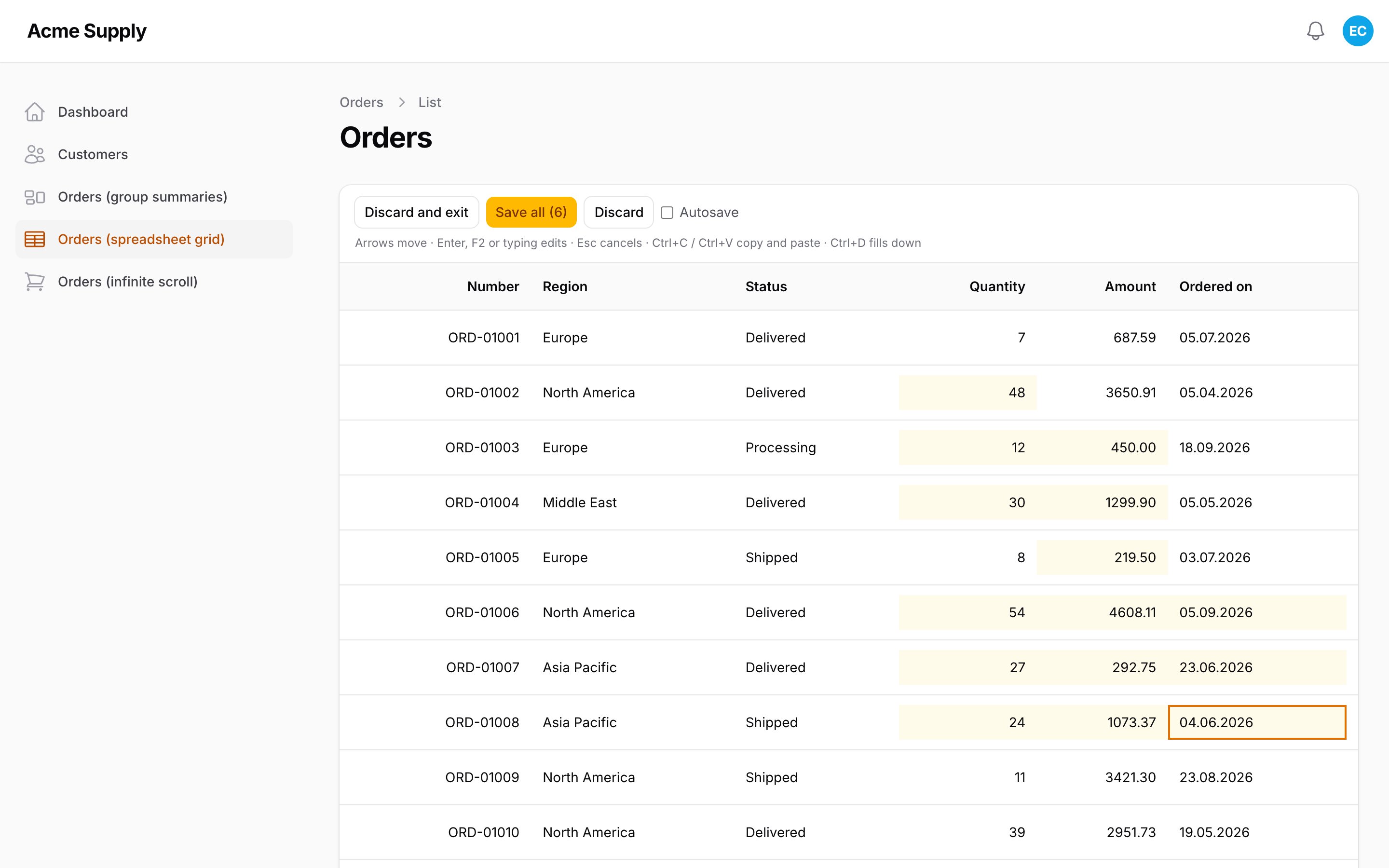
- Dirty cells are highlighted; Save all sends everything in one request, in one transaction, with errors reported per row and cell; Discard drops it all. Optional autosave per cell.
- Your write path:
->saveUsing(fn (Model $record, array $changes) => ...)for repositories, DTOs and models without mass assignment. The default writes attributes explicitly (neverfill()). -
Authorization: every record is checked with the same gate Filament uses for its Edit action (the resource's
canEdit(), a relation manager'scanEdit()/ read-only state, theupdatepolicy) or your callback, on render and on save. - Screenshots
- Requirements
- Installation
- Usage
- Keyboard and mouse
- Columns
- Saving
- Mode switch
- Authorization
- Configuration
- Gotchas
- Translations
- AI agents
- Testing
Screenshots
Requirements
- PHP 8.3+
- Filament 5
- Laravel 12 or 13
Installation
The service provider is discovered automatically; there is no panel plugin to register. The stylesheet and the Alpine
component are compiled and shipped in resources/dist, so your panel needs no custom theme or build step.
Usage
Three things: the trait on the Livewire component that owns the table, GridColumns instead of the plain columns you
want editable, and the toolbar in the table header.
The trait also works on a relation manager and on any Livewire component that uses InteractsWithTable. Plain columns
stay plain; mix them freely.
Keyboard and mouse
| Key | Action |
|---|---|
| Arrows, Ctrl+Arrow | move / jump to the edge; with Shift extend the selection |
| Tab, Shift+Tab | next / previous cell, wrapping to the next / previous row |
| Enter, F2 | edit the cell (a boolean cell toggles) |
| any character | edit and replace the content |
| Enter / Tab in the editor | commit and move down / right (Shift reverses) |
| Esc | cancel the edit; in navigation collapse the selection |
| Delete, Backspace | clear the selected cells |
| Home, End, Ctrl+Home, Ctrl+End | row start / end, grid corners |
| Ctrl+A | select everything on the page |
| Ctrl+C, Ctrl+X, Ctrl+V | copy, cut, paste TSV (Cmd on macOS) |
| Ctrl+D, Ctrl+R | fill down / right from the first row / column of the selection |
| click, Shift+click, drag | select a cell, extend, select a rectangle |
Paste anchors at the top-left cell of the selection and is clipped to the rows on the page (the grid never creates rows). One pasted value over a larger selection fills the whole selection. Read-only cells are skipped and counted.
Columns
A select() closure is evaluated once per request and shared by every cell. If the options depend on the row, ask for
the record (fn (Product $record) => ...): the closure then runs once per cell, so keep it cheap. Each cell then carries
its own list to the browser (data-sg-options), and the column config has none.
Types normalise what comes from the clipboard: 1 250,5 and 1.250,50 are numbers, так / yes / TRUE are booleans,
02.10.2026 is a date, a select is matched by value first and by label second. One separator before exactly three digits (1,000,
1.250) is thousands in one locale and decimals in another, so it is refused as an invalid number rather than guessed;
1 000, 1.000,00 and 1,25 are unambiguous. Values the grid itself holds (an unchanged edit, fill down, its own
copy pasted back) are in the machine form, where a dot is the decimal point, so a stored 1.250 keeps working. An emptied cell becomes null
(emptyAs() changes that; required() makes it an error). The server repeats all of it, the browser is never trusted.
GridColumn extends Filament's Column: sortable(), searchable(), label(), toggleable(), alignEnd() … work.
Saving
By default each changed row is written with explicit attribute assignment and save():
There is no mass assignment, so models with $guarded = ['*'] work. For anything else, give the grid your own path;
it receives the record and the validated, typed changes of one row:
- One request, one transaction. Every row runs in a savepoint: in the default (partial) mode a failing row rolls back
alone and the others are saved; in
atomic()mode a failing row (or a failing validation) writes nothing. - A
ValidationExceptionthrown fromsaveUsingis shown on the cells it names (an unknown field lands on the row). AQueryExceptionis reported and shown as "The row could not be saved." Only these two are isolated per row. Any other exception (aDomainExceptionfrom your repository, a model event, theLogicExceptionbelow) is not caught: the whole batch transaction rolls back, nothing is saved, and the request fails like any other server error. Turn domain refusals into aValidationExceptionto keep them on their row. - A column name does not have to be an attribute when you use
saveUsing(address.cityis just the key of the change); withoutsaveUsing, a dotted name throws aLogicException. - The browser sends
[recordKey => [column => value]]tosaveSpreadsheetGrid(). The record must be reachable through the table's base query (your resource'sgetEloquentQuery(), tenant scopes, relation constraints) so nothing outside the table can be written. User filters and search are not applied to the save: a row may leave the filtered view between editing and saving and still be saved. - Notifications (
->notify(false)silences them) report "N rows saved / not saved". Autosave requests notify only failures, so typing down a column does not stack a toast per cell. - Concurrent edits are detected (best effort). With every changed cell the browser sends the value it loaded; when
the stored value is different now (another editor saved in between), that cell is refused with a message showing the
current value.
->detectConflicts(false)returns to last-write-wins. The check is per cell: two editors changing different columns of one row do not conflict. The check reads the records without a lock, before the write transaction: two saves that overlap within those milliseconds can both pass it, and the later one wins. It catches the realistic case (someone saved while you were editing), it is not a substitute for optimistic locking. - The transaction runs on the model's own connection (
$connection), not the default one.
Mode switch
By default every GridColumn is editable all the time. To keep the table an ordinary Filament table until the user asks
for spreadsheet editing:
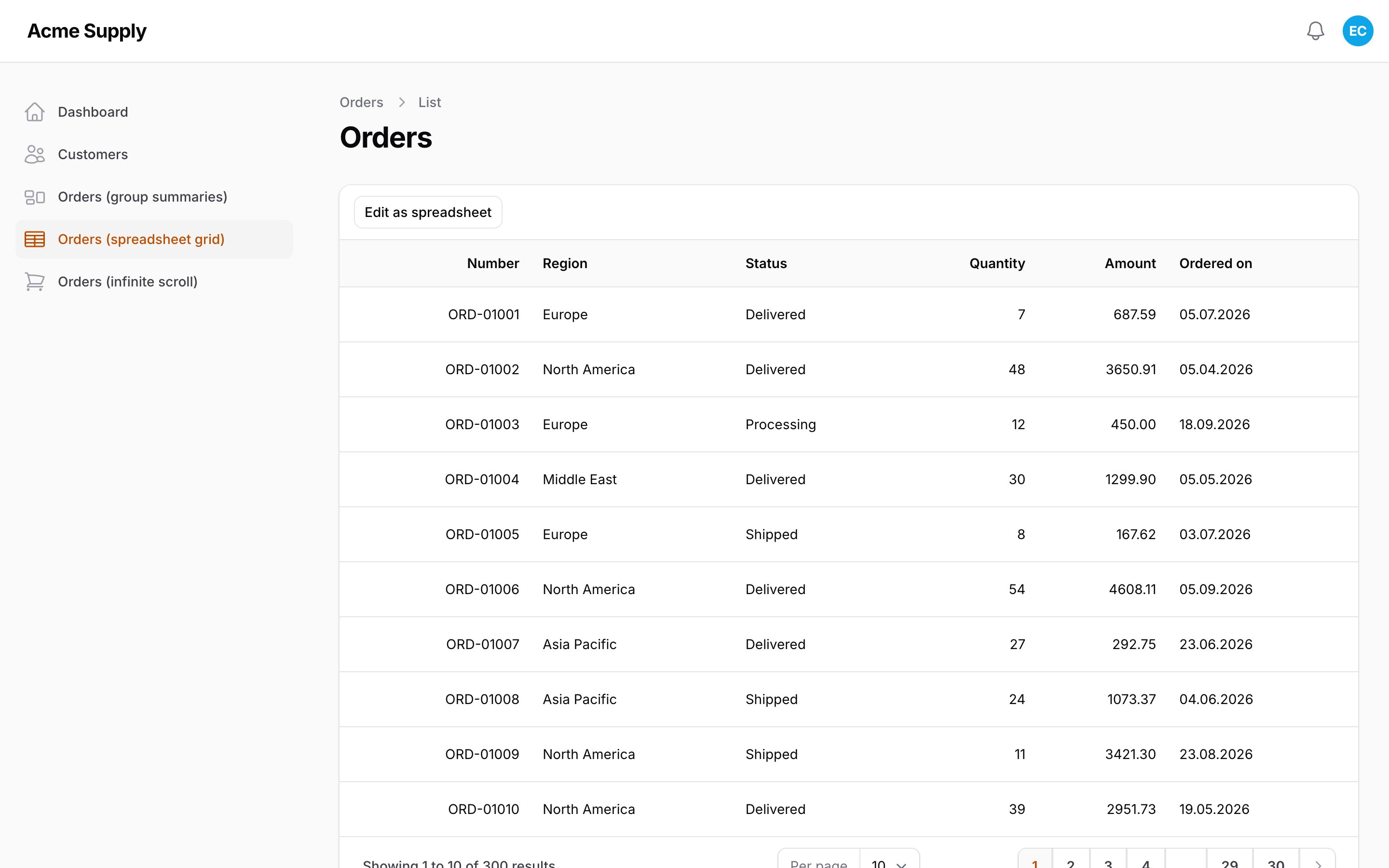
The toolbar then shows Edit as spreadsheet. While the mode is off, grid columns render as plain read-only text (row
clicks and recordUrl() work) and saveSpreadsheetGrid() refuses writes. The button becomes Done, or Discard and
exit (with a confirmation) when there are unsaved edits. The choice lives in the Livewire component ($spreadsheetGridActive,
#[Locked], changed only through toggleSpreadsheetGrid()); persist: true also remembers it in the session per
component class.
The mode switch is UX, not access control: anyone who can call the component can switch the mode on. What guards
the writes is authorization (below), hidden columns and editable().
Authorization
By default the grid asks the gate Filament itself asks for the Edit action of that table:
- on a resource page (List records): the resource's
canEdit($record), so acanEdit()override counts; - in a relation manager / "manage related records" page: its
canEdit($record), and a relation manager on a View page is read-only (Filament'sreadOnlyRelationManagersOnResourceViewPagesByDefault()); - anywhere else (a table widget, a custom page): the
updatepolicy ability, through Filament. No policy means editable, unless the panel usesstrictAuthorization(), which refuses (with Filament's exception) as it does everywhere.
Replace it:
A denied record renders read-only cells (selectable and copyable, not editable) and a forged request for it is
rejected row by row with a message. GridColumn::editable(false | Closure) limits single columns.
Configuration
| Key | Default | Meaning |
|---|---|---|
max_rows |
500 |
rows in one save request (also SpreadsheetGrid::maxRows()) |
max_cells |
5000 |
cells in one save request (also maxCells()) |
Over a limit nothing is saved and every row gets a message.
Gotchas
- The toolbar is required.
->header(SpreadsheetGrid::toolbar())hosts the Alpine component that attaches to the table. If your table already has a header, renderview('spreadsheet-grid::toolbar', ['config' => $livewire->spreadsheetGridClientConfig()])in it. - Do not combine with
recordUrl()/recordAction()on the same table: a click on a cell is meant to select it. Clicks on cells do not propagate to the row, but a row link is still the wrong UX for a grid. - Pending edits live in the browser. They survive filtering, sorting, pagination and Livewire re-renders (they are
keyed by record, and repainted after every DOM patch), but not a page reload. Leaving the page asks first: the browser
warns on a reload or a full navigation, and in
->spa()panels awire:navigatelink asks for confirmation. date()is for DATE columns. On a datetime column an edit stores the day only and the time becomes00:00:00; use a text column, orsaveUsing()to merge the time back.- Paste only fills the rows on the page; raise
->defaultPaginationPageOption()for bigger sheets. - Tables with pivot record keys (
BelongsToManywithallowDuplicates()) are not supported: the save looks records up by the model key, so the grid throws aLogicExceptionon render and on save instead of writing by the wrong key. - The table query must be an Eloquent query. A
select()that drops the primary key breaks the save. - Decimals are passed to the model as numeric strings (no float rounding); integers as
int.
Translations
en, uk, de, es, fr, it, nl, pl, pt_BR, tr. Publish to change them:
AI agents
The package ships Laravel Boost guidelines
(resources/boost/guidelines/core.blade.php): with Boost installed, php artisan boost:install
picks them up, so your coding agent knows the rules above.
Testing
Changelog
See CHANGELOG.md.
License
MIT. See LICENSE.md.
All versions of filament-spreadsheet-grid with dependencies

filament/filament Version ^5.0
illuminate/contracts Version ^12.0|^13.0
spatie/laravel-package-tools Version ^1.16