Download the PHP
package amjadiqbal/filament-record-pdf without Composer
On this page you can find all versions of the php package
amjadiqbal/filament-record-pdf. It is possible to download/install
these versions without Composer. Possible dependencies are resolved
automatically.
Vendor amjadiqbal Package filament-record-pdf Short Description Preview, download, bulk-download as ZIP, email and save any Filament 4/5 record as a PDF from a Blade view. Built on spatie/laravel-pdf, dompdf by default. License
MIT Homepage https://amjad.com.pk/filament/plugins/filament-record-pdf
After the download, you have to make one include require_once('vendor/autoload.php');. After that you have to import the classes with use statements.
Example:
If you use only one package a project is not needed. But if you use more then one package, without a project it is not possible to import the classes with use statements.
In general, it is recommended to use always a project to download your libraries. In an application normally there is more than one library needed.
Some PHP packages are not free to download and because of that hosted in private repositories.
In this case some credentials are needed to access such packages.
Please use the auth.json textarea to insert credentials, if a package is coming from a private repository.
You can look here for more information.
Some hosting areas are not accessible by a terminal or SSH. Then it is not possible to use Composer.
To use Composer is sometimes complicated. Especially for beginners.
Composer needs much resources. Sometimes they are not available on a simple webspace.
If you are using private repositories you don't need to share your credentials. You can set up everything on our site and then you provide a simple download link to your team member.
Simplify your Composer build process. Use our own command line tool to download the vendor folder as binary. This makes your build process faster and you don't need to expose your credentials for private repositories.
Informations about the package filament-record-pdf
# Record PDF
Preview, download, bulk-download as a ZIP, email and save any Filament 4 or 5 record as a PDF, from a Blade view
you write per resource. Rendering happens on the server through [spatie/laravel-pdf](https://github.com/spatie/laravel-pdf),
with the pure-PHP **dompdf** driver by default, so it works on any host without Chromium or Node.
[](https://packagist.org/packages/amjadiqbal/filament-record-pdf)
[](https://packagist.org/packages/amjadiqbal/filament-record-pdf)
[](LICENSE.md)
## What you get
| Action | Where | What it does |
|---|---|---|
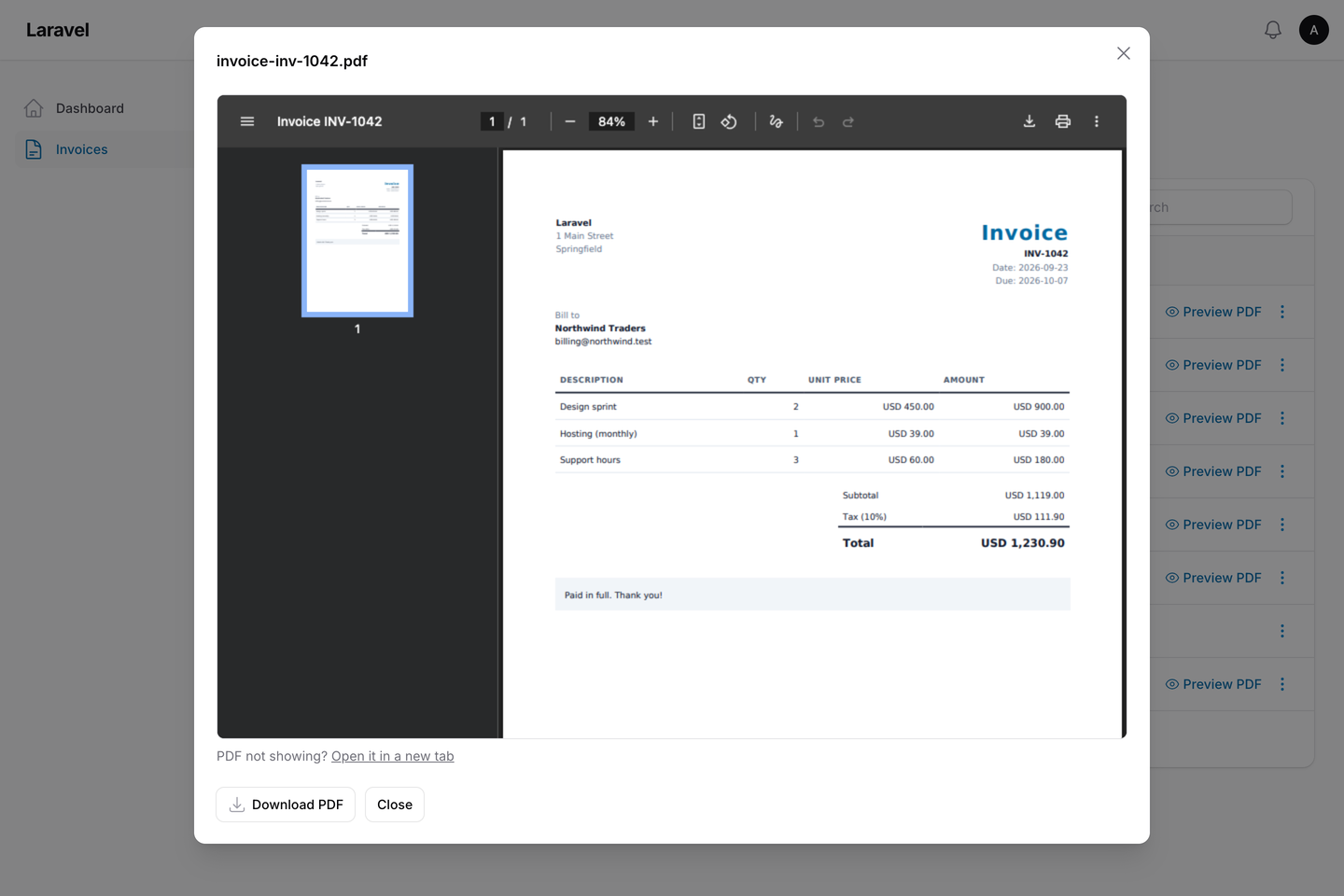
| `PreviewPdfAction` | row, page header | Opens the PDF in a modal, with a download button |
| `DownloadPdfAction` | row, page header | Downloads the PDF |
| `EmailPdfAction` | row, page header | Asks for recipients, subject and message, then sends the PDF as an attachment |
| `SavePdfAction` | row, page header | Saves the PDF to a disk (and optionally a column), or to a media library collection |
| `BulkDownloadPdfAction` | table toolbar | Downloads the selected records as a ZIP of PDFs. Large selections are built on the queue |
All five actions take the same options, so one view and one file-name rule cover every action on a resource.
## Requirements
- PHP 8.2+
- Laravel 12 or 13
- Filament 4 or 5
- `ext-zip` for the bulk ZIP action (most PHP builds include it)
## Installation
That is all you need for the dompdf driver: `spatie/laravel-pdf` and `dompdf/dompdf` are installed with the plugin.
There are no assets to publish and no migrations to run.
You can publish the config if you want to change it:
## Usage
Add the actions to a resource table:
On a View or Edit page, put the same actions in `getHeaderActions()`.
If you don't set `pdfView()`, a built-in view lists the record's attributes (hidden attributes are left out). This
lets you try the plugin before you write your own view.
### Write the Blade view
Create a starter view:
This creates `resources/views/pdf/invoice.blade.php`. The view receives `$record`, plus anything you pass with
`pdfData()`:
You can also use the invoice preset (`filament-record-pdf::presets.invoice`) directly, without copying it. Its
`logo` can be a local file path (for example `public_path('logo.png')`): the preset embeds it as a data URI, because
dompdf only reads local files inside its chroot. In your own views, embed images the same way or set
`LARAVEL_PDF_DOMPDF_CHROOT`.
dompdf handles HTML tables, floats and most of CSS 2.1, but not flexbox or grid. Use tables for layout, and the
bundled "DejaVu Sans" font for non-Latin text. spatie/laravel-pdf's `@pageBreak` directive works in these views.
### Shared options
Every action accepts:
File names are cleaned to lowercase letters, digits and dashes, and `.pdf` is added. Record data such as
`../../.env` in an invoice number can never become a path.
### Preview
`PreviewPdfAction` renders the PDF once and shows it in an iframe. The PDF is kept in the cache for `preview_ttl`
minutes (default 10). Its URL is signed, it expires, and it only works for the user who opened the preview. The
modal's download button uses the same file. Hide the button with `->downloadButton(false)`.
The PDF is stored base64-encoded, so a store with a small item limit (memcached's default is 1 MB) can refuse a large
one; the action then says so. Point `RECORD_PDF_CACHE_STORE` at `file`, `database` or `redis` in that case.
### Email
`EmailPdfAction` shows a form with **To** (up to 10 addresses, separated by commas, semicolons or spaces; duplicates
are removed), **Subject** and **Message**.
### Save
The directory must be relative to the disk root. Absolute paths, drive letters, URLs and `.` or `..` segments throw
an exception before anything is written.
To save into a [spatie/laravel-medialibrary](https://github.com/spatie/laravel-medialibrary) collection instead
(the model must implement `HasMedia`):
### Bulk ZIP
For up to `queue_after` records (default 25), the ZIP is built and downloaded straight away. Above that, the
plugin renders the HTML during the request, and a queued job renders the PDFs, stores the ZIP on the configured
disk, and sends the user a Filament database notification with a download link. The link is signed, expires after
`bulk.link_hours` (default 24), and only works for that user.
Queueing needs `->databaseNotifications()` on the panel and a running queue worker. The ZIP is always built straight
away when the panel has no database notifications, when no user is signed in, or when `modifyPdfUsing()` is set (a
closure cannot be queued).
One download can include up to `bulk.max_records` records (default 500). Records the user may not access are
skipped, and the user is told how many were skipped.
Queued ZIPs stay in `zip_directory` (one folder per download) until you delete them, for example with a scheduled
task that removes folders older than a day.
## Authorization
Each record is checked against its model's policy. The first ability that the policy defines decides:
| Action | Abilities, in order |
|---|---|
| Preview | `viewPdf`, `downloadPdf`, `view` |
| Download, and each record of a bulk download | `downloadPdf`, `view` |
| Bulk download button (no record yet) | `downloadAnyPdf`, `viewAny` |
| Email | `emailPdf`, `view` |
| Save | `savePdf`, `update` |
So `InvoicePolicy::view()` already guards downloads. Add `downloadPdf()` to the policy if users may view an invoice
but not download it. If the model has no policy, or the policy defines none of these methods, access to the panel is
the only check. Single-record actions the user may not use are hidden. The bulk action is hidden when the policy's
`downloadAnyPdf()` or `viewAny()` denies; otherwise it shows, checks each selected record when it runs, skips the ones
the user may not access and says how many were skipped. Change the abilities with `->pdfAbility()` (and
`->pdfAnyAbility()` on the bulk action), or replace the record check with `->authorizePdfUsing()`.
## Drivers
| Driver | What the server needs |
|---|---|
| `dompdf` (default) | Nothing extra: pure PHP |
| `browsershot` | `composer require spatie/browsershot`, Node, Puppeteer and Chromium |
| `chrome` | `composer require chrome-php/chrome` and a Chrome binary |
| `gotenberg` | A running [Gotenberg](https://gotenberg.dev) service |
| `cloudflare` | A Cloudflare account with Browser Rendering |
| `weasyprint` | `composer require pontedilana/php-weasyprint` and the WeasyPrint binary |
Set `RECORD_PDF_DRIVER=browsershot` (or `driver` in the config), or use `->pdfDriver()` on a single action. Each
driver's own options are in spatie/laravel-pdf's `config/laravel-pdf.php`. This plugin has its own driver setting,
so laravel-pdf's default (Browsershot) does not apply here unless you choose it.
## Configuration
Publish the translations with `--tag="filament-record-pdf-translations"` and the views with
`--tag="filament-record-pdf-views"`.
## Testing
`scripts/ci-local.sh` runs Pint, PHPStan and the tests on PHP 8.2 to 8.5, Laravel 12 and 13, and Filament 4 and 5.
It also tests the lowest supported versions of spatie/laravel-pdf and dompdf.
## Changelog
See [CHANGELOG.md](CHANGELOG.md).
## Support
- 🐛 **Bug or feature request**: [open an issue](https://github.com/amjadiqbal/filament-record-pdf/issues)
- 🔒 **Security issue**: please report it privately through GitHub's security tab
## Need this customised, or something built?
I'm available for custom development, package integration, and technical consulting.
[](https://www.upwork.com/freelancers/amjadkhatri)
## More packages
This is part of a family of open-source packages. See [all of them](https://github.com/amjadiqbal?tab=repositories).
| | |
|---|---|
| [filament-xlsx-import](https://github.com/amjadiqbal/filament-xlsx-import) | Excel (.xlsx) and .ods files in Filament's core ImportAction |
| [filament-deleted-records](https://github.com/amjadiqbal/filament-deleted-records) | A recycle bin for spatie/laravel-deleted-models in Filament |
| [filament-change-requests](https://github.com/amjadiqbal/filament-change-requests) | Hold record edits in Filament for approval, with a field-by-field diff |
## Credits
- [Amjad Iqbal](https://github.com/amjadiqbal)
- PDF rendering: [spatie/laravel-pdf](https://github.com/spatie/laravel-pdf) by Spatie (MIT) and
[dompdf](https://github.com/dompdf/dompdf) (LGPL-2.1). This plugin is not affiliated with or endorsed by Spatie.
## License
The MIT License (MIT). See [LICENSE.md](LICENSE.md).
All versions of filament-record-pdf with dependencies
Composer command for our command line client (download client)This client runs in each environment. You don't need a specific PHP version etc. The first 20 API calls are free.Standard composer command
The package amjadiqbal/filament-record-pdf contains the following files
Loading the files please wait ...
Loading please wait ...
Before you can download the PHP files, the dependencies should be resolved. This can take some minutes. Please be patient.



