Download the PHP package always-open/laravel-totem without Composer
On this page you can find all versions of the php package always-open/laravel-totem. It is possible to download/install these versions without Composer. Possible dependencies are resolved automatically.
FAQ
Example:

In general, it is recommended to use always a project to download your libraries. In an application normally there is more than one library needed.

- Some hosting areas are not accessible by a terminal or SSH. Then it is not possible to use Composer.
- To use Composer is sometimes complicated. Especially for beginners.
- Composer needs much resources. Sometimes they are not available on a simple webspace.
- If you are using private repositories you don't need to share your credentials. You can set up everything on our site and then you provide a simple download link to your team member.
- Simplify your Composer build process. Use our own command line tool to download the vendor folder as binary. This makes your build process faster and you don't need to expose your credentials for private repositories.
Informations about the package laravel-totem



Introduction
Manage your Laravel Schedule from a pretty dashboard. Schedule your Laravel Console Commands to your liking. Enable/Disable scheduled tasks on the fly without going back to your code again.
Documentation
Compatibility Matrix
| Laravel | Totem |
|---|---|
| 12.x | 11.x |
| 11.x | 11.x |
Requirements
- PHP 8.2+
- Laravel 11.x or 12.x
Installing
Use composer to install Totem into your Laravel project:
Once Laravel Totem is installed, run the migration and publish the assets:
Updating
Republish Totem assets after updating to a new version:
Configuration
Cron Job
This package assumes that you have a good understanding of Laravel's Task Scheduling and Laravel Console Commands. Before any of this works please make sure you have a cron running as follows:
Web Dashboard
Laravel Totem's dashboard is inspired by Laravel Horizon. Just like Horizon you can configure authentication to Totem's dashboard. Add the following to the boot method of your AppServiceProvider:
By default Totem's dashboard only works in the local environment. To view the dashboard point your browser to /totem of your app.
Table Prefix
Totem's tables use generic names which may conflict with existing tables in a project. To alleviate this the .env param TOTEM_TABLE_PREFIX can be set which will apply a prefix to all of Totem's tables and their models.
Cache Store
By default Totem uses your application's default cache store. In environments where UI servers and background worker servers use separate cache clusters (e.g. different Redis instances), Totem's cache can become inconsistent — a bust event on one server won't clear the cache on the other.
Set TOTEM_CACHE_STORE to a named store from your config/cache.php that is accessible by all servers:
Setting it to array disables cache persistence entirely (each request hits the database):
Leaving it unset uses your application's default cache store (existing behaviour).
Filter Commands Dropdown
By default Totem outputs all Artisan commands on the Create/Edit tasks. To make this dropdown more concise there is a filter config feature that can be set in the totem.php config file.
Example filters:
This feature uses fnmatch syntax to filter displayed commands. stats:* will match all Artisan commands that start with stats: while email:daily-reports will only match the command named email:daily-reports.
This filter can be used as either a whitelist or a blacklist. By default it acts as a whitelist but an option flag can be set to instead act as a blacklist:
Middleware
Laravel Totem uses the web middleware by default. If customization is required the middleware can be changed by setting the TOTEM_WEB_MIDDLEWARE value in your .env. These values can be found in config/totem.php.
Notifications
Totem can send notifications when a task completes. Email notifications are included out of the box. For SMS (Vonage) or Slack notifications, install the relevant package:
Making Commands Available in Laravel Totem
All artisan commands are available for scheduling. If you want to hide a command from Totem set the hidden attribute to true in your command:
Command Parameters
If your command requires arguments or options use the optional command parameters field. You can provide parameters as a string in the following format:
In the example above, name is an argument while greetings is an option.
Console Command
Totem provides an artisan command to view a list of scheduled tasks:
Screenshots
Task List
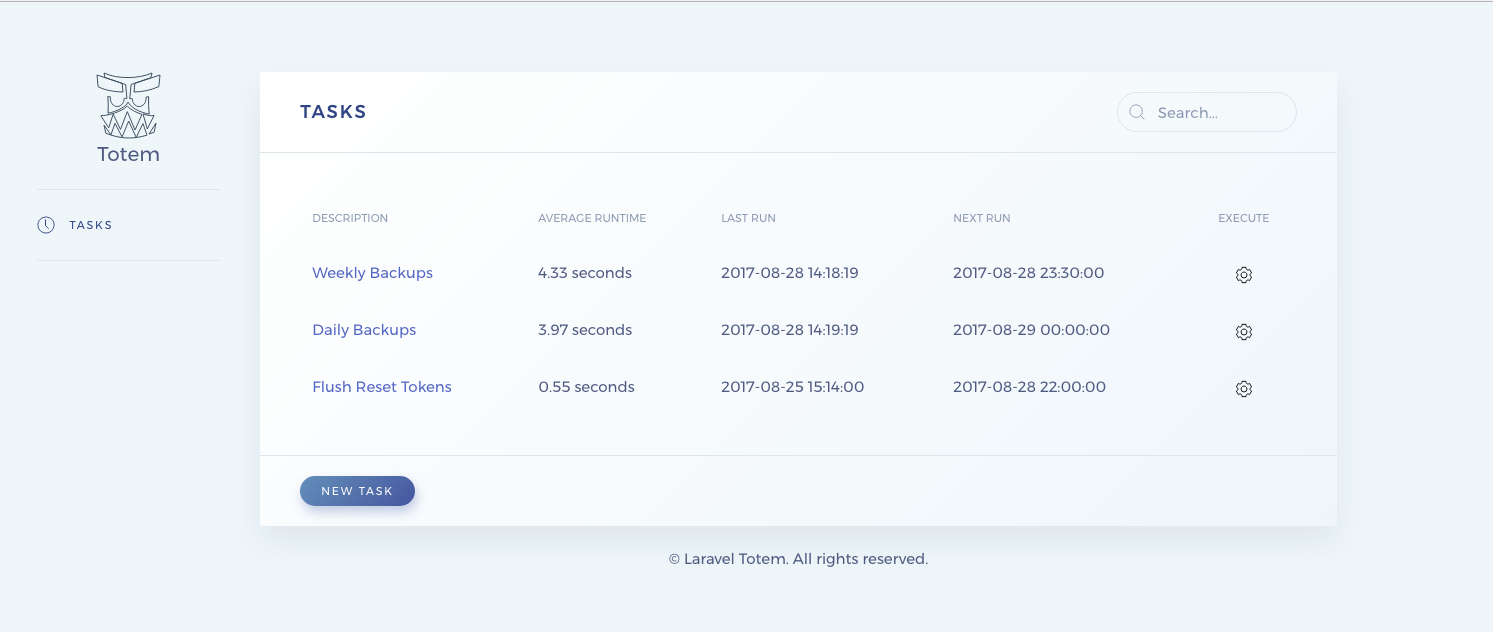
Task Details

Edit Task

Artisan Command to view scheduled tasks

Changelog
Important versions listed below. Refer to the Changelog for a full history of the project.
Credits
Bug reports, feature requests, and pull requests can be submitted by following our Contribution Guide.
Contributing & Protocols
- Versioning
- Coding Standards
- Pull Requests
License
This software is released under the MIT License.
© 2025 Roshan Gautam, All rights reserved.
All versions of laravel-totem with dependencies

ext-json Version *
illuminate/bus Version ^12.0|^13.0
illuminate/console Version ^12.0|^13.0
illuminate/contracts Version ^12.0|^13.0
illuminate/database Version ^12.0|^13.0
illuminate/events Version ^12.0|^13.0
illuminate/notifications Version ^12.0|^13.0