Download the PHP package xorgxx/neox-seo-bundle without Composer
On this page you can find all versions of the php package xorgxx/neox-seo-bundle. It is possible to download/install these versions without Composer. Possible dependencies are resolved automatically.
Download xorgxx/neox-seo-bundle
More information about xorgxx/neox-seo-bundle
Files in xorgxx/neox-seo-bundle
Package neox-seo-bundle
Short Description simply seo for your project
License proprietary
FAQ
Example:

In general, it is recommended to use always a project to download your libraries. In an application normally there is more than one library needed.

- Some hosting areas are not accessible by a terminal or SSH. Then it is not possible to use Composer.
- To use Composer is sometimes complicated. Especially for beginners.
- Composer needs much resources. Sometimes they are not available on a simple webspace.
- If you are using private repositories you don't need to share your credentials. You can set up everything on our site and then you provide a simple download link to your team member.
- Simplify your Composer build process. Use our own command line tool to download the vendor folder as binary. This makes your build process faster and you don't need to expose your credentials for private repositories.
Informations about the package neox-seo-bundle
NeoxSeoBundle { Symfony 6.4 / 7 / 8 } BETA* only dev-master
This bundle provides a simple and flexible to provide Seo functionality for developers. Tow way to use : 1 - Attribute 2 - Injection & 1+2 😉
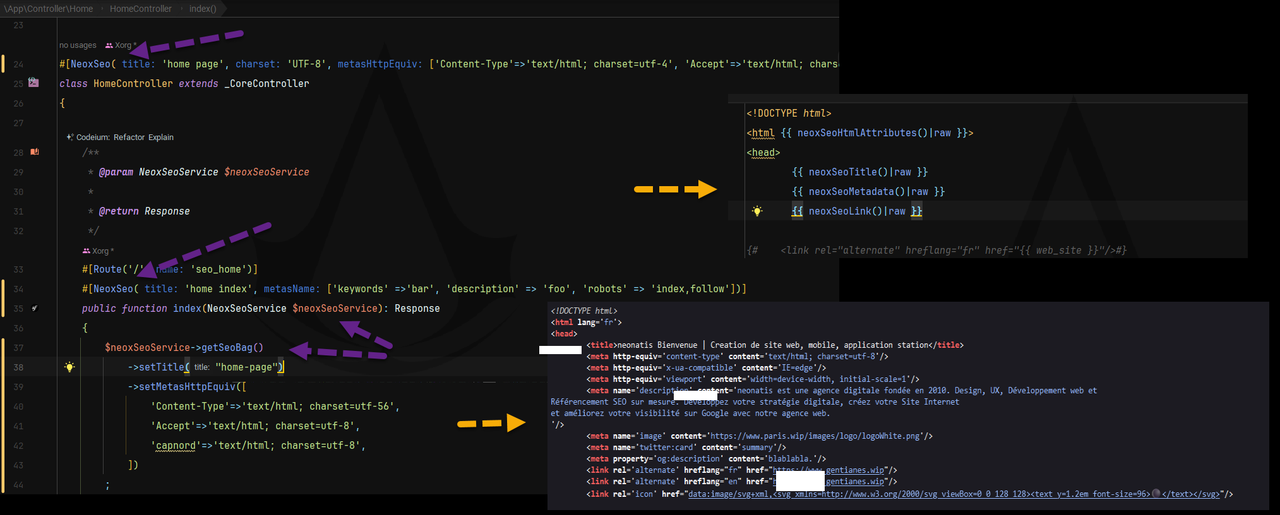
Installation !!
Install the bundle for Composer !! as is still on beta version !!
`
Make sure that is register the bundle in your AppKernel:
NOTE: You may need to use [ symfony composer dump-autoload ] to reload autoloading
..... Done 🎈
!! you style need to make configuration !!
it at this time we ded not optimize all !!
Configuration
- Install and configure ==> Symfony config
- Creat neox_seo.yaml in config folder
neox_seo.yaml
It set automatique but you can custom
How to use ?
By attribute name
By injection
Setup twig balise
..... Done 🎈🎉🎉🎉
Sitemap
The sitemap module generates a sitemap.xml that search engines (Google, Bing...) can crawl to discover all your pages.
How it works
Step 1: Enable and import routes
In config/packages/neox_seo.yaml:
In config/routes.yaml:
Step 2a: Add static pages with the attribute
For pages with no URL parameters (e.g. /about, /contact), add the #[NeoxSitemap] attribute on your controller method:
Result in /sitemap.xml:
Note: Routes with parameters (e.g.
/produits/{id}) are ignored by the attribute scanner because the bundle can't guess the IDs. Use a provider for those (see Step 2b).
Step 2b: Add dynamic pages with a provider
For pages with URL parameters (e.g. product pages, blog articles), create a class that implements SitemapProviderInterface:
Register it in config/services.yaml with the neox_seo.sitemap_provider tag:
You can create multiple providers (products, blog posts, categories...). Each one tagged with neox_seo.sitemap_provider will be automatically collected.
Step 3: Test it
Visit https://yoursite.fr/sitemap.xml in your browser. You should see the XML with all your URLs.
Step 4 (optional): Use CLI for large sites
If you have thousands of URLs, generating the sitemap on every request is expensive. Use the CLI to generate a static file:
Add a cron to keep it fresh:
Breadcrumb
The breadcrumb module generates a fil d'Ariane (e.g. Accueil > Produits > Boîte pizza) with both visible HTML and JSON-LD structured data for Google.
How it works
Step 1: Enable the module
In config/packages/neox_seo.yaml:
Step 2a: Use the attribute (static pages)
Add #[NeoxBreadcrumb] on your controller methods. You only need to set the label — the bundle automatically deduces the parent chain from the route name convention.
Convention: Route names use _ as hierarchy separator. The bundle removes the last segment to find the parent route, and repeats recursively.
How auto-deduction works:
Note: The
routeparameter on#[NeoxBreadcrumb]makes the item clickable (generates a link). Without it, the item is plain text. The last item is never clickable (best practice for breadcrumbs).
Override the parent explicitly
If the auto-deduction doesn't work for your route naming, you can override it with parent:
Disable breadcrumb on a specific route
If a route would inherit a breadcrumb from its parent but you don't want one, use enabled: false:
Step 2b: Use injection (dynamic pages)
For pages where the breadcrumb depends on data from the database (e.g. a product name), inject BreadcrumbService directly:
Available methods:
add(string $label, ?string $url = null)— add an item with a raw URL or plain textaddRoute(string $label, string $route, array $params = [])— add a clickable item from a route nameclear()— reset the breadcrumb (rarely needed)
Step 3: Render in Twig
Add this in your template where you want the breadcrumb to appear:
HTML output (visible by the user):
JSON-LD output (invisible, for Google rich results):
Combining attribute + injection
You can use both on the same controller. The attribute sets the label (and auto-deduces parents), and the injection adds dynamic items:
Seo Translator
The translator module automatically loads SEO data from translation files based on the route name.
Configuration
Route naming convention
Routes must follow the pattern: seo_{domain}_{action}
Translation files
Create translation files in the translations/ directory:
Social media mapping
| Translation key | Open Graph | Twitter Card |
|---|---|---|
social.title |
og:title |
twitter:title |
social.description |
og:description |
twitter:description |
social.image |
og:image |
twitter:image |
social.url |
og:url |
— |
social.type |
og:type |
— |
social.site_name |
og:site_name |
— |
social.locale |
og:locale |
— |
social.twitter.card |
— | twitter:card |
social.twitter.site |
— | twitter:site |
social.twitter.creator |
— | twitter:creator |
Fallback logic
If social.title is not defined, the bundle automatically uses seo.title. Same for social.description → seo.description and social.image → seo.image. This avoids duplication.
Global social config
For values common to all pages (site_name, twitter:site, locale), define them once in neox_seo.yaml:
These are applied globally. Per-page translations only override title, description, image, etc.
Priority order
- Translation files (applied automatically by SeoSubscriber)
- Attributes
#[NeoxSeo](override translations) - Manual injection via
$neoxSeoService->getSeoBag()(override everything)
The translator only applies if the route name starts with the configured prefix (seo_ by default). Routes without the prefix are ignored.
Contributing
If you want to contribute (thank you!) to this bundle, here are some guidelines:
- Please respect the Symfony guidelines
- Test everything! Please add tests cases to the tests/ directory when:
- You fix a bug that wasn't covered before
- You add a new feature
- You see code that works but isn't covered by any tests (there is a special place in heaven for you)
Todo list
- Sitemap ✅
- Breadcrumb ✅
- Seo Translator ✅
