Download the PHP package williamisted/remoteassetprotect without Composer
On this page you can find all versions of the php package williamisted/remoteassetprotect. It is possible to download/install these versions without Composer. Possible dependencies are resolved automatically.
Download williamisted/remoteassetprotect
More information about williamisted/remoteassetprotect
Files in williamisted/remoteassetprotect
Package remoteassetprotect
Short Description Never accidentally delete assets again. Spaces, beware: Remote Asset Protect is here! This Craft CMS plugin protects your remote assets from accidental deletion by developers on dev, staging and other environments. Keep your assets safe and secure.
License proprietary
FAQ
Example:

In general, it is recommended to use always a project to download your libraries. In an application normally there is more than one library needed.

- Some hosting areas are not accessible by a terminal or SSH. Then it is not possible to use Composer.
- To use Composer is sometimes complicated. Especially for beginners.
- Composer needs much resources. Sometimes they are not available on a simple webspace.
- If you are using private repositories you don't need to share your credentials. You can set up everything on our site and then you provide a simple download link to your team member.
- Simplify your Composer build process. Use our own command line tool to download the vendor folder as binary. This makes your build process faster and you don't need to expose your credentials for private repositories.
Informations about the package remoteassetprotect
Remote Asset Protect for Craft CMS

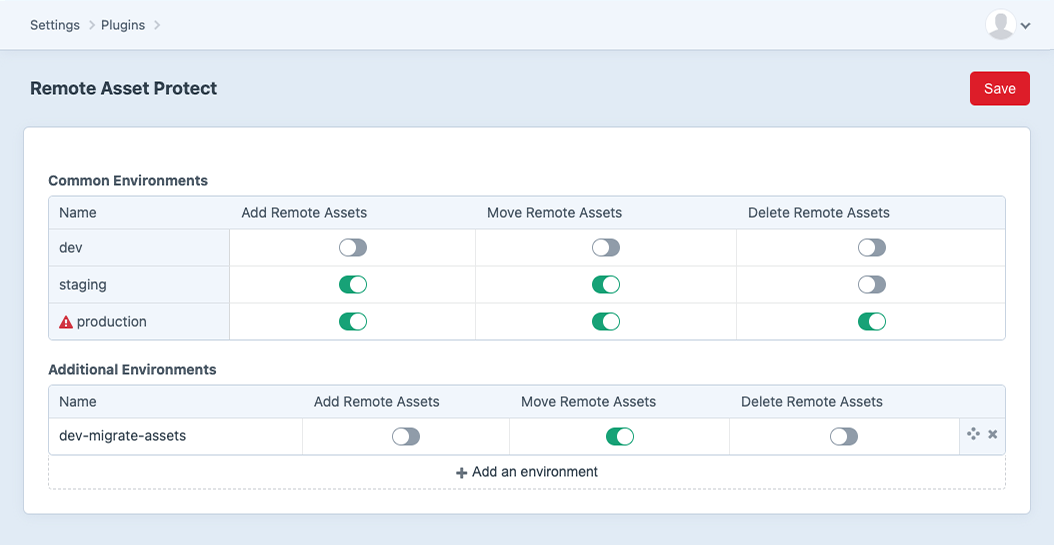
Never accidentally delete assets again. Spaces, beware: Remote Asset Protect is here! This Craft CMS plugin protects your remote assets from accidental deletion by developers on dev, staging and other environments.
Keep your assets safe and secure.
Requirements
- Craft CMS 3.x.
- PHP 7.2.5+
Installation
To install the plugin, follow these steps:
- Open your terminal and navigate to your Craft project directory.
- Run the command
composer require williamisted/remoteassetprotect - In the Craft Control Panel, go to Settings → Plugins and click the "Install" button for Remote Asset Protect.
Usage
Screenshots
Credits and Acknowledgements
This plugin was developed with the help of ChatGPT, a conversational AI trained by OpenAI. ChatGPT's assistance was used in fast-prototyping and summarising documentation, and we appriciate its contributions to this project.
Support and Contribution
- For support, please check existing discussions for similar questions or open a new discussion.
License
This plugin is licensed under the Craft license. See the LICENSE.md file for more information.
Made in Scotland 🏴
