Download the PHP package walsgit/flarum-discussion-cards without Composer
On this page you can find all versions of the php package walsgit/flarum-discussion-cards. It is possible to download/install these versions without Composer. Possible dependencies are resolved automatically.
Download walsgit/flarum-discussion-cards
More information about walsgit/flarum-discussion-cards
Files in walsgit/flarum-discussion-cards
Package flarum-discussion-cards
Short Description Output of discussions lists in form of cards
License MIT
FAQ
Example:

In general, it is recommended to use always a project to download your libraries. In an application normally there is more than one library needed.

- Some hosting areas are not accessible by a terminal or SSH. Then it is not possible to use Composer.
- To use Composer is sometimes complicated. Especially for beginners.
- Composer needs much resources. Sometimes they are not available on a simple webspace.
- If you are using private repositories you don't need to share your credentials. You can set up everything on our site and then you provide a simple download link to your team member.
- Simplify your Composer build process. Use our own command line tool to download the vendor folder as binary. This makes your build process faster and you don't need to expose your credentials for private repositories.
Informations about the package flarum-discussion-cards
Flarum Discussion Cards




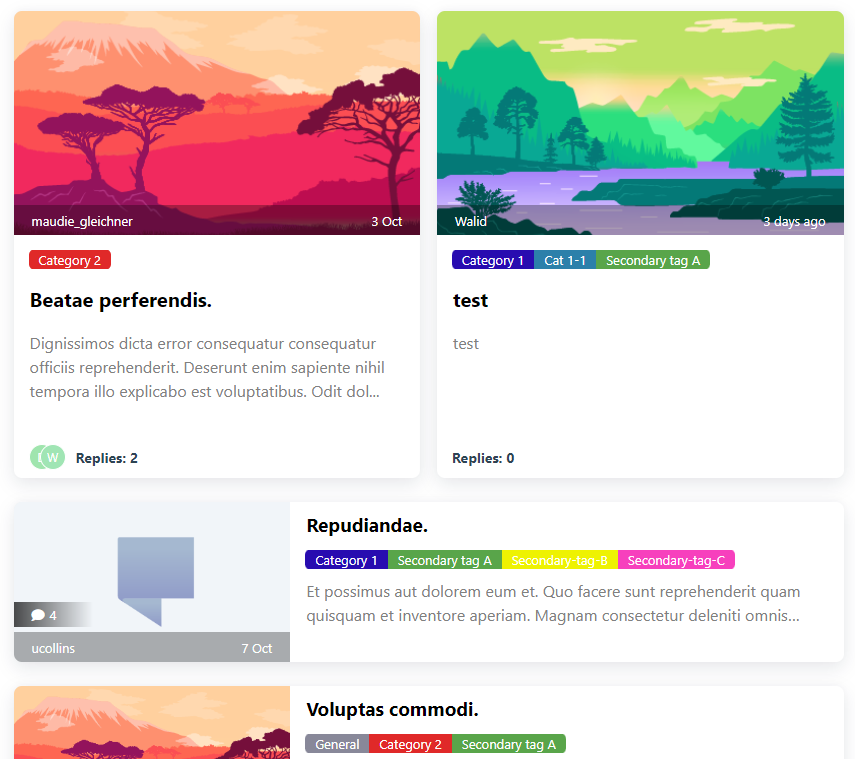
A Flarum extension (Fork of @Dem13n's discussion-cards). Allows you to display discussions in the form of cards, the first image of the first post is used as a preview, if there are no images, a stub is displayed.
This fork makes changes and adds new features where you can now set custom cards settings per tag page (different default image along with number and width of primary cards).
On the index page (all discussions), if a discussion has multiple tags with their own custom image set, the displayed image will be chosen according to these priority rules:
For full list of changes & new features, please refer to the CHANGELOG.md file.
📢 IMPORTANT NOTICE
Versions
2.xand up will target Flarum V2.Versions
1.4.xwill be the final versions targeting Flarum V1. No more new features will be added, but some bug fixes & security updates will still be provided (if necessary) until full support will be dropped sometime before the end of 2026 or early 2027. All future dev efforts will be for versions2.xand up targeting Flarum V2.
🧩 3rd party extensions support
-
Flarum V2
- As of version
2.0.0onlyfof/discussion-viewsis supported. The other extensions that where supported in V1 have yet to be ported for Flarum V2 as of the latest release. Support will be added once they'll be ported or it will be dropped unless an alternative is released.
- As of version
- Flarum V1
- Until version
1.3.0flarumite/simple-discussion-viewswas supported to show discussion views count on cards (see replacement below) - As of version
1.1.0added support for thev17development/flarum-blogextension. If activated, you can set to use the blog's extension images for blog posts' cards and/or their article summary as preview text on the cards. - As of version
1.2.0added support for theshebaoting/repostextension. If activated, you can set it so that when you click on the cardtitleof a discussion starting with a url, it will open that url, and clicking anywhere else on the card will open the discussion as usual. - As of version
1.3.0added support for themichaelbelgium/flarum-discussion-viewsextension. - As of version
1.4.0added support for thefof/discussion-viewsextension (replacing the abandoned flarumite/simple-discussion-views)
- Until version
🖥️ Console Commands (CLI)
As of version 1.4.0 new CLI commands have been added to manage card images:
php flarum discussion-cards:migrate-images(runs automatically on update).php flarum discussion-cards:purge-imagesto delete unused or all card images from server.php flarum discussion-cards:regenerate-imagesto regenerate card images or generate missing card images. All details on how to use them can be found in the extension's wiki on github (See Documentation in the Links section below or in the Admin Settings Page). You can also add the--helpflag to each command to list options.
🖼️ Screenshots
💬 Languages
The extension is natively in English 🇬🇧 & French 🇫🇷; it's partially translated to other language by the Flarum translation community:
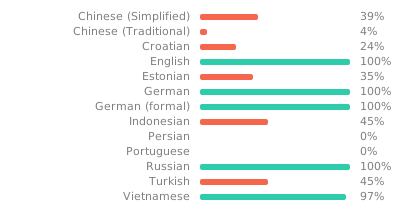 You can help translate it to your language via Weblate: here for Flarum V2 & here for Flarum V1.
🗒️ Notes
- V2 developed and tested on Flarum 2.0.0-rc.1 (first version released
2.0.0). - V1 developed and tested on Flarum 1.8.7 (first version released
1.0.0) and last version1.4.4was developed and tested on Flarum 1.8.16. - As of version
1.4.0it requires a Flarum minimum version of 1.8.0. - Thanks to whomever suggested on Discord to use the tags selection component (sorry, we can no longer access the messages on Discord to mention them properly).
- New settings page inspired by
Friends of Flarum's Best Answer Extension. - Additional tags settings based on
@askvortsov's Discussion Templates Extension. - Developed this with the help of AI (mainly ChatGPT, Gemini & Claude Code using Ollama Cloud models).
📥️ Installation
⚠️ IMPORTANT
if you're installing any version for the first time or are updating from a version older than 1.4.0 you will need to regenerate card images for all existing discussions after activating the extension as it no longer does it in the frontend on page loads (performance issues). You can run
php flarum discussion-cards:regenerate-imagesfirst to regenerate images for the 20 latest discussion (default) or use the button in the admin settings page (click on tools > regenerate images then on the Regenerate 20 latest card images button. Don't forget to add a general and/or tag default images first and if all is OK, you can regenerate card images for ALL discussions using the proper options with the command (see full documentation here)
Install with composer:
Then to generate card images for your discussion cards, activate the extension and run this command:
(see full documentation here for more options on the command)
ℹ️ Note that, as of versions 2.0.1 (V2) & 1.4.4 (V1), right after the installation, an automatic command will run to generate card images for the 20 latest, top & newest discussions
↕️ Updating
ℹ️ If you're updating from version
1.3.0or earlier TO version1.4.0or later not that thediscussion-cards:migrate-imagescommand will be automatically run to move and convert old images used for cards to new file structure and format (See changelog of version1.4.0for more details). You will also need to need to regenerate card images if you updating from those older versions (see post installation instruction above)
🆕 🔧 Troubleshooting & Support
As of version 2.0.1 (V2) & 1.4.4 (V1) a Debugging Information tools was added to the Tools menu in the Admin Settings Page. You can use it to check how & why a discussion has a specific card image (see what the resolver sees and checks).
Before you post an issue, copy & paste the debugging information from this tools along with your output and any relevant screen capture.
