Download the PHP package vuthaihoc/pdfparser without Composer
On this page you can find all versions of the php package vuthaihoc/pdfparser. It is possible to download/install these versions without Composer. Possible dependencies are resolved automatically.
Download vuthaihoc/pdfparser
More information about vuthaihoc/pdfparser
Files in vuthaihoc/pdfparser
Package pdfparser
Short Description Fork of prinsfrank/pdfparser: PDF parsing, text & image extraction, plus an experimental Imagick page renderer, HTTP Range reading and parser fixes
License MIT
Homepage https://github.com/vuthaihoc/pdfparser
FAQ
Example:

In general, it is recommended to use always a project to download your libraries. In an application normally there is more than one library needed.

- Some hosting areas are not accessible by a terminal or SSH. Then it is not possible to use Composer.
- To use Composer is sometimes complicated. Especially for beginners.
- Composer needs much resources. Sometimes they are not available on a simple webspace.
- If you are using private repositories you don't need to share your credentials. You can set up everything on our site and then you provide a simple download link to your team member.
- Simplify your Composer build process. Use our own command line tool to download the vendor folder as binary. This makes your build process faster and you don't need to expose your credentials for private repositories.
Informations about the package pdfparser

PDF Parser



This is a fork of prinsfrank/pdfparser used by OneLib. It adds an experimental page renderer, reading PDFs over HTTP Range requests and a set of parser fixes. The namespace is unchanged (
PrinsFrank\PdfParser) so upstream changes can still be merged; the upstream code is on theupstreambranch. The rest of this README is upstream's, from "Why this library?" on.
What this fork adds
Installation
The package is on Packagist. Releases of this fork continue
upstream's numbering from v3.9.0 (upstream v3.8.0 + this fork's changes + upstream main up to the release);
dev-main (alias 3.x-dev) follows the main branch.
The renderer needs ext-imagick (ImageMagick with FreeType; Liberation fonts and fc-match for fonts that are not
embedded), HttpRangeStream needs ext-curl.
Rendering pages (PrinsFrank\PdfParser\Render, experimental)
A region of the page (a figure, a table) can be rendered on its own, faster than the page since only what reaches it is drawn, with the width given for the region:
Embedded fonts are rebuilt once and kept, with their glyph maps, in a cache directory shared by renders and processes
(RenderOptions::$fontCacheDirectory, by default pdfparser-render-fonts in the temporary directory).
It draws paths, clipping, images (all filters and colour spaces, soft masks), forms, axial and radial shadings, annotation appearances and text. Text is drawn with the fonts embedded in the PDF: TrueType, CFF and Type 1 programs are rebuilt to be drawn by glyph id with the PDF widths, so text lands where the PDF puts it; fonts that are not embedded get a substitute system font stretched to the PDF width. Type 3 fonts, patterns other than shadings, blend modes and soft masks of groups are approximated, and count in the score.
Presets (RenderOptions::preset($name) or the static constructors), measured on 336 pages of mixed documents at
300 px against pdftoppm:
| Preset | Time | SSIM | For |
|---|---|---|---|
balanced (default) |
100 % (0.35 s/page) | 0.881 | general use |
quality |
122 % | 0.892 | closest result: 3× supersampling, Lanczos |
fast |
67 % | 0.855 | no supersampling, one run per string |
thumbnail |
68 % | 0.864 | previews up to ~200 px: substitute fonts |
low_memory |
85 % | 0.862 | small workers: ImageMagick pixel cache capped at 64 MB |
draft |
48 % | 0.793 | layout only: grey boxes for images |
Each option can also be set on its own (new RenderOptions(supersample: 1, images: RenderOptions::IMAGES_BOX, ...),
or on top of a preset: RenderOptions::preset('fast')->with(imageResolution: 0.5)):
supersampling and downscale filter, embedded/substitute/no text, TJ split threshold, full/box/no images, image
resolution and masks, paths, clipping, shading bands, annotations, ImageMagick memory and thread limits.
ImageMagick 6 leaks about 20 KB every time the font of a text changes; the renderer groups text by font to keep this to well under 1 MB per page, but long-running workers should still be restarted now and then.
Reading over HTTP Range requests
RangeStream fetches and caches blocks (64 KiB by default) through any callable, so other transports (S3, ...) can be
plugged in. Without Range support on the server the whole file is read once.
Over a network the round trips cost more than the bytes, so HttpRangeStream requests the start and the end of the file
together and fetches in parallel (curl_multi) what RangeStream::prefetch() is given: the page tree is walked one
level per round trip, and the renderer fetches the content, resources and font dictionaries of a page in a few rounds
(font programs only when they are not in the font cache, which identifies them by the file's /ID). A figure of a 1.9 MB
PDF on a server ~0.5 s away: 6 round trips and 0.8 MB instead of 10 round trips, or downloading the whole file.
Parser fixes
- Page
/Contentsand Type0/DescendantFontsthat refer to an array of references. Tj/TJ/"operands tokenized: adjustments after whitespace or written as.5, escaped and nested parentheses,"with spaces in its string.- Character codes from the bytes of a string (hexadecimal strings of Type0 fonts were read as 16-bit pairs).
- FlateDecode PNG predictors per pixel and per row length (multi-component images came out as garbage) and much faster, TIFF predictor 2.
- Content strings ending in an escaped backslash; widths of composite fonts by 2-byte codes.
- A dictionary entry with a value of an unexpected type is skipped instead of failing the whole dictionary.
shandboperators; inline images as oneEIcommand.- An empty stream is an empty string.
- Objects in object streams of encrypted (RC4) documents: the object stream is decrypted before its offsets are read.
parseFile($path, false)reads the file in cached blocks (RangeStream::file()) instead of unbufferedFileStreamreads, about ten times faster.





1.5x faster and 4.4x less memory than smalot/pdfparser. Actively maintained, MIT licensed, and built from scratch for PHP8.1+
:owl: This library is written by a human who understands all of its code. As such, it is small enough for a person to have a mental image of it, and no cognitive offloading is needed. AI-generated PRs are not rejected outright, but they should be small and focused.
Why this library?
Previously, there wasn't a PDF library that allows parsing of PDFs that was open source, MIT licensed and under active development. The PDFParser by smalot, while having been very useful over the years isn't under active development anymore. The parser of Setasign is not MIT licensed and not open source. And several other packages rely on java/js/python dependencies being installed that are called by PHP behind the scenes, losing any type information and underlying structure.
Instead, this package allows for parsing of a wide variety of PDF files while not relying on external dependencies, all while being MIT licensed!
Comparison with smalot/pdfparser
| Metric | prinsfrank/pdfparser | smalot/pdfparser |
|---|---|---|
| Speed | On average 1.5x faster, up to 110x faster on complex PDFs | baseline |
| Memory | On average 4.4x less memory | baseline |
| Success rate | 100% of test files | 95.3% |
| Encrypted PDFs | Supported | Not supported |
| Extract as markdown | Yes, including: Headings, Bold, Italic, Links! | No |
| Multi-column support | Yes | No |
| PHP version | PHP 8.1+ | PHP 7.1+ |
| Active development | Yes | Limited maintenance |
| PHPStan Level | 10 (max) | 3 |
View detailed benchmark results
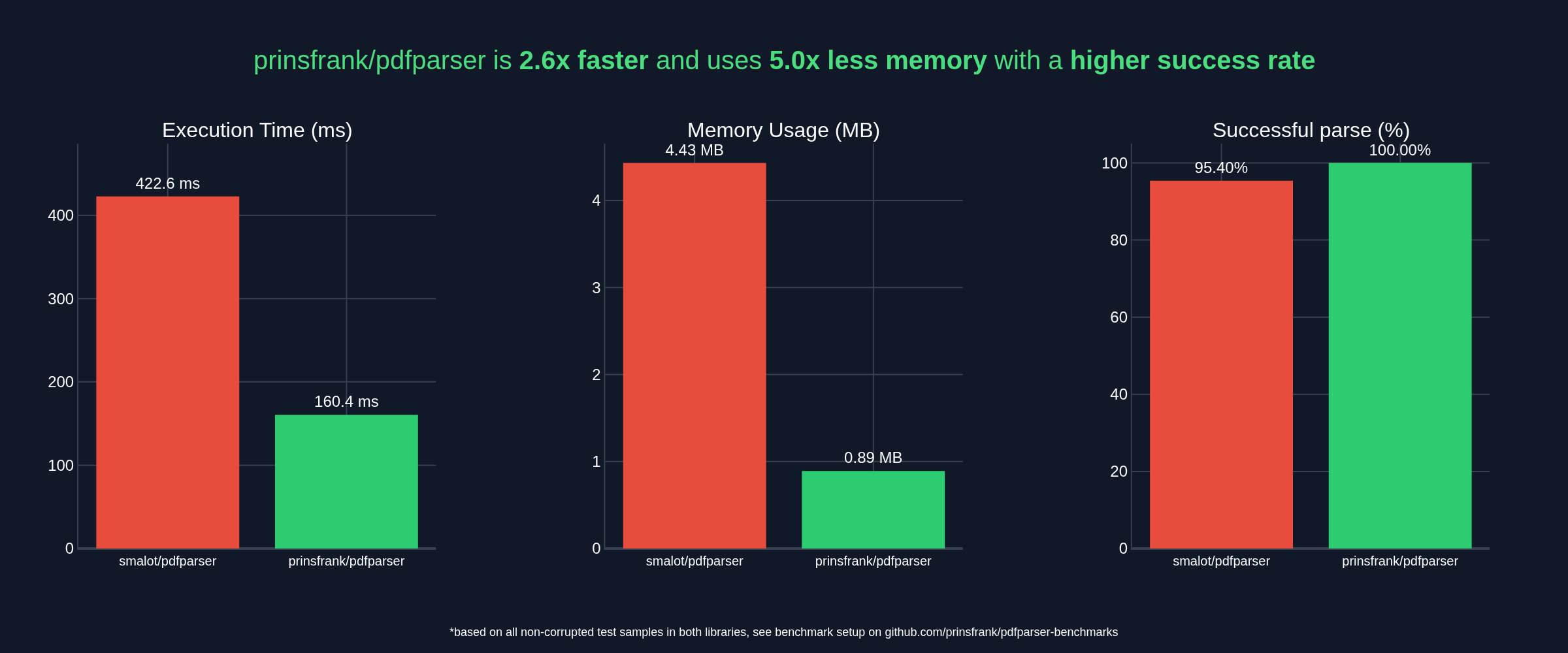
Or see the benchmark repository for more details.
Setup
To start right away, run the following command in your composer project;
(For this fork, see Installation above.)
Installation without Composer
If you don't want to install this package using Composer, or cannot due to some constraints, you can still download a phar file of the latest release, which bundles all the required dependencies. To do so, head to the "releases" section on the github repository, and click on "pdfparser.phar" under "Assets". Place the phar file somewhere you can access it from your code
As you don't have Composer to handle autoloading for you, you'll need to register the autoloader from the phar file. To do so, simply add the following line at the top of your custom bootstrap script or the file you want to parse PDFs in:
require 'phar://pdfparser.phar/vendor/autoload.php';
The most common use case - extracting text from a document - is then just as simple as this;
Or, if you prefer markdown:
💖 Sponsorship
If you depend on this package and want to support its maintenance, please consider sponsoring me. I'll continue maintaining and releasing updates regardless, but sponsorships help cover the time it takes to review changes and keep everything accurate.
Opening a PDF
To open a PDF file, you'll first need to load it and retrieve a Document object. That can be done by either parsing a file directly, or parsing a PDF from a string variable.
Parsing a PDF file
Parsing a PDF from a file directly is the easiest option. To do so, simply call the parseFile method on a PdfParser instance:
By default, this loads the file into memory while parsing. This greatly improves parsing speed, at the cost of a bigger memory footprint. If you want to reduce the base memory footprint and use a file handle instead, you can set the second parameter useInMemoryStream to false.
Parsing PDF from string
It is also possible to parse a PDF from a string in a variable. To do so, pass the string as an argument for the parseFile method on a PdfParser instance.
If you want to decrease the average memory footprint, you can also do so here, by setting the useFileCache parameter to true. This will result in the file content being written to a temporary file and the parser using the handle to that file from then on. This will be at the cost of speed.
The Document
Once you have opened a file from the filesystem with parseFile or from a string variable using parseString, you'll get back an instance of a Document.
While initially parsing the document, a small number of variables are populated in the Document instance that allow for further accessing of that document. This includes:
- The public
$streamproperty: a PHP stream handle to the file in memory or on the filesystem. - The public
$versionproperty: Information about the PDF version of the file. - the public
$crossReferenceSourceproperty: A parsed crossReference table or stream, containing several crossReference(Sub)Sections that contain information about objects stored in the document and where to find them. - The private
$pagesproperty to cache any pages that have already been retrieved. This property is only set when the pages are actually retrieved using thegetPagesmethod. (See below)
The document also contains several methods to retrieve specific objects from it. Those are discussed below.
If you want to quickly retrieve all text from a document, you can use the getText method.
Objects in a Document and their decorators
A PDF is organized in objects. Not all objects are created equally. Some objects might be a Page, while others a Font. Some objects might be Generic and without a specific type. There are currently 18 specific types, and a generic object type. Some of those will be specified below.
Code specific for certain object types lives in that object types' decorator. Retrieving text for a Page makes sense, retrieving the text from a Font not so much, so the Page decorator contains the getText method. Below you'll find some documentation for specific object decorators.
If you want to retrieve an object by its number, you can call the $document->getObject($objectNumber) method. If you know that the object with that number is supposed to be of a specific type, you can supply the second argument. For example, if you want to get object 42 which you know is of type Page, you can call the method like this:
If the object is not of the correct type, this will result in an exception. If you don't care about the object type, pass null as the second argument or don't supply the second argument at all.
Decorated InformationDictionary objects
If a PDF has a title, producer, author, creator, creationDate or modificationDate, it is stored in an InformationDictionary.
If a PDF has an InformationDictionary, it can be retrieved using the $document->getInformationDictionary() method. Not All PDFs have this available, so this method might return null.
To access information from the InformationDictionary, there are several methods available:
If you want to access non-standard data from the information dictionary, you can also retrieve the entire dictionary from the object:
Decorated Page objects
Page objects can be retrieved from a document by calling the $document->getPage($pageNumber) method for a single page, or $document->getPages() for all pages. Note that $pageNumber is zero-indexed, so even if different format page numbers are displayed at the bottom of a page, the first page in a document is still page 0, etc.
Once you have a Page object, there are several methods available to retrieve information from that page. The main method of interest here is the $page->getText() method. To retrieve all text from all pages, you could do something like this:
There is also a getText method available on the Document to retrieve all text at once without even having to retrieve pages.
There are also methods available to get the underlying positioned Text Elements using $page->getPositionedTextElements(), the resource dictionary for a page using $page->getResourceDictionary() and the font dictionary using $page->getFontDictionary().
Decorated XObject objects
Images and forms are stored in XObjects. These can be retrieved on a page-by-page basis using $page->getXObjects(). If you are only interested in images, you can retrieve all image XObjects by calling $page->getImages().
For XObjects, there are some additional methods: getWidth returns the width of the object in pixels if available, getHeight() the height in pixels, and getLength() the length in bytes. To determine the subtype, there are two methods available: isImage() and isForm. If the XObject is an image, getImageType() will return the image type.
To extract all images on a page and store them on your machine, you could do something like this:
All versions of pdfparser with dependencies

ext-gd Version *
ext-iconv Version *
ext-zlib Version *
prinsfrank/glyph-lists Version ^1.0
prinsfrank/markdown-dom Version ^0.2.1