Download the PHP package uxcode-fr/font-optimizer without Composer
On this page you can find all versions of the php package uxcode-fr/font-optimizer. It is possible to download/install these versions without Composer. Possible dependencies are resolved automatically.
Download uxcode-fr/font-optimizer
More information about uxcode-fr/font-optimizer
Files in uxcode-fr/font-optimizer
Package font-optimizer
Short Description Automate your web typography workflow with this Composer dev-tool.
License MIT
Homepage https://github.com/uxcode-fr/font-optimizer
FAQ
Example:

In general, it is recommended to use always a project to download your libraries. In an application normally there is more than one library needed.

- Some hosting areas are not accessible by a terminal or SSH. Then it is not possible to use Composer.
- To use Composer is sometimes complicated. Especially for beginners.
- Composer needs much resources. Sometimes they are not available on a simple webspace.
- If you are using private repositories you don't need to share your credentials. You can set up everything on our site and then you provide a simple download link to your team member.
- Simplify your Composer build process. Use our own command line tool to download the vendor folder as binary. This makes your build process faster and you don't need to expose your credentials for private repositories.
Informations about the package font-optimizer
Font Optimizer
Automate your web typography workflow with this Composer dev-tool.
Converts TTF fonts to optimized WOFF2 subsets using Python FontTools. Works with Laravel, Symfony, and vanilla PHP projects.
Prerequisites
Requires Python 3 and FontTools with Brotli support on your system.
Installation
After installation, Composer automatically checks that Python 3 and fontTools are available:
If the check fails, you will see:
The binary is available at vendor/bin/font-optimizer.
Configuration
Configuration is loaded from config/font-optimizer.php if present, otherwise from the extra section of composer.json.
Option A — config/font-optimizer.php (Laravel, Symfony, vanilla PHP)
Laravel — publish the default config:
Other projects — create the file manually at the root of your project:
Option B — composer.json extra section (all projects)
Configuration options
| Key | Description | Allowed values | Default |
|---|---|---|---|
source |
Directory containing your source .ttf files |
Any path relative to the project root | resources/fonts |
destination |
Directory where output files will be saved | Any path relative to the project root | public/fonts |
unicodes |
Unicode ranges to include in the subset — use * to keep all glyphs (no subsetting) |
Hex codepoints or ranges (U+0020-007F), comma-separated, or * |
Basic Latin + Latin-1 + Œœ |
features |
OpenType layout features to preserve | See OpenType feature tags, comma-separated, or * |
kern,liga |
flavor |
Output font format | woff2, woff |
woff2 |
name_ids |
Name table record IDs to keep | Comma-separated IDs (0–19), or * |
* |
hinting |
Keep hinting instructions | true, false |
true |
OpenType feature tags
| Tag | Description |
|---|---|
kern |
Kerning adjustments between glyph pairs |
liga |
Standard ligatures (fi, fl, ff…) |
clig |
Contextual ligatures |
calt |
Contextual alternates |
ccmp |
Glyph composition / decomposition |
locl |
Localized forms (language-specific glyph variants) |
mark |
Mark positioning (diacritic placement) |
mkmk |
Mark-to-mark positioning |
case |
Case-sensitive forms (punctuation for all-caps) |
frac |
Diagonal fractions (1/2, 3/4) |
sups |
Superscript |
subs |
Subscript |
smcp |
Small capitals |
onum |
Oldstyle figures |
tnum |
Tabular figures |
zero |
Slashed zero |
ss01–ss20 |
Stylistic sets |
Unicode range examples
| Range | Characters |
|---|---|
U+0020-007F |
Basic Latin (ASCII printable) |
U+00A0-00FF |
Latin-1 Supplement (accented, ©, €…) |
U+0100-017F |
Latin Extended-A (Œœ, Šš, Žž…) |
U+0400-04FF |
Cyrillic |
U+0370-03FF |
Greek and Coptic |
U+2000-206F |
General Punctuation (—, …, ", "…) |
U+20A0-20CF |
Currency Symbols (€, £, ¥…) |
Usage
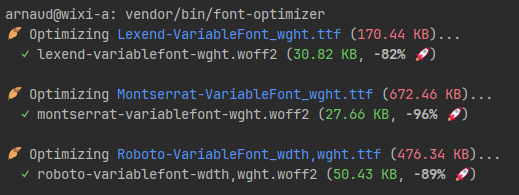
Output example:
Convert without subsetting
To convert TTF fonts to WOFF/WOFF2 without any subsetting (keep all glyphs), set unicodes to * and features to *:
Composer shortcut (optional)
Add to your composer.json:
Then run:
Why use this?
- Performance — reduces font file size by up to 70–90% via WOFF2 and Unicode subsetting.
- Automation — no more manual CLI commands or online converters.
- Consistency — every developer on your team uses the same optimization settings.
Articles
Authors
Contributing
Feel free to fork this repo and submit pull requests. For major changes, please open an issue first.
License: MIT
All versions of font-optimizer with dependencies

composer-runtime-api Version ^2.0
symfony/console Version >=6.0
symfony/process Version >=6.0