Download the PHP package techlab/smartwizard without Composer
On this page you can find all versions of the php package techlab/smartwizard. It is possible to download/install these versions without Composer. Possible dependencies are resolved automatically.
Download techlab/smartwizard
More information about techlab/smartwizard
Files in techlab/smartwizard
Package smartwizard
Short Description The awesome jQuery step wizard plugin
License MIT
Homepage http://techlaboratory.net/jquery-smartwizard
FAQ
Example:

In general, it is recommended to use always a project to download your libraries. In an application normally there is more than one library needed.

- Some hosting areas are not accessible by a terminal or SSH. Then it is not possible to use Composer.
- To use Composer is sometimes complicated. Especially for beginners.
- Composer needs much resources. Sometimes they are not available on a simple webspace.
- If you are using private repositories you don't need to share your credentials. You can set up everything on our site and then you provide a simple download link to your team member.
- Simplify your Composer build process. Use our own command line tool to download the vendor folder as binary. This makes your build process faster and you don't need to expose your credentials for private repositories.
Informations about the package smartwizard
jQuery Smart Wizard v7
A modern and accessible step wizard plugin for jQuery



jQuery Smart Wizard v7 is a lightweight and extensible step wizard plugin built for modern web applications using jQuery. It provides a clean, intuitive interface for managing multi-step processes such as registration forms, checkout screens, surveys, configuration flows, and more.
jQuery Smart Wizard v7 focuses on usability and flexibility. It offers customizable navigation styles, toolbars, transitions, and events, making it easy to integrate into existing applications. Whether you’re building a simple step form or a complex workflow, Smart Wizard adapts to your needs.
Screenshots
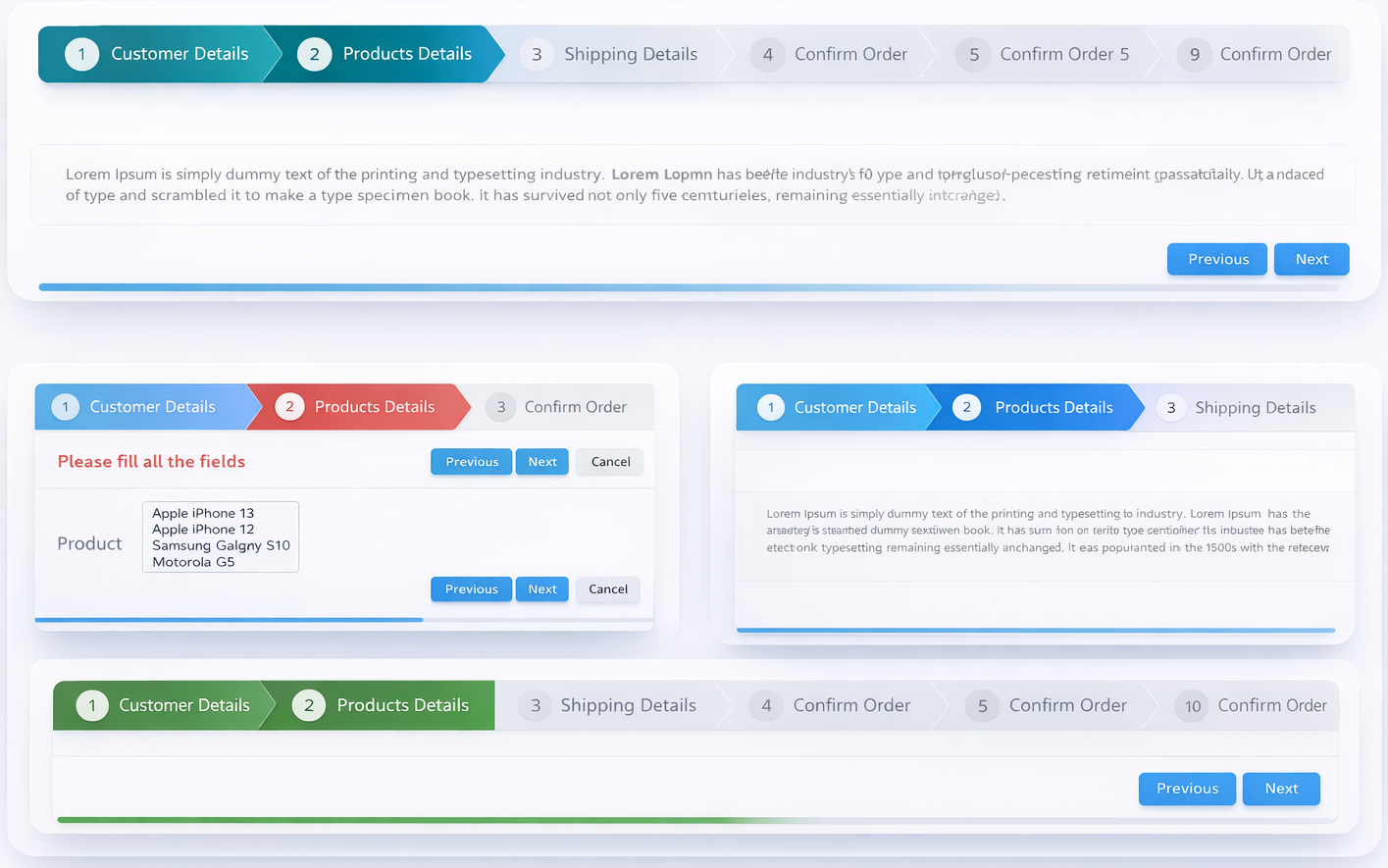
Requirements
- jQuery >= 1.11.1 (jQuery 4.x and jQuery Slim versions are also supported)
Installation
NPM
npm install smartwizardYarn
yarn add smartwizardCDN - jsDelivr
CDN - UNPKG
ES Module / Bundler
CommonJS / Webpack
Download
Download from GitHub
Features
- Easy to implement with minimal and clean HTML structure
- Fully rewritten in TypeScript (v7) with built-in type declarations
- Compatible with all modern browsers
- Responsive and mobile-ready design
- Multiple built-in themes (
basic|arrows|glow|pills), easily customizable - Flexible color customization using CSS variables
- Light / dark / auto display mode support
- Built-in transition animations (
default|fade|slideHorizontal|slideVertical|slideSwing|css) - Compatible with CSS animation libraries (including Animate.css)
- Extendable transition system with custom animation handlers
- Comprehensive step states:
completed,active,disabled,hidden,error,warning - Runtime option updates via
setOptions() - Automatic horizontal scrolling when steps overflow (mouse wheel supported)
- Keyboard navigation (left/right arrow keys)
- Form validation support via
leave.swevent - RTL (right-to-left language) support
- Accessible navigation controls
- Support for external navigation controls
- Dynamic content loading via
contentLoadercallback - Auto content height adjustment
- Customizable toolbar with support for additional HTML elements
- Integrated progress bar
- URL hash navigation with browser history integration
- UMD (Universal Module Definition) compatible
- Supports jQuery >= 1.11.1, jQuery 3.x, jQuery 4.x, and jQuery Slim versions
Usage
Include SmartWizard CSS
Include HTML (This is the basic HTML markup. Customize it by adding your own step content).
Include JavaScript
Note:- jQuery should be included before the jQuery SmartWizard JavaScript file.
Include SmartWizard plugin JavaScript
Initialize the jQuery SmartWizard
That's it!
Please see the detailed documentation for implementation and usage.
All options
Events
Public methods
License
jQuery SmartWizard v7 is dual-licensed:
MIT License — Free for personal and open-source projects.
Commercial License — Required for closed-source, SaaS, or any commercial projects.
If you use jQuery SmartWizard v7 in a commercial or client application, please purchase a commercial license.
Commercial licenses help support continued development, maintenance, and new features.
Contribute
If you like the project please support with your contribution.
Happy Coding ❤️
