Download the PHP package storviaio/vantage without Composer
On this page you can find all versions of the php package storviaio/vantage. It is possible to download/install these versions without Composer. Possible dependencies are resolved automatically.
Download storviaio/vantage
More information about storviaio/vantage
Files in storviaio/vantage
Package vantage
Short Description Vantage: Strategic queue monitoring and observability for Laravel applications.
License MIT
Homepage https://github.com/storviaio/vantage
FAQ
Example:

In general, it is recommended to use always a project to download your libraries. In an application normally there is more than one library needed.

- Some hosting areas are not accessible by a terminal or SSH. Then it is not possible to use Composer.
- To use Composer is sometimes complicated. Especially for beginners.
- Composer needs much resources. Sometimes they are not available on a simple webspace.
- If you are using private repositories you don't need to share your credentials. You can set up everything on our site and then you provide a simple download link to your team member.
- Simplify your Composer build process. Use our own command line tool to download the vendor folder as binary. This makes your build process faster and you don't need to expose your credentials for private repositories.
Informations about the package vantage
Vantage





A Laravel package that tracks and monitors your queue jobs. Automatically records job execution history, failures, retries, and provides a simple web interface to view everything.
Why Vantage?
Vantage records every queue job your application runs and keeps that record in your own database, so you can still answer questions about a job long after it left the queue.
Works with every queue driver. Database, Redis, SQS, Beanstalkd, or anything else. Vantage listens to Laravel's queue events rather than to a specific backend, so you can mix drivers or switch between them and tracking keeps working.
Complete execution history. Every run stores status, queue, connection, duration, memory and CPU usage, exception class, message and stack trace, payload, tags, and the full retry chain — kept for as long as you choose.
Built for debugging, not just watching. Answer "what happened to that job?" days or weeks later. Follow a single failure through every retry attempt. See which job classes fail most often and which exceptions are behind them.
Real performance numbers. Per-job memory and CPU telemetry from production, so slow and memory-hungry jobs are something you measure instead of guess.
Search and filter everything. By status, queue, job class, tag or date range — from the dashboard, or from the JSON API for your own tooling.
Retry from anywhere. The dashboard, the CLI (vantage:retry), or your own code through the Vantage facade.
Stays out of the way. Give Vantage its own database connection, turn off payload storage, sample telemetry, exclude noisy jobs, and prune old history on a schedule — see Multi-Database Support.
Installation
The package will automatically register itself using
Publishing Assets:
- Config:
php artisan vendor:publish --tag=vantage-config - Views:
php artisan vendor:publish --tag=vantage-views(optional, for customization) - Migrations: Automatically loaded, but you can publish with
php artisan vendor:publish --tag=vantage-migrationsif needed
Requirements
- Laravel 10.x, 11.x, 12.x, or 13.x
- PHP 8.2, 8.3, or 8.4
- One of the following databases:
- MySQL 5.7+ / MariaDB 10.3+
- PostgreSQL 9.6+
- SQLite 3.8.8+
Features
Universal Queue Driver Support
Works with all Laravel queue drivers - database, Redis, SQS, Beanstalkd, and any other driver. Unlike other monitoring tools that require specific drivers, Vantage tracks jobs from any queue driver and saves all data to your database for persistent tracking and analysis.
Job Tracking
Every job gets tracked in the vantage_jobs table with:
- Job class, queue, connection
- Status (processing, processed, failed)
- Start/finish times and duration
- UUID for tracking across retries
- All data saved to database - complete history of every job execution
Failure Details
When jobs fail, we store the exception class, message, and full stack trace. Much easier to debug than Laravel's default failed_jobs table.
Visit /vantage/failed to see all failed jobs with exception details and retry options.
Web Interface
Visit /vantage to access the comprehensive monitoring dashboard:
Dashboard (/vantage) - Overview of your queue system:
- Statistics Cards: Total jobs, processed, failed, processing, and success rate
- Queue Depth Monitoring: Real-time pending job counts per queue with health status
- Success Rate Trend Chart: Visual representation of job success/failure over time
- Top Failing Jobs: See which job classes fail most often
- Top Exceptions: Most common error types with counts
- Recent Jobs Table: Latest 20 jobs with quick actions
- Recent Batches: Track Laravel job batches with success/failure rates
- Time Period Filters: View data for last hour, 6 hours, 24 hours, 7 days, 30 days, or all time
Recent Jobs Table - Quick view of the latest 20 jobs with status, duration, and quick actions:
The Recent Jobs table appears on the dashboard showing:
- Job ID, class name, and queue
- Tags associated with each job
- Status indicators (Processing, Processed, Failed)
- Duration and creation time
- Quick "View" action to see full job details
Recent Batches - Track Laravel job batches with success/failure rates:
Jobs List - View and filter all jobs with advanced filtering options:
Visit /vantage/jobs to access the jobs list with powerful filtering capabilities:
- Filter by status (processed, failed, processing)
- Filter by queue name
- Filter by job class (partial match supported)
- Filter by tags (supports multiple tags with "all" or "any" mode)
- Filter by date range
- Popular tags cloud for quick filtering
- Pagination (50 jobs per page)
Filter jobs by status, queue, job class, tags, and date range:
Job Details (/vantage/jobs/{id}) - Comprehensive job information:
- Basic Information: Status, UUID, queue, connection, job class
- Timing: Start time, finish time, duration
- Exception Details: Full exception class, message, and stack trace for failed jobs
- Payload: Complete job payload with JSON formatting
- Tags: All tags associated with the job
- Retry Chain: View original job and all retry attempts
- Quick Actions: Retry failed jobs directly from the details page
Note: The dashboard requires authentication by default. Make sure you're logged in, or customize the viewVantage gate / VANTAGE_AUTH_ENABLED setting (explained below) if you need different behavior.
Retry Failed Jobs
Or use the web interface - just click retry on any failed job.
Programmatic Access
Vantage provides a convenient facade for easy programmatic access to queue monitoring data. The facade is automatically registered and ready to use:
Available Facade Methods:
queueDepth(?string $queue = null)- Get queue depths for all or specific queuesjobsByStatus(string $status, int $limit = 50)- Get jobs by status (processing, processed, failed)failedJobs(int $limit = 50)- Get failed jobsprocessingJobs(int $limit = 50)- Get currently processing jobsjobsByTag(string $tag, int $limit = 50)- Get jobs filtered by tagstatistics(?string $startDate = null)- Get dashboard statisticsretryJob(int $jobId)- Retry a failed job programmaticallycleanupStuckJobs(int $hoursOld = 24)- Clean up stuck processing jobspruneOldJobs(int $daysOld = 30)- Prune old job recordslogger()- Get the VantageLogger instanceenable()/disable()/enabled()- Control package state
Job Tagging
Jobs with tags (using Laravel's tags() method) are automatically tracked. Visit /vantage/tags to see:
- Tags Analytics: View statistics for all tags (total jobs, processed, failed, processing, success rate, average duration)
- Search: Filter tags by name in real-time
- Sortable Columns: Click any column header to sort by that metric
- Clickable Tags: Click a tag to view all jobs with that tag
- Time Filters: View data for last 24 hours, 7 days, or 30 days
Filter and view jobs by tag in the web interface.
Queue Depth Monitoring
Real-time queue depth tracking for all your queues. See how many jobs are pending in each queue with health status indicators.
Visit /vantage to see queue depths displayed with:
- Current pending job count per queue
- Health status (healthy/normal/warning/critical)
- Support for database and Redis queue drivers
Performance Telemetry
Vantage automatically tracks performance metrics for your jobs:
- Memory usage (start, end, peak)
- CPU time (user and system)
- Execution duration
Telemetry can be configured via environment variables (see Environment Variables section below).
Configuration
The config file should already be published during installation. If you need to republish it:
Main Settings
store_payload- Whether to store job payloads (for debugging/retry)redact_keys- Keys to redact from payloads (password, token, etc.)retention_days- Default number of days to keep job history (used byvantage:prunecommand, default: 14)routes- Master switch to register dashboard routesroute_prefix- Base URI segment for all dashboard routes (default:vantage)logging.enabled- Toggle Vantage's own log outputnotify.email- Email to notify on failuresnotify.slack_webhook- Slack webhook URL for failurestelemetry.enabled- Enable performance telemetry (memory/CPU)telemetry.sample_rate- Sampling rate (0.0-1.0, default: 1.0)telemetry.capture_cpu- Enable CPU time tracking
Enable/Disable Package
To disable the package entirely (useful for staging environments):
When disabled:
- No job tracking occurs
- Routes are not registered
- Event listeners are not active
- Commands are not registered
- No database writes
- Gate authorization is not registered
Perfect for testing in staging without affecting production data!
Multi-Database Support
If your application uses multiple databases, you can specify which database connection to use for storing queue job runs:
This ensures the vantage_jobs table is created and accessed from the correct database connection. The package automatically detects your database driver (MySQL, PostgreSQL, SQLite) and uses the appropriate SQL syntax for queries.
You can also point Vantage at a database of its own, so job history is kept separate from the data your application is working with. Define the connection in config/database.php like any other — it can live on the same server or a different one.
Other settings for high-volume queues:
| Setting | Effect |
|---|---|
VANTAGE_STORE_PAYLOAD=false |
Stop storing job payloads — by far the largest column |
VANTAGE_TELEMETRY_SAMPLE_RATE=0.1 |
Collect memory/CPU telemetry for 10% of jobs |
VANTAGE_RETENTION_DAYS=7 |
Keep less history, combined with a scheduled vantage:prune |
exclude_jobs / ShouldNotBeTracked |
Skip noisy, high-frequency jobs entirely |
Authentication
Vantage protects the dashboard with Laravel's Gate system via the viewVantage gate.
- Default behaviour: Any authenticated user can access the dashboard.
- Gate input: The gate receives the authenticated user instance or
nullif no one is logged in. - Customization: Override the gate in your
AppServiceProviderto implement your own rules. - Disable entirely: Set
VANTAGE_AUTH_ENABLED=falseto bypass the gate (not recommended for production).
Make sure your application has authentication set up (Laravel Breeze, Jetstream or your own implementation) unless you intentionally open the dashboard to everyone.
To customize access (e.g., only allow admins), override the viewVantage gate in your AppServiceProvider:
Want to keep the dashboard public but still record jobs? Either return true from the gate even for guests, or set VANTAGE_AUTH_ENABLED=false.
Exclude Jobs from Monitoring
if you want to exclude some jobs from being tracked by Vantage, you can add them to the exclude_jobs config array:
Or implement the 'ShouldNotBeTracked' class.
Testing
Using the Model Factory
Vantage includes a comprehensive model factory for creating test data in your application tests:
Running Package Tests
Run the test suite:
Commands
Retry Failed Job
Retry a failed job by its ID. The job will be re-queued with the same payload and settings.
Cleanup Stuck Jobs
Clean up jobs that are stuck in "processing" state. Useful for jobs that were interrupted or crashed.
--timeout=1- Hours to consider a job stuck (default: 1 hour)--dry-run- Show what would be cleaned without actually cleaning
Example:
Prune Old Jobs
Prune old job records from the database to free up space. This is essential for high-volume applications where the database can grow very large over time.
Options:
--days=30- Keep jobs from the last X days (defaults toretention_daysconfig value or 30)--hours=- Keep jobs from the last X hours (overrides--days)--status=- Only prune jobs with specific status (processed,failed, orprocessing). Leave empty to prune all--keep-processing- Always keep jobs with "processing" status (recommended)--dry-run- Show what would be deleted without actually deleting--force- Skip confirmation prompt
Examples:
Scheduling Automatic Cleanup:
Add this to your app/Console/Kernel.php to automatically prune old jobs:
For scheduled tasks:
- Use
--forceto skip confirmation (required for unattended execution) - Omit
--daysto usevantage.retention_daysconfig value automatically - The command will show "(from config: vantage.retention_days)" in the output when using config
Important Notes:
- The command handles retry chain relationships automatically (orphans children when parents are deleted)
- Processing jobs are preserved by default to avoid deleting active work
- Deletion happens in chunks to avoid memory issues with large datasets
- Use
--dry-runfirst to preview what will be deleted
Environment Variables
Demo
Watch a brief demo of the Vantage dashboard in action:
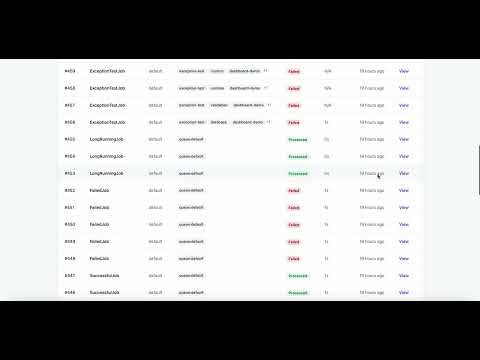
Click the thumbnail above to watch the demo video on YouTube.
Contributing
Please see CONTRIBUTING for details on how to contribute to this project.
License
The MIT License (MIT). Please see License File for more information.
All versions of vantage with dependencies

illuminate/support Version ^10.0|^11.0|^12.0|^13.0
illuminate/queue Version ^10.0|^11.0|^12.0|^13.0
illuminate/events Version ^10.0|^11.0|^12.0|^13.0
illuminate/notifications Version ^10.0|^11.0|^12.0|^13.0