Download the PHP package socket-manager/demo-project without Composer
On this page you can find all versions of the php package socket-manager/demo-project. It is possible to download/install these versions without Composer. Possible dependencies are resolved automatically.
Download socket-manager/demo-project
More information about socket-manager/demo-project
Files in socket-manager/demo-project
Package demo-project
Short Description DEMO-PROJECT: フレームワークのデモ環境プロジェクト
License MIT
FAQ
Example:

In general, it is recommended to use always a project to download your libraries. In an application normally there is more than one library needed.

- Some hosting areas are not accessible by a terminal or SSH. Then it is not possible to use Composer.
- To use Composer is sometimes complicated. Especially for beginners.
- Composer needs much resources. Sometimes they are not available on a simple webspace.
- If you are using private repositories you don't need to share your credentials. You can set up everything on our site and then you provide a simple download link to your team member.
- Simplify your Composer build process. Use our own command line tool to download the vendor folder as binary. This makes your build process faster and you don't need to expose your credentials for private repositories.
Informations about the package demo-project
DEMO-PROJECT:フレームワークのデモ環境プロジェクト
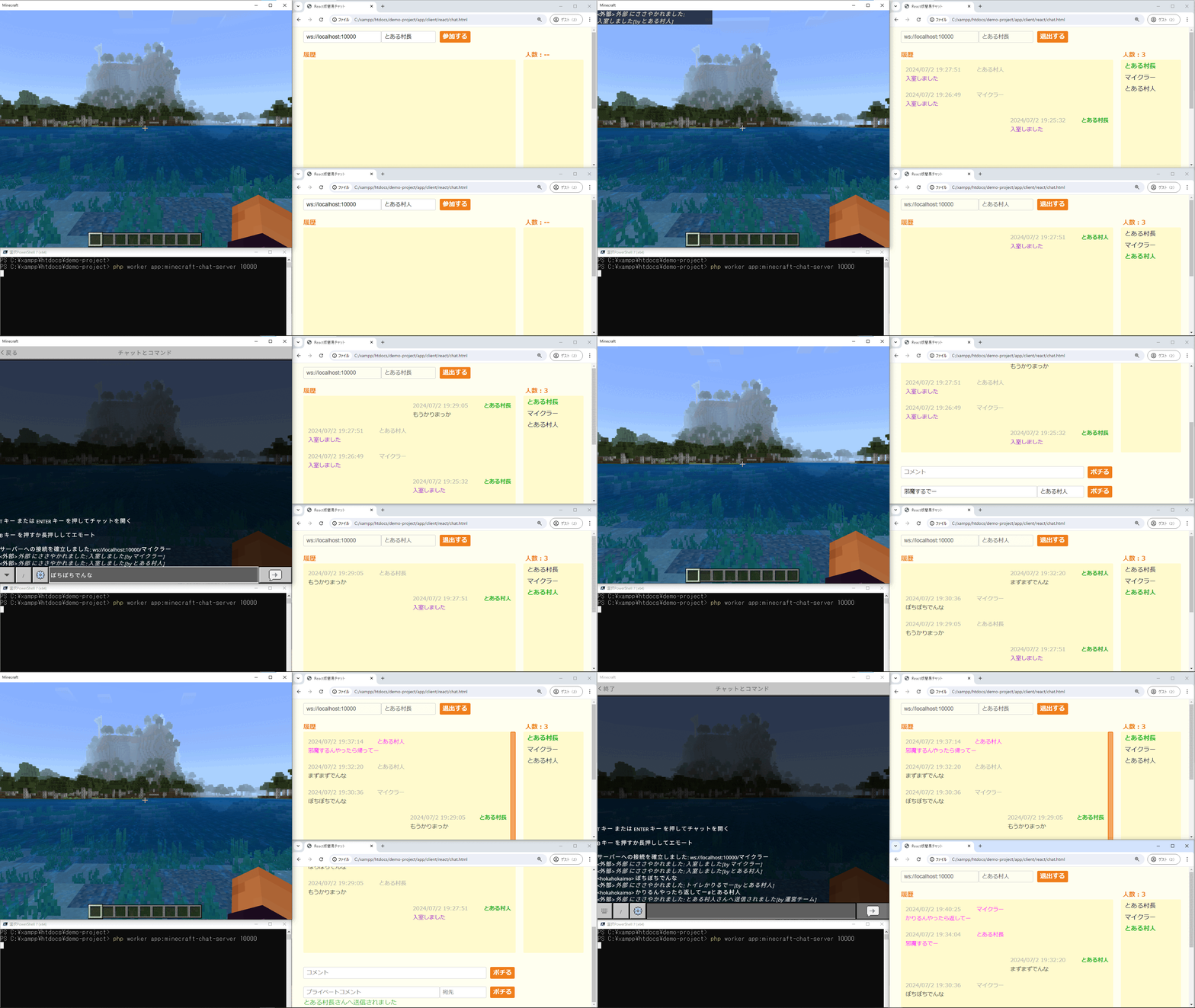
Minecraftと連携できる軽量WebSocketサーバーのデモプロジェクトです。
リアルタイムチャットのサンプル(ブラウザ/Minecraftクライアント対応)と、Laravel連携のサンプルを含みます。
【 概要 】
このリポジトリは、SOCKET-MANAGERフレームワーク上で動作するWebSocketサーバーのデモです。
Minecraftと連携してチャットを行うサンプルや、ブラウザクライアント(jQuery / React)を提供し、リアルタイム通信の実装例として利用できます。Laravel連携のサンプルも用意しています。
【 特徴 】
- WebSocketベースのリアルタイムチャット(ブラウザ / Minecraft)
- Minecraftクライアントからの接続サンプル(チャット連携)
- jQuery / React のクライアントサンプルを同梱
- Laravelとの連携方法をドキュメントで提供
【 クイックスタート(サーバー起動) 】
プロジェクトルートで以下のコマンドを実行してサーバーを起動します。
例)
起動後、指定したポートでWebSocketサーバーが待ち受けます。
【 クライアントの使い方 】
ブラウザ(jQuery / React)
同梱のクライアントHTMLをブラウザで開いて接続できます。任意のブラウザでファイルを開くか、静的ファイルサーバーに配置してアクセスしてください。
- jQuery版: /app/client/jquery/chat.html
- React版: /app/client/react/chat.html
これらのファイルは、WebSocket経由でチャットメッセージを送受信する動作サンプルです。
Minecraftから接続する方法
Minecraftのチャット画面から以下のコマンドを実行して接続します。
例:
接続後は通常のチャットと同様にメッセージを送れます。特定ユーザーへのプライベートメッセージは以下のフォーマットで送れます。
【 Windows (UWP) のループバック許可 】
Minecraft(UWP版)を使う場合、ローカルのWebSocketサーバーにアクセスするためにループバックを許可する必要があります。管理者権限のコマンドプロンプトで以下を実行してください。
【 補足とリンク 】
このプロジェクトには複数のサーバー例を用意しています。より詳しい使い方や追加のデモは以下を参照してください。
- 追加デモ: https://socket-manager.github.io/document/extra-demo.html
- Laravel連携: https://socket-manager.github.io/document/laravel.html
<デモ画面>
【 Contact Us 】
バグ報告やご要望などはこちらから受け付けております。
【 License 】
MIT, see LICENSE file.
