Download the PHP package rosgear/rg-cms-standard without Composer
On this page you can find all versions of the php package rosgear/rg-cms-standard. It is possible to download/install these versions without Composer. Possible dependencies are resolved automatically.
Download rosgear/rg-cms-standard
More information about rosgear/rg-cms-standard
Files in rosgear/rg-cms-standard
Package rg-cms-standard
Short Description RG CMS: Standard edition
License LGPL-3.0-or-later
Homepage https://rosgear.ru/cms/standard/
FAQ
Example:

In general, it is recommended to use always a project to download your libraries. In an application normally there is more than one library needed.

- Some hosting areas are not accessible by a terminal or SSH. Then it is not possible to use Composer.
- To use Composer is sometimes complicated. Especially for beginners.
- Composer needs much resources. Sometimes they are not available on a simple webspace.
- If you are using private repositories you don't need to share your credentials. You can set up everything on our site and then you provide a simple download link to your team member.
- Simplify your Composer build process. Use our own command line tool to download the vendor folder as binary. This makes your build process faster and you don't need to expose your credentials for private repositories.
Informations about the package rg-cms-standard
English







RG CMS: Редакция «Стандарт»
Веб-приложение «RosGear: Управление сайтом», Редакция «Стандарт» («RosGear: Site management», Edition «Standard»).
Что такое RG CMS?
- RG CMS — это Система управления содержимым (CMS), что позволяет вам создавать веб-сайты и мощные онлайн-приложения;
- Это простое и мощное веб-приложение RosGear для работы которого, требуется сервер с PHP и MySQL, MariaDB или PostgreSQL. Редакция «Стандарт» веб-приложения RosGear имеет набор компонентов для создания веб-сайта с расширенным функционалом;
- RG CMS — это бесплатное программное обеспечение с открытым исходным кодом, распространяемое по лицензии GNU General Public License версии 3 или более поздней.
С составом редакции «Стандарт» вы можете ознакомиться по ссылке.
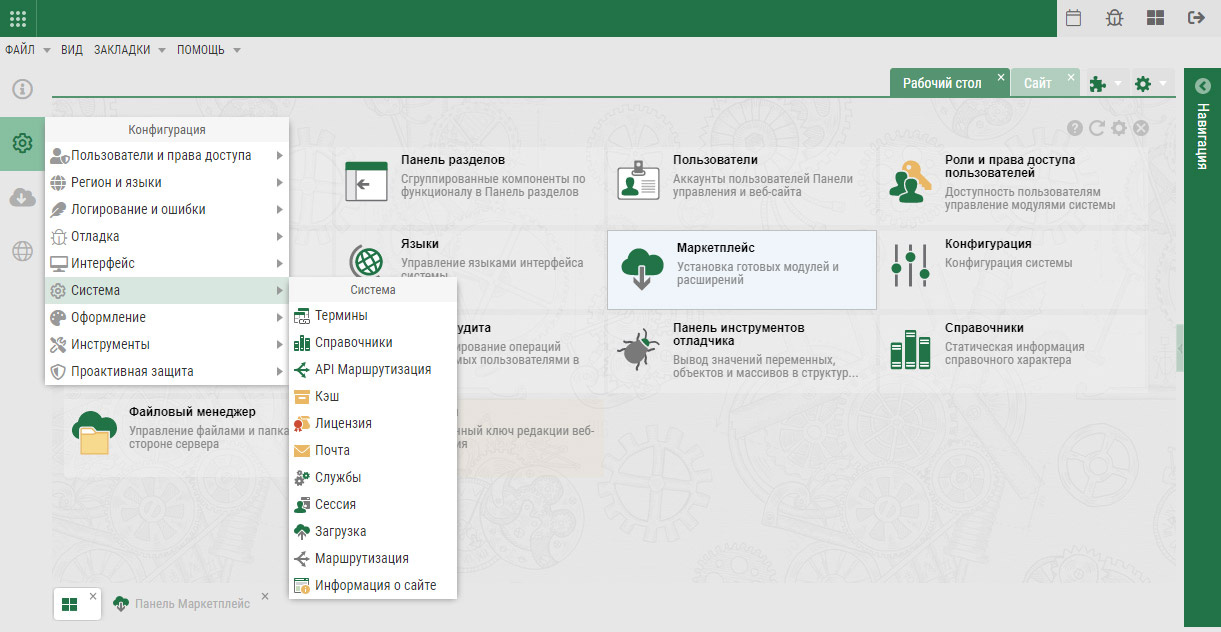
Скриншот
Как получить рабочую установку из исходников
Вам понадобится:
- PHP — который входит в состав XAMPP (кроссплатформенная сборка локального веб-сервера) или OSPanel (локальный веб-сервер для Windows);
- Composer - для управления зависимостями веб-приложения RosGear. Для получения помощи по установке Composer прочтите документацию https://getcomposer.org/doc/00-intro.md;
- Git — для управления версиями. Скачать отсюда https://git-scm.com/downloads (пользователи MacOS также могут использовать Brew, а пользователи Linux могут использовать встроенный менеджер пакетов, например apt, yum и т. д.).
Установка
Для установки веб-приложения, вы можете просто выполнить команду ниже:
После установки всех пакетов перейти в каталог (например "rg-cms-standard") вашего веб-приложения и выполнить команду:
этой командой будут установлены все файлы из каталога ".install" для вашей редакции веб-приложения.
Следующая команда необходима для удаления файлов Git и файлов (README.md и т.п.) в которых нет необходимости в размещении на хостинге.
Авторские права
- (C) 2015-2026 RosGear, https://rosgear.ru/
- Распространяется по лицензии GNU General Public License версии 3 или более поздней.
- См. Подробности лицензии
RG CMS: Edition «Standard»
Web application «RosGear: Site Management», Edition «Standard».
What is RG CMS?
- RG CMS is a Content Management System (CMS) that allows you to create websites and powerful online applications;
- This simple and powerful RosGear web application requires a server running PHP and MySQL, MariaDB, or PostgreSQL. The «Standard» edition of the RosGear web application includes a set of components for creating a website with advanced functionality;
- RG CMS is free and open source software licensed under the GNU General Public License version 3 or later.
You can find the editorial board of «Standard» at link.
Screenshot
How to get a working installation from source
You will need:
- PHP - which is part of XAMPP (a cross-platform assembly of a local web server) or OSPanel (a local web server for Windows);
- Composer - for managing RosGear web application dependencies. For help installing Composer, see the documentation at https://getcomposer.org/doc/00-intro.md;
- Git — for version control. Download from https://git-scm.com/downloads (MacOS users can also use Brew, and Linux users can use a built-in package manager, such as apt, yum, etc.).
Installation
To install the web application, you can simply run the command below:
After installing all the packages, go to the directory (for example, "rg-cms-standard") of your web application and run the command:
This command will install all files from the ".install" directory for your web application edition.
The following command is required to remove Git files and files (README.md, etc.) that do not need to be hosted.
Copyright
- (C) 2015-2026 RosGear, https://rosgear.ru/
- Distributed under the GNU General Public License version 3 or later.
- See License details
All versions of rg-cms-standard with dependencies

rosgear/ge2-composer-plugin Version *
rosgear/rg-skeleton Version 1.*
rosgear/ge-site Version 1.*
rosgear/ge-panel Version 1.*
rosgear/ge-panel-assets Version 1.*
rosgear/rg-theme-green Version *
rosgear/rg-theme-impact Version *
rosgear/rg-setup Version 1.*
rosgear/rg-be-references Version *
rosgear/rg-be-references-desk Version *
rosgear/rg-be-references-articles Version *
rosgear/rg-be-references-elements Version *
rosgear/rg-be-references-properties Version *
rosgear/rg-be-references-folder_profiles Version *
rosgear/rg-be-references-media_dialogs Version *
rosgear/rg-be-references-media_folders Version *
rosgear/rg-be-references-media_types Version *
rosgear/rg-be-config Version *
rosgear/rg-be-config-desk Version *
rosgear/rg-be-config-defense Version *
rosgear/rg-be-config-ipwhitelist Version *
rosgear/rg-be-config-ipblacklist Version *
rosgear/rg-be-config-ipblocklist Version *
rosgear/rg-be-config-api_routes Version *
rosgear/rg-be-config-url Version *
rosgear/rg-be-config-upload Version *
rosgear/rg-be-config-timezone Version *
rosgear/rg-be-config-page Version *
rosgear/rg-be-config-services Version *
rosgear/rg-be-config-session Version *
rosgear/rg-be-config-mail Version *
rosgear/rg-be-config-logger Version *
rosgear/rg-be-config-wspace Version *
rosgear/rg-be-config-version Version *
rosgear/rg-be-config-license Version *
rosgear/rg-be-config-datetime Version *
rosgear/rg-be-config-cache Version *
rosgear/rg-be-config-autorun Version *
rosgear/rg-be-config-audit Version *
rosgear/rg-be-config-multisite Version *
rosgear/rg-be-mp Version *
rosgear/rg-be-mp-desk Version *
rosgear/rg-be-mp-catalog Version *
rosgear/rg-be-mp-mmanager Version *
rosgear/rg-be-mp-emanager Version *
rosgear/rg-be-mp-wmanager Version *
rosgear/rg-be-mp-pmanager Version *
rosgear/rg-be-mp-themes Version *
rosgear/rg-be-dashboard Version *
rosgear/rg-ds-license Version *
rosgear/rg-ds-version Version *
rosgear/rg-ds-shortcuts Version *
rosgear/rg-be-media_gallery Version *
rosgear/rg-plg-image_album Version *
rosgear/rg-be-recovery Version *
rosgear/rg-be-signin Version *
rosgear/rg-be-rss_feeds Version *
rosgear/rg-be-site_markup Version *
rosgear/rg-be-site_menu Version *
rosgear/rg-be-mediafiles Version *
rosgear/rg-be-filemanager Version *
rosgear/rg-be-workspace Version *
rosgear/rg-be-menu Version *
rosgear/rg-be-partitionbar Version *
rosgear/rg-be-traybar Version *
rosgear/rg-be-languages Version *
rosgear/rg-be-debug_toolbar Version *
rosgear/rg-be-users Version *
rosgear/rg-be-user_roles Version *
rosgear/rg-be-templates Version *
rosgear/rg-be-terms Version *
rosgear/rg-be-task Version *
rosgear/rg-be-tags Version *
rosgear/rg-be-articles Version *
rosgear/rg-be-article_categories Version *
rosgear/rg-be-error_report Version *
rosgear/rg-be-guide Version *
rosgear/rg-be-audit_log Version *
rosgear/rg-fe-sitemap Version *
rosgear/rg-fe-site Version *
rosgear/rg-fe-rss Version *
rosgear/rg-fe-api Version *
rosgear/rg-fe-tags Version *
rosgear/rg-wd-codemirror Version *
rosgear/rg-wd-breadcrumbs Version *
rosgear/rg-wd-fine_uploader Version *
rosgear/rg-wd-kcaptcha Version *
rosgear/rg-wd-lightgallery Version *
rosgear/rg-wd-fancybox Version *
rosgear/rg-wd-menu Version *
rosgear/rg-wd-tinymce Version *
rosgear/rg-wd-yandexshare Version *
rosgear/rg-wd-tagcloud Version *
rosgear/rg-wd-tags Version *
rosgear/rg-wd-article Version *
rosgear/rg-wd-articles Version *