Download the PHP package philwilliammee/cd-events-wp-plugin without Composer
On this page you can find all versions of the php package philwilliammee/cd-events-wp-plugin. It is possible to download/install these versions without Composer. Possible dependencies are resolved automatically.
Download philwilliammee/cd-events-wp-plugin
More information about philwilliammee/cd-events-wp-plugin
Files in philwilliammee/cd-events-wp-plugin
Package cd-events-wp-plugin
Short Description AA wordpress plugin to use Localist Events Viewer.
License GPL-2.0-or-later
Homepage https://it.cornell.edu/custom-web
FAQ
Example:

In general, it is recommended to use always a project to download your libraries. In an application normally there is more than one library needed.

- Some hosting areas are not accessible by a terminal or SSH. Then it is not possible to use Composer.
- To use Composer is sometimes complicated. Especially for beginners.
- Composer needs much resources. Sometimes they are not available on a simple webspace.
- If you are using private repositories you don't need to share your credentials. You can set up everything on our site and then you provide a simple download link to your team member.
- Simplify your Composer build process. Use our own command line tool to download the vendor folder as binary. This makes your build process faster and you don't need to expose your credentials for private repositories.
Informations about the package cd-events-wp-plugin
wp-localist-viewer
A wordpress plugin to use Localist Events Viewer
How to use this plugin
Installation
-
composer with packagist repo. example-composer.json :
composer require philwilliammee/cd-events-wp-plugin -
zip file : https://github.com/CU-CommunityApps/CD-events-wp-plugin/archive/master.zip
- repo : https://github.com/CU-CommunityApps/CD-events-wp-plugin
Download the plugin and add it to your sites plugins directory.
Activation
activate the plugin via the wordpress dashboard.
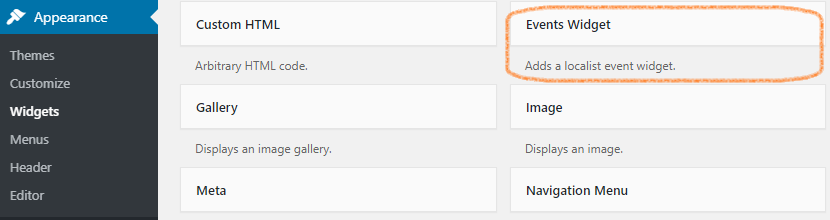
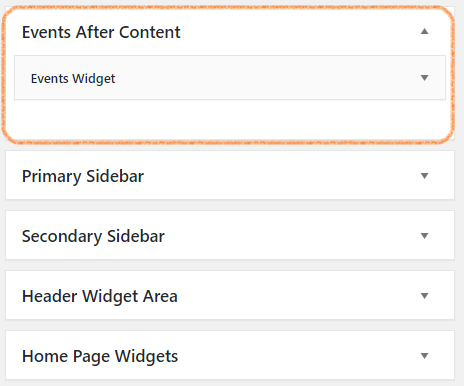
After activation the plugin adds:
-
Events Widget.
-
Events After Content section
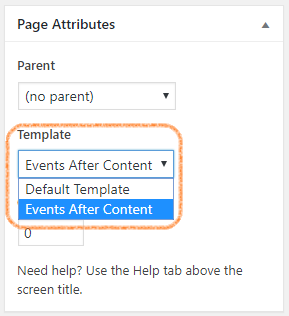
- Events After Content template to display widgets section.
Configuration
-
Add a events widget to Events After Content section and expand the widget to set configuration.
- Configure the widget for your site.
- Configuration fields.
- Unique ID: (string) A unique identifier for the widget.
- heading: (string) The text heading to display above the widget
- depts: (number(s)) A single department id or a comma seperated list of ids.
- entries: (number) The number of events to show.
- daysahead: ((-)number) The number of days to query for events. Use negative numbers for archive. 365 max, -365 min.
- format (string option) The view layout for the event.
- group (number) The group id used by localist api. Used for filtering.
- keyword (string) Uses keywords or tags to filter events.
- filterby (string option) Exposed filters.
- calendarurl (string) The localist events calendar api url
- apikey (number) Optional API key. not required for get requests.
- hideaddcal (boolean) Show or hide add to cal links for google,ios, and outlook
- hidedescription (boolean) Show or hide the event description.
- truncatedescription (number) The number of characters to show in the description
- hideimages (boolean) Show or hides event images.
- hidepagination (boolean) Show or hides the pagination.
- wrapperclass (string) Class to add to events wrapper.
- listclass (string) Class
- itemclass (string) Class
- readmore (string) Link text to events page.
- url (string) Link url to events page.
- Create an events page and use the Events After Content Template. (The events will now display on the page)
For developers
download the repo using git.
modify the page templates in /page-templater/cwd-events-template.php
To modify the css styles go to /src and run npm install modify the style in /src/styles/app.scss the styles will need to be compiled go to /src and run then npm run prod this will compile the css file and output to cwd-events-component-public.css
