Download the PHP package permafrost-dev/ray-cli without Composer
On this page you can find all versions of the php package permafrost-dev/ray-cli. It is possible to download/install these versions without Composer. Possible dependencies are resolved automatically.
Download permafrost-dev/ray-cli
More information about permafrost-dev/ray-cli
Files in permafrost-dev/ray-cli
Package ray-cli
Short Description sends data to Ray via a cli command
License MIT
FAQ
Example:

In general, it is recommended to use always a project to download your libraries. In an application normally there is more than one library needed.

- Some hosting areas are not accessible by a terminal or SSH. Then it is not possible to use Composer.
- To use Composer is sometimes complicated. Especially for beginners.
- Composer needs much resources. Sometimes they are not available on a simple webspace.
- If you are using private repositories you don't need to share your credentials. You can set up everything on our site and then you provide a simple download link to your team member.
- Simplify your Composer build process. Use our own command line tool to download the vendor folder as binary. This makes your build process faster and you don't need to expose your credentials for private repositories.
Informations about the package ray-cli
ray-cli




This package provides a command-line interface for interacting with the Ray application by Spatie.
Supported PHP versions: 7.4, 8.0.
Installation
You may install the package using composer:
composer require permafrost-dev/ray-cli --dev
Also available is a download for a phar executable from the releases page. The primary advantage of using a phar is that you don't need to install the package into your project.
If you download a phar, replace vendor/bin/ray with the filename of the phar in the examples, i.e.:
would become:
Note: Some users may need to set the phar as executable using chmod. Example: chmod +x ray-1.6.0.phar
Usage
Sending data to Ray is as simple as calling the ray script and providing a single argument, either a string or a filename:
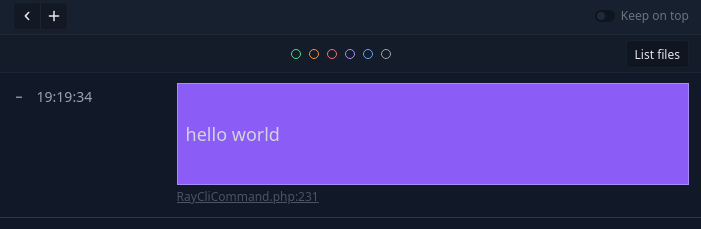
vendor/bin/ray 'hello world'
You can provide a JSON string and Ray will format it for you:
vendor/bin/ray '{"message": "hello world"}'
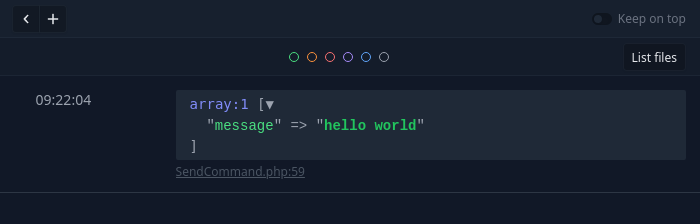
You're also able to pass a valid filename instead of a string. The contents of the file will be sent instead, with automatic JSON detection.
You can even pass a valid URL - it will be downloaded and sent to Ray, with automatic JSON detection.
Available Options
The ray script offers several flags for sending additional payloads to Ray:
--update-check
Arguments: none
Default: false
Description: Checks for an updated version of ray-cli. If specified, all other flags are ignored.
Example:
--exec
Arguments: none
Default: false
Description: Treats the argument as a script or executable, executes it, and sends the output to Ray. Supported interpreters for scripts are PHP, Python, and NodeJS. If the file is executable, such as a binary or .sh script, it will also be executed. JSON content is automatically detected.
Example:
--refresh
Arguments: integer or decimal
Default: none
Description: Refreshes the payload display in Ray every N seconds, where N is either a whole number (i.e., 10) or a decimal (i.e., 7.5). If a file is specified, it is re-read every N seconds; if a URL is specified, it is re-retrieved.
Example:
--color or -c
Arguments: string
Default: none
Description: sends a "color" payload along with the data.
Example:
--large or --lg
Arguments: none
Default: false
Description: sends the payload as large-sized text.
Example:
--smallor --sm
Arguments: none
Default: false
Description: sends the payload as small-sized text.
Example:
--size or -S
Arguments: string
Default: normal
Possible Values: large, lg, small, sm, normal
Description: sends a payload with the specified text size. See --large and --small. Note that while included for completeness, specifying normal is not necessary as it is the default text size.
Example:
--label or -L
Arguments: string
Default: none
Description: sends a "label" payload along with the data. Only works when sending plain (non-JSON and non-delimited) strings.
Example:
--notify or -N
Arguments: none
Default: false
Description: sends a "notification" payload, causing Ray to display an OS notification instead of logging the data in its window.
Example:
--csv
Arguments: none
Default: false
Description: causes the payload data to be treated as a comma-separated list of values, and will explode() the data and send the resulting array of values instead.
Example:
--delimiter or -D
Arguments: string
Default: none
Description: causes the payload data to be treated as a list of values delimited by the provided delimiter string, and will explode() the data and send the resulting array of values instead.
Example:
--json or -j
Arguments: none
Default: false
Description: Forces the payload data to be treated as a JSON string. Note that this flag is unnecessary in most cases because JSON strings are automatically detected.
Example:
--stdin
Arguments: none
Default: false
Description: Reads the payload data from the standard input instead of as a command line parameter. Note that the payload data can be specified as as dash ("-") instead of specifying the --stdin flag.
Example:
--raw
Arguments: none
Default: false
Description: Forces the payload data be pre-processed and to display the raw, unrendered content. The data is processed to encode HTML entities, spaces, and converts new lines to <br> tags (this is done to display HTML source code).
Example:
--screen or -s
Arguments: string
Default: none
Description: causes a new screen to be created in Ray, with the argument being the "name" of the new screen. Passing an empty string or a string value of "-" will cause the screen to be unnamed (the same effect as calling ray()->clearScreen()). Passing --screen or -s as the last argument on the command line is the same as providing a screen name of "-".
Example:
--clear or -C
Arguments: none
Default: none
Example:
Description: causes Ray the clear the screen (it's really just creating a new screen with no name). If both --screen and --clear are provided, --clear takes precedence.
Example:
--clear-all
Arguments: none
Default: none
Description: causes Ray to clear all screens.
Example:
--image or -i
Arguments: none
Default: none
Description: causes the payload to be treated as an image. The payload must be either a URL or an existing filename.
Example:
--blue, --gray, --green, --orange, --purple, --red
Arguments: none
Default: false
Description: causes the payload to be sent with the indicated color. Alias for the --color=N flag.
Example:
--bg-blue, --bg-gray, --bg-green, --bg-orange, --bg-purple, --bg-red
Arguments: none
Default: false
Description: causes the payload to be sent with the indicated background color.
Example:
Examples
Send the contents of a JSON file to Ray with a blue marker:
Send the contents of test.json with small text, a red marker, and to a new screen named "my data":
Testing
This package uses PHPUnit for unit tests. To run the test suite, run:
./vendor/bin/phpunit
Changelog
Please see CHANGELOG for more information on what has changed recently.
License
The MIT License (MIT). Please see License File for more information.
All versions of ray-cli with dependencies

ext-curl Version *
ext-json Version *
spatie/ray Version ^1.7
symfony/console Version ^5.2