Download the PHP package nrngajurel/nepali-calendar without Composer
On this page you can find all versions of the php package nrngajurel/nepali-calendar. It is possible to download/install these versions without Composer. Possible dependencies are resolved automatically.
Download nrngajurel/nepali-calendar
More information about nrngajurel/nepali-calendar
Files in nrngajurel/nepali-calendar
Package nepali-calendar
Short Description Bikram Sambat (Nepali) calendar conversion with configurable, tenant-friendly Carbon macros for Laravel.
License MIT
Homepage https://github.com/nrngajurel/nepali-calendar
FAQ
Example:

In general, it is recommended to use always a project to download your libraries. In an application normally there is more than one library needed.

- Some hosting areas are not accessible by a terminal or SSH. Then it is not possible to use Composer.
- To use Composer is sometimes complicated. Especially for beginners.
- Composer needs much resources. Sometimes they are not available on a simple webspace.
- If you are using private repositories you don't need to share your credentials. You can set up everything on our site and then you provide a simple download link to your team member.
- Simplify your Composer build process. Use our own command line tool to download the vendor folder as binary. This makes your build process faster and you don't need to expose your credentials for private repositories.
Informations about the package nepali-calendar
nrngajurel/nepali-calendar



Bikram Sambat (BS) ⇄ Gregorian (AD) date conversion for PHP, with Laravel Carbon macros that respect a configurable calendar mode. Storage stays AD; only the view layer switches — drop it into any app that needs to show dates in BS, AD, or both.
Contents
- Features
- Datepicker components
- Requirements
- Install
- Carbon macros
- Manager / facade
- Making the mode configurable per tenant / user
- Framework-agnostic converter
- Package layout
- Testing
- Changelog
- Publishing
- Contributing
- Security
- Credits
- License
Features
- Pure PHP converter (
NepaliCalendarConverter) — works outside Laravel too. - Verified against known Nepali New Year dates and round-trip tested across the entire supported range (BS 1970–2100 / AD 1914–2043) with zero drift.
- Calendar mode ('bs' vs 'ad') is resolved through a
CalendarModeResolverinterface — bind your own for tenant- or user-specific behaviour. - Throws typed exceptions (
InvalidNepaliDateException,UnsupportedDateRangeException) instead of silently returningnull. - Scaffolded to match
laravel package(Laravel Installer ≥ v5.31.0) — Pest, Pint, Larastan, and a Testbench workbench sandbox, so it's ready forcomposer test/composer serveout of the box.
Datepicker components
This package ships three Blade components that wrap
nrngajurel/nepali-datepicker-pro
(a zero-dependency JS/CSS package, loaded via CDN by default — nothing to
npm install or composer require) out of the box. Each renders an
<input> using that package's own documented data-nepali-* auto-init
contract, so you get a working BS/AD picker with zero JavaScript of your own:
Date Picker
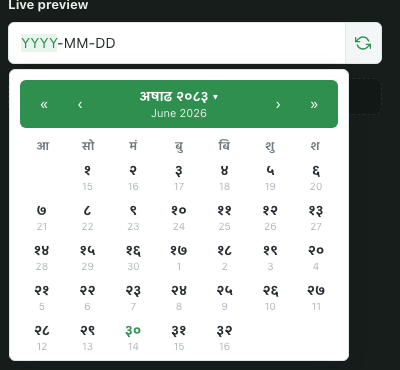
Date Picker |
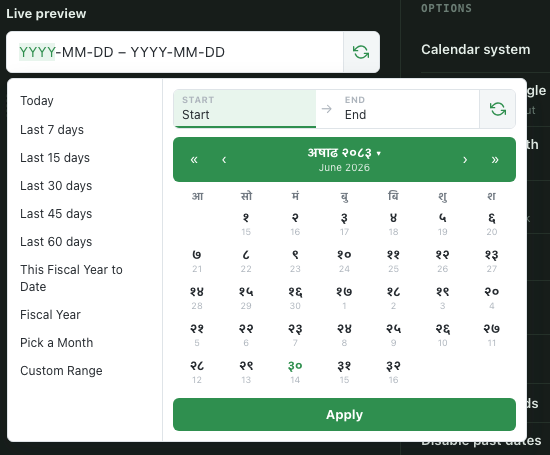
Date Range Picker |
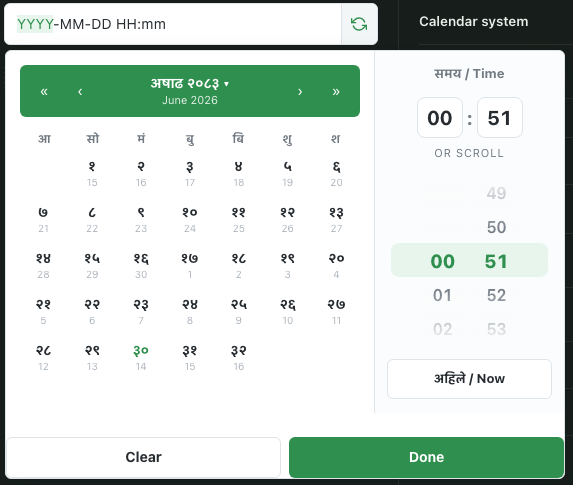
Date Time Picker |
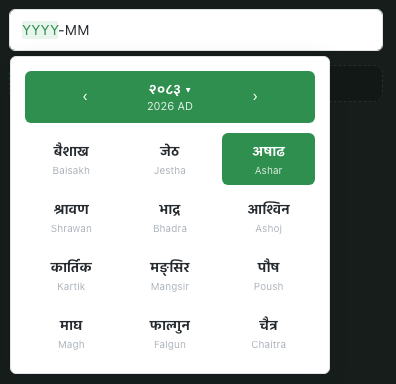
Month Picker |
The picker you show the user (BS, Nepali digits, whatever displayFormat
you configure on the JS side) is never assumed to be the value you submit —
submit-name injects a hidden field carrying the AD value, exactly like
nepali-datepicker-pro's own submitName option. See that package's README
for the full JS-side option set (min/max dates, disabled weekdays, presets,
locale, etc.) — anything not exposed as a Blade prop below is still reachable
by adding your own data-* attribute or calling the JS API directly on the
rendered input's id.
| Component | Wraps | Key props |
|---|---|---|
<x-nepali-calendar::date-picker> |
NepaliDateTimePicker |
name, submit-name, alt-field, with-time, time-format (12h/24h), minute-step, value-format (iso/iso-bs/timestamp), value, placeholder, required |
<x-nepali-calendar::date-range-picker> |
NepaliDateRangePicker |
submit-name, alt-field, fiscal-start-month, value-format, value, placeholder, required |
<x-nepali-calendar::month-picker> |
NepaliMonthPicker |
submit-name, alt-field, value-format, value, placeholder, required |
Any attribute not listed (class, extra data-*, x-model, etc.) passes
straight through to the rendered <input>.
Assets (the CDN <link>/<script> tags plus a single NepaliPicker.autoInit()
call) are injected once automatically, no matter how many of the three
components appear on a page. If you already bundle nepali-datepicker-pro
yourself via npm, publish the config and set datepicker.load_assets to
false — the components still render the correct markup, they just skip
the CDN tags:
Publish the views if you want to customize the markup:
Requirements
- PHP 8.1+
- Laravel 9, 10, 11, 12, or 13 (via
illuminate/contracts+illuminate/support) nesbot/carbon^2.63 or ^3.0
Install
nepali-datepicker-pro itself is a plain npm/JS package — the 3 components
above pull it in for you via CDN, so there's nothing extra to install unless
you want to bundle it yourself (npm install nepali-datepicker-pro).
Laravel auto-discovers the service provider and the NepaliDate facade.
Publish the config if you want to change defaults:
Carbon macros
display() and friends only affect presentation. Keep storing and querying
dates in AD — that's what parseDisplay() is for: it takes whatever the user
typed (or whatever nepali-datepicker-pro submitted) in the currently active
calendar and converts it back to AD before you touch the database.
Manager / facade
For services, jobs, and Artisan commands where a Carbon instance isn't already in scope:
Or inject Nrngajurel\NepaliCalendar\NepaliCalendarManager directly.
Making the mode configurable per tenant / user
The default resolver reads a single config value, which is fine for a
single-tenant app. For anything more dynamic, bind your own resolver in your
own AppServiceProvider — the package never touches a global helper:
Or implement CalendarModeResolver yourself for anything more involved
(caching, request-scoped state, etc.):
Framework-agnostic converter
No Laravel required:
Weekday is 1 (Sunday) .. 7 (Saturday).
Supported range
- AD input: 1914–2043
- BS input: 1970–2100
Dates outside these ranges throw UnsupportedDateRangeException. Structurally
invalid dates (e.g. 13/32, Feb 30) throw InvalidNepaliDateException.
Package layout
Scaffolded to match the output of laravel package nrngajurel/nepali-calendar --config --facade --views (Laravel Installer ≥ v5.31.0, using
laravel/package-skeleton) — no routes/migrations/translations, since this
package doesn't need them:
If you'd rather generate a fresh scaffold yourself and diff it against this
repo (e.g. after a future laravel/package-skeleton update), run:
Testing
Or individually:
The test suite includes:
- Round-trip conversion (
AD → BS → AD) across the full supported range. - Regression tests against two independently verified Nepali New Year dates (BS 2081-01-01 = 13 Apr 2024, BS 2083-01-01 = 14 Apr 2026).
- Feature tests for the Carbon macros, the resolver contract (including binding a custom resolver), and the facade.
- Feature tests for all 3 datepicker components: correct
data-nepali-*markup, asset dedup across multiple components on one page, and theload_assetsconfig toggle. - An arch test enforcing
strict_typesand banningdd()/env()/exit()in package source.
Changelog
See CHANGELOG.md for release history.
Publishing
- Push this repository to GitHub as
nrngajurel/nepali-calendar. - Tag a release matching
CHANGELOG.md:git tag v1.0.0 && git push --tags. - On packagist.org, "Submit" the GitHub repo URL.
- Enable the Packagist GitHub App (or add the webhook it gives you) so future tags auto-publish without a manual "Update" click.
composer require nrngajurel/nepali-calendarthen works anywhere.
Contributing
- Fork and clone the repo.
composer install- Make your change, with a Pest test covering it.
composer test— must pass (Larastan, Pint, Pest) before opening a PR.- Open a PR against
main. CI (.github/workflows/tests.yml) runs the same matrix across PHP 8.1–8.4 and Testbench ^9–^11.
Security
If you discover a security vulnerability, please email [email protected] instead of opening a public issue.
Credits
- Narayan Gajurel
- Datepicker UI powered by nrngajurel/nepali-datepicker-pro
License
MIT © Narayan Gajurel LICENSE.md.
All versions of nepali-calendar with dependencies

nesbot/carbon Version ^2.63||^3.0
illuminate/contracts Version ^9.0||^10.0||^11.0||^12.0||^13.0
illuminate/support Version ^9.0||^10.0||^11.0||^12.0||^13.0