Download the PHP package millancore/ladoc without Composer
On this page you can find all versions of the php package millancore/ladoc. It is possible to download/install these versions without Composer. Possible dependencies are resolved automatically.
Download millancore/ladoc
More information about millancore/ladoc
Files in millancore/ladoc
Package ladoc
Short Description Console tool for explore Laravel Documentation
License MIT
FAQ
Example:

In general, it is recommended to use always a project to download your libraries. In an application normally there is more than one library needed.

- Some hosting areas are not accessible by a terminal or SSH. Then it is not possible to use Composer.
- To use Composer is sometimes complicated. Especially for beginners.
- Composer needs much resources. Sometimes they are not available on a simple webspace.
- If you are using private repositories you don't need to share your credentials. You can set up everything on our site and then you provide a simple download link to your team member.
- Simplify your Composer build process. Use our own command line tool to download the vendor folder as binary. This makes your build process faster and you don't need to expose your credentials for private repositories.
Informations about the package ladoc
Laravel Documentation for Console
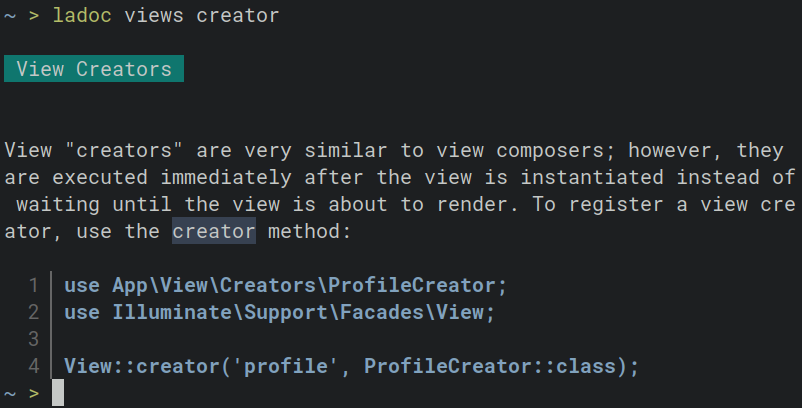




Ladoc allows you to search and browse Laravel documentation in all its versions.
[!TIP] Unlike Laravel Boost, Ladoc supports versions prior to 10.x — all the way back to 4.x — making it perfect for maintaining older Laravel projects.
Ladoc itself needs PHP 8.2 to run, but that's independent of your project: you can browse Laravel 4.x docs while maintaining an app stuck on an old PHP version. If your machine only has an older PHP, use the Docker image instead.
Index
- Use with AI tools
- MCP Server
- Agent Skill (CLI)
- Installation
- Usage
- Search
- List all sections
- Filter Main List
- Navigation System
- Using the search with index
- Versions
- Working with legacy Laravel versions
Use with AI tools
Ladoc can be used by AI coding agents (Claude Code, Cursor, etc.) to look up accurate, version-specific Laravel documentation. There are two ways to connect it.
Both require ladoc to be installed first — see Installation.
MCP Server
Ladoc ships with an MCP server (ladoc-mcp, stdio transport)
that exposes three tools:
| Tool | Description |
|---|---|
list_sections |
List all sections of the documentation |
get_section |
Get the topic index of a section |
search_docs |
Search a section and return the matching articles |
All tools accept an optional version (e.g. "12.x", defaults to the latest).
Claude Code
Cursor, Windsurf, and other MCP clients
For project scope, add a .mcp.json to the project root (Claude Code reads this file,
and it is what --scope project generates):
The same block works in each client's own configuration file, e.g. .cursor/mcp.json
(project scope) or ~/.cursor/mcp.json (global) for Cursor.
ladoc-mcpis installed bycomposer global require millancore/ladoc. If your composer global bin directory is not inPATH, use the full path, e.g.~/.config/composer/vendor/bin/ladoc-mcp.
Using Docker
The Docker image includes ladoc-mcp, so you don't need PHP on the host. Keep a named
container running (the downloaded doc indexes are reused between sessions):
Then point your MCP client at it:
Use
-i, never-t: MCP communicates over stdin/stdout and a TTY corrupts the stream. A throwaway container also works (docker run --rm -i millancore/ladoc ladoc-mcpas the command), but it re-downloads the docs on the first search of each session.
Agent Skill (CLI)
Any agent that can run shell commands can use the ladoc CLI directly — output is plain
text (no ANSI codes) when piped. A ready-made skill for Claude Code is included in
skills/laravel-docs; install it with:
Installation
Using Composer
Requires PHP 8.2
or Using Docker
Uses:
Usage
Tip: To make it easier to use, create an alias, I usually use
zz.
Search
ladoc <section> <query>
List all sections
simply execute the command without parameters, you will see a list of all the sections (in brackets).
Result:
Filter Main List
To simplify the navigation you can filter main list with '--letter' or -l and initial letter.
Result:
Navigation System
You can navigate through all sections using the indexes in the list.
Result:
and continue in that way
Result:
Using the search with index
You can search directly in a section using its index. ladoc 4 @once it's equal to ladoc blade @once.
Versions
Ladoc allows you to search all versions of Laravel, just use --branch or -b to define the version you want to use.
If no version is set, use the latest one.
Working with legacy Laravel versions
Ladoc covers every Laravel version back to 4.0, so you can maintain old projects with the documentation that actually matches them.
1. Find the project's Laravel version
Check laravel/framework in the project's composer.json:
2. Pass it to ladoc with -b
Versions 6 and later use the Nx branch format; versions 4 and 5 use the exact minor:
| Laravel | -b value |
Example |
|---|---|---|
| 6.0 and later | 6.x … 13.x |
ladoc -b8.x eloquent scopes |
| 5.0 – 5.8 | 5.0 … 5.8 |
ladoc -b5.2 blade |
| 4.0 – 4.2 | 4.0, 4.1, 4.2 |
ladoc -b4.2 templates |
The first search on a version downloads and indexes its docs; after that it's instant. Each version keeps its own index, so you can switch between projects freely.
[!NOTE] Old versions organize the docs differently — for example, Laravel 4.x has
templatesinstead ofblade. Runladoc -b4.2(no query) to list the sections that exist in that version, and if you search a section that doesn't exist, ladoc suggests the closest match.
3. With AI tools
Agents using the MCP server pass the version as the version argument of
each tool; with the skill, they read the constraint from
composer.json and add -b automatically. Either way, the agent gets answers for the
version your project actually runs.
Ladoc itself requires PHP 8.2, no matter which Laravel version you're consulting — if the legacy machine can't provide it, use the Docker image.
Ladoc is an open-sourced software licensed under the MIT license.
All versions of ladoc with dependencies

ext-dom Version *
ext-curl Version *
ext-libxml Version *
league/commonmark Version ^2.4
nunomaduro/termwind Version ^1.15
symfony/process Version ^6.3
symfony/console Version ^6.3