Download the PHP package mageme/module-eu-withdrawal without Composer
On this page you can find all versions of the php package mageme/module-eu-withdrawal. It is possible to download/install these versions without Composer. Possible dependencies are resolved automatically.
Download mageme/module-eu-withdrawal
More information about mageme/module-eu-withdrawal
Files in mageme/module-eu-withdrawal
Package module-eu-withdrawal
Short Description Magento 2 implementation scaffolding for the EU consumer-withdrawal workflow under Art. 11a Directive 2011/83/EU (as amended by 2023/2673): guided storefront flow (find order, select items, confirm), durable-medium receipt email, 22-locale Annex I content. NOT legal advice — see README disclaimer; merchant is responsible for compliance verification.
License proprietary
FAQ
Example:

In general, it is recommended to use always a project to download your libraries. In an application normally there is more than one library needed.

- Some hosting areas are not accessible by a terminal or SSH. Then it is not possible to use Composer.
- To use Composer is sometimes complicated. Especially for beginners.
- Composer needs much resources. Sometimes they are not available on a simple webspace.
- If you are using private repositories you don't need to share your credentials. You can set up everything on our site and then you provide a simple download link to your team member.
- Simplify your Composer build process. Use our own command line tool to download the vendor folder as binary. This makes your build process faster and you don't need to expose your credentials for private repositories.
Informations about the package module-eu-withdrawal
MageMe EU Withdrawal for Magento 2
EU withdrawal button for Magento 2 — the consumer right-of-withdrawal flow required under Article 11a of the Consumer Rights Directive (2011/83/EU) as amended by Directive (EU) 2023/2673.





The Magento 2 withdrawal button your EU storefront needs — a storefront-ready, guided flow (find order → select items → review & confirm) with durable-medium receipt emails and Annex I content in 22 EU locales. It runs on Luma and Breeze out of the box, with companion modules for Hyvä and Hyvä Checkout.
It adds only the legal withdrawal step required under Art. 11a, and works alongside your existing RMA / refund process rather than replacing it.
Live demo — try the guest flow · Documentation · Get Pro features
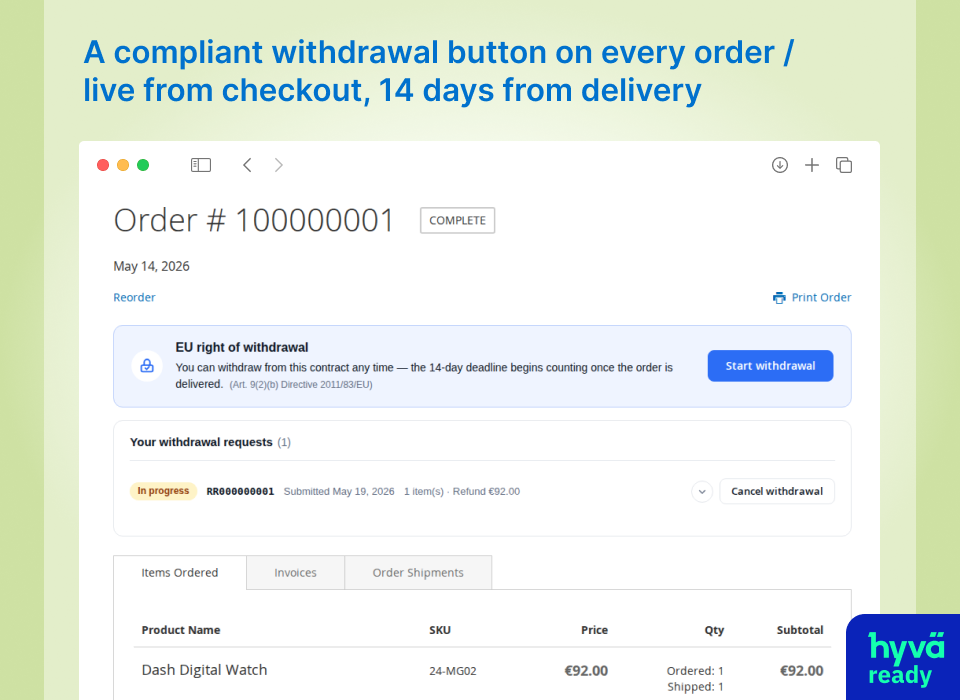
What it does
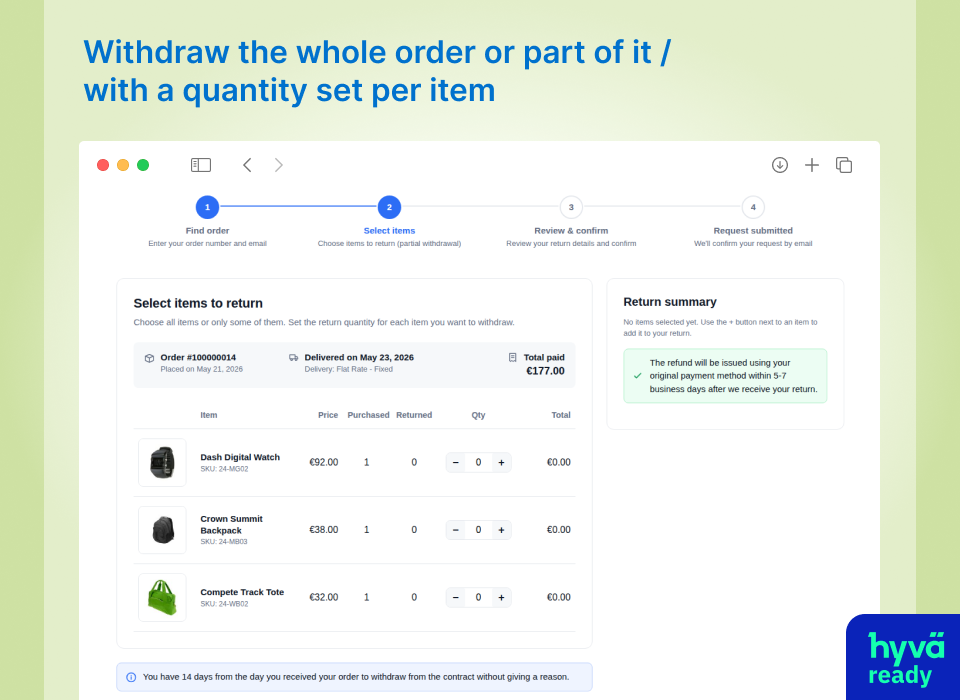
- Guided storefront flow — find order → select items → review & confirm at
/withdraw-contract/, for registered customers and guests (lookup by order number and the email on the order), with per-item or full-order selection - Article 16 exclusions — presets for custom-made, perishable, sealed-hygiene, sealed audio/video, and digital-content goods, configurable per category with merchant override
- Digital-content waiver at checkout (Art. 16(m)) — express-consent and right-loss acknowledgment step, with matching enforcement on REST/GraphQL and headless orders
- Eligibility controls — configurable withdrawal window, handling for orders with no recorded delivery date, merchant-excluded order statuses, and automatic exclusion of canceled orders
- Scope controls — limit the self-service flow by country and by customer group (for example, hide it from B2B / wholesale groups while guests and consumers keep it)
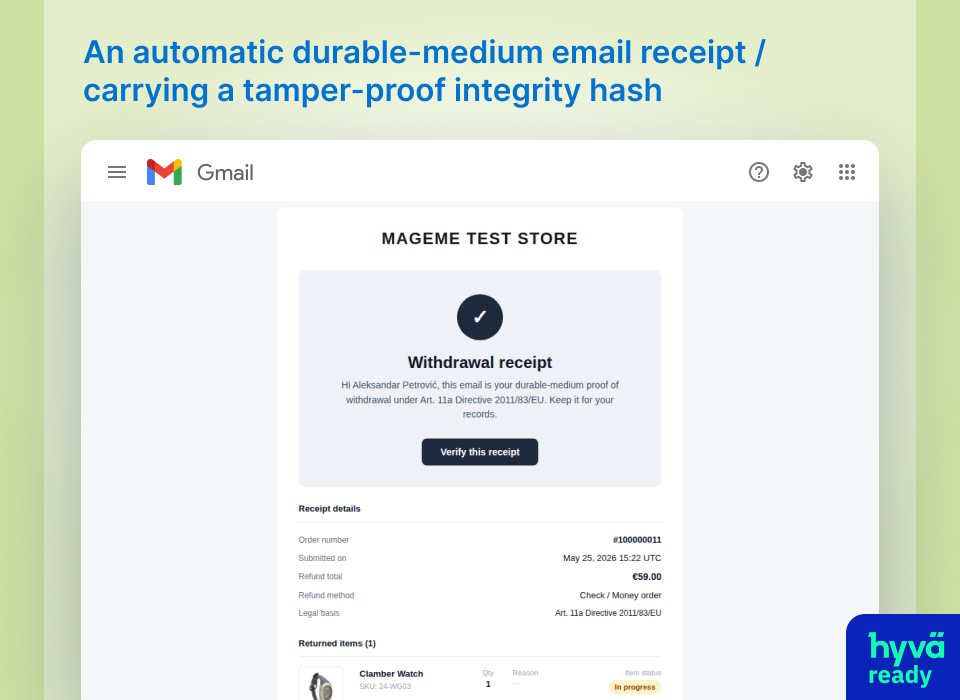
- Durable-medium receipt — confirmation email with a frozen snapshot of the legal text shown to the consumer
- Annex I in 22 EU locales — pre-contractual notice and model withdrawal form, verbatim EUR-Lex translations where available, theme-overridable per locale
- Pro-rata refund calculation — Art. 13(2)/14(2) totals (with order-level adjustments) shown in the admin and added to the order timeline; calculation only — it does not replace Magento's credit-memo / refund processing
- Reimbursement tracking — each approved request tracks its 14-day refund deadline (Art. 13(3)) with a due / withheld / overdue / refunded state and a credit-memo link, a daily overdue digest emailed to admins, the option to withhold a refund until the goods come back and resume it later, and a "mark refund as paid" action for refunds issued outside Magento (bank transfer or elsewhere) — after which no second refund can be raised
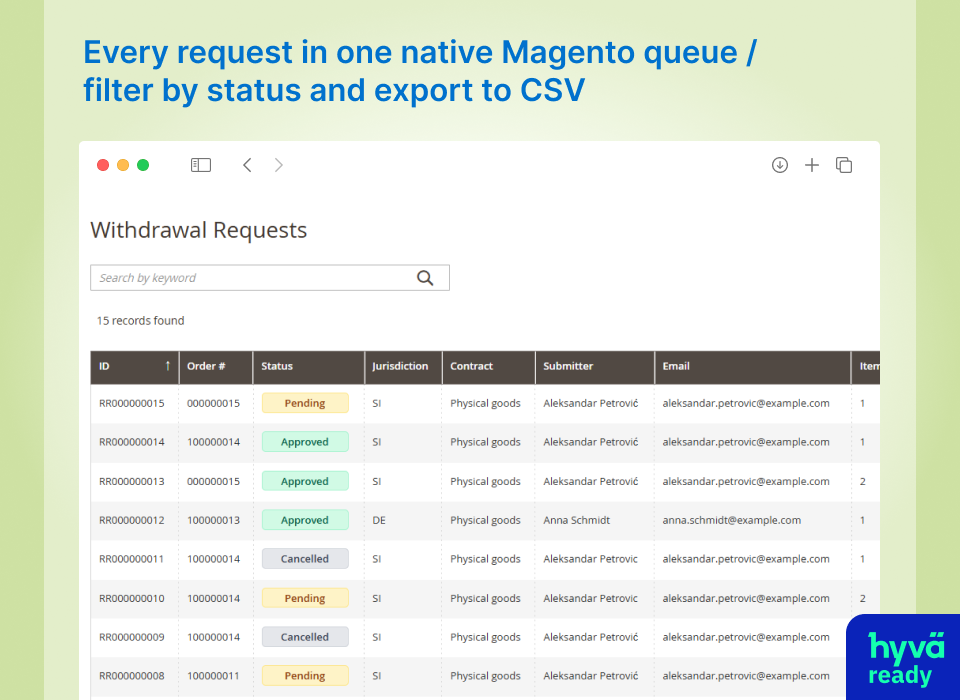
- Admin grid and workflow — filterable request list, status changes (approve / deny / cancel), order-timeline notes, column controls, and CSV export
Live demo
Start with the guest withdrawal flow: find an order by order number and email, select items, and submit the request.
Storefront
- Registered-customer flow — opens a demo account and starts from the customer's order page
- Sealed-item exception — answer the Art. 16(e) seal question and attach photos
- Bundle withdrawal — item selection and eligibility for a product bundle
- Email magic-link access — open the flow from an emailed one-time link, without signing in
- Completed request, customer view — an approved and refunded withdrawal as the consumer sees it
Admin — opens signed in, no credentials needed
- Request card — the same request from the merchant side: refund totals, evidence, and status actions
- All withdrawal requests — filterable grid with the status workflow and CSV export
- Auto-approval rules and decision history — which rule fired on which request (Pro)
- Audit trail — the tamper-evident hash-chain log of one request (Pro)
Proof
- Verify a submission receipt — re-check a receipt's SHA-256 hash against the stored snapshot (Pro)
- Demo mailbox — durable-medium receipts and magic links exactly as customers receive them
Browse all demo scenarios using the demo menu on the right.
Screenshots
Storefront — guided withdrawal flow (find order → select items → review & confirm):
Admin — manage withdrawal requests (status workflow, jurisdictions, refund totals, CSV export):
Durable-medium receipt email — the confirmation sent to the consumer with a frozen snapshot of the legal text they accepted. (The SHA-256 integrity-hash card and one-click verification shown here are a Pro add-on.)
Free vs Pro
| Feature | Free | Pro |
|---|---|---|
| Storefront withdrawal flow | Yes | Yes |
| Annex I — 22 EU locales | Yes | Yes |
| Durable-medium receipt email | Yes | Yes |
| Admin grid + status workflow | Yes | Yes |
| Article 16 exclusion presets | Yes | Yes |
| Per-item or full-order selection | Yes | Yes |
| Country & customer-group scope | Yes | Yes |
| Digital-content waiver (Art. 16(m)) | Yes | Yes |
| Eligibility controls (window, statuses, delivery) | Yes | Yes |
| API / headless waiver enforcement | Yes | Yes |
| Pro-rata refund calculation | Yes | Yes |
| Reimbursement deadline tracking & withhold | Yes | Yes |
| Receipt verification — SHA-256 cryptographic audit | — | Yes |
| Annex I forensic snapshot — immutable per-request copy | — | Yes |
| Hash-chain audit log — DB-backed, tamper-evident | — | Yes |
| Magic-link guest access — one-click tokenised URL | — | Yes |
| Seal-photo evidence — optional intact-seal photos | — | Yes |
| Auto-approval engine — rule-based auto-approve + memo | — | Yes |
Install
After installation, enable the module at Stores → Configuration → MageMe Extensions → EU Withdrawal.
→ Full installation guide and configuration reference
On Luma and Breeze (Swissup) storefronts the base module works out of the box — no extra package required. Only Hyvä themes need the companion module below.
Hyvä storefront
If your storefront runs on a Hyvä theme, install the theme companion alongside this module — it ports the customer-facing withdrawal flow and order-view integrations to Tailwind + Alpine.js:
If you also run Hyvä Checkout, add the checkout companion as well — it re-implements the pre-contract Annex I block and the digital-content waiver step (Art. 16(m)) for Hyvä Checkout's Magewire runtime:
→ Hyvä theme companion · Hyvä Checkout companion
Requirements
- Magento 2.4.4 – 2.4.9 (Open Source / Commerce)
- PHP 8.1, 8.2, 8.3, 8.4, or 8.5 — match your Magento version's PHP support matrix
- MySQL 8.0+ / MariaDB 10.6+
Legal disclaimer
This module is provided AS-IS, without warranty. It is a technical implementation of the workflow described in Article 11a of Directive 2011/83/EU; it is not legal advice and has not been reviewed by EU consumer-law counsel.
The merchant is solely responsible for verifying that this implementation satisfies their jurisdiction's specific consumer-protection requirements, reviewing bundled translations for accuracy in their target markets, and adapting Article 16 exclusion presets to their actual catalogue.
Streaming and SaaS subscriptions — out of scope
This module's Art. 16(m) waiver flow is for one-time digital content — extensions, ebooks, courses, software licences, downloadable templates. It is not for ongoing digital services (streaming, SaaS subscriptions), where the waiver may not remove the withdrawal right — a digital-content vs digital-service distinction now before the CJEU in Case C-234/25. For subscription cancellations and pro-rata refunds, use your billing platform's own cancellation flow.
→ Full disclaimer and merchant compliance checklist
Digital-content waiver on API / headless orders
The Art. 16(m) waiver record is created only from a genuine storefront confirmation (the customer ticking both consent boxes). By default, digital-content orders placed through the REST/GraphQL API are blocked unless a genuine consent record exists for each digital item (the same protection the storefront enforces). If your headless integration collects the consent itself, record it through the waiver-event mechanism and the order will pass; or set Stores → Configuration → MageMe Extensions → EU Withdrawal → Digital Waiver → Enforce Waiver on API / Headless Orders to No to opt out of API enforcement (the storefront waiver step is unaffected either way).
Custom Magento development
Need a feature an extension doesn't cover, or a bespoke Magento build? MageMe takes on custom extension development and integration work.
Support
- Documentation: docs.mageme.com
- Bug reports and feature requests: GitHub Issues
Note: This GitHub Issues tracker is for free tier bug reports and feature requests only.
Changelog
See Semantic Versioning.
License
All tiers are governed by the MageMe End User License Agreement (mageme.com/license). The base module is distributed free of charge; Pro requires a paid commercial licence.
MageMe builds Magento 2 and Adobe Commerce extensions for B2B merchants — form building, quoting, catalog control, and EU compliance.
