Download the PHP package magefan/module-translation without Composer
On this page you can find all versions of the php package magefan/module-translation. It is possible to download/install these versions without Composer. Possible dependencies are resolved automatically.
Download magefan/module-translation
More information about magefan/module-translation
Files in magefan/module-translation
Package module-translation
Short Description This module allowed admin user to change translations in admin panel
License
FAQ
Example:

In general, it is recommended to use always a project to download your libraries. In an application normally there is more than one library needed.

- Some hosting areas are not accessible by a terminal or SSH. Then it is not possible to use Composer.
- To use Composer is sometimes complicated. Especially for beginners.
- Composer needs much resources. Sometimes they are not available on a simple webspace.
- If you are using private repositories you don't need to share your credentials. You can set up everything on our site and then you provide a simple download link to your team member.
- Simplify your Composer build process. Use our own command line tool to download the vendor folder as binary. This makes your build process faster and you don't need to expose your credentials for private repositories.
Informations about the package module-translation
Magento 2 Translation Extension by Magefan

Magento 2 Translation Extension is a fully-featured tool that allows you to add translations for buttons, labels, CMS content, email templates, and product and category attributes directly from the admin panel. It makes the translation process easy and intuitive.
Enhance the manual translation, localize your store automatically, and take full control over what gets translated.
Don’t dive deep into the code — use this tool to make the Magento translation a breeze!
Compatibility: Magento 2.3.0 - 2.4.x (CE, EE, ECE, B2B)
Note: The 2.3.8 version of the Magento 2 Translation extension is available only on magefan.com listing.


TL;DR: Magefan Magento 2 Translation Extension lets you translate Magento 2 content directly from admin or frontend. No CSV files, no code edits, no risk of losing changes after updates — just quick, controlled, SEO-friendly translations.
Why Use Magento 2 Translation Extension?
Magento 2 provides language packs by default, but real-world translation needs go far beyond basic label and buttons translation.
Store owners often need to:
- Adjust default Magento default text
- Fix inaccurate or missing translations from language packs
- Translate checkout and cart messages
- LOcalize product attributes for different markets
- Modify email template wording and translations
- Override theme texts and system messges without rewriting templates
Relying on CSV files with translations makes this process technical for teams that want to apply changes fast, without a developer.
That's why Magento 2 Translation Extension removes this complexity.
It allows you to override and translate text directly from the admin panel without modifying core files or having any technical knowledge.
Features of Magento 2 Translation Extension
- Magento translations added directly in the admin panel
- Translation form or popup for bulk translation on all store views
- Auto translation for on or multiple pages (bulk translation)
- Auto translation schedule for entire store
- Integration with AI-based tools: ChatGPT, DeepL, Google Translate
- Auto transation for Knokout and JavaScript texts
- Auto-search for all untranslated texts
Pricing for the Magento 2 Translation Extension
Magento 2 Translation Extension price depends on the amount of translation work you need and the number of translations required.
Magefan Translation module offers 3 plans with Basic covering basic translation fo labels, buttons and default Magento text, Plus offering auto search and handy multi store view translation forms and Extra coverin auto translation across your entire store.
<img src="https://cm.magefan.com/wysiwyg/products/translation-extension-new-pricing.png" alt="Pricing for Magento 2 Translation Extension" />
Benefits of Translation Extension for Magento 2
Get Your Store Ready for a Global Audience
As profitable as your local market is, you’ll certainly want to explore new possibilities as your business grows. There are numerous things to prepare before going global, and your store localization is one of the most important aspects.
By translating your store, you communicate your offers clearly and ensure people feel comfortable browsing your catalog. Thus, Magento translation is not optional, it’s obligatory if you want to succeed globally.
That said, to get the job done effectively, you need a reliable Magento translation tool.
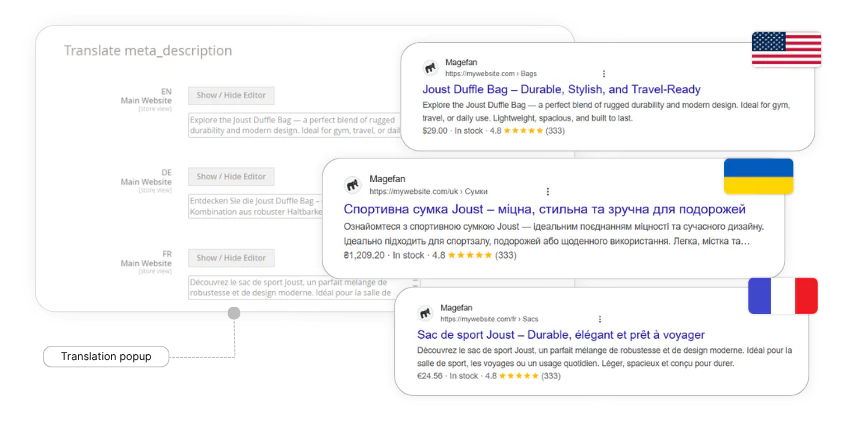
Don’t Miss a Single Phrase and Cover All Your Bases
It’s crucial to have all interface elements translated since they are an integral part of your store and facilitate the customer journey.
The Magento 2 Translation Extension has a solution. It allows you to translate labels, buttons, product and category attributes, CMS blocks and pages, email templates, as well as the Magefan Blog entities for all store views right from the admin panel.
Rest assured that not a single element will be missed!

Give A Boost to Manual Translation
By default, you have to go to each store view separately to translate content and edit attributes. It is extremely ineffective and time-consuming. But not if you have this Magento Translation Extension.
It allows you to translate all content and edit product attributes without leaving a default store view. Just press the “Translate” button and update your content in a handy pop-up or a translation form. Can you imagine how much time you are going to save?

Search and Translate Missing Text Easier
Adding translations is one thing. However, knowing what phrases are yet to be translated is another task. The Magento 2 Translation extension makes it easier for you.
The "Search and Translate" dashboard features all strings that haven’t been translated yet. Thus, you can easily find and translate all the entities right in the grid. No need to waste time looking for untranslated text. This module does it for you.

Add Translations Automatically
To translate even faster, the Magento Translation extension allows you to integrate 3 AI engines — Google Translate, ChatGPT, and DeepL — and add translations within seconds.
Automatically translate product and category attributes, CMS blocks and pages, Magefan Blog posts, and more, individually or in bulk.
Then, review and adjust translations to ensure they are accurate. This saves you tons of time, which you can invest in other tasks.

Benefit From the Scheduled Translation
As you update your store content, new material for translation regularly appears on the radar. Still, it’s quite difficult to keep track of changes pending translation. But you don’t have to with this comprehensive Magento translation tool.
Using this extension, you can set the translation schedule and let the translations be added by cron once your content is updated. Define what entities should be scheduled and monitor the process in the translation schedule grid.
Maximize your localisation efforts without losing control over the process!

Restrict Specific Entities From Translation
While most of your content has to be translated, there are still some specific elements better left untouched. This Magento Translation Extension takes that into account and allows you to skip specific entities from auto translation.
Simply specify the fields you’d like to skip from translation in the extension config, and the extension will ignore them in the process. Be sure your content remains consistent across all store views.

Keep Track of All Translations
Magento translation is an ongoing task. You regularly add new content that requires translation, so it’s quite difficult to keep track of what you did or didn’t add.
The Magento 2 Translation Extension makes the process easier. Each translation you make is carefully stored in the Translations panel. You can quickly find the required text by using original/translated text, locale, or store views filters.
You create your own dictionary, have a clear picture of the added translations, and know exactly where you stand.

Import/ Export Translations
If you already have some translations and want to migrate them from one instance to another, there is an easy way. You can import and export your translation between instances using this Magento Translation tool.
Export all your translations in the CSV/XML format and import them back if needed. It won’t take you more than a few seconds.
Frequently Asked Questions About Magento 2 Translation
How do I translate text in Magento without editing CSV files?
You can use Magefan Translation Extension for Magento that allows to add translaitons directly from the admin panel and offer automatic search and translation for all untranslated texts. This eliminates the need to edit language pack files manually.
Can I edit default Magento labels and messages?
Yes. Magefan Translator for Magento allows you to replace any default Magento text, including system messages, checkout labels, and frontend interface elements as well as translate it to multiple languages.
Does Magento Translation Extension work with multi-language stores?
Yes. This Translation Extension supports multiple store views and allows you to configure translation schedule or bulk tranlate for every store views separately.
Will translations remain after Magento updates?
Yes. Magefan Translation Extenion for Magento does not edit core files. This means your translations remain intact during Magento or any other upgrades.
Demo
Try out our open demo and if you like our extension please give us some star on Github ★
| Storefront Demo | Admin Panel Demo |

|

|
| view | view |
Support
If you have any issues, please contact us then if you still need help, open a bug report in GitHub's issue tracker.
License
The code is licensed under EULA.
Magento Extensions by Magefan
Magento 2 SEO Extensions
- Magento SEO
- Magento 2 Rich Snippets
- Magento 2 LLMs TXT Generator
- Magento 2 HTML Sitemap
- Magento 2 XML Sitemap
- Magento 2 Twitter Cards
- Magento Open Graph Tags
Magento 2 Google Extensions
- Magento Google Tag Manager
- Magento 2 Google Analytics 4
- Magento Google Shopping Feed
- Magento Google Customer Reviews
- Magento 2 Google Indexing
Magento Speed Optimisation Extensions
- Magento 2 Google Page Speed Optimizer
- Magento 2 AVIF Images
- Magento 2 WebP Images
- Magento Full Page Cache Extension
- Magento 2 Lazy Load Images
- Magento 2 Defer JavaScript
Magento Admin Extensions
- Magento 2 Dynamic Category
- Magento 2 Size Chart
- Magento 2 Security Extension
- Magento 2 Bot Blocker
- Magento 2 AI Agent
- Magento 2 Admin Action Log
- Magento Extended Product Grid
- Magento 2 Product Tabs
- Magento 2 Product Widget
- Magento 2 Email Attachments
- Magento 2 Admin View
- Magento 2 Email Notifications
- Magento 2 Login As Customer
Magento Order Management Extensions
Magento 2 Blog Extensions
Magento Marketing Extensions
- Magento 2 Facebook Pixel
- Magento TikTok Pixel
- Magento 2 Dynamic Blocks and Pages
- Magento 2 Cookie Consent
- Magento 2 Base Price
- Magento 2 Price History
- Magento 2 Mautic Extension
- Magento 2 YouTube Video
Magento Promotions Extensions
Magento 2 Multi-Language Extensions
- Magento 2 Hreflang Tags
- Magento 2 Currency Switcher
- Magento 2 Language Switcher
- Magento 2 Store Switcher
Developers Tools
- Magento Zero Downtime Deployment
- Magento 2 Cron Schedule
- Magento 2 CLI Extension
- Magento 2 Conflict Detector
Shopify Apps by Magefan
- Shopify Login As Customer
- Shopify Blog
- Shopify Persistent Cart
- Shopify Size Chart
- Shopify Google Indexer
- Shopify Product Feeds
- Shopify Server GTM & GA4
