Download the PHP package mabolek/google-drive-fal without Composer
On this page you can find all versions of the php package mabolek/google-drive-fal. It is possible to download/install these versions without Composer. Possible dependencies are resolved automatically.
Download mabolek/google-drive-fal
More information about mabolek/google-drive-fal
Files in mabolek/google-drive-fal
Package google-drive-fal
Short Description Google Drive™ for FAL: Use Google Drive™ as File Storage in your TYPO3 installation.
License GPL-2.0-or-later
FAQ
Example:

In general, it is recommended to use always a project to download your libraries. In an application normally there is more than one library needed.

- Some hosting areas are not accessible by a terminal or SSH. Then it is not possible to use Composer.
- To use Composer is sometimes complicated. Especially for beginners.
- Composer needs much resources. Sometimes they are not available on a simple webspace.
- If you are using private repositories you don't need to share your credentials. You can set up everything on our site and then you provide a simple download link to your team member.
- Simplify your Composer build process. Use our own command line tool to download the vendor folder as binary. This makes your build process faster and you don't need to expose your credentials for private repositories.
Informations about the package google-drive-fal
Google Drive™ Driver for TYPO3's File Abstraction Layer (FAL)
This extension enables you to use files from Google Drive in your TYPO3 projects.
Please note: This extension is still in beta and might not work 100% as expected. Feel free to contribute.
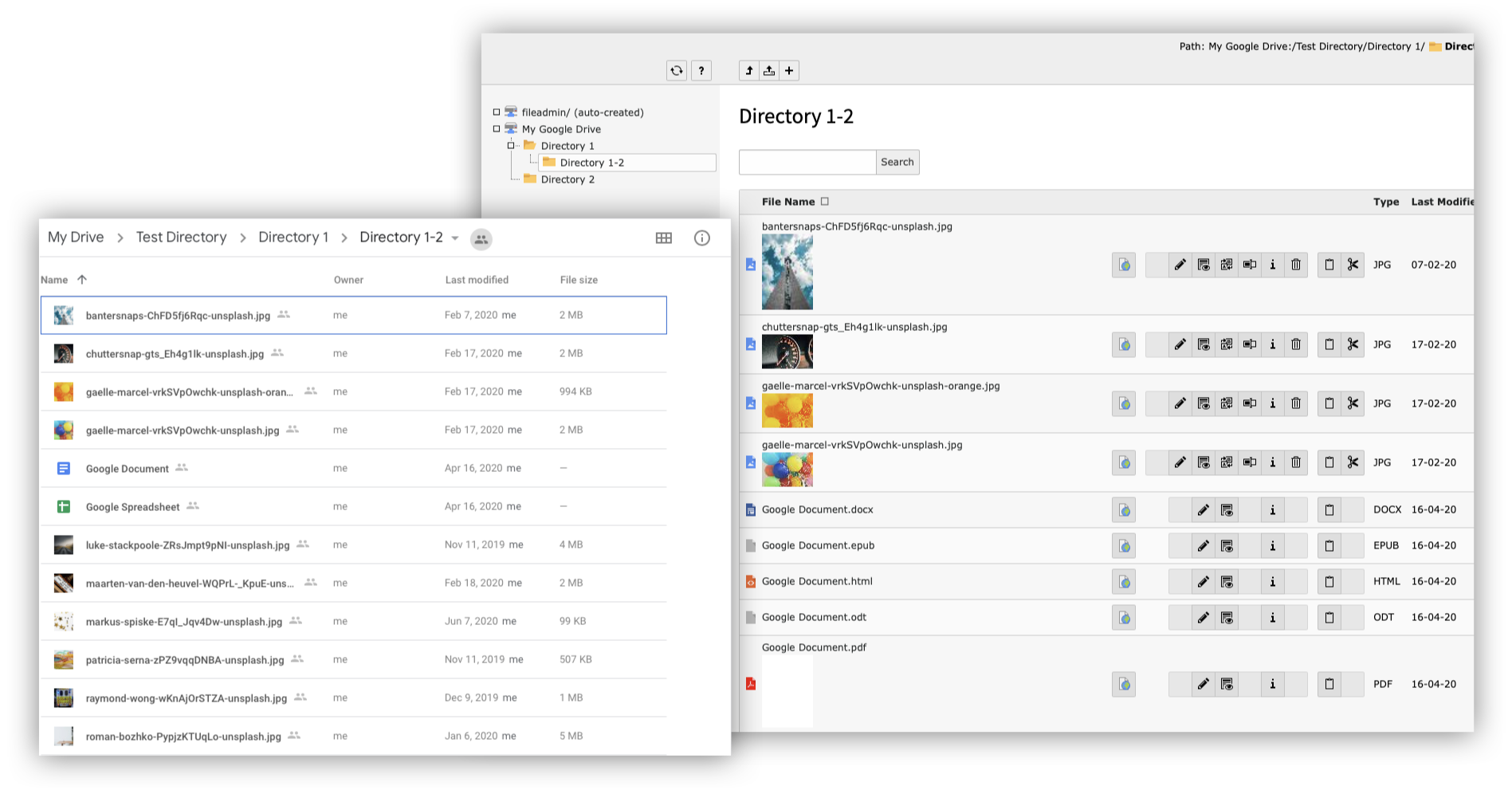
- View and modify files and folders from Google Drive in the Filelist module
- Add images to content elements and create links to files for download.
- Google Documents, Spreadsheets, and Slides are listed multiple times, once for each of their export formats (e.g. PDF or HTML).
Installation
- Install the extension using Composer:
composer req mabolek/google-drive-fal - Activate the extension in the Extensions module or by running
vendor/bin/typo3 extension:activate google_drive_fal
Configuration
Set up Google OAuth Client ID
This a big topic and the detailes are described in detail in Google's documentation.
Here's the simple way:
- Click on the Enable Google Docs API button at https://developers.google.com/drive/api/v3/quickstart/js
- Download the Client Configuration and save it on the server
- Run
vendor/bin/typo3 googledrive:setup [PATH-TO-FILE] - You will be prompted to open a URL in your browser. Follow the authentication process in the browser.
- Paste in the entire resulting URL when you are prompted to enter the verification link.
- The extension will extract the verification code from the URL and (hopefully) tell you it has been successfully configured.
Create a File Storage Record
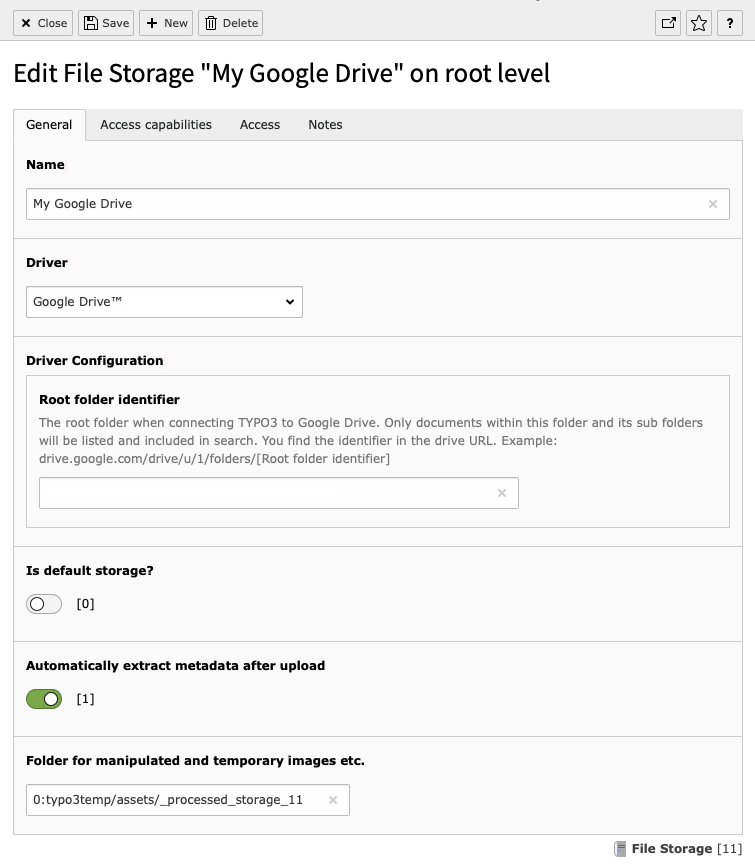
- Create a new File Storage Record in the root page.
- Give it a name.
- Choose Google Drive™ from the Driver menu.
- If you have a lot of files on your drive, we recommend that you supply a root folder identifier so Filelist doesn't have to process them all.
- If you do not supply one, the driver will create its own folder for manipulated and temporary images etc. This folder cannot be on the Google Drive itself, so the default is in a folder within
typo3temp/assets/. - Save and close.
If you go to the Filelist module, you should see your Google Drive there.
Limitations
Your drive is not publicly available : TYPO3 will have to download each file to process it. That will work OK for images that are processed, because they are stored elsewhere, but file downloads may be slower than usual. The plan is to add a caching mechanism to make it faster to serve files publicly.
Contribution
This is a hobby project. Feel free to join the project or contibute pull requests of all kinds.
Thanks and Credits
This extension was created by Mathias Bolt Lesniak on his free time.
The original Client and SetupCredentialsCommand classes came from Georg Ringer's google_docs_content extension. That extension was also a major inspiration behind this project, and hopefully this driver will make that extension even better.
The GoogleDriveDriver class would not have been possible without the eye-opening code in Anders und sehr's Amazon S3 Driver.
Trademarks
Google Drive™ and the Google Drive™ logo are trademarks of Google Inc.
All versions of google-drive-fal with dependencies

typo3/cms-frontend Version ^9.5 || ^10.1
google/apiclient Version ^2.0
ext-json Version *