Download the PHP package lupasearch/prestashop-lupasearch-plugin without Composer
On this page you can find all versions of the php package lupasearch/prestashop-lupasearch-plugin. It is possible to download/install these versions without Composer. Possible dependencies are resolved automatically.
Download lupasearch/prestashop-lupasearch-plugin
More information about lupasearch/prestashop-lupasearch-plugin
Files in lupasearch/prestashop-lupasearch-plugin
Package prestashop-lupasearch-plugin
Short Description Help your website visitors turn into buyers. LupaSearch delivers accurate search results that boost your business sales.
License MIT
FAQ
Example:

In general, it is recommended to use always a project to download your libraries. In an application normally there is more than one library needed.

- Some hosting areas are not accessible by a terminal or SSH. Then it is not possible to use Composer.
- To use Composer is sometimes complicated. Especially for beginners.
- Composer needs much resources. Sometimes they are not available on a simple webspace.
- If you are using private repositories you don't need to share your credentials. You can set up everything on our site and then you provide a simple download link to your team member.
- Simplify your Composer build process. Use our own command line tool to download the vendor folder as binary. This makes your build process faster and you don't need to expose your credentials for private repositories.
Informations about the package prestashop-lupasearch-plugin
LupaSearch PrestaShop plugin
Upgrade your PrestaShop store with our plugin that transforms your search feature. It connects to a fast, smart LupaSearch solution, making it easy for customers to find what they need quickly.
Requirements
- PHP: >=7.1
- PrestaShop: compatible with PrestaShop 1.7.x - 9.x
Installation
Installation steps
- Download the latest plugin version.
- Log in to your PrestaShop back office.
- Navigate to Modules → Module Manager → Upload a module.
- Upload the downloaded
lupasearch.zipfile. - Follow the on-screen instructions to complete the installation.
Configuration
- Go to Modules → Module Manager → LupaSearch integration → Configure.
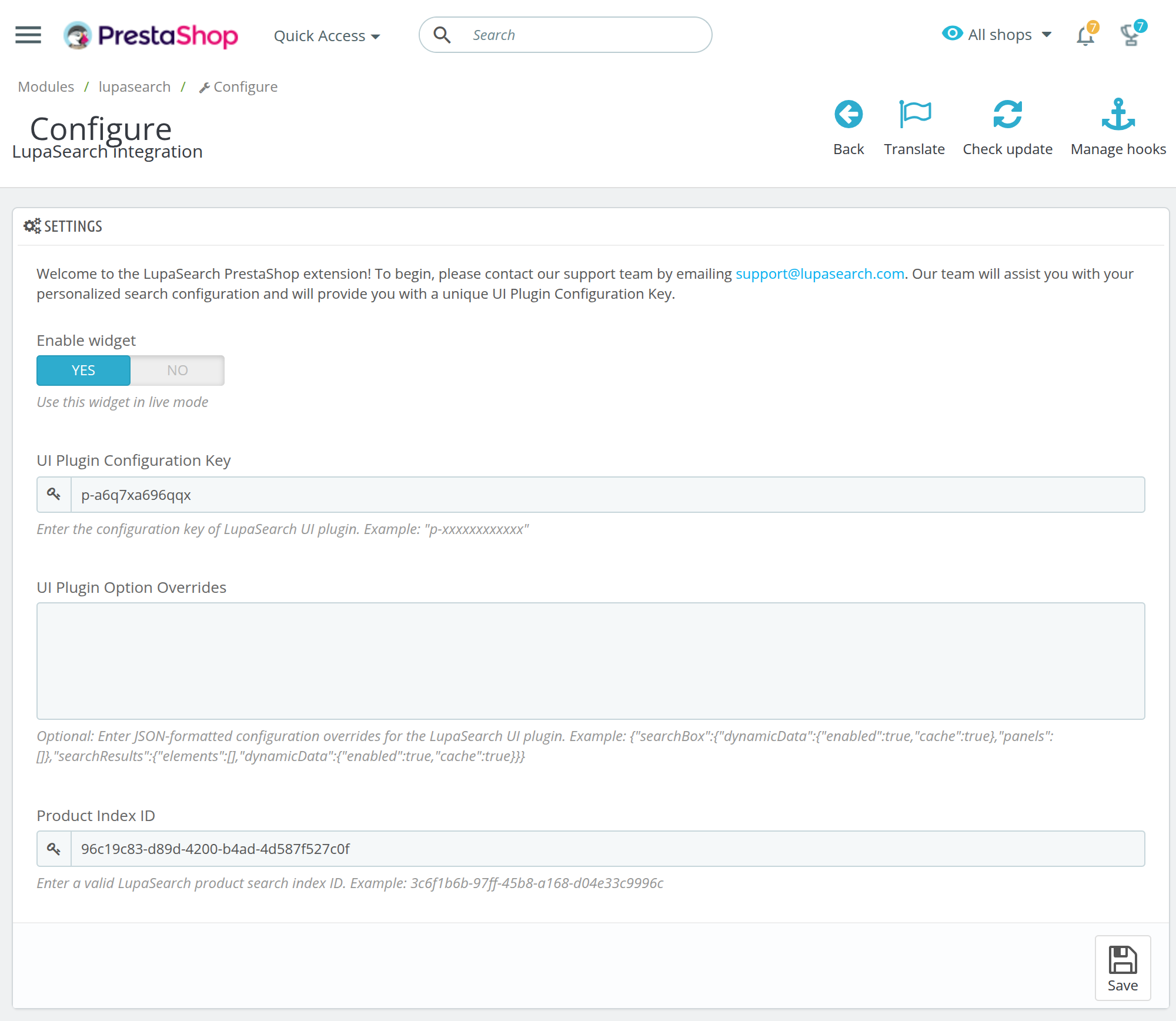
- Enter the configuration values from your LupaSearch dashboard into the UI Plugin Configuration Key and Product Index ID fields, then click Save.
- Activate the widget by setting Enable Widget to Yes.
Each setting has a collapsed Per-language override section for per-language values (e.g. /en/ vs /es/); leave blank to inherit the default.
Below is an example of how the configuration screen looks after setting up the LupaSearch plugin:
Add custom attributes to LupaSearch product feed
LupaSearch provides two hooks to allow other modules to extend product and variant data:
actionLupaSearchAddProductAttributesactionLupaSearchAddVariantAttributes
These hooks let your module inject custom attributes into the LupaSearch feed, enhancing search and filtering capabilities.
How to extend product or variant data
1. Create or edit a PrestaShop module
Documentation: https://devdocs.prestashop-project.org/1.7/modules/creation/tutorial/
2. Register LupaSearch hooks in your module’s install() method
Documentation: https://devdocs.prestashop-project.org/1.7/modules/concepts/hooks/#registration
3. Add custom attributes to the LupaSearch feed
Documentation: https://devdocs.prestashop-project.org/1.7/modules/concepts/hooks/#execution
Example: Add custom attributes to products
Example: Add custom attributes to variants
For detailed guidance on setting up, reach out to our support team ([email protected]) who are ready to assist you with the process.
