Download the PHP package laraish-maintain/options without Composer
On this page you can find all versions of the php package laraish-maintain/options. It is possible to download/install these versions without Composer. Possible dependencies are resolved automatically.
Download laraish-maintain/options
More information about laraish-maintain/options
Files in laraish-maintain/options
Package options
Short Description Package for creating options page in WordPress, updated fork.
License MIT
Homepage https://github.com/laraish-maintain/options
FAQ
Example:

In general, it is recommended to use always a project to download your libraries. In an application normally there is more than one library needed.

- Some hosting areas are not accessible by a terminal or SSH. Then it is not possible to use Composer.
- To use Composer is sometimes complicated. Especially for beginners.
- Composer needs much resources. Sometimes they are not available on a simple webspace.
- If you are using private repositories you don't need to share your credentials. You can set up everything on our site and then you provide a simple download link to your team member.
- Simplify your Composer build process. Use our own command line tool to download the vendor folder as binary. This makes your build process faster and you don't need to expose your credentials for private repositories.
Informations about the package options
A simple framework for creating WordPress options page.
Basic Usage
Here is an example for creating an options page.
The example code above is going to create an options page looks like this
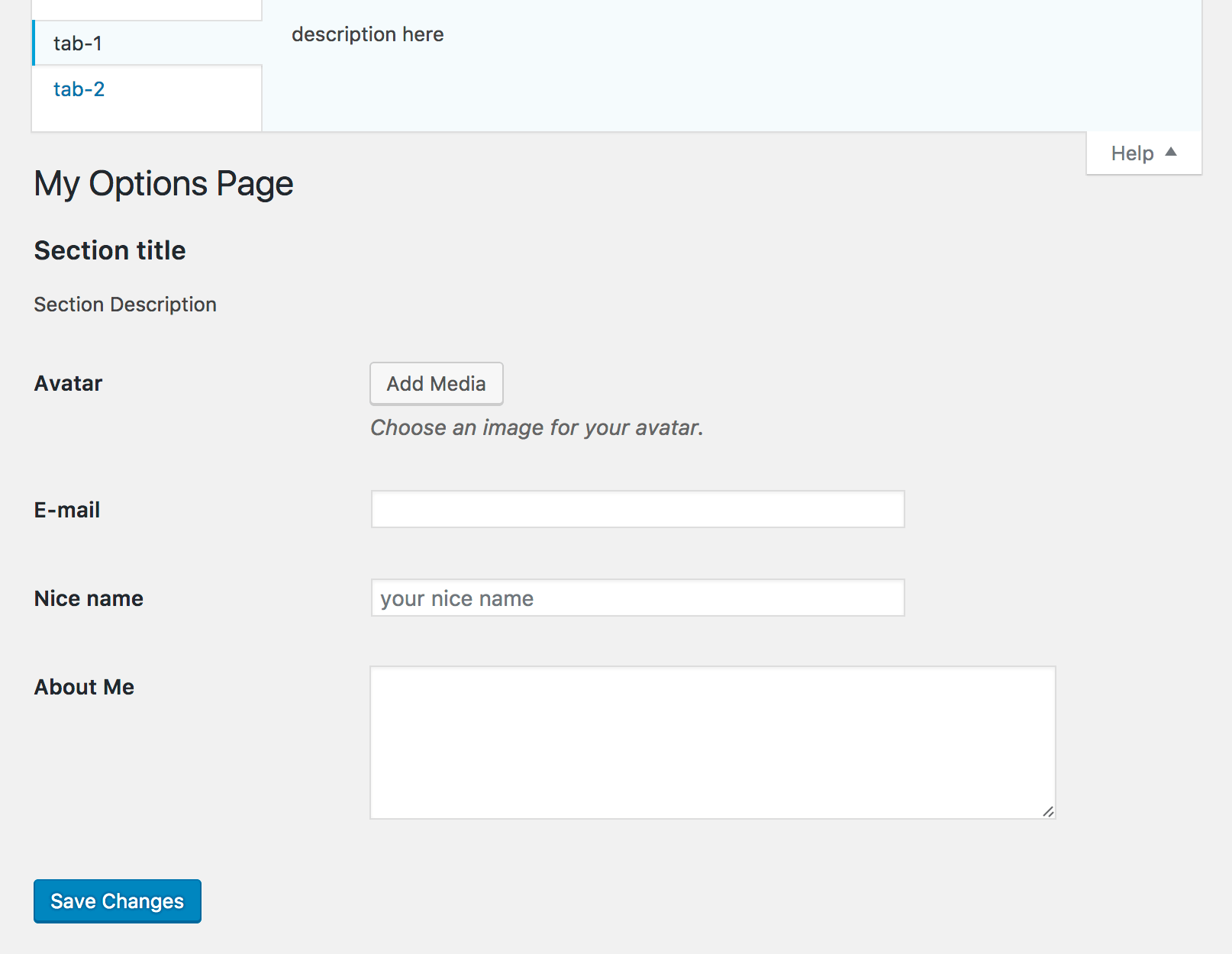
Usage of OptionsSection and OptionsField
You can also replace the value of 'sections' with an array of OptionsSection objects and replace the value of 'fields' with an array of OptionsField objects.
Get the value of an option
You can use the OptionsRepository to get the value of an option.
OptionsPage
Options
menuSlug
| Type | required |
|---|---|
| string | yes |
The slug name to refer to the menu by (should be unique for this menu).
menuTitle
| Type | required |
|---|---|
| string | yes |
The text to be used for the menu.
pageTitle
| Type | required |
|---|---|
| string | yes |
The text to be displayed in the title tags of the page when the menu is selected.
optionGroup
| Type | required |
|---|---|
| string | yes |
The option group you wish to use in the page.
optionName
| Type | required |
|---|---|
| string | yes |
The option name you wish to use in the page.
capability
| Type | Default |
|---|---|
| string | 'manage_options' |
The capability required for this menu to be displayed to the user.
position
| Type | Default |
|---|---|
| int | null |
The position in the menu order this one should appear.
iconUrl
| Type | Default |
|---|---|
| string | '' |
The URL (or icon name) to the icon to be used for the menu.
parent
| Type | Default |
|---|---|
| null / string / OptionsPageContract | null |
If you wish to make the page as a sub-page of a top-level page, set the top top-level page here.
sections
| Type | Default |
|---|---|
| array | [] |
Settings-Sections to be inserted into the page. Every element of this array represents a Settings-Section.
See Options for OptionsSection for more details.
renderFunction
| Type | Default |
|---|---|
| callable | null |
The function to be called to output the content for the page.
This function retrieves two arguments; the first one is an instance of OptionsPage, the second one is an instance of OptionsForm. By using the OptionsForm object you can create form input elements much easier than by hard coding.
Below is an example of customizing the output of an options page.
helpTabs
| Type | Default |
|---|---|
| array | [] |
The help tabs to be added to the page. Every tab represented by an array.
scripts
| Type | Default |
|---|---|
| array | [] |
The scripts to be enqueued to the page.
styles
| Type | Default |
|---|---|
| array | [] |
The styles to be enqueued to the page.
Methods
register()
Register the settings page.
OptionsSection
Options
id
| Type | required |
|---|---|
| string | yes |
ID of the section.
title
| Type | required |
|---|---|
| string | yes |
Title of the section.
description
| Type | Default |
|---|---|
| string | null |
Description of the section.
renderFunction
| Type | Default |
|---|---|
| callable | null |
Function that fills the section with the desired content. The function should echo its output.
fields
| Type | Default |
|---|---|
| array | [] |
settings fields in the section. See Options for OptionsField for more details.
capability
| Type | Default |
|---|---|
| string | 'manage_options' |
The capability required for this section to be displayed to the current user.
Methods
register()
Register the settings page.
OptionsField
Options
id
| Type | Default |
|---|---|
| string | '' |
The ID of this field.
title
| Type | Default |
|---|---|
| string | null |
The title of this field.
type
| Type | Default |
|---|---|
| string | 'text' |
The type of the field. Default is 'text'. See Field types for more details.
capability
| Type | Default |
|---|---|
| string | 'manage_options' |
The capability required for this field to be displayed to the current user.
renderFunction
| Type | Default |
|---|---|
| callable | null |
Function that fills the field with the desired content. The function should echo its output.
This function will be given an argument(array) with two elements field(OptionsField) and form(OptionsForm) object.
sanitizeFunction
| Type | Default |
|---|---|
| callable | null |
The sanitize function called before saving option data.
Field types
Common Options
- attributes (array)
- The attributes of the field element.
For example['placeholder'=> 'Type your name', 'class'=> 'foo bar baz']. - defaultValue (mixed)
- The default value of the field.
Color
Same as Common Options.
Date
Same as Common Options.
Same as Common Options.
Hidden
Same as Common Options.
Number
Same as Common Options.
Password
Same as Common Options.
Range
Same as Common Options.
Search
Same as Common Options.
Textarea
Same as Common Options.
Text
Same as Common Options.
Time
Same as Common Options.
Url
Same as Common Options.
Checkboxes
- horizontal (true)
- The layout of the checkboxes. Set to
falseif you want to put the checkboxes vertically. - options ([])
- An array of options.
For example['Red'=> '#f00', 'Green'=> '#0f0', 'Blue'=> '#00f'].
Checkbox
- text (string)
- The text of the checkbox.
- value (string)
- The value of the checkbox.
Radios
Same as Checkboxes.
Select
Same as Checkboxes.
File
- maxFileSize (string)
- The maximum file size (byte) of the file.
- isJson (bool)
- Set to
trueif you are going to upload a json file.
Default value isfalse.
Media
- button_text (string)
- The text of the media uploader button.
- media_uploader_title (string)
- The title of media uploader.
All versions of options with dependencies

laraish-maintain/contracts Version ^3.1
laraish-maintain/support Version ^3.1