Download the PHP package jeffersongoncalves/secure-lock-cli without Composer
On this page you can find all versions of the php package jeffersongoncalves/secure-lock-cli. It is possible to download/install these versions without Composer. Possible dependencies are resolved automatically.
Download jeffersongoncalves/secure-lock-cli
More information about jeffersongoncalves/secure-lock-cli
Files in jeffersongoncalves/secure-lock-cli
Package secure-lock-cli
Short Description CLI tool to audit project dependencies (Composer & npm) for known vulnerabilities and tell whether an available update actually leaves the vulnerable range.
License MIT
Homepage https://github.com/jeffersongoncalves/secure-lock-cli
FAQ
Example:

In general, it is recommended to use always a project to download your libraries. In an application normally there is more than one library needed.

- Some hosting areas are not accessible by a terminal or SSH. Then it is not possible to use Composer.
- To use Composer is sometimes complicated. Especially for beginners.
- Composer needs much resources. Sometimes they are not available on a simple webspace.
- If you are using private repositories you don't need to share your credentials. You can set up everything on our site and then you provide a simple download link to your team member.
- Simplify your Composer build process. Use our own command line tool to download the vendor folder as binary. This makes your build process faster and you don't need to expose your credentials for private repositories.
Informations about the package secure-lock-cli
secure-lock-cli

secure-lock audits a project's dependencies and answers three questions
for every package:
- Is there a newer version? (registry lookup)
- Is the installed version vulnerable? (advisory database lookup)
- Is the available update actually safe? — i.e. does the target version really leave the vulnerable range, instead of merely being newer?
Born out of the recent wave of supply-chain attacks (compromised / vulnerable packages on Composer and npm), the tool distinguishes a useful bump that fixes the flaw from a useless bump that stays exposed.
It covers Composer (composer.lock) and the JavaScript managers that
share the npm ecosystem: npm (package-lock.json v1/v2/v3 and
npm-shrinkwrap.json), pnpm (pnpm-lock.yaml lockfileVersion 5/6/9),
bun (bun.lock text lockfile) and yarn (yarn.lock classic v1 and
berry v2+). The ECO column shows the real manager a package came from, while
advisories and the registry are resolved against the shared npm ecosystem.
Built with Laravel Zero and modeled on the other CLIs in this monorepo.
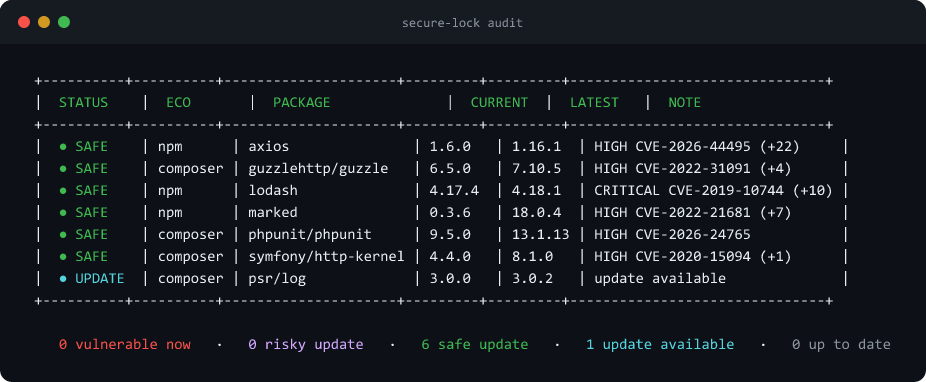
Every package is checked against the registry and the GitHub Advisory
Database, then classified — here six packages have a published fix (SAFE)
and one only has a newer release (UPDATE).


Requirements
- PHP
^8.2 - A
composer.lockand/or apackage-lock.jsonto audit - Optionally a
GITHUB_TOKEN(raises the GitHub Advisory API rate limit from ~60 req/h to 5000 req/h)
Install
Global (recommended)
The binary secure-lock will be on your PATH as long as Composer's
global vendor/bin is in it.
From source
Usage
The JavaScript lockfile is auto-detected in the project directory by priority
(pnpm > bun > yarn > npm); pass --pnpm/--bun/--yarn/--npm to
target one explicitly.
Options
Verdicts
For each package the tool compares the advisories that hit the current version against those still hitting the latest version:
| Verdict | Badge | Meaning |
|---|---|---|
VULN |
● VULN (red) |
vulnerable now, no published fix |
RISKY_UPDATE |
● RISKY (magenta) |
an update exists but stays exposed |
UNKNOWN |
● UNKNOWN (yellow) |
advisory lookup failed — status not verified |
SAFE_UPDATE |
● SAFE (green) |
the update fixes the vulnerability |
UPDATE |
● UPDATE (cyan) |
newer version, no known vulnerability |
OK |
● OK (gray) |
up to date and clean |
The table is sorted by risk (VULN > RISKY > UNKNOWN > SAFE > UPDATE >
OK) and the NOTE column shows the highest-severity advisory as
SEVERITY CVE-XXXX (+N) (the CVE when present, otherwise the GHSA id).
UNKNOWNmatters. When an advisory lookup fails (most often the GitHub rate limit without a token), the package is reported asUNKNOWN— never asOK. A security tool must not turn a failed request into a false "all clear". Set aGITHUB_TOKENto lift the limit, and add--fail-on-unverifiedto make CI fail when anything could not be checked.
Fixing
Pass --fix to also print, per manager, the upgrade command for each
currently-vulnerable package. The target is the smallest version greater
than the installed one that escapes every vulnerable range (computed from the
advisories' patched versions and the latest release), so the bump is minimal
and verified — not just "the newest":
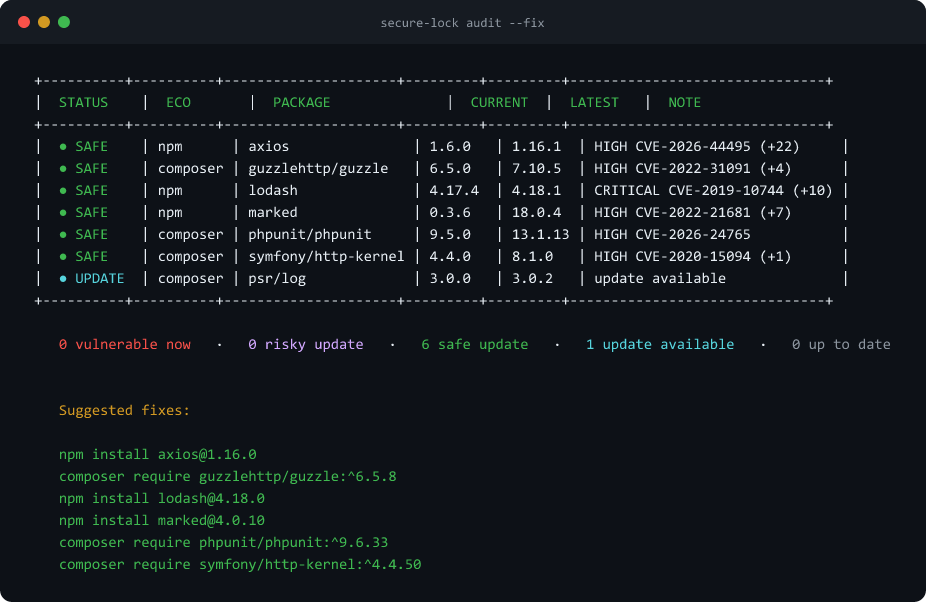
Note how the target is the minimum safe version, not the newest:
guzzlehttp/guzzle goes to 6.5.8 (not 7.10.5) and phpunit to 9.6.33.
Direct vs. transitive. A direct dependency gets a plain
add/require/install. A transitive one can't be pinned that way — an
npm install wouldn't reach the nested version — so the suggestion is the
manager's override mechanism instead: overrides (npm/bun), pnpm.overrides
(pnpm) or resolutions (yarn) in package.json. Composer always uses
composer require, which pins transitive packages too.
Packages with no version that leaves the vulnerable range (VULN) are skipped.
In --json mode each package gains a fix object ({target, command, transitive}) or null.
Suppressing advisories
Accepted or un-patchable risks would otherwise keep failing CI forever. Pass
one or more --ignore flags, or commit a secure-lock.json to the project
root (auto-detected, or point at it with --config):
An ignored advisory no longer counts toward the verdict. Entries with an
expires date stop suppressing once that date has passed, so a deferred risk
re-surfaces instead of being forgotten.
GitHub code scanning (SARIF)
--sarif emits SARIF 2.1.0, which GitHub can ingest to show the findings in
the repository's Security › Code scanning tab:
Exit codes (for CI)
0— no critical risk.1— aVULNorRISKY_UPDATEwas found (fails the pipeline).2— input error (lockfile not found, invalid JSON, etc.).
GitHub Actions
How it works
- Registry — Composer:
repo.packagist.org/p2/{name}.json, walking every version and ignoring pre-releases (alpha|beta|rc|dev|next|canary|nightly) to find the highest stable. npm:registry.npmjs.org/{name}(/encoded as%2Ffor scoped packages), usingdist-tags.latest. - Advisories — the GitHub Advisory Database REST API:
GET /advisories?affects={name}&ecosystem={eco}. Theaffectsparameter receives only the package name (e.g.guzzlehttp/guzzle) — the ecosystem goes in its own parameter. Prefixing it (composer:...) returns200with a silently empty list. - Redundant fallbacks — when a package's GitHub lookup fails (e.g. the
rate limit without a token), a second source is queried so the result is
recovered instead of left
UNKNOWN: the Packagist Security Advisories API for Composer, and the npm audit bulk endpoint for npm/pnpm/bun/yarn. Each is one batched request for all failed packages. As a result every ecosystem can be audited with no token at all. Disable with--no-packagist/--no-npm-audit. - Semver — comparisons and range satisfaction use
composer/semver, including GHSA ranges where a comma means logical AND (e.g.>= 7.0.0, < 7.4.5). - Concurrency — every package's registry and advisory lookups are fired
concurrently with
Http::pool(capped), so a large lockfile is audited in a few waves instead of one request at a time. - Cache — registry/advisory responses are cached to disk with a configurable TTL so repeated runs don't hit the API rate limits. Failed lookups are never cached, so a transient error is retried next run.
Keep the CLI up to date
When installed from the released PHAR:
When installed via Composer:
Development
HTTP calls are mocked in the test suite with Http::fake(). Fixture
lockfiles created during tests live under tests/tmp/ (gitignored).
Release
- Merge changes to
main— CI builds a freshbuilds/secure-lockagainst the latest tag and commits it back. - Create a new GitHub release (tag
X.Y.Z, novprefix). - The
publish-phar.ymlworkflow attachessecure-lock.pharto the release andupdate-changelog.ymlupdatesCHANGELOG.md+version.txt.
Roadmap
The core feature set is complete (multi-ecosystem audit, safe-update
classification, --fix, redundant advisory fallbacks, SARIF). Ideas welcome
via issues.
