Download the PHP package jamesil/nova-google-polygon without Composer
On this page you can find all versions of the php package jamesil/nova-google-polygon. It is possible to download/install these versions without Composer. Possible dependencies are resolved automatically.
FAQ
Example:

In general, it is recommended to use always a project to download your libraries. In an application normally there is more than one library needed.

- Some hosting areas are not accessible by a terminal or SSH. Then it is not possible to use Composer.
- To use Composer is sometimes complicated. Especially for beginners.
- Composer needs much resources. Sometimes they are not available on a simple webspace.
- If you are using private repositories you don't need to share your credentials. You can set up everything on our site and then you provide a simple download link to your team member.
- Simplify your Composer build process. Use our own command line tool to download the vendor folder as binary. This makes your build process faster and you don't need to expose your credentials for private repositories.
Informations about the package nova-google-polygon
Nova Google Polygon Field



Draw and edit map areas — coverage zones, delivery boundaries, geofences — directly in your Laravel Nova admin, then query them in PHP. Polygons are stored as plain {lat, lng} JSON, so your data stays simple and portable.
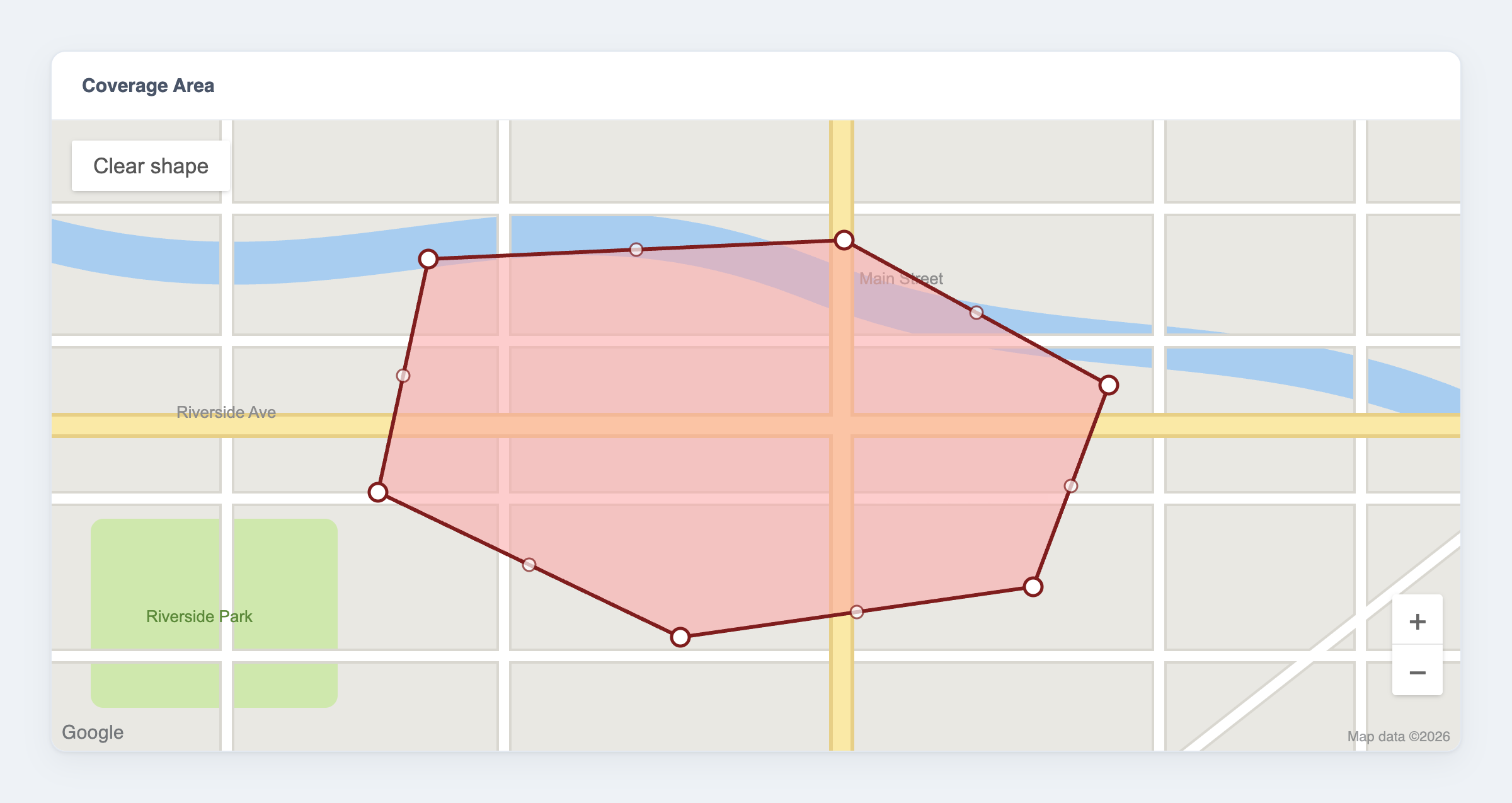
Features
- ✏️ Draw and edit polygons on an interactive Google Map, right inside Nova
- 📍 Add, move, and delete vertices — mouse or touch
- 🗄️ Stored as plain
{lat, lng}JSON; cast to a richPolygonobject with Eloquent - 📐 Geofencing helpers: point-in-polygon (
contain()), bounding box, and coordinate bounds - 🌍 Configurable default map centre
Requirements
| Package | Laravel | Laravel Nova | PHP |
|---|---|---|---|
2.x |
12.x | 5.0+ | 8.2+ |
2.x |
13.x | 5.8+ | 8.3+ |
1.x |
9.x – 11.x | 4.x or 5.x | 8.1+ |
You also need a Google Maps API key with the Maps JavaScript API enabled.
The main branch tracks the 2.x line (Laravel 12/13). The 1.x branch is the maintenance line for Laravel 9–11. Laravel 13 requires Nova 5.8.0 or newer.
[!IMPORTANT] Versions ≤ 2.0.1 and ≤ 1.1.0 no longer work — Google removed the Maps JavaScript API drawing library they relied on (details). Use 2.1+ (Laravel 12/13) or 1.2+ (Laravel 9–11), which draw with Terra Draw instead. Your stored data is unchanged, so upgrading is drop-in.
Installation
For Laravel 9–11, require the 1.x line instead:
Configuration
Add your Google Maps API key to .env. The default map centre is optional (it only sets where a brand-new, empty map opens):
To change the defaults in code, publish the config file (optional):
[!WARNING] Restrict your API key. It is sent to the browser to load the map, so anyone can read it. In the Google Cloud Console, add HTTP-referrer restrictions (your Nova domain) and enable only the Maps JavaScript API.
Usage
1. Add the field
The field is shown on forms and detail views (it is hidden on the resource index).
2. Store the data
The polygon is saved as JSON, so give the attribute a JSON column:
Add the AsPolygon cast so the attribute reads and writes as a Polygon object:
The column holds an array of points:
3. Draw and edit on the map
Drawing (empty map):
- Click to place each vertex.
- Finish by clicking the first point again, or pressing Enter.
- Escape cancels the shape you're drawing.
Editing (a polygon exists):
- Drag a vertex to move it.
- Click a midpoint — the fainter handle on an edge — to insert a vertex.
- Right-click a vertex to remove it (a polygon keeps at least 3).
- Clear shape (the button on the map) removes the polygon so you can start over.
Touch devices work the same way — tap to place vertices and drag the handles. If the handles vanish after you click elsewhere on the map, click the polygon to select it again.
4. Work with a polygon in PHP
With the cast in place, the attribute is a Polygon you can query — ideal for geofencing:
You can also build a polygon directly:
Example: taxi pickup zones
Store a drawable pickup area per zone, then find which zone a rider falls in:
API reference
Polygon
| Method | Description |
|---|---|
contain(Point\|array $point): bool |
Whether the point is inside the polygon (even-odd ray casting). A point on a vertex is inside; points on an edge follow a half-open convention (the minimum-latitude and minimum-longitude edges are inclusive, the opposite edges exclusive). |
pointOnVertex(Point\|array $point): bool |
Whether the point sits exactly on a vertex. |
getBoundingBox(): array |
The four [lat, lng] corners of the bounding box. |
getMinLatitude() / getMaxLatitude(): float |
Latitude bounds. |
getMinLongitude() / getMaxLongitude(): float |
Longitude bounds. |
getPoints(): Point[] |
All vertices. |
setPoints(array $points): Polygon |
Replace the vertices. |
Point
| Method | Description |
|---|---|
new Point(float $lat, float $lng) |
Create a point. |
Point::fromArray(array $input): Point |
From ['lat' => …, 'lng' => …] or [$lat, $lng]. |
toArray(): array / toJson(): string |
Serialise the point. |
Limitations
- One polygon per field — no multi-polygons or holes.
- The map is a fixed 500px tall and auto-fits to an existing polygon; zoom is automatic.
Testing
Credits
- James Embling
- Based on the original work by YieldStudio
License
The MIT License (MIT). See LICENSE.md.
