Download the PHP package inspiredminds/contao-youtube-sync without Composer
On this page you can find all versions of the php package inspiredminds/contao-youtube-sync. It is possible to download/install these versions without Composer. Possible dependencies are resolved automatically.
Download inspiredminds/contao-youtube-sync
More information about inspiredminds/contao-youtube-sync
Files in inspiredminds/contao-youtube-sync
Package contao-youtube-sync
Short Description Contao extension to synchronize a contao news archive with a YouTube playlist.
License LGPL-3.0-or-later
Homepage https://github.com/inspiredminds/contao-youtube-sync
FAQ
Example:

In general, it is recommended to use always a project to download your libraries. In an application normally there is more than one library needed.

- Some hosting areas are not accessible by a terminal or SSH. Then it is not possible to use Composer.
- To use Composer is sometimes complicated. Especially for beginners.
- Composer needs much resources. Sometimes they are not available on a simple webspace.
- If you are using private repositories you don't need to share your credentials. You can set up everything on our site and then you provide a simple download link to your team member.
- Simplify your Composer build process. Use our own command line tool to download the vendor folder as binary. This makes your build process faster and you don't need to expose your credentials for private repositories.
Informations about the package contao-youtube-sync


Contao YouTube Sync
This extension allows you to automatically import all videos of a YouTube playlist as news entries in Contao.
Configuration
First you need to obtain a Google API key.
- Go to console.developers.google.com and create a project, or use an existing one.
- Go to the API Library and search for YouTube Data API v3.
- Enable the YouTube Data API v3 for your project.
- Go to the Credentials of your project and choose Create Credentials » API key. You can also use an existing key.
- Copy the API key for later use.
After obtaining the API key it can be configured for the extension:
Once this extension is installed, you will have additional options in the settings of your Contao news archives:
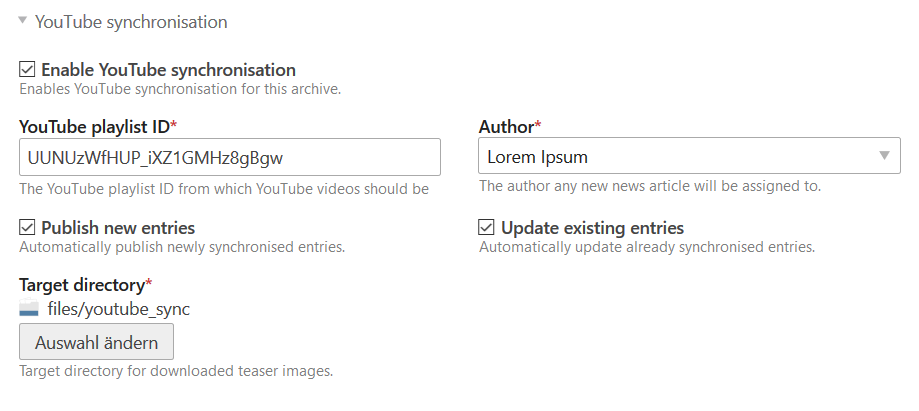
Enable the synchronisation and set the YouTube playlist ID from which to import videos as news entries. You also need to define a default author for the synchronised entries and a target directory for the downloaded thumbnail images. Optionally you can define whether new entries should be published by default or not and if already synchronised entries should always be updated (this will not update the alias or author).
Synchronisation
Synchronisation can be triggered in three ways:
- Cronjob: executed hourly.
- Command:
contao_youtube_sync:sync - Back end: in the article overview, use the YouTube sync link in the global operations.
Events
Whenever a YouTube video is imported as a news article (or whenever a news article is updated), the following event will be dispatched:
This event lets you retrieve the \Contao\NewsModel to be saved to the database, as well as the \Google\Service\YouTube\PlaylistItem instance of the YouTube video. It also allows you to discard the news article (or the changes added to it) by setting $event->setDiscard(true).
Templates
There will be two additional variables available within a news template:
$this->youtube_id: This will contain the video ID of the YouTube video, if the news article was imported from a YouTube playlist.$this->youtube_data: This is an object containing the original data of the video from the Google YouTube API.
The extension also provides a basic news_youtube template, which can be used instead of the news_full template for the newsreader of YouTube videos. The template contains markup to show the YouTube video embedded in an iframe.
All versions of contao-youtube-sync with dependencies

contao/core-bundle Version ^5.0
contao/news-bundle Version ^5.0
doctrine/dbal Version ^3.0 || ^4.0
google/apiclient Version ^2.18
symfony/config Version ^5.4 || ^6.4 || ^7.3
symfony/console Version ^5.4 || ^6.4 || ^7.3
symfony/dependency-injection Version ^5.4 || ^6.4 || ^7.3
symfony/event-dispatcher-contracts Version ^3.6
symfony/filesystem Version ^5.4 || ^6.4 || ^7.3
symfony/http-client Version ^5.4 || ^6.4 || ^7.3
symfony/http-client-contracts Version ^3.6
symfony/http-foundation Version ^5.4 || ^6.4 || ^7.3
symfony/http-kernel Version ^5.4 || ^6.4 || ^7.3
symfony/messenger Version ^5.4 || ^6.4 || ^7.3
symfony/routing Version ^5.4 || ^6.4 || ^7.3
symfony/translation-contracts Version ^3.6
twig/twig Version ^3.21