Download the PHP package iconsofthu/magento2-german-language-pack without Composer
On this page you can find all versions of the php package iconsofthu/magento2-german-language-pack. It is possible to download/install these versions without Composer. Possible dependencies are resolved automatically.
Download iconsofthu/magento2-german-language-pack
More information about iconsofthu/magento2-german-language-pack
Files in iconsofthu/magento2-german-language-pack
Package magento2-german-language-pack
Short Description German language package for Magento 2
License MIT
Homepage https://icoders.co
FAQ
Example:

In general, it is recommended to use always a project to download your libraries. In an application normally there is more than one library needed.

- Some hosting areas are not accessible by a terminal or SSH. Then it is not possible to use Composer.
- To use Composer is sometimes complicated. Especially for beginners.
- Composer needs much resources. Sometimes they are not available on a simple webspace.
- If you are using private repositories you don't need to share your credentials. You can set up everything on our site and then you provide a simple download link to your team member.
- Simplify your Composer build process. Use our own command line tool to download the vendor folder as binary. This makes your build process faster and you don't need to expose your credentials for private repositories.
Informations about the package magento2-german-language-pack
Magento 2 German Language Pack
This project forked from Mageplaza and will be continuously updated.
1. Language Package Process
This is status of German Language Pack, you can see how many percentage of this project has been done.
2. How to Install German Language Pack
There are 3 different methods to install this language pack.
✓ Method #1. Composer method (Recommend)
Install the German language pack via composer is never easier.
Install German pack:
Update German pack:
Authentication required (If any)

If you have not added this authentication, you can follow this guide
Or use these keys:
✓ Method #2. Copy & Paste method (Not recommended)
This method suitable for non-technical people such as merchants. Just download the package then flush cache.
Overview
- Step 1: Download the German language pack
- Step 2: Unzip German pack
- Step 3: Flush Magento 2 Cache
Step 1 : Download the German language pack
You can download the language pack from above link
Step 2: Unzip German pack
Unzip the German language pack to Magento 2 root folder. In this guide, we extract to /var/www/html/
Your Magento 2 root folder can be: /home/account_name/yourstore.com/public_html/
Rename folder magento2-German-language-pack to de_DE.
You also can unzip locally and upload them to Magento 2 root folder.
Step 3: Flush Magento 2 Cache
Follow this guide to Flush Cache on your Magento 2 store
✓ Method #3. Download and install manually (Not recommended)
To download and install German pack manually, you have to access to your server via FTP or SFTP.
Step 1: Download the package
Step 1: Unzip and upload
Unzip the compressed file and upload file master.zip into app/i18n/Iconocoders/de_DE/
See this screenshot:
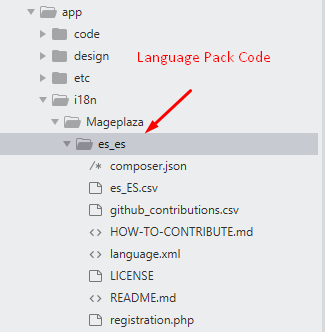
This language pack code is: de_DE
Step 2: Flush cache
Follow this guide to Flush Cache on your Magento 2 store
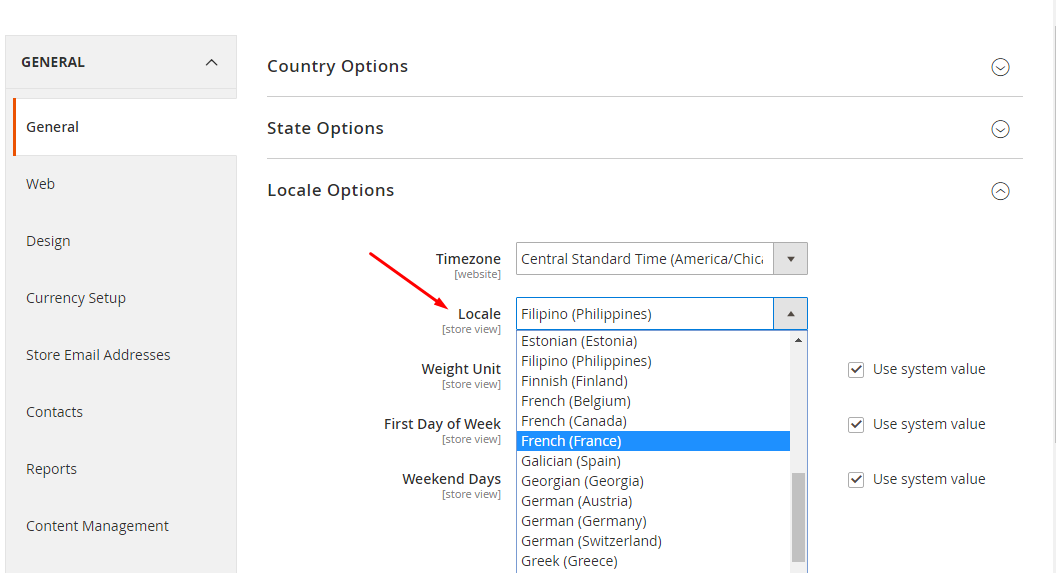
3. How to Active the German language pack
Now time to active the German language pack for your Magento 2 store. From Magento 2 admin panel, navigate to Stores > Configuration > General > Locale Options
4. Supported Magento versions
- Magento v2.0.x
- Magento v2.1.x
- Magento v2.2.x
- Magento v2.3.x
6. Notes
- This project automatically updates weekly from Crowdin.
- Any question, issue please create a new issue
7. Language package authors
- Magento official translations project for Magento 2
- Magento Community
