Download the PHP package ernestdefoe/menu-control without Composer
On this page you can find all versions of the php package ernestdefoe/menu-control. It is possible to download/install these versions without Composer. Possible dependencies are resolved automatically.
Download ernestdefoe/menu-control
More information about ernestdefoe/menu-control
Files in ernestdefoe/menu-control
Package menu-control
Short Description Arrange the forum sidebar: drag to reorder, hide, rename, re-icon and highlight any item, add your own links, and choose which groups see each one.
License MIT
FAQ
Example:

In general, it is recommended to use always a project to download your libraries. In an application normally there is more than one library needed.

- Some hosting areas are not accessible by a terminal or SSH. Then it is not possible to use Composer.
- To use Composer is sometimes complicated. Especially for beginners.
- Composer needs much resources. Sometimes they are not available on a simple webspace.
- If you are using private repositories you don't need to share your credentials. You can set up everything on our site and then you provide a simple download link to your team member.
- Simplify your Composer build process. Use our own command line tool to download the vendor folder as binary. This makes your build process faster and you don't need to expose your credentials for private repositories.
Informations about the package menu-control
Menu Control



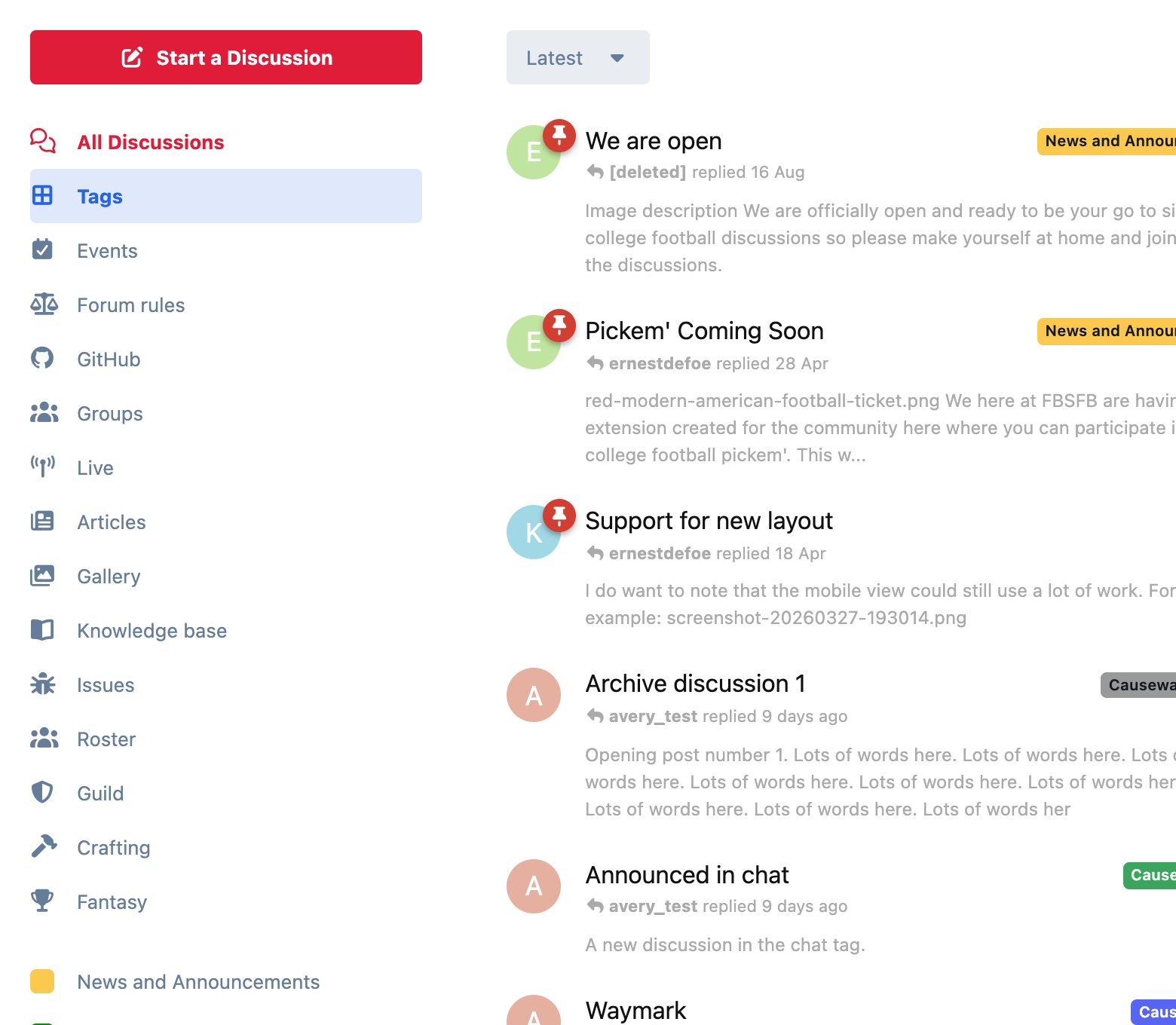
A Flarum 2 extension that gives you full control of the forum sidebar: All Discussions, Tags, Following and every item another extension adds.
Features
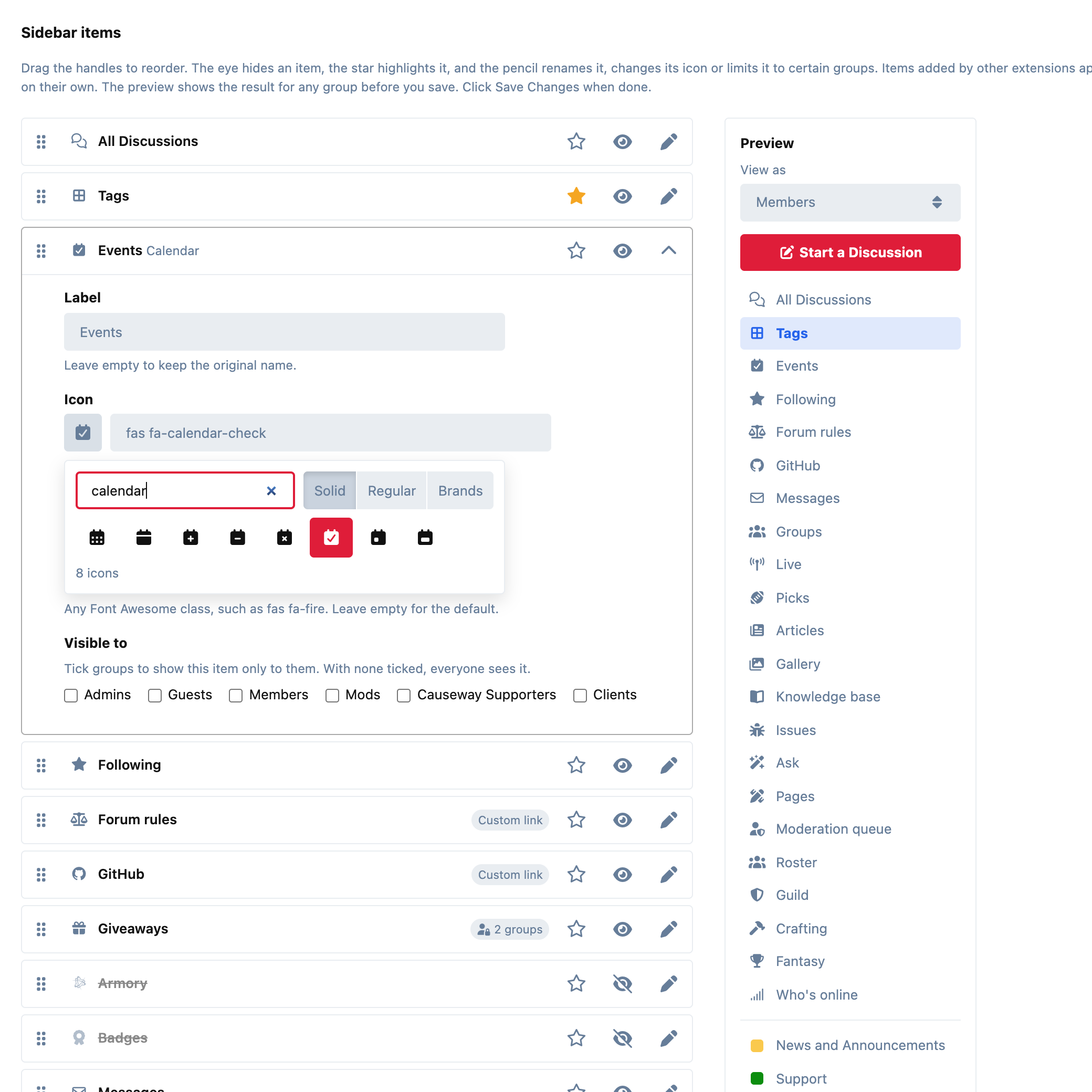
- Drag to reorder. Every sidebar item is listed in the admin panel. Drag one into place and save.
- Hide without deleting. The eye icon hides an item and shows it again later. Nothing is lost.
- Rename any item. Give "All Discussions" or any extension's link your own label, with no language pack needed.
- Change any icon. Pick one from a searchable grid of every Font Awesome icon your forum can show (solid, regular and brands), or type any Font Awesome class yourself.
- Highlight items. Make an item stand out in a colour you choose. It defaults to your forum's primary colour.
- Custom links. Add links to pages on your forum or to other sites. A plain address like
example.com/pageworks too. You can reorder, rename, highlight and restrict them like any other item. External links open in a new tab by default, and you can change that for each link. - Choose who sees each item. Show an item only to certain groups: guests, members, staff, or any group you've made. Restricted links are never sent to people who can't see them.
- Tags first. You can put the tag list above the menu items.
- Sticky sidebar. The sidebar, including the Start a Discussion button, can stay in view as people scroll. Desktop only.
- Works wherever the sidebar is shown, including the tags page and other extensions' pages that reuse it.
- Preview before you save. A live sidebar preview updates with every change. Choose View as to see it as guests, members or any group sees it.
- Picks up new items by itself. The admin page reads your real sidebar, so items from extensions you install later appear without any setup.
Installation
Then enable Menu Control in your admin panel.
Updating
Switching from resofire/menu-control
Your existing setup comes across automatically: the order, custom icons, highlights, highlight colour, custom links, and the flip and sticky options. Items you had removed in the old extension come across as hidden. That is what removing was meant to do, but the old extension never actually took them off the forum.
-
Swap the packages. Don't use the old extension's Uninstall button in the admin panel first: it deletes the settings that are about to be imported.
- Enable Menu Control in your admin panel. The import runs once, the moment it's enabled.
- Open its settings page to check the result. Clear your forum's cache if the old sidebar is still showing.
The two extensions can't be installed together, because both would rearrange the same list.
Good to know
- The admin page reads the sidebar as you see it, as an admin. An item that some other extension shows only to guests won't be listed until it's been seen at least once. Items you've already arranged stay in the list even while the extension that adds them is switched off.
- Hiding an item or restricting it to some groups only controls the menu. It doesn't lock the page the item links to. Use permissions for that.
- The forum script is about 1.2 KB gzipped. The drag-and-drop library is loaded only on the admin page, and it's the copy Flarum's core already ships. The extension adds no database queries, even when items are limited to certain groups.
Links
☕ If you like the things I have built, consider buying me a coffee.
