Download the PHP package ernestdefoe/curio without Composer
On this page you can find all versions of the php package ernestdefoe/curio. It is possible to download/install these versions without Composer. Possible dependencies are resolved automatically.
Download ernestdefoe/curio
More information about ernestdefoe/curio
Files in ernestdefoe/curio
Package curio
Short Description Members show off what they collect: games, vinyl, books, films, LEGO, cards, anything. Collections with photos, details, wishlists and trades, barcode look-up, and titles and descriptions in every language the forum speaks.
License MIT
FAQ
Example:

In general, it is recommended to use always a project to download your libraries. In an application normally there is more than one library needed.

- Some hosting areas are not accessible by a terminal or SSH. Then it is not possible to use Composer.
- To use Composer is sometimes complicated. Especially for beginners.
- Composer needs much resources. Sometimes they are not available on a simple webspace.
- If you are using private repositories you don't need to share your credentials. You can set up everything on our site and then you provide a simple download link to your team member.
- Simplify your Composer build process. Use our own command line tool to download the vendor folder as binary. This makes your build process faster and you don't need to expose your credentials for private repositories.
Informations about the package curio
Curio


A Flarum 2 extension for showing off what members collect: games, vinyl, books, films, LEGO, cards, anything. Every member can build collections with photos and details, mark what they own, want or would trade, and scan a barcode to add an item. Titles and descriptions show in each reader's language.
Features
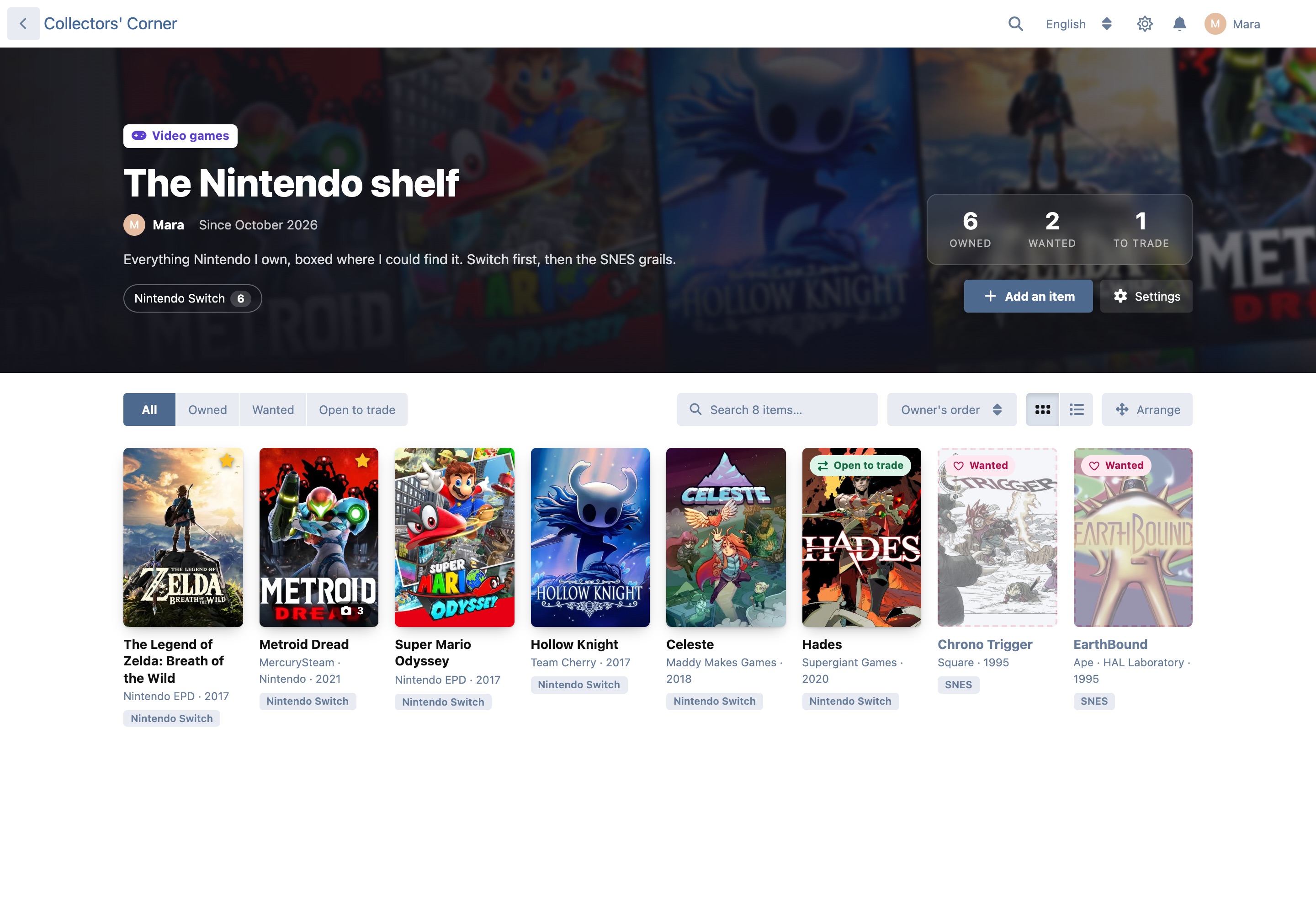
- Collections on every profile. A Collections tab with the member's collections, what they own, want and trade, and their wishlist.
- A page for each collection. It has a hero built from the member's own covers and a breakdown by platform or format, which you can click to filter. You can also filter by owned, wanted and open to trade, search inside the collection, sort, and switch between grid and list. The owner drags items into order with a mouse or a finger.
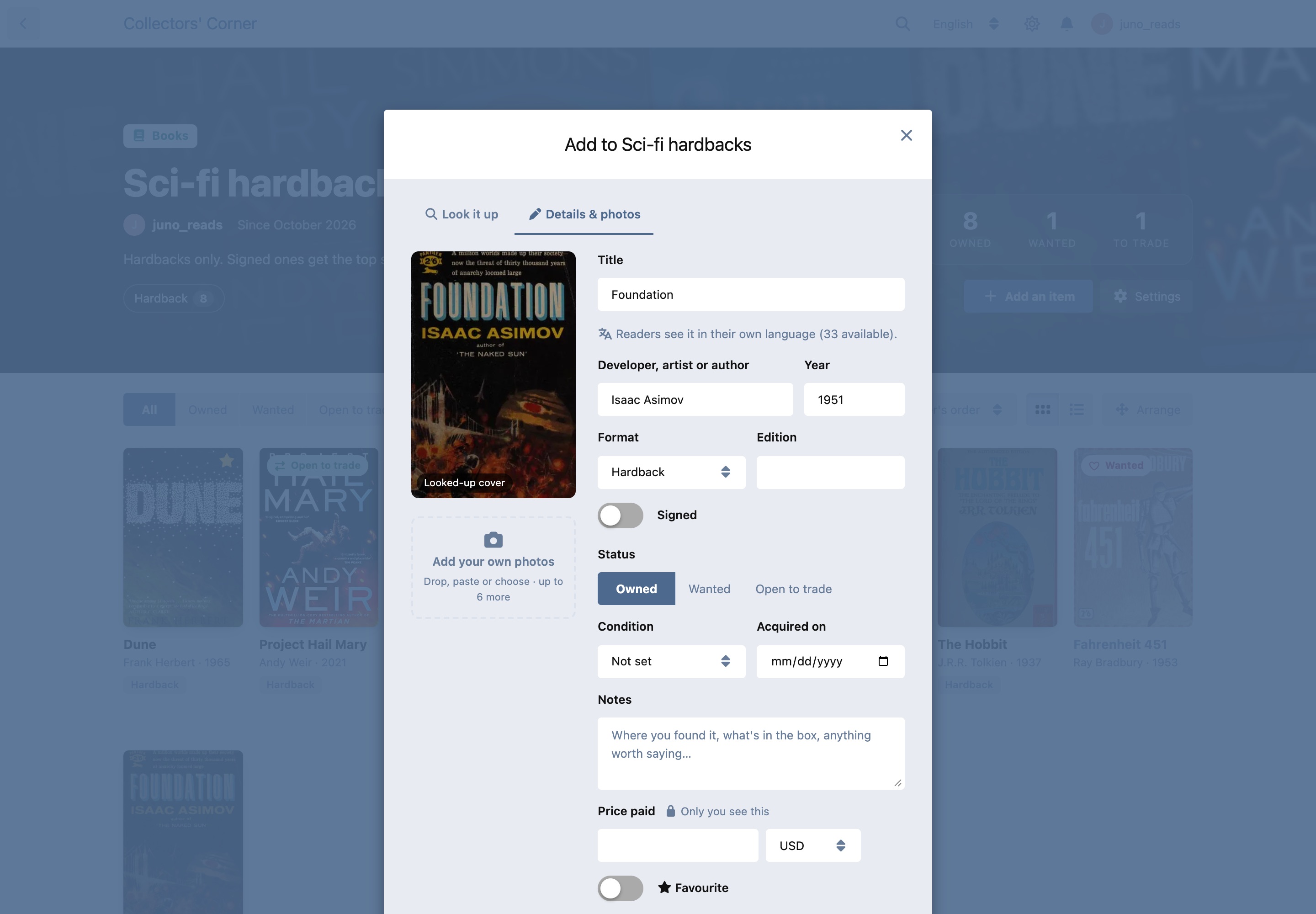
- Items with photos and details. Each item has up to six photos (re-encoded as WebP, with the phone's location data removed), the type's own details (platform, edition, region…), condition, the date it was acquired, notes, a favourite star, and the owner's rating (five stars, in half stars). Collections sort by rating, and the stars show on the grid, in the list and on the item.
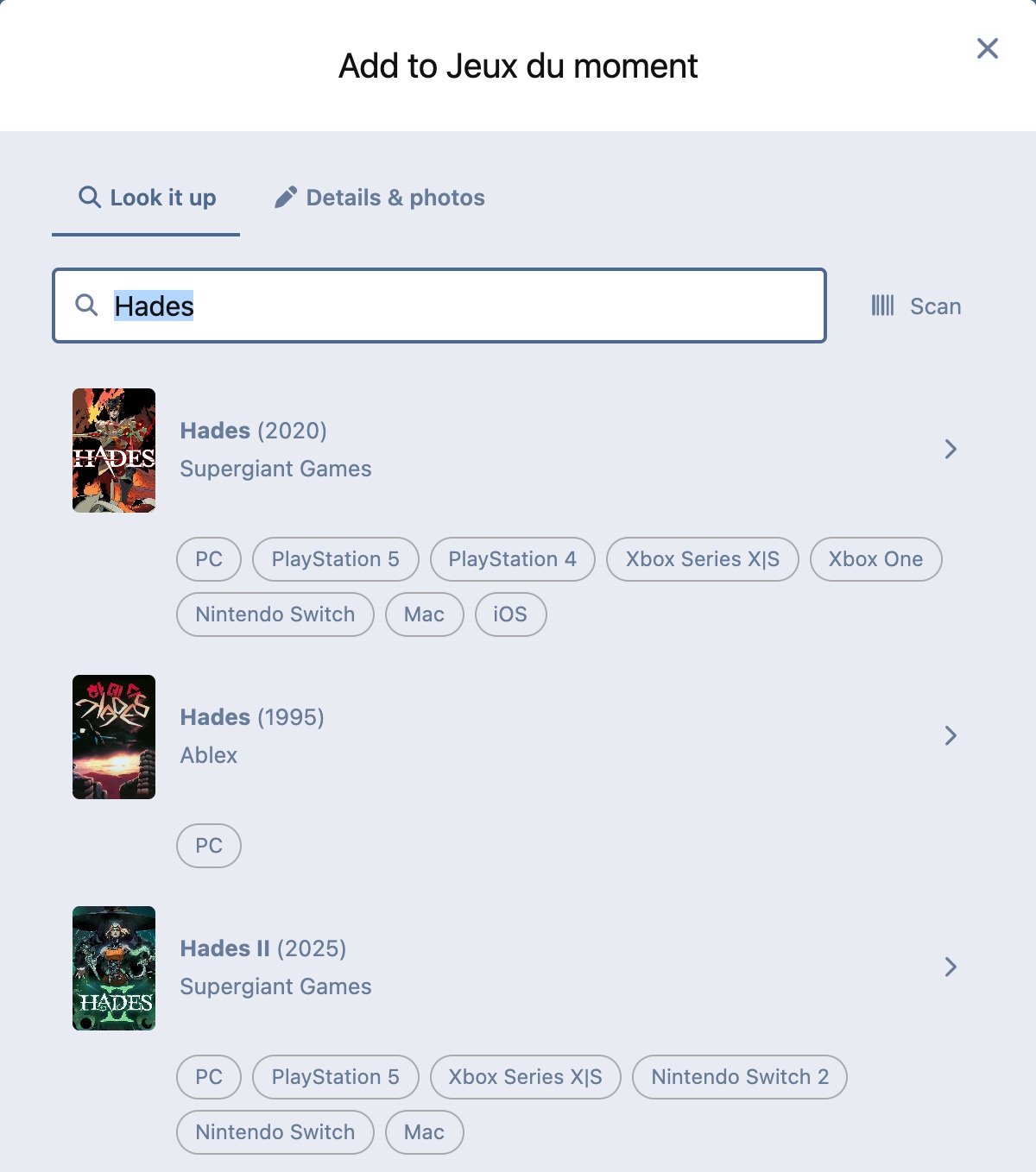
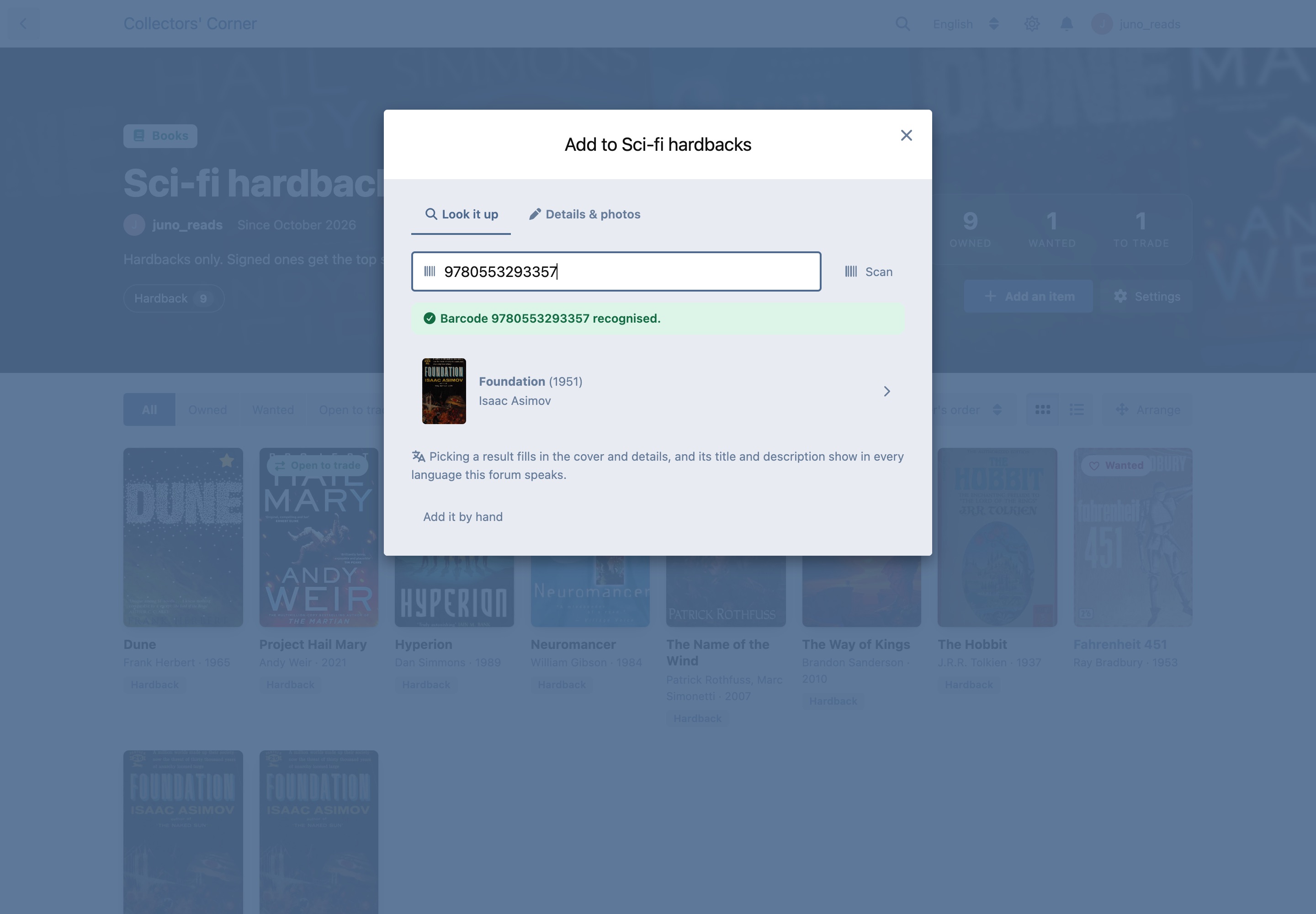
- Look it up, or scan it. Search by title, or scan or type a barcode or ISBN. The cover and details fill in:
- Books come from Open Library and albums from Deezer and MusicBrainz. Neither needs a key.
- Games come from IGDB when you add a free Twitch app's client ID and secret: cover, developer, publisher, release date, platforms and genres (genre names are translated). Each result shows the platforms it came out on; click one to add that version with its platform chosen. When the game is on only one platform the forum knows, that platform is filled in too. Without the keys, games come through Marquee as before (its results show their platforms too).
- Trading cards come from free sources with no key, chosen per type: Pokémon from TCGdex (card names, sets and rarities in the reader's language where TCGdex has it), Magic: The Gathering from Scryfall, Yu-Gi-Oh! from YGOPRODeck, or all three at once. A Card language menu beside the search picks which printings are searched: every language TCGdex has (including Japanese, Korean, Chinese, Thai and Indonesian, with their own sets and promos like
201/SV-P) and every language Scryfall has; a Pokémon's English name finds its cards in any language. Yu-Gi-Oh! stays in English (YGOPRODeck's data). Each result shows its set and number; a Yu-Gi-Oh! card offers its printings to pick from. The set, card number, rarity and language fill in. - Films and TV (and games, without IGDB keys) come through Marquee when it is installed.
- Any other barcode (a game box, a Blu-ray) goes to UPCitemdb (best for North American boxes) and Open Icecat (best for European ones), no keys needed. The platform or format is read from the product's name, for example "Nintendo Switch", "PS5" or "4K", and shop words ("Video Game", "European Version", "Deluxe Edition", "[Physical]") are dropped before the title is searched.
- The forum keeps every barcode it learns. A box anyone has scanned is never looked up again, so UPCitemdb's free 100 lookups a day is plenty for most forums. When nobody knows a barcode, Curio says so and offers Search by title instead; whatever the member picks (or types by hand) is kept with the barcode, and the next person who scans it gets it straight away.
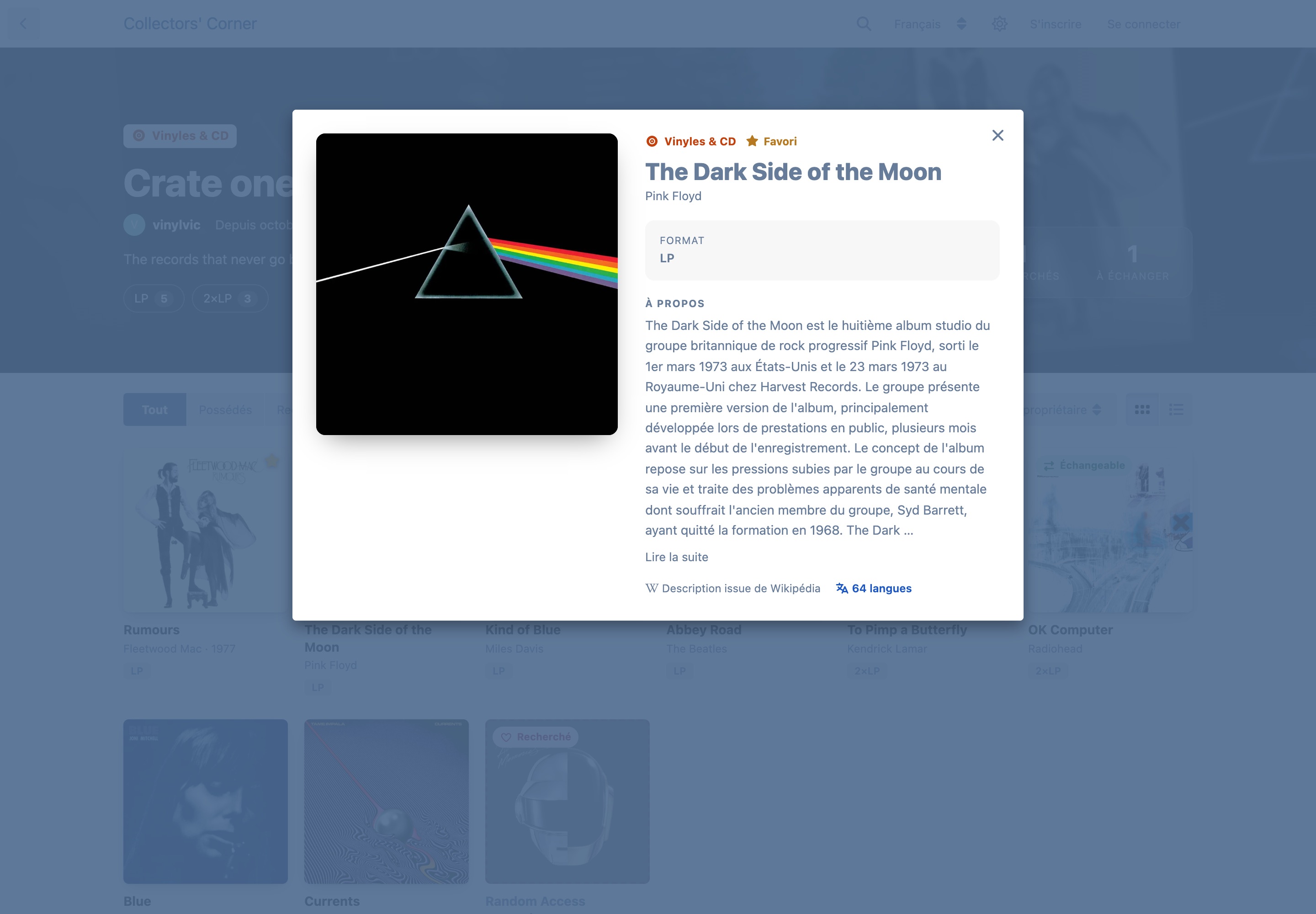
- Every language the forum speaks. Each looked-up title is matched to Wikidata, which supplies its name in every language, and its description comes from that language's Wikipedia, with credit. When Wikipedia has nothing in a language, an optional DeepL key translates the English description. The admin's own labels (types, details, choices) are edited per installed language. Curio ships in English and French.
- Show it off. From any item you own, start a discussion about it. The discussion opens with the item as its hero: the cover, details, condition, how many members have it, and the description in the reader's language. Everyone else gets "I have this too" and "Add to my wishlist" right there, and the item links back to its discussion.
- Works with Marquee and Shelf. With Marquee installed, its cards get Add to collection. With Shelf, collections move to Curio:
php flarum curio:import-shelfcopies members' "In my collection" titles across once, and running it again adds nothing. - Import and export. A collection downloads as a CSV file, and a Curio export, a Discogs collection export, or a Goodreads or StoryGraph library export imports into one. Ratings come across from all four. Each has its own permission.
- Wishlists and trades. Mark items as wanted or open to trade. A wishlist can be hidden on its own.
- "I have this too" / "Add to my wishlist" on anyone's item copies it, cover and all, into one of your collections.
- Who sees what. Each collection can be seen by everyone, by members only, or by its owner only. The price paid is private and is only ever sent to the owner.
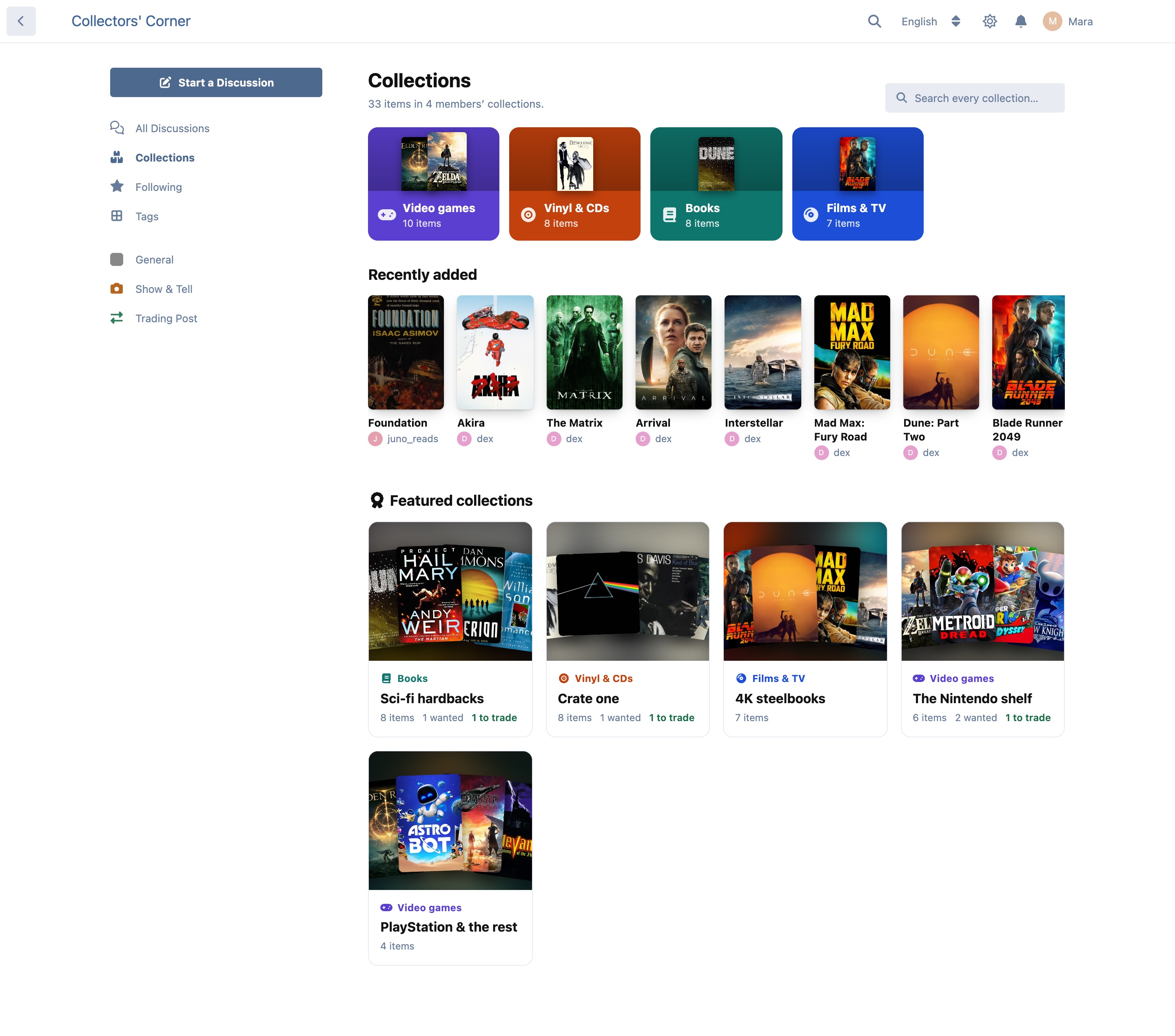
- A Collections page (
/collections, with a sidebar link) has what the forum collects by type, recently added items (Owned, Wishlist and Open to trade, each its own list), the latest changes (Status: who marked what as completed or in progress; Ratings: who rated what, in stars), featured collections, and a search across every collection. By default the types are drawn exactly like Flarum's own Tags page (coloured tiles, with the latest collection along the foot); cover tiles and compact tabs (one row of small buttons, filled with the type's colour or with it on the icon and name only) are the other choices in the settings. Signed-in members get Add an item right there, which asks which collection (or makes a new one). - One click to your own. Members get My collections in the forum sidebar and in their account menu.
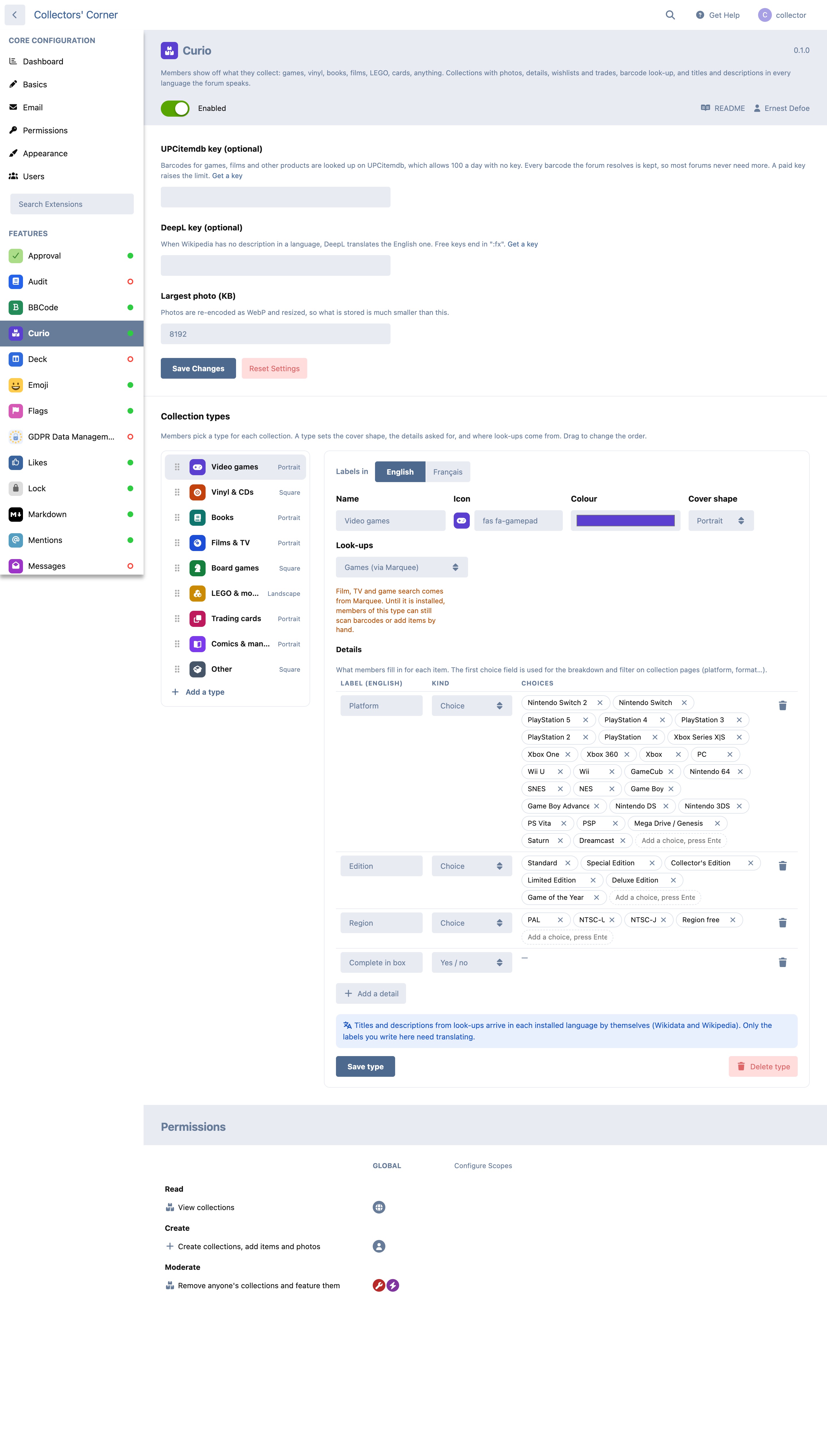
- Types you can shape. It starts with video games, vinyl & CDs, books, films & TV, board games, LEGO & models, trading cards, comics & manga, and other. You can add, rename, reorder or remove types, and choose each one's icon, colour, cover shape (portrait, square or landscape), look-up source and details.
- A widget, if you want one. "Recently added" can be offered to Bespoke and FoF Forum Widgets. It is off until you turn it on in Curio's settings; with FoF it then shows in FoF's layout editor, where it can be moved or removed.
Installation
Permissions
| Permission | Default | What it allows |
|---|---|---|
| View collections | Everyone | Seeing public collections, and members-only ones when signed in |
| Create collections, add items and photos | Members | Their own collections, items and photos, and look-ups |
| Import spreadsheets into their collections | Members | Importing a CSV file into their own collection |
| Export their collections as spreadsheets | Members | Downloading their own collection as a CSV file |
| Remove anyone's collections and feature them | Moderators | Moderation, and choosing the featured collections |
Settings
- Collections page layout. Like the Tags page (the default), cover tiles, or compact tabs.
- Colour of the compact tabs. The type's colour as the tab's background (the default), or on its icon and name only.
- Show "Latest changes" (on by default). The row with members' latest progress and ratings, from collections the reader can see.
- Offer the "Recently added" widget (off by default).
- IGDB client ID and secret (optional). Game look-ups on IGDB. Create a Twitch app (any name, OAuth redirect URL
http://localhost, category Application Integration), then copy its Client ID and make a New Secret. The forum keeps its Twitch token until a day before it expires, keeps searches for a day, and sends IGDB at most four requests a second and 2,000 a day. - UPCitemdb key (optional). Barcodes work without it: UPCitemdb allows 100 lookups a day with no key, and Open Icecat needs none. Every barcode the forum resolves is kept, so it never asks twice. A paid key only raises UPCitemdb's limit. UPCitemdb plans.
- Barcode scanning and look-ups (on by default). Turned off, the Scan button goes, a number typed in the search box is searched as a title, and the forum asks no barcode service at all (the look-up endpoint answers a barcode with 403).
- barcodelookup.com API key and EAN-Search.org API token (optional, paid). See Paid barcode services.
- eBay App ID, Cert ID and site (optional). See eBay barcode look-ups.
- DeepL key (optional). Translates a description when Wikipedia has none in a language. Keys ending in
:fxuse DeepL's free plan. - Largest photo (default 8 MB). Photos are resized and re-encoded, so what is stored is far smaller.
Paid barcode services (optional)
For forums that want more boxes found than the free services know, Curio can also ask two paid services with the forum's own key. Without a key a service is never contacted.
| barcodelookup.com | EAN-Search.org | |
|---|---|---|
| Cost (October 2026) | from $99 a month for 5,000 answers (Starter); free test key on the same page | from €19 a month for 5,000 queries (Pro); €1 trial month of 100, once per person |
| Counted | only look-ups that find something | every query |
| Asked | after UPCitemdb and Open Icecat | after barcodelookup.com, before eBay |
| Kept by Curio | the name, for a day | the name for a month, a miss for a week |
- Order: the forum's own barcode table, UPCitemdb and Open Icecat (in the order the barcode's country favours), barcodelookup.com (a miss costs nothing there), EAN-Search, then eBay.
- Within limits. Each is asked at most 2 times a second, 200 times a day and 25 times per member a day, and never twice for a barcode while its answer is kept.
- Fails safe. Any problem (refused key, rate limit, outage, an unexpected answer) is a miss: the member gets the usual "Search by title instead", and one line a day goes to the forum's log, with no key in it. A refused key is not tried again for an hour; a new key is tried at once.
- Only the name is used. barcodelookup.com's images and descriptions belong to third parties under its terms, so Curio never shows or keeps them; its terms also ask that kept answers go when the subscription ends, which is why a name is kept a day. EAN-Search answers with names and categories only.
eBay barcode look-ups (optional)
For forums that create their own free eBay developer app, Curio can ask eBay's Browse API about barcodes that UPCitemdb and Open Icecat both miss. Without the keys nothing changes and eBay is never contacted.
- Sign in at eBay Application Keys (join the eBay Developers Program first if you are new) and create a Production keyset (any name).
- Beside the keyset, open Notifications and, under Marketplace Account Deletion, turn on the Not persisting eBay data exemption. That is true of Curio: see below.
- Copy the App ID (Client ID) and Cert ID (Client Secret) into Curio's settings. The Cert ID is a password field. Like every Flarum setting it is visible to admins only, it is never sent to the forum's pages, and it is never written to the log.
- Optionally pick the eBay site to ask. By default it follows the forum's language: French → eBay France, German → eBay Germany, British English → eBay UK, otherwise eBay US.
How it works:
- Asked last. The forum's own barcode table first, then UPCitemdb and Open Icecat, then eBay. When eBay names the product, its platform or format words fill the item's details and the rest is searched on IGDB, Marquee or the type's other source, as with any barcode.
- The name is what most listings share. Curio asks for ten listings with that barcode (
item_summary/search?gtin=), keeps those of the most common eBay catalogue product, and takes the words at least half of them use, dropping sellers' words such as "New", "Sealed" or a trailing "Game". - Within eBay's limits. An application token (about two hours) is kept until five minutes before it ends and renewed once if eBay refuses it. At most 2 requests a second and 1,000 a day (eBay allows 5,000). A name is kept for a day, a barcode eBay does not know for a week.
- Fails safe. Any eBay problem (refused keys, rate limit, outage, an answer that is not search results) counts as a miss: the member gets the usual "Search by title instead", and one line a day goes to the forum's log, with no keys or token in it. Refused keys are not tried again for an hour.
- What is kept. Only the product name Curio derived and, once a member saves an item, the barcode with the work they picked, in the forum's own barcode table. Nothing about listings, prices, sellers or buyers is stored.
- No eBay photos. eBay's API License Agreement keeps eBay content within eBay's displays and asks that it be no older than a day (six hours for listing details). Listing photos also belong to their sellers. So Curio never shows, downloads or re-hosts them: the cover comes from the work the member picks (IGDB, Marquee, Open Library…), or from their own photo.
Good to know
- Lean. On every page Curio costs one small script and three permission flags. Its pages and windows load only when they are opened. A collection's counts, cover preview and breakdown are stored with it, so cards and profiles never count rows. List pages make a fixed number of queries however many items they show, and the Collections page's counts are worked out every ten minutes and shared.
- Look-ups are polite. They run on the server behind the forum's CSRF protection and are limited per member. A service that is down is left alone for a minute. Covers are only downloaded from the known image hosts and are kept on the forum, so a dead link never blanks a shelf.
- Descriptions stay fresh. A daily task (
php flarum curio:refresh-texts) re-reads titles and descriptions for the works that have gone longest without, a few at a time. A language installed later fills in the first time someone opens an item in it. - Scanning with the camera works in every current browser. Chrome and Edge on Android, macOS and ChromeOS use their own built-in barcode reader. Everywhere else (Safari, Firefox, every iPhone and iPad browser, Chrome and Edge on Windows and Linux) a small reader (about 43 KB) downloads the first time someone taps Scan, and never with the forum's other pages. A typed barcode, or a USB or Bluetooth scanner, works in the same field.
- Who sees the lists. Recently added, wishlists and latest changes only ever show items from collections the reader may open. Wanted items show only where their owner left the wishlist visible. Ratings are shown to whoever can see the item, as on the item itself. Imported rows do not count as changes, so an import never floods the list.
- Card look-ups keep within each service's rules. Searches are kept for a day, each service gets at most 8–10 requests a second and 5,000 a day from the forum, and every request names Curio. YGOPRODeck asks sites not to hotlink its pictures, so Yu-Gi-Oh! results show none until the card is added, when its picture is downloaded once and served by the forum (like every other cover).
- Wikipedia descriptions are CC BY-SA and are credited with a link on each item.
- Limits: 50 collections per member, 2,000 items per collection, 6 photos per item. An import file is at most 2 MB, fills a collection up to its 2,000 items, and a member can import five times an hour; covers and descriptions for imported rows are found in the background, 25 every five minutes.
