Download the PHP package dachcom-digital/social-data-twitter-connector without Composer
On this page you can find all versions of the php package dachcom-digital/social-data-twitter-connector. It is possible to download/install these versions without Composer. Possible dependencies are resolved automatically.
Download dachcom-digital/social-data-twitter-connector
More information about dachcom-digital/social-data-twitter-connector
Files in dachcom-digital/social-data-twitter-connector
Package social-data-twitter-connector
Short Description Pimcore Social Data Twitter Connector
License GPL-3.0-or-later proprietary
Homepage https://github.com/dachcom-digital/pimcore-social-data-twitter-connector
FAQ
Example:

In general, it is recommended to use always a project to download your libraries. In an application normally there is more than one library needed.

- Some hosting areas are not accessible by a terminal or SSH. Then it is not possible to use Composer.
- To use Composer is sometimes complicated. Especially for beginners.
- Composer needs much resources. Sometimes they are not available on a simple webspace.
- If you are using private repositories you don't need to share your credentials. You can set up everything on our site and then you provide a simple download link to your team member.
- Simplify your Composer build process. Use our own command line tool to download the vendor folder as binary. This makes your build process faster and you don't need to expose your credentials for private repositories.
Informations about the package social-data-twitter-connector
Pimcore Social Data - X (Twitter) Connector
[!IMPORTANT] This bundle will not be compatible with Pimcore 12 or any future Pimcore versions.
For all future development, updates, and documentation, please refer to opendxp.io:
- Access the latest info here: https://www.opendxp.io/en/bundles
- Migration of Dachcom Digital Bundles: https://www.opendxp.io/en/dachcom-bundles
Note: We are open to partnerships for those interested in porting this bundle to future versions.
For inquiries, please contact: [email protected]



This Connector allows you to fetch social posts from Twitter (API v2).

Release Plan
| Release | Supported Pimcore Versions | Supported Symfony Versions | Release Date | Maintained | Branch |
|---|---|---|---|---|---|
| 3.x | 11.0 |
6.4 |
07.11.2023 | Feature Branch | master |
| 2.x | 10.1 - 10.6 |
5.4 |
05.01.2022 | Unsupported | 2.x |
| 1.x | 6.0 - 6.9 |
3.4, ^4.4 |
22.10.2020 | Unsupported | 1.x |
Installation
Add Bundle to bundles.php:
Install Assets
Enable Connector
Twitter Backoffice
Some hints to set up your Twitter app:
- Create Project via https://developer.x.com
- Generate Keys in
Keys and tokensin sectionAccess Token and Secret - Be aware, that the
free limitplan only allows1 requests / 15 mins
Connector Configuration
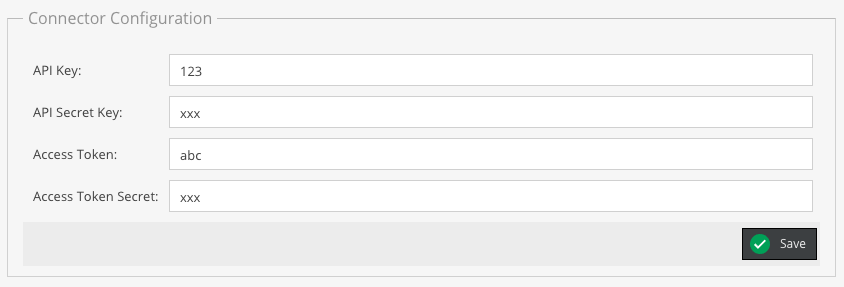
Now head back to the backend (System => Social Data => Connector Configuration) and checkout the twitter tab.
- Click on
Install - Click on
Enable
Connection
Twitter is auto connected after you have filled out the connector configuration fields.
Feed Configuration
| Name | Description |
|---|---|
User Id |
Defines which user entries should be imported |
Count |
Define a limit to restrict the amount of social posts to import |
Upgrade Info
Before updating, please check our upgrade notes!
License
DACHCOM.DIGITAL AG, Löwenhofstrasse 15, 9424 Rheineck, Schweiz
dachcom.com, [email protected]
Copyright © 2025 DACHCOM.DIGITAL. All rights reserved.
For licensing details please visit LICENSE.md
