Download the PHP package ci4-cms-erp/ci4ms without Composer
On this page you can find all versions of the php package ci4-cms-erp/ci4ms. It is possible to download/install these versions without Composer. Possible dependencies are resolved automatically.
Download ci4-cms-erp/ci4ms
More information about ci4-cms-erp/ci4ms
Files in ci4-cms-erp/ci4ms
Package ci4ms
Short Description Modular CodeIgniter 4 CMS featuring RBAC admin, theming, blog/page management, elFinder media integration, and CLI tooling for rapid customization.
License MIT
Homepage https://github.com/ci4-cms-erp/ci4ms
FAQ
Example:

In general, it is recommended to use always a project to download your libraries. In an application normally there is more than one library needed.

- Some hosting areas are not accessible by a terminal or SSH. Then it is not possible to use Composer.
- To use Composer is sometimes complicated. Especially for beginners.
- Composer needs much resources. Sometimes they are not available on a simple webspace.
- If you are using private repositories you don't need to share your credentials. You can set up everything on our site and then you provide a simple download link to your team member.
- Simplify your Composer build process. Use our own command line tool to download the vendor folder as binary. This makes your build process faster and you don't need to expose your credentials for private repositories.
Informations about the package ci4ms
CI4MS
CI4MS is a CodeIgniter 4-based CMS skeleton that delivers a production-ready, modular architecture with RBAC authorization and theme support. It combines CMS workflows, developer-focused CLI commands, an extensible module system, and customizable front-end themes in a single package.









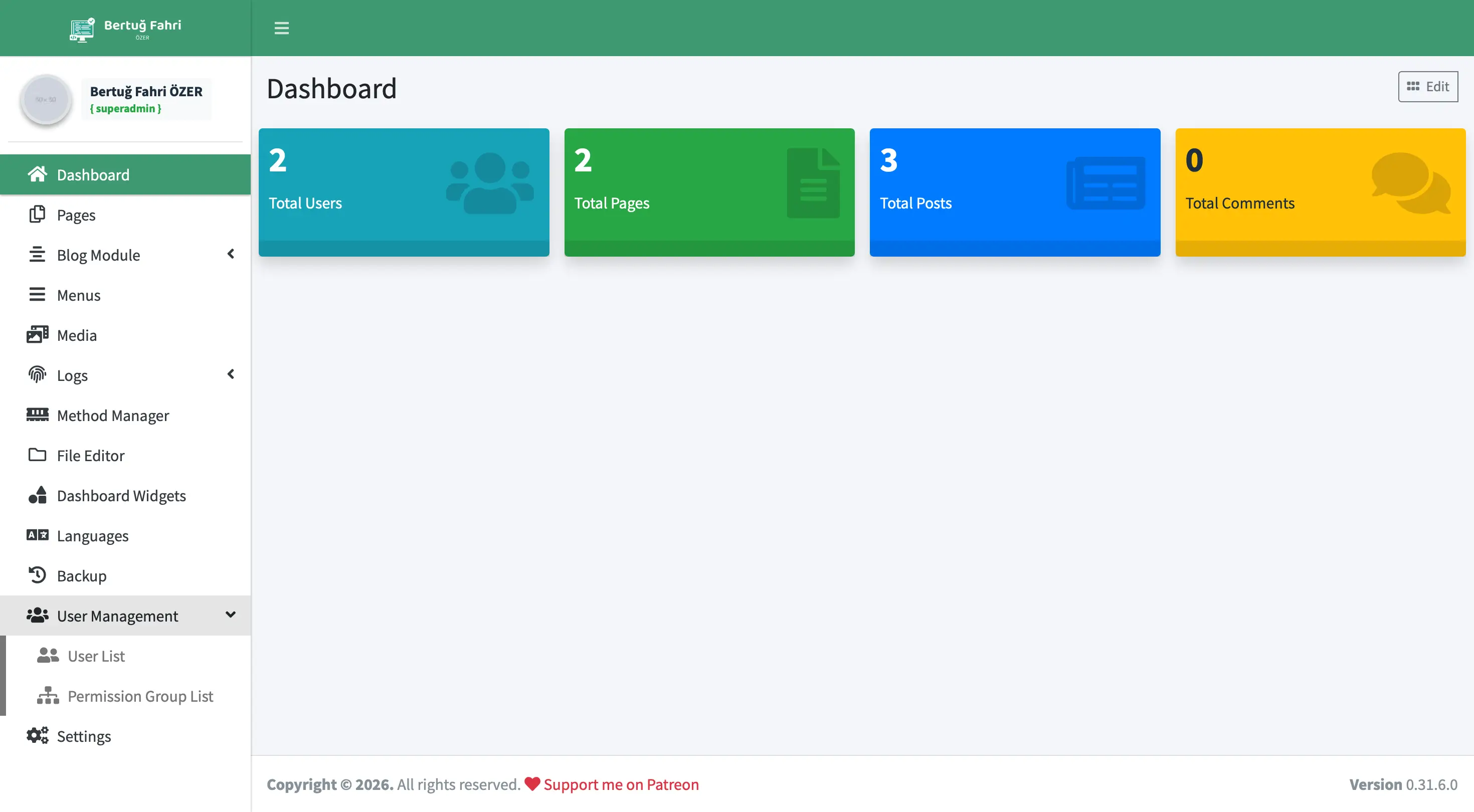
Key Features
- Authentication & RBAC:
Modules\Authhandles user login, lockouts, and password resets via CodeIgniter Shield. Permissions map toauth_permissions_pagesrecords. - Modular backend: Each feature ships as an independent module (Blog, Pages, Menu, Media, Users, Settings, Theme, etc.) under
modules/*. - Flexible content management: Page and blog entries include SEO metadata, categories, tags, and full comment workflows.
- Media & files: Includes elFinder-powered media management, a built-in file editor, and an in-panel log viewer.
- Automatic Updates: Modernized
UpdateServiceprovides a "One-Click Update" system with atomic file operations, automated GitHub version discovery (bypassing 300-file limits), and secure rollback management. - Signed Updates (fail-closed): Every file an update writes must appear in a
manifest.jsoncarrying a detached Ed25519 signature from a key your installation already trusts, with a per-file SHA-256 check on top. A compromise of the GitHub account, the release, or the CDN is not enough to push code — the publisher's offline private key is required. There is no "continue anyway" option, downgrades through the updater are refused, and the shipped keyring is empty on purpose, so auto-update stays off until you add a key you have verified. See Release Signing & Trusted Keys. - Security Architecture: Global CSRF protection across all AJAX endpoints, strict HTTP security headers (CSP, HSTS, X-Frame-Options), executable file upload blacklists, and HTMLPurifier sanitization to prevent XSS and RCE attacks.
- Migration & seed runner:
Modules\MigrationManagerlists every migration namespace with its applied/pending state and runs migrations orWebRunnableSeederseeds from the backend. Superadmin-only behind three independent layers, namespaces matched against a server-side allowlist built from disk, concurrent runs serialised with aflock()lock, and every run recorded inmigration_runsand announced to superadmins overci4ms.audit. - Backup Support: Updates automatically trigger a full backup of modified files before applying patches, with a dedicated management interface for restores.
- Theme system: The
public/templates/*structure and theModules\Thememodule enable installing or upgrading themes from ZIP packages. - Setup & automation: Offers a web-based installer (
/install) plus a single CLI command (php spark ci4ms:setup) for automated installation, default data seeding, and route generation. Module scaffolding is available viaphp spark make:module. - Docker support: Ships with a production-ready
Dockerfile,docker-compose.yml, and a GitHub Actions CI workflow out of the box. - SEO helpers:
ci4seoprobuilds meta tags and JSON-LD, whileCommonLibrarycentralizes email, breadcrumbs, and inline shortcode utilities.
Requirements
- PHP 8.2 or newer (
intl,json,mbstring,gd,curl,opensslextensions required) - Composer 2.5+
- MySQL / MariaDB (or any CodeIgniter 4-supported driver)
- Writable directories:
writable/,public/uploads/, optionallypublic/templates/ - Optional: Redis +
ext-redis(phpredis) — only for realtime notifications, which are off by default. The extension must be built for the PHP version that serves the site; on a multi-version setuppecl install rediseasily targets the wrong one, and the feature then degrades silently to 60 s polling. See the Notifications module README.
See composer.json for the full dependency list (e.g. bertugfahriozer/ci4commonmodel, bertugfahriozer/sql2migration, ci4-cms-erp/ext_module_generator, claviska/simpleimage, gregwar/captcha, studio-42/elfinder).
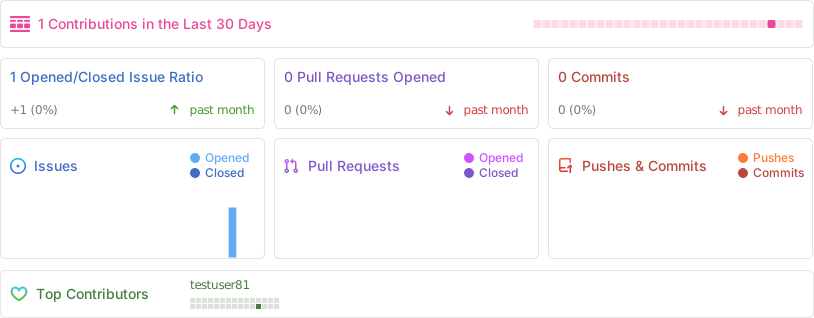
🪴 Project Activity
Installation
Fresh Project (recommended)
Clone Existing Repository
Docker (recommended for development & CI)
Refer to DOCKER_SETUP.md for full Docker configuration details.
Environment & Configuration
-
Create your
.envfrom the template: -
Update these core settings in
.env:app.baseURLdatabase.default.*- Optional:
cookie.*,honeypot.*,security.*
-
Prepare the routes file:
- If you prefer the web installer, open
/installin the browser and follow the wizard. Use the CLI step below to skip the wizard.
One-Command Setup (CLI)
This single command runs all migrations, seeds default data (modules, permissions, sample content), and creates the initial administrator account. No separate migrate or seed commands are needed.
Run the Dev Server
Access the backend via: https://<domain>/backend
Directory Layout
Key files:
app/Commands/— CLI tooling (make:a*,create:route,ci4ms:setup).app/Filters/Ci4ms.php— Install guard, maintenance mode redirect, menu cache.app/Config/DefaultRoutes.php— Routes template; copy toRoutes.phpon setup.modules/*— Each module includes its ownConfig/Routes.php,Controllers,Models,Views,Language,Libraries,Filters.public/templates/— Theme assets; each theme requiresinfo.xmlandscreenshot.png.writable/— Cache, logs, temporary files.
Modules
| Module | Purpose | Highlights |
|---|---|---|
| Auth | Authentication lifecycle | Shield-based, CAPTCHA, email activation, reset tokens |
| Backend | Admin shell | Dashboard stats, shared base controller |
| Blog | Blog CRUD | Categories, tags, comments, bad-word filters |
| Pages | Static page management | SEO fields, inline shortcode parsing |
| Menu | Menu builder | Drag-and-drop ordering, slug helpers |
| Media | Media manager | elFinder integration, optional WebP conversion |
| Fileeditor | Project file editor | Safe read/write/rename; dangerous extension blacklist |
| Settings | System configuration | One-click updates, company/social/mail settings, i18n support |
| Users | User & role management | Shield groups, reset tracking |
| Methods | Route → permission mapping | Module toggling, router scan |
| Logs | Log viewer | Browses CodeIgniter log files inside the backend |
| Theme | Theme manager | ZIP upload, DB migration support, duplicate checks |
| Install | Web installer | Creates .env, triggers migrations |
| Backup | Database backup manager | Create, download, and restore with SQL sanitization |
| DashboardWidgets | Dashboard statistics | Modular widget system for admin overview |
| LanguageManager | Language file manager | Edit and manage translation files from the backend |
| Notifications | In-app admin notifications | Bell dropdown, single-global-row targeting (user / group / broadcast), optional Redis-backed SSE realtime, per-user opt-out screen |
| MigrationManager | Migration & seed runner | Superadmin-only; per-namespace applied/pending state, WebRunnableSeeder contract, flock run lock, migration_runs audit trail |
| DevGate | Development-only access gate | Basic-Auth wall for non-production environments; the installer generates and hashes a random password |
See docs/architecture.md for deeper architectural notes.
CLI Commands
| Command | Description |
|---|---|
php spark ci4ms:setup |
Full automated installation: migrations, seeding, default data |
php spark make:module Blog |
Scaffold a new module (Config, Controllers, Views, language files) |
php spark make:abview dashboard |
Generate a backend view from the AdminLTE template |
php spark create:route |
Rebuild app/Config/Routes.php from the template |
php spark migrate --all |
Run all pending migrations across modules |
php spark ci4ms:migrate |
Same as migrate --all, plus a migration_runs audit row (run_source='cli') for the superadmin panel's run history |
php spark cache:clear |
Clear all application caches |
php spark ci4ms:geoip-update |
Download/update the local DB-IP City Lite database for session geo lookup (run monthly via cron) |
php spark ci4ms:release:keygen |
(publisher only) Generate an Ed25519 release signing keypair into a password-sealed keyfile |
php spark ci4ms:release:manifest |
(publisher only) Build and sign writable/release/manifest.json + .sig from the tracked tree |
php spark ci4ms:release:verify |
Verify a local manifest/signature pair, or a published release with --remote --tag v<x.y.z.w> |
Standard CodeIgniter commands (php spark db:seed, php spark key:generate, etc.) are also available.
Developer Notes
- Cache keys:
settings(24h),menus_{locale}(per-locale, 24h),sidebar_menu(24h), and the two the authorization filter reads —shield_auth_dynamic_config(24h, Shield's group/permission matrix) andbackend_page_info_*(1h, per-route page rows). Clear withphp spark cache:clearorcache()->delete(). After any RBAC write, callrbac_cache_flush()(modules/Backend/Helpers/ci4ms_helper.php) rather than deleting either key on its own:Ci4MsAuthFilterreads both, so clearing one leaves the other stale for up to its TTL. - Base controller: Extend
Modules\Backend\Controllers\BaseControllerfor new backend controllers; it prepares session user, navigation, mail settings, and shared data. - Permissions: Register new secured routes in
Modules\Methods(or via the database) so the permission filter recognizes them. - Slug generation:
seflink()handles transliteration (including Turkish characters). - Form security: Global CSRF is enabled; backend AJAX endpoints opt out via
BackendConfig::$csrfExcept. - Comment moderation:
CommonLibrary::commentBadwordFilteringhandles bad word filtering and moderation rules. - Theme uploads: Each theme must include
info.xmlandscreenshot.png; missing files trigger a backend warning.
Testing & Maintenance
composer test— runs PHPUnit.- The GitHub Actions workflow (
.github/workflows/docker-test.yml) automatically builds the Docker image and runs migrations on every push tomaster. - Maintenance mode: When
settings.maintenanceMode.scalar == 1, theCi4msfilter redirects visitors tomaintenance-mode. - Security:
Fileeditorenforcesrealpathguards and a dangerous extension blacklist (.php,.phtml,.phar,.htaccess) to prevent RCE; destructive operations (deleteFileOrFolder,renameFile) additionally validate against an extension allowlist to block renaming or deleting critical application files.Backuprestore uses SQL statement whitelist to block malicious queries (LOAD_FILE,GRANT, etc.).HTMLPurifierconfig is hardened against XSS bypass (data:URIs blocked,CSS.Trusteddisabled) andCustomRules::getClean()output is persisted on everycreateandupdateflow in Blog and Pages controllers to prevent Stored XSS. All$_SERVERreads replaced with CI4base_url()/site_url()helpers. ConfigureApp.php::$proxyIPsif behind Cloudflare/Nginx.
Release Signing & Trusted Keys
The auto-updater verifies a detached Ed25519 signature over the release manifest before it writes a single file, and then checks every downloaded file against its SHA-256 entry in that manifest. Because the trust decision is made against a key list stored inside your installation, an attacker who takes over the GitHub account, the release, or the CDN still cannot push code to you.
Auto-update is off until you configure trust. The repository ships with an empty keyring (Modules\Settings\Config\UpdateKeys::$keys = []), which is deliberate: a key shipped in the same repository it is supposed to protect proves nothing. Until you add a public key, the updater refuses every update and reports Settings.updateNoTrustedKeys.
Published signing key fingerprints
Before adding a key to your keyring, confirm its key_id and full hex SHA-256 fingerprint against the table below and against at least one channel that is not this repository (release announcement, project website, maintainer's own key publication). If the two do not match, do not add the key and open a security report.
key_id |
SHA-256 fingerprint (hex) | Status | Added |
|---|---|---|---|
| not yet published | not yet published | — | — |
Publisher: replace the placeholder row with the real
key_idand fingerprint printed byphp spark ci4ms:release:keygen. Publish the full hex fingerprint, never a truncated one, and add a new row (rather than editing the old one) when rotating — during a rotation window both keys are listed, the old one moving torevokedonce the transition is complete. Arevokedkey causes the entire manifest to be rejected, even if a valid active signature is present alongside it.
Checking what your own installation trusts
The backend Settings page lists the release signing keys your installation currently trusts, with each entry's key_id, fingerprint, and status (active / revoked). Compare that list against the published fingerprints above; anything present there that is not published here did not come from the publisher. The keyring itself is a plain PHP config file — modules/Settings/Config/UpdateKeys.php — so it can also be reviewed directly and kept under your own change control.
Private keys are never held by the application, never committed, and never present in CI: signing happens offline via php spark ci4ms:release:keygen / ci4ms:release:manifest against a password-sealed keyfile stored outside ROOTPATH and public/. Anyone can independently verify a published release with php spark ci4ms:release:verify --remote --tag v<x.y.z.w>. The full pipeline, gates, and release ritual are documented in docs/architecture.md.
Third-Party Data Attribution
- Session geo lookup (optional, disabled by default) uses the free DB-IP City Lite database. If you enable it (Settings → Session Location Tracking, or the installer checkbox) and run
php spark ci4ms:geoip-update, you must comply with the database license: IP Geolocation by DB-IP, distributed under CC BY 4.0. Keep this attribution visible in your deployment. No IP data leaves your server — lookups are performed locally against the downloaded database.
Additional Docs
docs/architecture.md— Architecture, flow, permissions, and extension guidance.docs/developer-handbook.md— Environment setup, coding standards, deployment checklist.docs/theme_development.md— Theme folder structure, routing, andbase.phpvariables.docs/web-server-hardening.md— Apache/nginx rules that stop uploaded files from executing. Read this if you deploy on anything other than Apache —.htaccessis ignored by nginx, Caddy and FrankenPHP.DOCKER_SETUP.md— Docker environment configuration and usage.CHANGELOG.md— Full release history.- Wiki — EN/TR operator guide (install, configure, harden, upgrade, troubleshoot). Source lives in
wiki/and is published by.github/workflows/publish-wiki.yml.
Questions or contributions? Open an issue or pull request.
🏆 Acknowledgments
- Security researchers who reported vulnerabilities → SECURITY_HALL_OF_FAME.md
- Community bug reporters who caught functional regressions → BUG_REPORTERS.md
Found a security vulnerability? See the open an issue with reproduction steps.
All versions of ci4ms with dependencies

bertugfahriozer/ci4commonmodel Version ^1.2
bertugfahriozer/ci4seopro Version ^v1.3.2
bertugfahriozer/sql2migration Version ^1.0
ci4-cms-erp/ext_module_generator Version ^1.1
claviska/simpleimage Version 4.4.0
codeigniter4/framework Version 4.7.4
codeigniter4/settings Version 2.2
codeigniter4/shield Version 1.4.0
codeigniter4/translations Version 4.7.2
ezyang/htmlpurifier Version 4.19
gregwar/captcha Version 1.3.0
maxmind-db/reader Version ^1.13
studio-42/elfinder Version 2.1.70