Download the PHP package callmeleon167/debugphp without Composer
On this page you can find all versions of the php package callmeleon167/debugphp. It is possible to download/install these versions without Composer. Possible dependencies are resolved automatically.
Table of contents
Download callmeleon167/debugphp
More information about callmeleon167/debugphp
Files in callmeleon167/debugphp
Download callmeleon167/debugphp
More information about callmeleon167/debugphp
Files in callmeleon167/debugphp
Vendor callmeleon167
Package debugphp
Short Description Real-time PHP debugging in the browser — zero config, zero dependencies, just send() and see.
License MIT
Homepage https://debugphp.dev
Package debugphp
Short Description Real-time PHP debugging in the browser — zero config, zero dependencies, just send() and see.
License MIT
Homepage https://debugphp.dev
FAQ
After the download, you have to make one include require_once('vendor/autoload.php');. After that you have to import the classes with use statements.
Example:

Example:
If you use only one package a project is not needed. But if you use more then one package, without a project it is not possible to import the classes with use statements.
In general, it is recommended to use always a project to download your libraries. In an application normally there is more than one library needed.
In general, it is recommended to use always a project to download your libraries. In an application normally there is more than one library needed.
Some PHP packages are not free to download and because of that hosted in private repositories.
In this case some credentials are needed to access such packages.
Please use the auth.json textarea to insert credentials, if a package is coming from a private repository.
You can look here for more information.

- Some hosting areas are not accessible by a terminal or SSH. Then it is not possible to use Composer.
- To use Composer is sometimes complicated. Especially for beginners.
- Composer needs much resources. Sometimes they are not available on a simple webspace.
- If you are using private repositories you don't need to share your credentials. You can set up everything on our site and then you provide a simple download link to your team member.
- Simplify your Composer build process. Use our own command line tool to download the vendor folder as binary. This makes your build process faster and you don't need to expose your credentials for private repositories.
Please rate this library. Is it a good library?
Informations about the package debugphp
 **Real-time PHP debugging in the browser.**
DebugPHP streams your debug output to a browser-based dashboard via Server-Sent Events — no page reloads, no desktop apps, no configuration headaches.
[](LICENSE)
[](https://php.net)
[](https://packagist.org/packages/callmeleon167/debugphp)
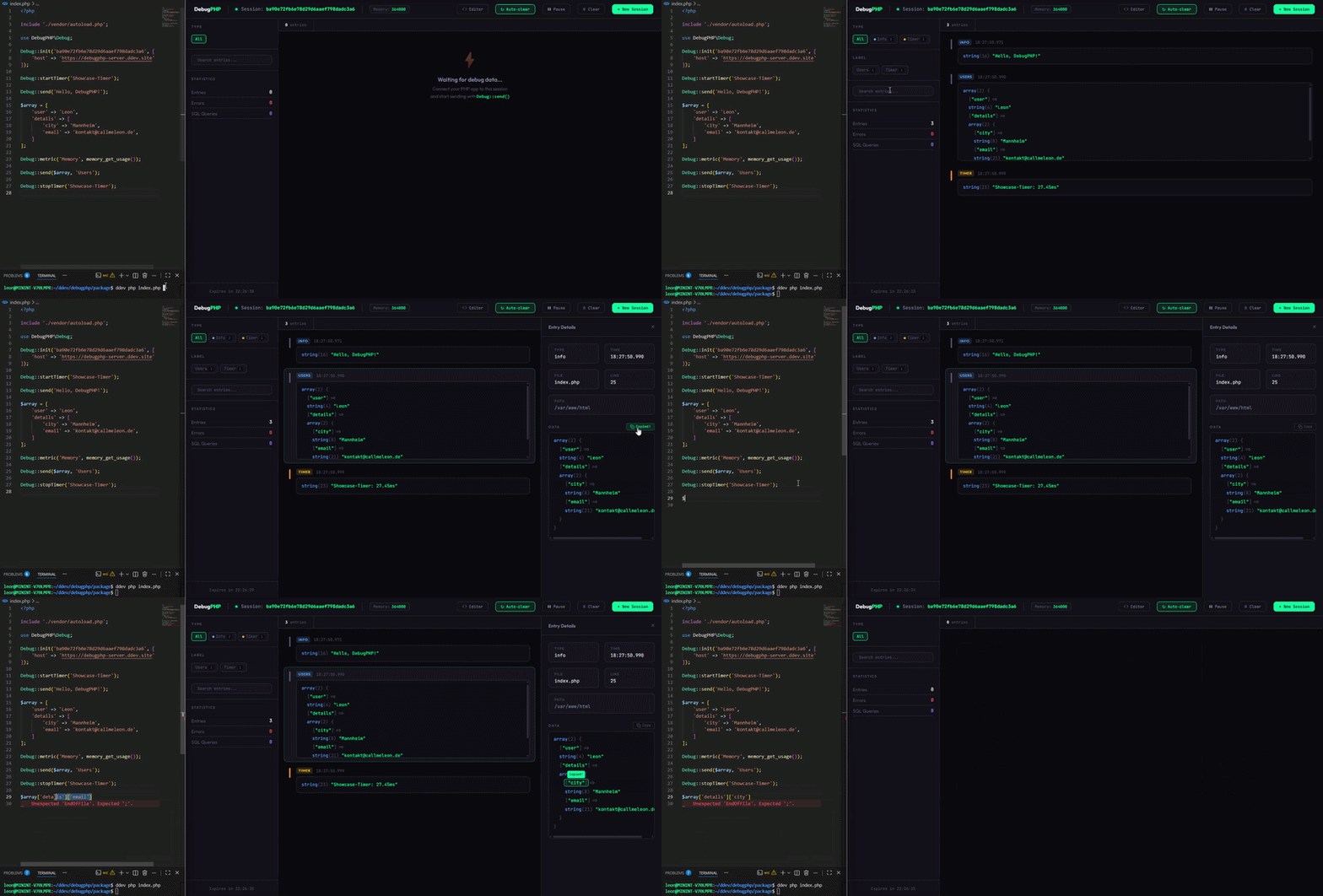
Why DebugPHP?
| dd() / var_dump() | Xdebug | Spatie Ray | DebugPHP | |
|---|---|---|---|---|
| Real-time output | ❌ | ❌ | ✅ | ✅ |
| No page disruption | ❌ | ✅ | ✅ | ✅ |
| Zero config | ❌ | ❌ | ❌ | ✅ |
| Browser-based | ❌ | ❌ | ❌ | ✅ |
| Free & open source | ✅ | ✅ | ❌ ($49/yr) | ✅ |
| No dependencies | ✅ | ❌ | ❌ | ✅ |
Installation
Requirements: PHP 8.1+ and the
curlextension.
Quick Start
Open the Dashboard in your browser — your debug data appears in real-time.
Self-Hosted
Want to keep your debug data on your own server? Use the DebugPHP Server:
Option A — PHP built-in server
Then point your configuration to your local server:
Option B — Docker
Enable auto-detection so the client finds the server automatically:
How It Works
- Your PHP app sends debug data via HTTP to the DebugPHP server.
- The server stores the entry and pushes it to the dashboard via SSE.
- The browser dashboard renders the entry in real-time.
Contributing
Please read CONTRIBUTING.md before opening a pull request.
License
MIT — see LICENSE for details.
Links
- Website: debugphp.dev
- Documentation: debugphp.dev/docs
- Server: github.com/CallMeLeon167/debugphp-server
- Dashboard: dashboard.debugphp.dev
All versions of debugphp with dependencies
PHP Build Version
Package Version

Requires
php Version
^8.1
ext-curl Version *
ext-curl Version *
The package callmeleon167/debugphp contains the following files
Loading the files please wait ...