Download the PHP package bymayo/vouch without Composer
On this page you can find all versions of the php package bymayo/vouch. It is possible to download/install these versions without Composer. Possible dependencies are resolved automatically.
Package vouch
Short Description Customer reviews for Craft CMS - pull from Google, Trustpilot, Feefo and Reviews.io, or collect your own.
License proprietary
FAQ
Example:

In general, it is recommended to use always a project to download your libraries. In an application normally there is more than one library needed.

- Some hosting areas are not accessible by a terminal or SSH. Then it is not possible to use Composer.
- To use Composer is sometimes complicated. Especially for beginners.
- Composer needs much resources. Sometimes they are not available on a simple webspace.
- If you are using private repositories you don't need to share your credentials. You can set up everything on our site and then you provide a simple download link to your team member.
- Simplify your Composer build process. Use our own command line tool to download the vendor folder as binary. This makes your build process faster and you don't need to expose your credentials for private repositories.
Informations about the package vouch

Vouch for Craft CMS 5
Pull customer reviews from Google, Trustpilot, Feefo and Reviews.io straight into Craft - or collect your own through the CP and a front-end form. Relate ratings to any element (entries, products, users, categories - you name it), block the spam, and render everything through Twig or GraphQL. You can also view and approve reviews straight from your dashboard with built-in widgets.
Features
- Multiple providers - Google, Trustpilot, Feefo, Reviews.io (with more on the way), plus a Manual source for CP and front-end submissions
- Renameable - call it "Reviews", "Testimonials", "VIP Feedback"… whatever fits the site
- Per-source moderation - manual approval, minimum ratings, auto-approve thresholds
- Front-end submission form - CSRF, validation, length caps, honeypot and per-IP rate limiting baked in
- User matching - reviews automatically link back to existing Craft users when the email matches an account
- Element-index integration - Rating column on Entries and Commerce Products, Reviews count column on Users, plus a "Reviews" tab on the user edit page
- Dashboard widgets - Reviews Pending Approval, Latest Reviews, Top Reviewed Elements, and a Sources widget with one-click sync
- Bulk approve - tidy up the pending queue in one go
- Granular permissions - View / Create / Edit / Delete / Approve / Sync, each on its own switch
- Developer APIs - chainable Twig query, GraphQL types and queries, and events for your own integrations
- Cron syncing - schedule pulls per source or all at once, with sync buttons throughout the CP for ad-hoc runs
- Points integration - award loyalty points or site credit when a review is approved (requires the Points plugin)
[!TIP] 📦 Part of a suite. A wider set of plugins built for Commerce stores - pair them up for a more complete setup:
- Vouch - pull and manage customer reviews from Google, Trustpilot, Feefo and Reviews.io
- Commerce Widgets - sales, revenue and order dashboard widgets for your Commerce store
- Points - reward customers with loyalty points or site credit to spend at checkout
- Curated - build hand-picked product collections for your Commerce store
Contents
- Install
- Requirements
- Providers
- Setting up a source
- Google Reviews
- Trustpilot
- Feefo
- Reviews.io
- Manual
- Front-end review submissions
- Twig
- Sync
- Attribution & spam controls
- Element integration
- Dashboard widgets
- Settings
- GraphQL
- Events
- Nice to know
- Support
Install
- Install with Composer via
composer require bymayo/craft-vouchfrom your project directory - Enable / Install the plugin in the Craft Control Panel under
Settings > Plugins
You can also install the plugin via the Plugin Store in the Craft Admin CP by searching for Vouch.
Requirements
- Craft CMS 5.6+
- PHP 8.2+
Providers
| Provider | Backed by | Auth |
|---|---|---|
| Google Reviews | Places API (New) or Business Profile API | API key, or OAuth 2.0 |
| Trustpilot | Public Business Units API | API key + Business Unit ID |
| Feefo | Reviews API v20 | Merchant identifier + optional API key |
| Reviews.io | Merchant Reviews API | Store ID + API key |
| Manual | Authored in the CP or via front-end form | n/a |
Setting up a source
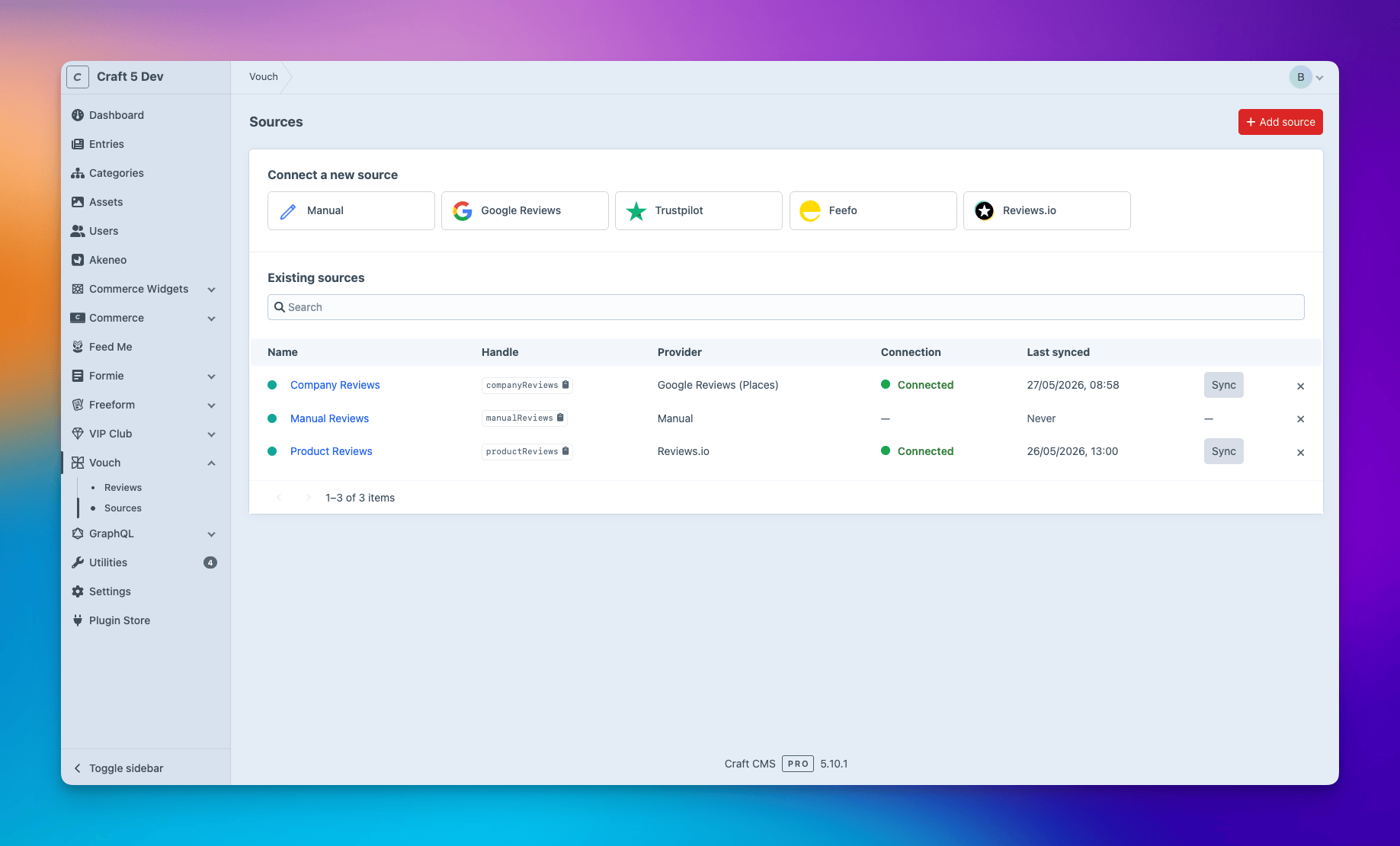
A source is a single feed of reviews tied to a provider. You might set up a Google Reviews source to pull in your overall company reviews, a Reviews.io source for product reviews, or a Manual source for testimonials you collect yourself - you can have as many as you like, mixing and matching providers as you go.
Head to Vouch → Sources → New source, choose your provider, fill in the credentials and Save. A "Test connection" check runs automatically on the edit page so you'll know straight away if something's off.
Google Reviews
Google sources have a Mode dropdown:
- Places API - works for any place, but Google caps you at 5 reviews per call
- Business Profile API - only for businesses you (or the OAuth-connecting account) own or manage. Full review history with pagination, but needs Google partner approval - more on that below
Places API mode
- Open the Google Cloud Console and create (or select) a project.
- Enable the Places API (New) under APIs & Services → Library.
- Create an API key under APIs & Services → Credentials → Create credentials → API key.
- Worth doing: restrict the key. In its settings, set "Application restrictions" to your server IP(s) and "API restrictions" to Places API (New) only - if the key ever leaks, it can't be re-used for billed Maps calls.
-
In Vouch, leave Mode on "Places API", paste your API key, then use the built-in "Find a Place ID" search box. Type a company name, address or postcode and hit Search - Vouch proxies Google's Text Search endpoint server-side and shows the matches. Click one and the Place ID fills in for you.
Already got a Place ID from Google's Place ID Finder? Paste it in manually instead.
⚠ Heads up: Google only ever returns the 5 most recent reviews on the Places API, and there's no way around it - that's just how their API works. Don't worry though, re-syncing won't create duplicates, you'll always just get the latest 5. Set
backfillDaysto0for Places-mode sources so you grab everything available.
Business Profile API mode
⚠ Heads-up: Google gatekeeps this endpoint. Back in 2023 Google clamped down on programmatic access to reviews via the Business Profile API. To use this mode in production:
- Apply via Google's Business Profile API form.
- Get an OAuth 2.0 consent screen verified by Google (its own review process if your scope is "sensitive").
- Wait for approval - usually weeks, and first-time applicants are often turned down.
Without approval the OAuth flow completes fine, but the reviews endpoint comes back with
403 PERMISSION_DENIED.
Once you're approved:
- Enable the My Business Account Management API, My Business Business Information API, and the Business Profile API in Google Cloud Console.
- Create an OAuth 2.0 Client ID of type "Web application". Add
https://<your-site>/admin/actions/vouch/sources/google-oauth-callbackto "Authorized redirect URIs", then jot down the Client ID and Client Secret. - In Vouch: Add source → Google Reviews, switch Mode to "Business Profile API", paste in the Client ID + Client Secret and Save.
- Reload, click "Connect Google account" and approve on Google's consent screen. The OAuth callback stores an encrypted refresh token on the source.
- Fill in the Location resource name (
accounts/{accountId}/locations/{locationId}). You can list your accounts/locations via the API explorer or a quickcurlagainsthttps://mybusinessaccountmanagement.googleapis.com/v1/accounts. Save again. - Hit "Test connection" to make sure everything's talking.
Trustpilot
- Sign in to Trustpilot Business.
- Generate an API key under your account's API / Integrations settings. The public tier is plenty for pulling reviews of your own business unit.
-
In Vouch, paste the API key, then use the built-in "Find a Business Unit" search box. Type your company name or domain, hit Search, and click a match to fill in the Business Unit ID for you.
Already got the Business Unit ID? Just paste it in manually.
Feefo
- Your Merchant identifier is the slug in your Feefo dashboard URL.
- An API key is optional. Public review data flows without one; private fields (e.g. customer email) need a paid plan and a bearer key.
- Paste the merchant identifier and (optionally) the API key into the Feefo source edit page.
Without an API key, reviewer emails come through as null and user-matching won't fire.
Reviews.io
- Sign in to your Reviews.io merchant dashboard.
- Integrations → API: copy your Store ID (merchant code) and API key.
- Paste both into the Reviews.io source edit page.
Reviewer email is passed through when present, so user-matching works out of the box.
Manual
No external credentials needed. Add a Manual source to:
- Author reviews directly in the CP via the + New review button.
- Collect reviews through a front-end form (see Front-end review submissions below).
Manual sources can still have Require manual approval toggled on - moderation respects the same autoApproveThreshold setting as the API-backed sources.
Front-end review submissions
Drop a form on your front-end so customers can leave reviews directly through your site. Submissions are accepted against Manual sources only.
On a failed submission, Vouch repopulates a review variable with the user's input and errors.
| Field | Required | Notes |
|---|---|---|
sourceHandle |
Yes | The handle of the Manual source to submit against |
rating |
Yes | Numeric rating from 1-5 |
headline |
Yes | Short title for the review |
review |
Yes | The review body |
reviewerName |
Yes | Display name shown alongside the review |
reviewerEmail |
Yes | Used for moderation and user matching |
relatedElementId |
No | Tie the review to a specific entry, product, user, etc. |
vouchHoneypot |
No | Hidden honeypot - leave empty. Any value silently discards the submission |
Twig
Because Vouch pulls reviews from every provider into a single store, you can mix and slice them however you like from one Twig API. Here are some real-life examples you can drop straight into a template.
Overall rating across all sources
Drop this in a footer, homepage hero, or trust banner.
Rating for a single entry or product
Use on a product or entry detail page to show that element's own rating.
Listing the latest reviews
A user's own reviews on their profile page
Pulls reviews where the reviewer's email matched a Craft user account.
Per-source breakdown for an element
Useful when you're pulling reviews from more than one provider and want to show each one's average side-by-side.
Filtering by source and rating
Grab the high-rated reviews from one source.
Review properties
Each review element returned by craft.vouch.reviews() exposes:
| Call | Returns |
|---|---|
review.headline |
The review's short title |
review.review |
The review body text |
review.rating |
Numeric rating from 1-5 |
review.reviewerName |
Display name of the reviewer |
review.reviewerEmail |
Reviewer's email (when available) |
review.reviewedAt |
Date the review was left |
review.sourceName |
The source's display name (e.g. "Google UK") |
review.sourceHandle |
The source's machine handle |
review.providerHandle |
The connector handle (google, trustpilot, feefo, reviewsio, manual) |
review.reviewerUser |
The Craft User element when the reviewer's email matched an account, otherwise null |
Full Twig API
| Call | Returns |
|---|---|
craft.vouch.reviews() |
Review query. Chainable filters: .sourceId(id), .externalId(str), .rating(value), .approved(bool\|null), .reviewerUserId(id), .relatedElementId(id). Defaults to approved-only - pass .approved(false) for pending only or .approved(null) for both. |
craft.vouch.sources() |
All Source models |
craft.vouch.source(handle) |
A single Source by handle |
craft.vouch.sourceById(id) |
A single Source by id |
craft.vouch.providers() |
All registered connectors |
craft.vouch.averageRating(sourceId?) |
Site-wide or per-source average rating |
craft.vouch.rating(elementId) |
Average rating across approved reviews for one element |
craft.vouch.ratingsBySource(elementId) |
Per-source rows of {sourceId, sourceName, providerHandle, average, count} |
craft.vouch.settings |
The plugin's settings model (e.g. craft.vouch.settings.pluginName) |
Sync
Set up a cron job to pull in new reviews on a schedule. You decide how often it runs.
The argument on vouch/sync/source is the handle you set when creating the source (visible in the Sources index). You can also hit the Sync button on the Sources index, the source edit page, or the dashboard widget for an ad-hoc pull.
Attribution & spam controls
Vouch has a few protections built in to stop fake or forged reviews coming through your front-end form.
How emails are handled
The reviewer's email is stored for moderation and contact only. A review is only linked to a Craft user when the submitter is logged in and uses their own account email - so no one can claim to be someone else.
Blocking impersonators
requireLoginForKnownEmails (on by default) rejects any submission whose email already belongs to a Craft user, unless they're logged in as that user.
Locking it down further
Vouch comes with a honeypot field and per-IP rate limiting baked in - just include the vouchHoneypot input in your form (see the example above) and tweak submissionRateLimit / submissionRateWindow in Settings to taste. For extra peace of mind:
- Turn on "Require manual approval" on the source so reviews stay Pending until an admin approves them.
- Restrict the form to logged-in users with
{% requireLogin %}. - Add a CAPTCHA (hCaptcha / reCAPTCHA) if you're getting a lot of traffic from anonymous users.
Reviews that aren't from Manual sources (e.g. Google, Trustpilot, etc.) don't go through any of this - those emails come straight from the provider.
Element integration
Vouch wires ratings into Craft's own element indexes and edit pages so reviews surface where you'd expect them. Each column is opt-in - turn it on via the column settings cog on the element index.
| Element | What you get | How to enable |
|---|---|---|
| Entries | Rating column on the index + sidebar block on the edit page with the average and per-source breakdown. | Index → cog → tick Rating |
| Commerce Products | Same as Entries. | Index → cog → tick Rating |
| Users | Reviews count column on the index + a Reviews tab on the edit page listing reviews they've authored. | Index → cog → tick Reviews |
Dashboard widgets
Add via the Craft dashboard → + New widget.
| Widget | Shows | Settings |
|---|---|---|
| Reviews Pending Approval | Reviews waiting to be approved. | limit |
| Latest Reviews | The most recent approved reviews. | limit, sourceId |
| Top Reviewed Elements | Elements ranked by review count or average rating. | elementType, sectionId, sort, limit |
| Sources | Each source with its last-synced timestamp and a one-click Sync button. Manual sources are excluded. | sourceId |
Settings
Settings live at Settings → Plugins → Vouch in the CP, and can be overridden per environment via config/vouch.php.
| Setting | Default | What it does |
|---|---|---|
pluginName |
Vouch |
Plugin name shown in the CP. |
matchAuthorsToUsers |
true |
Link reviewer emails to Craft users. |
emailRetentionDays |
365 |
Days to keep reviewer emails. 0 = forever. |
backfillDays |
90 |
History to pull on first sync. 0 = everything. |
autoApproveThreshold |
5.0 |
Auto-approve reviews at or above this rating. |
requireLoginForKnownEmails |
true |
Block submissions using an email already tied to a Craft user. |
headlineMaxLength |
120 |
Max headline length. 0 = no limit. |
reviewMaxLength |
2000 |
Max review body length. 0 = no limit. |
submissionRateLimit |
5 |
Max submissions per IP per window. 0 = no limit. |
submissionRateWindow |
60 |
Rate-limit window in seconds. |
GraphQL
Public GraphQL queries default to approved: true so pending-moderation reviews never leak. Admins can override with approved: false when they need to.
| Query | Args | Returns |
|---|---|---|
vouchReviews |
sourceId, rating, minRating, approved, reviewerUserId, relatedElementId, limit, offset |
[VouchReview] |
vouchReview |
id: Int! |
VouchReview |
Events
| Event | When it fires |
|---|---|
Reviews::EVENT_AFTER_SYNC_REVIEW |
After a review is created or updated during sync. $event->isNew tells you which. |
Reviews::EVENT_AFTER_APPROVE_REVIEW |
Once per review, the moment it goes live. Won't re-fire on re-syncs. |
Sync::EVENT_BEFORE_SOURCE_SYNC |
Just before a source syncs. Set $event->cancelled = true to skip it. |
Sync::EVENT_AFTER_SOURCE_SYNC |
After a source sync finishes. $event->result has the counts and any errors. |
Nice to know
Permissions
Vouch adds its own permissions group to each user group's permissions page - View / Create / Edit / Delete for reviews and sources, plus Approve, Trigger sync, Use widgets and Manage settings.
Bulk approving reviews
On the Reviews element index, select any pending reviews and use the Bulk Approve action to approve them all in one go.
Renaming the plugin
Vouch picks up whatever you set as pluginName in Settings - so you can call it whatever suits your site, e.g. Reviews, Testimonials, Feedback.
Points integration
If you've got Points installed, Vouch automatically registers a Review approved trigger so you can award points (or site credit) whenever a customer's review goes live. Build a rule in Points → Rules pointed at that trigger and optionally narrow it down with the bundled conditions:
| Condition | What it does |
|---|---|
| Is from source | Only fire for reviews from specific sources - e.g. more points for Google than Trustpilot. |
| Rating is at least | Only fire when the review's rating meets a minimum (e.g. 4★+ only). |
| Review length is at least | Only fire when the body meets a minimum character count - encourages thoughtful reviews over one-liners. |
Points are only awarded for reviews tied to a Craft user (matched by email).
Support
If you have any issues (surely not!) I'll aim to reply as soon as possible. If it's a site-breaking-oh-no-what-has-happened moment, hit me up on the Craft CMS Discord - @bymayo.
