Download the PHP package bonlineco/module-translation without Composer
On this page you can find all versions of the php package bonlineco/module-translation. It is possible to download/install these versions without Composer. Possible dependencies are resolved automatically.
Download bonlineco/module-translation
More information about bonlineco/module-translation
Files in bonlineco/module-translation
Package module-translation
Short Description Enhanced translation management for Magento 2
License OSL-3.0 AFL-3.0
FAQ
Example:

In general, it is recommended to use always a project to download your libraries. In an application normally there is more than one library needed.

- Some hosting areas are not accessible by a terminal or SSH. Then it is not possible to use Composer.
- To use Composer is sometimes complicated. Especially for beginners.
- Composer needs much resources. Sometimes they are not available on a simple webspace.
- If you are using private repositories you don't need to share your credentials. You can set up everything on our site and then you provide a simple download link to your team member.
- Simplify your Composer build process. Use our own command line tool to download the vendor folder as binary. This makes your build process faster and you don't need to expose your credentials for private repositories.
Informations about the package module-translation
Bonlineco Translation Module for Magento 2
Overview
The Bonlineco Translation module enhances Magento 2's translation capabilities by providing a user-friendly interface in the admin panel to manage, import, export, and deploy translations. This simplifies the process of customizing translations for your store without modifying CSV files directly.
Features
Translation Management
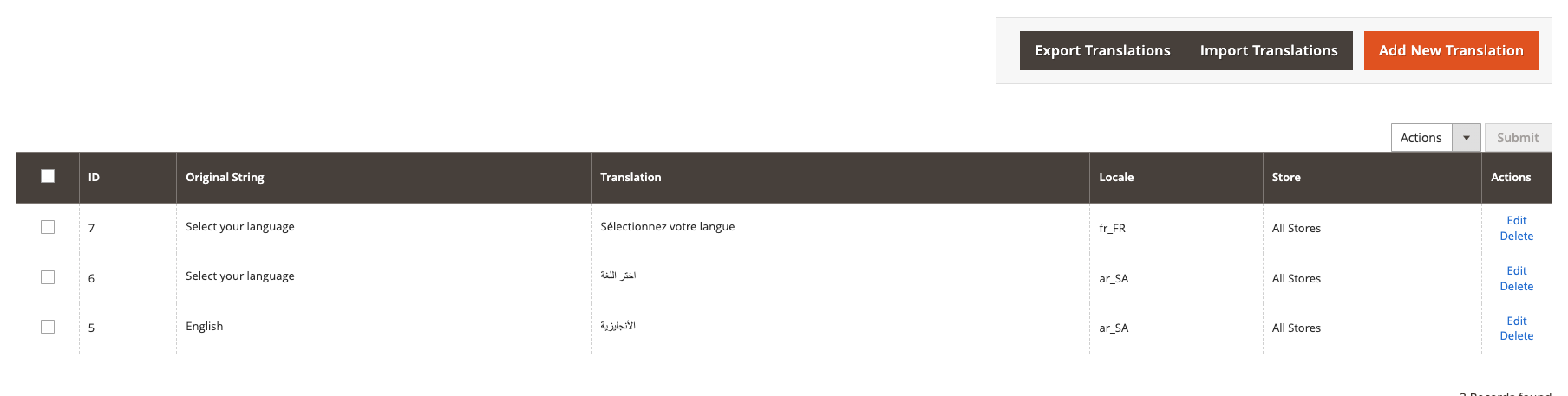
- View and Search Translations: Easily browse, search, and filter translations by locale and store view.
- Add/Edit Translations: Create new translations or modify existing ones through an intuitive interface.
- Delete Translations: Remove unwanted translations individually or in bulk.
- Mass Actions: Select multiple translations to delete in bulk.
Import/Export
- Import Translations: Upload CSV files with translations to quickly add multiple translations at once.
- Export Translations: Export translations to CSV files for backup or editing in a spreadsheet application.
Deployment and Cache Management
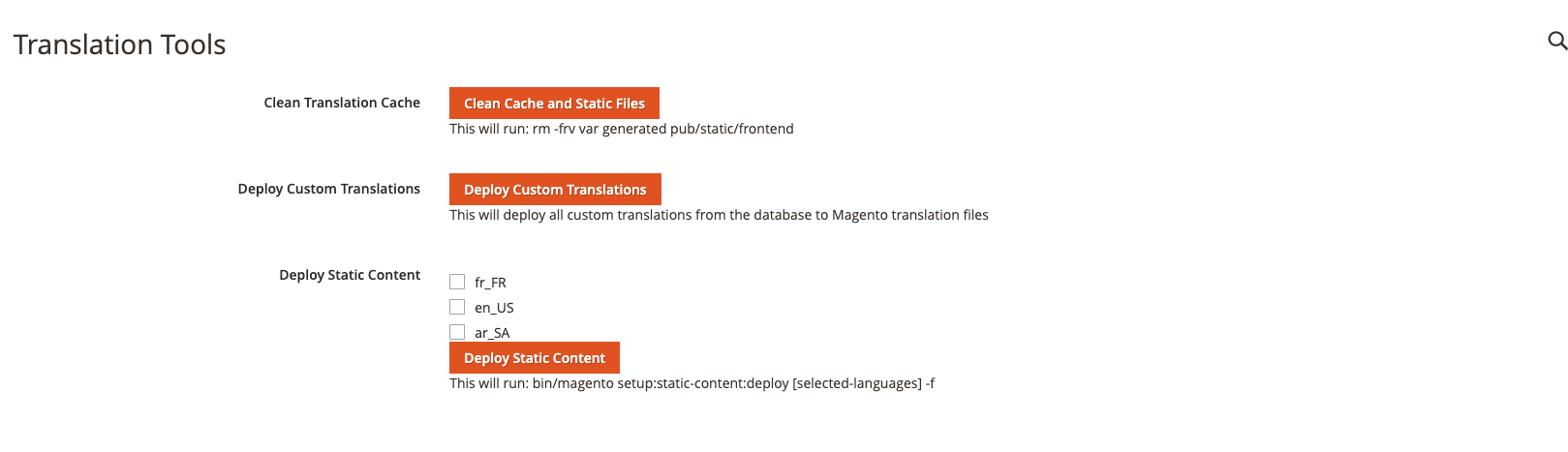
- Deploy Custom Translations: Deploy custom translations from the database to Magento's translation files.
- Clean Cache: Clear Magento's translation cache directly from the admin panel.
- Deploy Static Content: Run the static content deployment process to apply translation changes.
Screenshots
Translation Management
Translation Tools
Installation
Manual Installation
- Download the module archive
- Extract the contents to
app/code/Bonlineco/Translation/directory - Run the following commands from the Magento root directory:
Using Composer
Usage
Managing Translations
- Navigate to Bonline > Translation > Manage Translations
- Use the search field, locale, and store filters to find specific translations
- Click Add New Translation to create a new translation
- Click Edit on an existing translation to modify it
- Select multiple translations and use the mass actions dropdown to delete them in bulk
Importing Translations
- Navigate to Bonline > Translation > Manage Translations
- Click Import Translations
- Select a CSV file with columns: string, translation, locale, store_id
- Click Import
Exporting Translations
- Navigate to Bonline > Translation > Manage Translations
- Click Export Translations
- Select a locale (optional) to export translations for a specific language
- Click Export
Deploying Translations
- Navigate to Bonline > Translation > Translation Tools
- Click Deploy Custom Translations to apply your custom translations
- Use Clean Translation Cache and Deploy Static Content as needed after making changes
CSV Format for Import
The CSV file for importing translations should have the following format:
- string: The original text to be translated
- translation: The translated text
- locale: The locale code (e.g., en_US, fr_FR)
- store_id: The store ID (0 for all stores or a specific store ID)
Permissions
This module adds the following permissions:
Bonlineco_Translation::manage- Allows managing translationsBonlineco_Translation::tools- Allows access to translation tools
Compatibility
- Magento 2.3.x
- Magento 2.4.x
Support
For issues or questions, please contact the Bonline support team or submit an issue in the repository. [email protected]
License
This module is licensed under the MIT License.
All versions of module-translation with dependencies

magento/framework Version 102.0.*||103.0.*