Libraries tagged by iata code api
nogrod/tyre24-common-php-sdk
801 Downloads
## API Versioning We're constantly updating and improving the API, and while we try to ensure backwards compatibility, there's always a chance that we'll introduce a change that affects the way your app works. To get around any problems that this might cause, we recommend that you include the Accept header with every API request that you make. This header enables you to target your request to a particular version of the API. It looks like this in HTTP: ```text Accept: application/vnd.saitowag.api+json;version={version_number} ``` Normally, you set the value of the placeholder to the current version of the API. But if you're troubleshooting your app, and you know that an older version of the API works perfectly, say version 1.0, you'd substitute 1.0 for the placeholder value. The API then handles the request as if it were for version 1.0, and your app goes back to working properly. ### Example of an error with invalid `ACCEPT` header. The `HTTP status code` in case of an invalid `ACCEPT` header will be `400 Bad Request` and the following response will be returned. ```json { "data": [ { "error_code": "ERR_ACCEPT_HEADER_NOT_VALID", "error_message": "Accept header is not valid or not set." } ] } ``` ### Unexpected Error If an unexpected error occours, a so called Error General will be returned. The `HTTP status code` in case of an invalid `ACCEPT` header will be `500` and the following response will be returned. ```json { "data": [ { "error_code": "ERR_GENERAL", "error_message": "An unexpected error has occurred. If this problem persists, please contact our support." } ] } ``` ### Invalid Endpoint Error Any call to a non-existing API endpoint (i.e. wrong route) will return a response with `HTTP status code` `404` and the following response body: ```json { "data": [ { "error_code": "ERR_GENERAL_INVALID_ENDPOINT", "error_message": "The requested endpoint does not exist." } ] } ``` Please, note that this error is returned also when a request parameter, part of a valid route, is not well formed. For example, a call to a route that contains a wrong order id (i.e. it does not meet the accepted order id pattern - e.g. 123456789PAC instead of PAC123456789) will return the error just mentioned, as the route is considered as badly formed. In conclusion, please pay special attention to all those routes that have request parameters with specific pattern requirements. ### Shipping Method IDs These ids may not be available in all the countries. | ID | Name | | --- | --- | | 1 | Standard `Standard` | | 2 | Self-collection `Selbstabholung` | | 3 | Express morning (truck) `Express-Morgen (LKW)` | | 4 | Express Today (Truck) `Express-Heute (LKW)` | | 5 | Express morning (package forwarding) `Express-Morgen (Packet Spedition)` | | 7 | Express-now | ### Payment Method IDs These ids may not be available in all the countries. | ID | Name | | --- | --- | | 1 | SEPA Direct Debit `SEPA-Lastschrift` | | 2 | Prepayment `Vorkasse` | | 3 | Cash on delivery `Nachnahme` | | 4 | PayPal/Credit Card `PayPal/Kreditkarte` | | 5 | open payment method `offene Zahlungsart` | | 7 | Invoice(8 days payment term) `Rechnung(8 Tage Zahlungsziel)` | | 8 | open payment method (SEPA) `offene Zahlungsart (SEPA)` | ## Query String Filters Query String Filters | Operator | Full Name | Description | Example | | ------ | ------ | ------ | ------ | | eq | Equal | Used to narrow down the result of a query to some specific value, for specified field. It adds the "**=**" symbol to the SQL query. Eg. `{url}?filter[{alias_name}]=eq;11` will result in the following sql: `SELECT {field_name} AS {alias_name} FROM {table_name} WHERE {alias_name} = 11` | integer: `{url}?filter[id]=eq;21`float: `{url}?filter[average]=eq;3.7`string: `{url}?filter[free_text]=eq;apple`Date: `{url}?filter[birthday]=eq;2020-06-03`DateTime: `{url}?filter[created_at]=eq;2020-06-03 14:32:32`boolean: `{url}?filter[is_active]=eq;1` | | neq | Not equal | Used to exclude the value from a query result. It adds the "****" symbol to the SQL query. Eg. `{url}?filter[{alias_name}]=neq;11` will result in the following sql: `SELECT {field_name} AS {alias_name} FROM {table_name} WHERE {alias_name} 11` | integer: `{url}?filter[id]=neq;21`float: `{url}?filter[average]=neq;3.7`string: `{url}?filter[free_text]=neq;apple`Date: `{url}?filter[birthday]=neq;2020-06-03`DateTime: `{url}?filter[created_at]=neq;2020-06-03 14:32:32`boolean: `{url}?filter[is_active]=neq;1` | | gt | Greater than | Used to reduce fetched values to those greater than the one provided in a query string. It adds the "**>**" symbol to the SQL query. Eg. `{url}?filter[{alias_name}]=gt;11` will result in the following sql: `SELECT {field_name} AS {alias_name} FROM {table_name} WHERE {alias_name} > 11` | integer: `{url}?filter[id]=gt;21`float: `{url}?filter[average]=gt;3.7`Date: `{url}?filter[birthday]=gt;2020-06-03`DateTime: `{url}?filter[created_at]=gt;2020-06-03 14:32:32` | | gte | Greater than or equal | Used to reduce fetched values to those greater than or equal to the one provided in a query string. It adds the "**>=**" symbol to the SQL query. Eg. `{url}?filter[{alias_name}]=gte;11` will result in the following sql: `SELECT {field_name} AS {alias_name} FROM {table_name} WHERE {alias_name} >= 11` | integer: `{url}?filter[id]=gte;21`float: `{url}?filter[average]=gte;3.7`Date: `{url}?filter[birthday]=gte;2020-06-03`DateTime: `{url}?filter[created_at]=gte;2020-06-03 14:32:32` | | lt | Less than | Used to reduce fetched values to those less than provided in a query string. It adds the "**
cseufert/iso3166php
6895 Downloads
ISO3166 Country and Subdivision Data with PHP API
codewithagents/openapi-laravel
1395 Downloads
Generate Laravel models (spatie/laravel-data classes, validation rules, enums) from an OpenAPI spec. The spec is the source of truth.
briqpay/php-sdk
12246 Downloads
This is the API documentation for Briqpay. You can find out more about us and our offering at our website [https://briqpay.com](https://briqpay.com) In order to get credentials to the playgrund API Please register at [https://app.briqpay.com](https://app.briqpay.com) # Introduction Briqpay Checkout is an inline checkout solution for your b2b ecommerce. Briqpay Checkout gives you the flexibility of controlling your payment methods and credit rules while optimizing the UX for your customers # SDKs Briqpay offers standard SDKs to PHP and .NET based on these swagger definitions. You can download them respively or use our swagger defintitions to codegen your own versions. #### For .NET `` Install-Package Briqpay `` #### For PHP `` composer require briqpay/php-sdk `` # Standard use-case As a first step of integration you will need to create a checkout session. \n\nIn this session you provide Briqpay with the basic information necessary. In the response from briqpay you will recieve a htmlsnippet that is to be inserted into your frontend. The snippet provided by briqpay will render an iframe where the user will complete the purchase. Once completed, briqpay will redirect the customer to a confirmation page that you have defined. 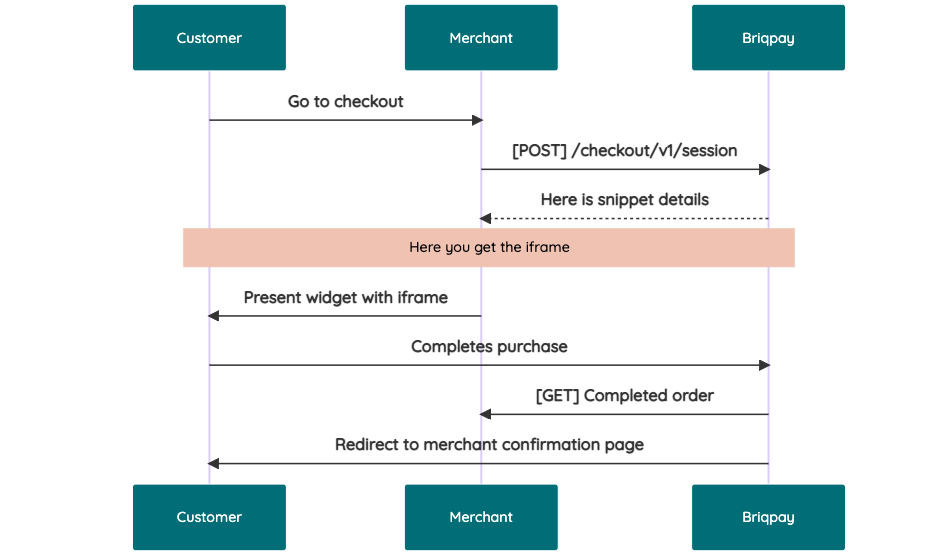 # JavaScript SDK The first step of integration is to add our JS to your site just before closing the ```` tag. This ensures that our JS library is avaliable to load the checkout. ```` Briqpay offers a few methods avaliable through our Javascript SDK. The library is added by our iframe and is avalable on ``window._briqpay`` If you offer the posibility to update the cart or order amonts on the checkout page, the JS library will help you. If your store charges the customer different costs and fees depening on their shipping location, you can listen to the ``addressupdate``event in order to re-calculate the total cost. ```javascript window._briqpay.subscribe('addressupdate', function (data) { console.log(data) }) ``` If your frontend needs to perform an action whe the signup has completed, listen to the ``signup_finalized`` event. ```javascript window._briqpay.subscribe('signup_finalized', function (status) { // redirect or handle status 'success' / 'failure' }) ``` If you allow customers to change the total cart value, you can utilise the JS library to suspend the iframe while you perform a backen update call towards our services. As described below: 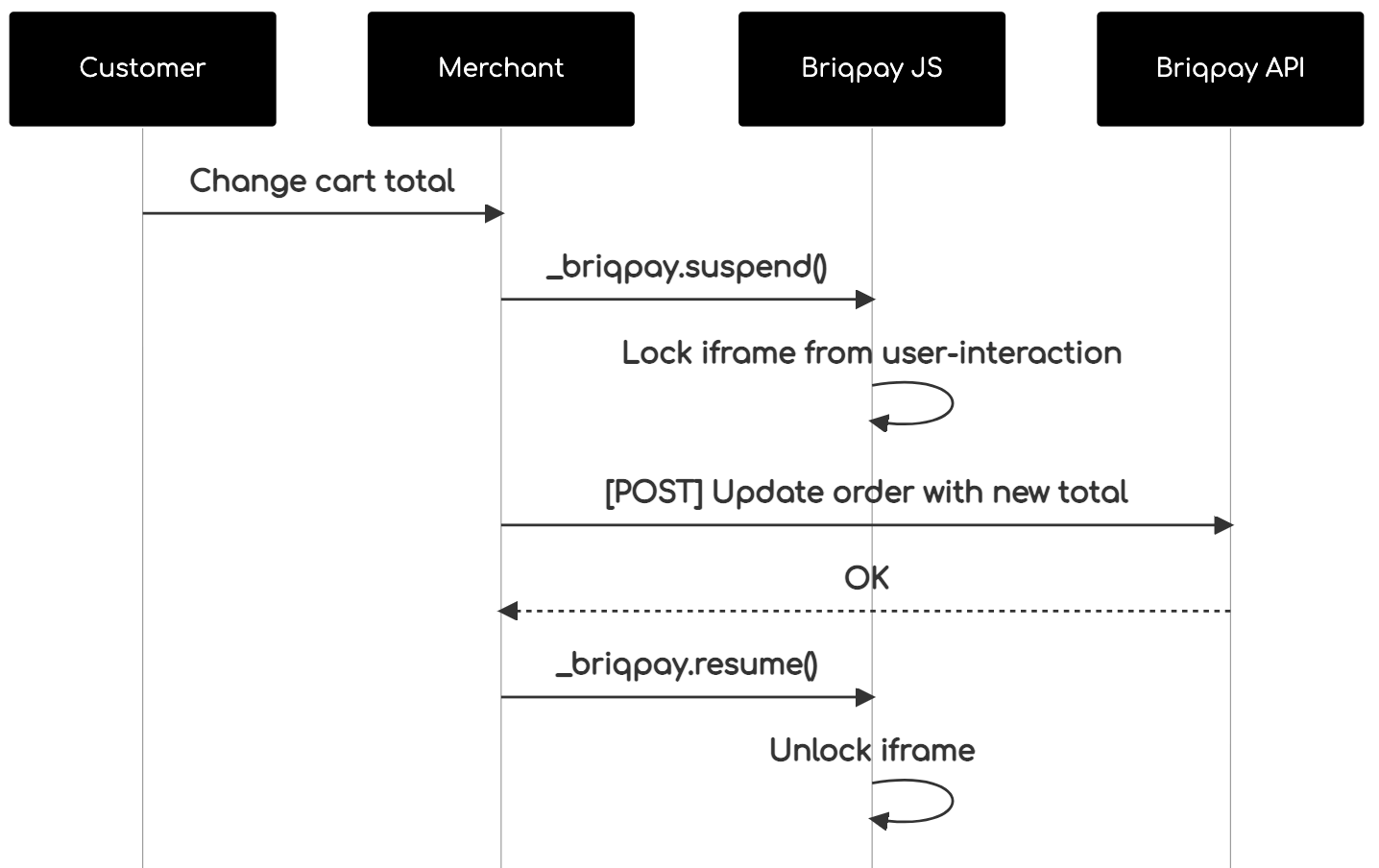 The iframe will auto-resume after 7 seconds if you dont call ``_briqpay.resume()`` before # Test Data In order to verify your integration you will neeed to use test data towards our credit engine. ## Company identication numbers * 1111111111 - To recieve a high credit scoring company ( 100 in rating) * 2222222222 - To test the enviournment with a bad credit scoring company (10 in rating) ## Card details In our playground setup your account is by default setup with a Stripe integration. In order to test out the card form you can use the below card numbers: * 4000002500003155 - To mock 3ds authentication window * 4000000000000069 Charge is declined with an expired_card code. You can use any valid expiry and CVC code # Authentication Briqpay utilizes JWT in order to authenticate calls to our platform. Authentication tokens expire after 48 hours, and at that point you can generate a new token for the given resource using the ``/auth`` endpoint. - Basic Auth - only used on the auth endpoint in order to get the Bearer Token - JWT Bearer Token - All calls towards the API utlizes this method"
andrecorugda/synapse
43 Downloads
Self-hosted, data-driven app builder for Laravel + Filament: visual pages, typed collections + instant REST API, an n8n-style flow engine, end-user auth (SSO/2FA), and external data sources. Drops into an existing app as a configurable package that lives alongside it — prefixed tables, its own auth guard, an opt-in panel, routes that defer to yours. AI is an optional accelerator.
toneflix-code/laravel-resource-modifier
1137 Downloads
A Laravel package that intercepts and help you customize, remove or modify the meta data on your eloquent api resource response.
danilowa/laravel-api-response-builder
43 Downloads
A Laravel package designed to simplify the creation of structured and formatted API responses (JSON, XML) with custom status codes, messages, and data. XML support is currently under construction.
php-extended/php-api-fr-insee-cog-builder
5909 Downloads
A library that provides the raw data to the php-api-fr-insee-cog-object library
jerrydepredator/laravel-predator-api-utils
103 Downloads
A collection of utility classes and traits to streamline common Laravel development tasks, including error handling, paginated responses, data handling, middleware creation, a base repository for advanced filtering, keyset pagination, base query filtering, and more. This package aims to reduce boilerplate code often encountered in Laravel projects.
teksite/handler
68 Downloads
Some features to work with error handling in Laravel codes
xoeoro/spherical-geometry
777 Downloads
This library provides classes and functions for the computation of geometric data on the surface of the Earth. Code ported from the Google Maps Javascript API v3
marketo/silverstripe-regional
1322 Downloads
Using modern GeoIP lookup mechanisms, this SilverStripe module makes available the coordinates, postal code, city, state, country, content, timezone, organization, and ISP to the SilverStripe instance and can open a frontend API for static websites to take advantage of. It can be extended with GeoIP drivers to provide additional or custom contextual data.
shell/data-and-reporting-sdk
74 Downloads
Data And Reporting product consists of API's which provides details of transaction and invoice informations about shell cards. The Shell Card Transaction and Invoice API is REST-based and employs Basic authentication in Version 1 and Oauth authentication in Version 2 end points. The API endpoints accept JSON-encoded request bodies, return JSON-encoded responses and use standard HTTP response codes. All resources are located in the Shell Card Platform. The Shell Card Platform is the overall platform that encompasses all the internal Shell systems used to manage resources.
kruegge82/billbee-php-sdk-api
26 Downloads
Documentation of the Billbee REST API to connect a Billbee account to external aplications. ## Endpoint The Billbee API endpoint base url is https://api.billbee.io/api/v1 ## Activation You have to enable the API in the settings of your Billbee account. In addition you need a Billbee API Key identifying the application you develop. To get an API key, send a mail to [email protected] and send us a short note about what you are building. ## Authorization & security Because you can access private data with the Billbee API, every request has to be sent over https and must * Contain a valid API Key identifying the application/developer. It has to be sent as the HTTP header X-Billbee-Api-Key * Contain a valid user login with billbee username and api password in form of a basic auth HTTP header ## Throttling 50 calls per second for each API Key. 10 calls per second for each API Key in combination with Billbee user. Besides that each endpoint has a throttle of max 2 requests per second per combination of API Key and Billbee user. When you exceed the throttle threshold, the API will return a HTTP 429 status code and a Retry-After-Header indicating how many seconds you will have to wait before you can call the API again.
gabrieldevro/romania-geo-data
1 Downloads
All 42 Romanian counties and 13,755 localities with SIRUTA codes, postal codes, diacritics and search. JSON, CSV and SQL data plus a tiny PHP API. Official open data (INS + Posta Romana).