Libraries tagged by customer data platform
briqpay/php-sdk
12115 Downloads
This is the API documentation for Briqpay. You can find out more about us and our offering at our website [https://briqpay.com](https://briqpay.com) In order to get credentials to the playgrund API Please register at [https://app.briqpay.com](https://app.briqpay.com) # Introduction Briqpay Checkout is an inline checkout solution for your b2b ecommerce. Briqpay Checkout gives you the flexibility of controlling your payment methods and credit rules while optimizing the UX for your customers # SDKs Briqpay offers standard SDKs to PHP and .NET based on these swagger definitions. You can download them respively or use our swagger defintitions to codegen your own versions. #### For .NET `` Install-Package Briqpay `` #### For PHP `` composer require briqpay/php-sdk `` # Standard use-case As a first step of integration you will need to create a checkout session. \n\nIn this session you provide Briqpay with the basic information necessary. In the response from briqpay you will recieve a htmlsnippet that is to be inserted into your frontend. The snippet provided by briqpay will render an iframe where the user will complete the purchase. Once completed, briqpay will redirect the customer to a confirmation page that you have defined. 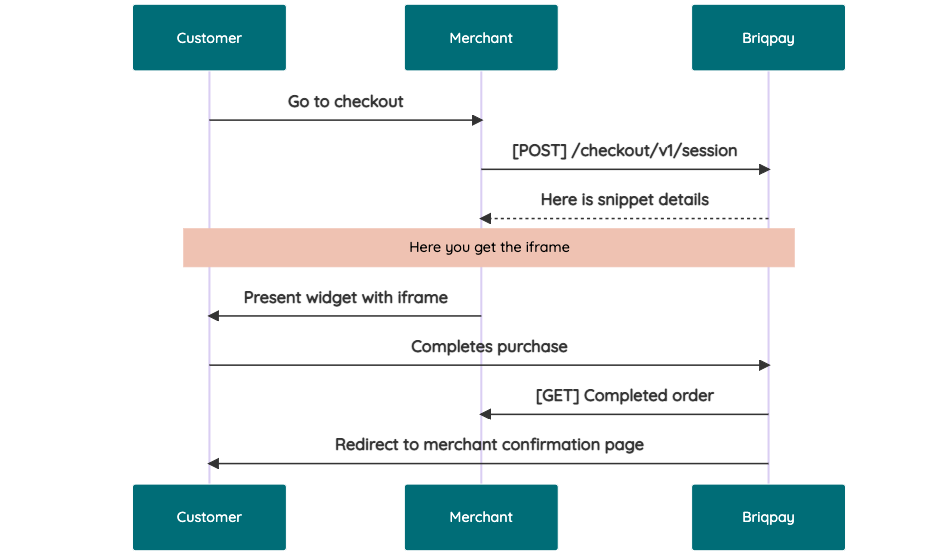 # JavaScript SDK The first step of integration is to add our JS to your site just before closing the ```` tag. This ensures that our JS library is avaliable to load the checkout. ```` Briqpay offers a few methods avaliable through our Javascript SDK. The library is added by our iframe and is avalable on ``window._briqpay`` If you offer the posibility to update the cart or order amonts on the checkout page, the JS library will help you. If your store charges the customer different costs and fees depening on their shipping location, you can listen to the ``addressupdate``event in order to re-calculate the total cost. ```javascript window._briqpay.subscribe('addressupdate', function (data) { console.log(data) }) ``` If your frontend needs to perform an action whe the signup has completed, listen to the ``signup_finalized`` event. ```javascript window._briqpay.subscribe('signup_finalized', function (status) { // redirect or handle status 'success' / 'failure' }) ``` If you allow customers to change the total cart value, you can utilise the JS library to suspend the iframe while you perform a backen update call towards our services. As described below: 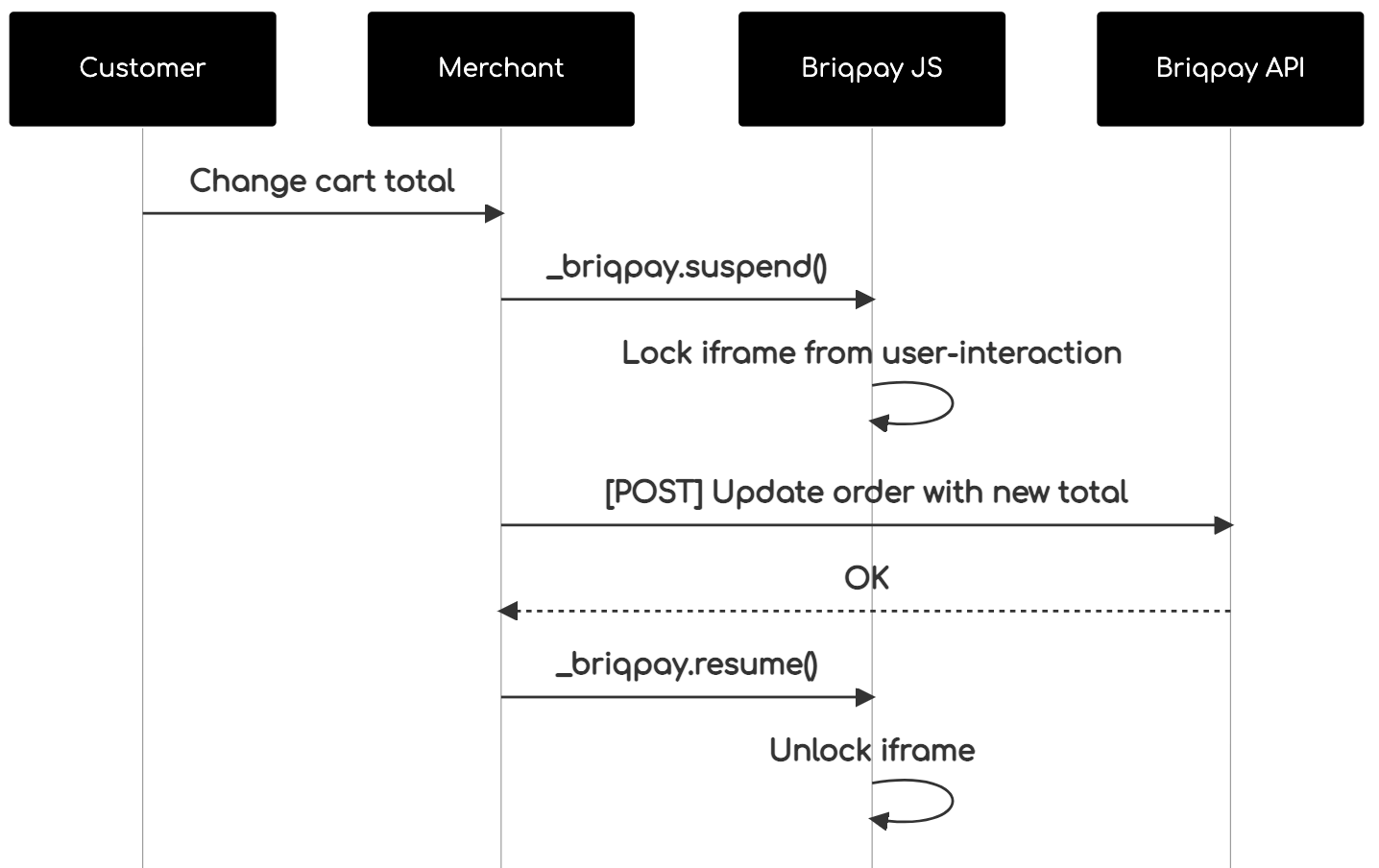 The iframe will auto-resume after 7 seconds if you dont call ``_briqpay.resume()`` before # Test Data In order to verify your integration you will neeed to use test data towards our credit engine. ## Company identication numbers * 1111111111 - To recieve a high credit scoring company ( 100 in rating) * 2222222222 - To test the enviournment with a bad credit scoring company (10 in rating) ## Card details In our playground setup your account is by default setup with a Stripe integration. In order to test out the card form you can use the below card numbers: * 4000002500003155 - To mock 3ds authentication window * 4000000000000069 Charge is declined with an expired_card code. You can use any valid expiry and CVC code # Authentication Briqpay utilizes JWT in order to authenticate calls to our platform. Authentication tokens expire after 48 hours, and at that point you can generate a new token for the given resource using the ``/auth`` endpoint. - Basic Auth - only used on the auth endpoint in order to get the Bearer Token - JWT Bearer Token - All calls towards the API utlizes this method"
d2dsoft/module-data-migration
9 Downloads
Magento Data Migration by D2dSoft is a solution for migrating data to Magento from another platform. The extension support migrating many entity types (taxes, manufacturers, categories, products, customers, orders, reviews) with many options. The extension can work in the local environment or the online environment.
code-matic/opencdp-php
0 Downloads
PHP SDK for Codematic's Customer Data Platform (CDP) with optional Customer.io integration
toweringmedia/module-hubspot-integration
0 Downloads
Real-Time Data Sync – Seamlessly sync customers, companies, orders, and products between Magento 2 and HubSpot. Bi-Directional Integration – Keep both platforms aligned with automatic updates in both directions. Advanced Automation Triggers – Leverage Magento data to trigger HubSpot workflows, segmentation, and campaigns. Revenue & Customer Insights – Push order and lifecycle data into HubSpot for deeper marketing and sales intelligence.
zvps/ebay-sell-marketing-php-client
33 Downloads
The Marketing API offers two platforms that sellers can use to promote and advertise their products: Promoted Listings is an eBay ad service that lets sellers set up ad campaigns for the products they want to promote. eBay displays the ads in search results and in other marketing modules as SPONSORED listings. If an item in a Promoted Listings campaign sells, the seller is assessed a Promoted Listings fee, which is a seller-specified percentage applied to the sales price. For complete details, see Promoted Listings. Promotions Manager gives sellers a way to offer discounts on specific items as a way to attract buyers to their inventory. Sellers can set up discounts (such as "20% off" and other types of offers) on specific items or on an entire customer order. To further attract buyers, eBay prominently displays promotion teasers throughout buyer flows. For complete details, see Promotions Manager. Marketing reports, on both the Promoted Listings and Promotions Manager platforms, give sellers information that shows the effectiveness of their marketing strategies. The data gives sellers the ability to review and fine tune their marketing efforts. Important! Sellers must have an active eBay Store subscription, and they must accept the Terms and Conditions before they can make requests to these APIs in the Production environment. There are also site-specific listings requirements and restrictions associated with these marketing tools, as listed in the "requirements and restrictions" sections for Promoted Listings and Promotions Manager. The table below lists all the Marketing API calls grouped by resource.
macropage/sdk-ebay-rest-marketing
24 Downloads
The Marketing API offers two platforms that sellers can use to promote and advertise their products: Promoted Listings is an eBay ad service that lets sellers set up ad campaigns for the products they want to promote. eBay displays the ads in search results and in other marketing modules as SPONSORED listings. If an item in a Promoted Listings campaign sells, the seller is assessed a Promoted Listings fee, which is a seller-specified percentage applied to the sales price. For complete details, refer to the Promoted Listings playbook.Promotions Manager gives sellers a way to offer discounts on specific items as a way to attract buyers to their inventory. Sellers can set up discounts (such as "20% off" and other types of offers) on specific items or on an entire customer order. To further attract buyers, eBay prominently displays promotion teasers throughout buyer flows. For complete details, see Promotions Manager. Marketing reports, on both the Promoted Listings and Promotions Manager platforms, give sellers information that shows the effectiveness of their marketing strategies. The data gives sellers the ability to review and fine tune their marketing efforts.Store Email Campaign allows sellers to create and send email campaigns to customers who have signed up to receive their newsletter. For more information on email campaigns, see Store Email Campaigns.Important! Sellers must have an active eBay Store subscription, and they must accept the Terms and Conditions before they can make requests to these APIs in the Production environment. There are also site-specific listings requirements and restrictions associated with these marketing tools, as listed in the "requirements and restrictions" sections for Promoted Listings and Promotions Manager. The table below lists all the Marketing API calls grouped by resource.
cocosport/rybbit-sdk-for-laravel
96 Downloads
A simple, elegant Laravel package for integrating Rybbit analytics into your application. This SDK provides a clean, Laravel-native way to track events, page views, and custom analytics data using Rybbit's privacy-friendly, open-source analytics platform
marlemiesz/wp-sdk
15 Downloads
The WP API SDK for PHP is a client library that makes it easy to interact with the WordPress REST API from a PHP application. This SDK provides an easy-to-use interface for sending HTTP requests and handling the responses, and also includes convenient methods for accessing common API endpoints and data structures. With this SDK, developers can easily retrieve, create, update, and delete content and metadata within a WordPress site, and also perform other common tasks such as managing users and media. The WP API SDK for PHP is an essential tool for any PHP developer working with the WordPress platform, and provides a powerful and flexible way to build custom applications and integrations that interact with WordPress.